
Apply Levels and Gangs to cues from Presets Menu

micpool

You drag your music cues in and they all default to this setting.
You then have a load of mono voiceover cues that you want matrixed to all sliders but not ganged, like this:

In the attached example workspace you can select all the cues you want to change (after you have dragged them in and they have the default levels applied).
Hit hotkey 1 and select a levels and gang option from a menu and all selected cues will have that preset applied.

You edit the presets in the Preset Templates cuelist. Leave the cue numbers as they are. You can set your own levels and gangs and describe what the preset does in the q name field.
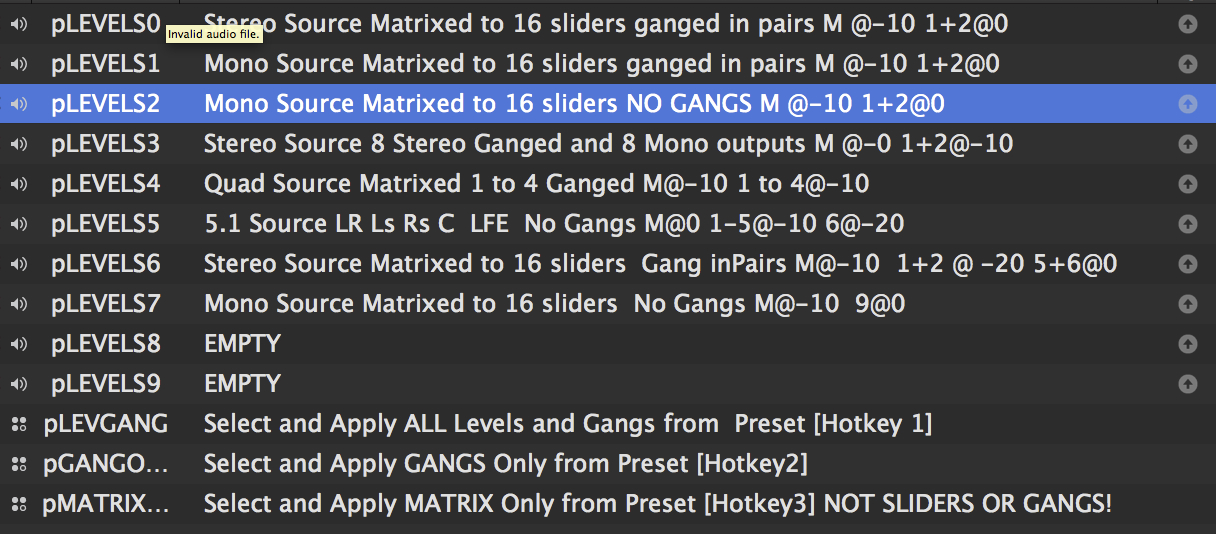
It's also useful for correcting a ganging mistake on multiple cues, removing ganging from a cue (and reapplying a gang preset after you have adjusted split levels etc.
In the example workspace there are 10 preset slots, but this is easily expanded.
The Hotkey scripts are also in the Preset Templates cue list.
You can use Hotkey 2 to just apply the GANGS from a Preset
Hotkey 3 only applies the crosspoints to selected cues i.e not the GANGS or SLIDER Levels
It can be speeded up by setting the maximum number of rows you want to use at the top of the scripts. If you are only working with mono and stereo files you can set the scripts to only use rows 0 to 2. If your maximum track count is 6 for 5.1 you set it to 6 etc. Its set in the example workspace at 24 for 24 ch click track and stem mixes.
Test thoroughly before using in a show situation. I may have missed something. I'll leave it here for people to try and break and put a final version on the cookbook next week.
Any suggestions to improve the scripts welcome.
IMPORTANT NOTE: Gangs are only copied and applied for the sliders (Row 0). Personally I have never ganged a crosspoint, but if you do as part of your workflow it should be reasonably obvious what you need to add to the scripts.
Mic

Rich Walsh
- Make the preset list auto-populate from the cues in a specific Group Cue
- Have a set of toggles to enable sections of the script so you only have to write it once and then switch bits of it on and off in your Hotkey implementations of it