
Qlab's dB-faders to Midi velocity
220 views
Skip to first unread message

Steffen Hofseth
Apr 29, 2021, 6:53:06 AM4/29/21
to QLab
Hi all,
Does anyone know how to calculate dB fader positions in Qlab to MIDI velocity to be sent to a MIDI controller?
I have it working with a linear scale, but then my controller is predictably offset. 0dB in Qlab isn't 0dB on the MIDI controller. (fader)

Rich Walsh
Apr 29, 2021, 7:32:31 AM4/29/21
to ql...@googlegroups.com
I don't think there is a standard mapping curve – if you think about it every console has a different fader law: that's why we prefer some to others.
I've seen this equation but never tracked down the definitive source: L(dB) = 40 log (V/127) (eg: http://midi.teragonaudio.com/tech/midispec/vol.htm).
Allen & Heath's documents say they use velocity = (fader value in dB + 54) / 64 * 127 – which is an offset linear scale.
I'd probably capture the velocity sent at various fader positions on your MIDI controller and use a lookup table or reverse engineer a polynomial curve using Excel's LINEST function. Or maybe just look in its manual for how it maps dB markings to MIDI values?
Rich
I've seen this equation but never tracked down the definitive source: L(dB) = 40 log (V/127) (eg: http://midi.teragonaudio.com/tech/midispec/vol.htm).
Allen & Heath's documents say they use velocity = (fader value in dB + 54) / 64 * 127 – which is an offset linear scale.
I'd probably capture the velocity sent at various fader positions on your MIDI controller and use a lookup table or reverse engineer a polynomial curve using Excel's LINEST function. Or maybe just look in its manual for how it maps dB markings to MIDI values?
Rich
Steffen Hofseth
May 2, 2021, 8:27:30 AM5/2/21
to QLab
Thanks a lot!


This was a real head-scratcher. The Allen & Heath scale worked fine. I adjusted it so I can insert user volume limits:
(fader value in dB + userMin) / (userMax + userMin) * 127
But I wanted to have it logarithmically like the Avid's old Command 8 controller collecting dust at work. So I tried your suggestion of reverse engineering it. I took a couple of measurements and found this: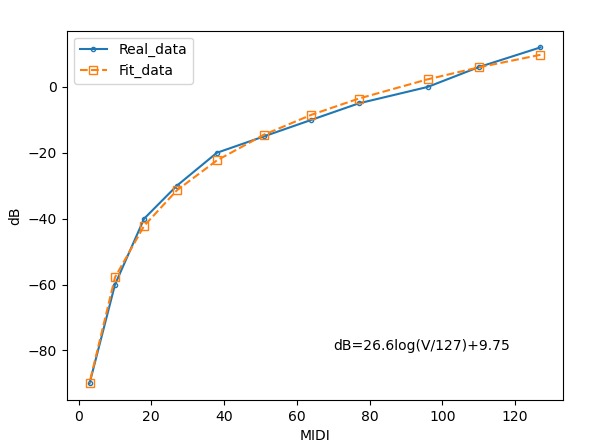
It looks fine, but when I tested some dB values, I didn't get the correct corresponding velocities. Then I used Pro Tools to read of the dB values to get more data and more accurate data points. (Then I'm really mapping Pro Tools and not the device anymore I guess. Also, PT 2018 didn't match well with the dB-labelling on the Command8 from 2006?).
And look! Four linear scales stitched together to make one pseudo-logarithmical scale.
This has a +12dB -90dB range. If I use this on the default volume limits in Qlab 4. (+12/-60), then -60dB would be velocity 9 not 0. It would be nice to combine this pseudo-logarithmical scale with user volume limits. Can the volume limits be accessed in Applescript? Maybe the easiest way would to "shrink" each segment of my pseudo scale to match Qlab's default setting?
Steffen
Reply all
Reply to author
Forward
0 new messages