
QLab // NodeMCU // sending and receiving OSC Messages
415 views
Skip to first unread message

Marius N
Jul 22, 2018, 8:11:07 PM7/22/18
to QLab
Hello everyone,
My name is Marius, i am student from Germany and currently working on my thesis for my final studies in Film- and Sounddesign.
One part of my written work will be about Multimedia Design, especially using Qlab for immersive "Live-Entertainment-Design" projects and the integration of microcontrollers like the NodeMCU, ESP8266 via OSC.
I am really used QLab and worked with it on several Projects for Exhibit-Design, Theater-Performances and so on... BUT i am not a programmer (luckily my girlfriend is), therefore we spend the last months to get used to Arduino- and OSC-Basics. In the past, I used MIDI Sensor's to trigger effects and sounds, but now as things get more and more complex i want to step a little bit further and use QLab's ability to talk OSC.
Here is my question / problem:
Maybe it sounds ridiculous and "too easy" to most of you but for me it is really hard to get "clear"-Message from the NodeMCU to QLab. When QLab receives (for example a /go) message from the ESP8266, it behaves like this message is coming in over and over again and won't stop, even when i press the button once. Same thing with the sensors like a SR-04, even after changing my written programm inside the Arduino IDE to just send it one time an then stop, QLab seems to receive it over and over again after a OSC-talking device enters the network.
What is the easiest way to organize clear OSC Messages? Max? ETC's OSCRouter? Vuo?
Do you guys have any simple tutorials for me? I searched nearly the whole internet, youtube and this group and always having connection issues so my messages are not finding their way through my network. By the way, direct connection from TouchOSC -> NodeMCU is always working fine.
I am currently using the "OSCuino" library and plan to connect more than 5x ESP8266 and 4-5 Rasberry Pi's to my final project, but most of them will be connected to simple buttons or just triggering a video via the HDMI, so i don't need to process a lot of real time data - just message's like /ButtonPressed 1 / 0.
Thank you guys, if maybe anyone is interested in quick a skype call or something like that, let me know! That would help me a lot :-)
Best regards from Germany,
Marius

richardmoores
Jul 23, 2018, 6:41:26 AM7/23/18
to QLab
Hi Marius
As far as i'm aware Qlab doesn't need a clear message - if you send a single '/go', it will only trigger once. It might be an idea to use OSCulator ( https://osculator.net/ ) to see how many messages are actually coming from nodeMCU - it may be that your button is 'bouncing' or the message is repeating for some other reason
Have you tried touchOSC straight into Qlab?
I'm triggering qlab from openFrameworks with a simple OSC '/go' (set as the osc address) and it's fine without 'clear'
hope that helps
richard

Rich Walsh
Jul 23, 2018, 6:44:00 AM7/23/18
to ql...@googlegroups.com
You can see OSC input directly in QLab in the “Workspace Status” window: no need for a third party monitor.
Rich

micpool
Jul 23, 2018, 8:33:43 AM7/23/18
to QLab
In this case (and most others) the Workspace Status OSC Monitor in QLab is adequate for the task. It's worth pointing out though that though that it will not be able to diagnose all OSC problems.
e.g QLab displays identical logs for these OSC messages from 2 different devices

but only the first 2 are valid OSC messages. The second 2 have the common mistake of including one of the arguments as part of the address, and would not show on most OSC monitors as they are not valid OSC messages (space in address). They also will not do anything in QLab.
The first 2 will work, but arguably shouldn't, because the arguments are 2 integers instead of the string followed by a number that the QLab OSC dictionary describes.
Mic
micpool
Jul 23, 2018, 8:47:35 AM7/23/18
to QLab
Here, OSC Shark ( a good free monitor) clearly shows that the OSC messages are not identical by clearly separating the address from the arguments, and showing their types.
Mic

Mic
micpool
Jul 23, 2018, 9:28:22 AM7/23/18
to QLab
On Monday, July 23, 2018 at 1:47:35 PM UTC+1, micpool wrote:
Here, OSC Shark ( a good free monitor) clearly shows that the OSC messages are not identical by clearly separating the address from the arguments, and showing their types.
One weakness of OSC Shark is it doesn't show if it can't receive messages on a selected port because it is in use.
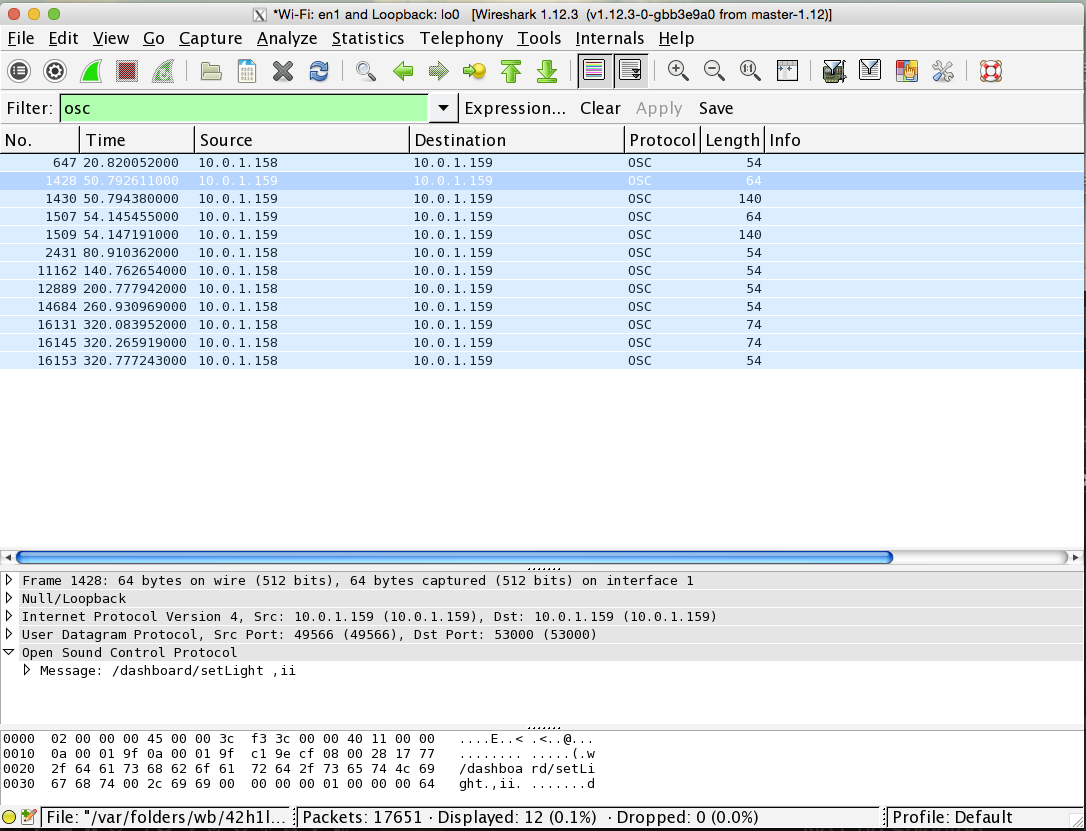
To conclude our brief discussion (well, me talking to myself), If you can cope with its complexity, WireShark is a good OSC monitor that has the advantage of being able to monitor OSC messages on ports that are in use by other applications, e.g QLab.
Mic
Reply all
Reply to author
Forward
0 new messages