
Controlling QLab from Go Button?
838 views
Skip to first unread message

Matt Padden
Apr 9, 2019, 11:23:20 AM4/9/19
to QLab
Hi,
I'm building a show in which a small number of Go Button-equipped ipods (each with its own minirig speaker) are the only sound playback sources. For one of the Go Button audio cues, I want to achieve a sound-level-to-light-intensity mapping (ie a sound-to-light effect) for a particular lighting fixture, via an ETC lighting desk, while that cue is playing.
QLab provides the LiveAverageLevel OSC method which can do this sort of thing (as wonderfully described by Mic Pool in his cookbook and on this group), but obviously that's not an option in Go Button. But I wonder if there is a way to have that particular Go Button cue trigger the identical piece of audio on a QLab laptop, which can then do the LiveAverageLevel magic to send OSC intensity information to the lighting desk while that audio cue is running?
Go Button's OSC implementation seems to be very much for it being controlled, rather than being the controller. I looked at ways to use OSC query replies from Go Button to check the running state ( /cue/{number}/isRunning etc), but I don't see a way of using that OSC query reply as a variable in another OSC message, as the destination addresses for each would be different; the nested query would be for the iPod, while the main message would be for the ETC desk.
Has anyone tried anything like this?
Matt

Brent Lord
Apr 9, 2019, 6:59:04 PM4/9/19
to QLab
Hi Matt --
(Cross-posting from the Go Button Google Group so that folks here can see it too)
That sounds like a really neat effect, but unfortunately Go Button is not able to send arbitrary OSC messages at this time. The OSC library in Go Button is mainly focused on allowing other devices to remote control it.
We do have this feature request on our list though, and we have added your vote!

micpool
Apr 10, 2019, 12:50:58 PM4/10/19
to QLab
This is easy to do to do with OSCULATOR
From QLab send a network cue with duration for as long as you are likely to want to standby to receive a GO from Go Button
/cue/playhead/goButtonText
OSCULATOR will then capture a new unique OSC message each time goButton advances through the QList and the Go Button message changes.
You can then map the message that indicated the relevant cue has started to send an OSC /cue/{number} start cue to QLab
like this:

Mic
Matt Padden
Apr 10, 2019, 1:08:33 PM4/10/19
to QLab
Brilliant; that bridges the missing link I was trying to achieve by nesting OSC queries. In the show I'm using Go Button hits instead of cues, so expect I can achieve a similar result by using /hit/{number}/isRunning as the long-duration network cue. I'll test this later.
Thanks Mic,
Matt
--
Contact support anytime: sup...@figure53.com
Follow Figure 53 on Twitter: https://twitter.com/Figure53
User Group Code of Conduct: https://figure53.com/help/code-of-conduct/
---
You received this message because you are subscribed to a topic in the Google Groups "QLab" group.
To unsubscribe from this topic, visit https://groups.google.com/d/topic/qlab/YmXHo1e_euI/unsubscribe.
To unsubscribe from this group and all its topics, send an email to qlab+uns...@googlegroups.com.
To view this discussion on the web visit https://groups.google.com/d/msgid/qlab/a718689d-76e9-4dfd-9901-337e848f57d4%40googlegroups.com.
For more options, visit https://groups.google.com/d/optout.
Matt Padden
Apr 10, 2019, 2:18:45 PM4/10/19
to QLab
Hmm, using Hits seems to make this more complicated. If I send /hit/2/isRunning then the reply includes a "data" element that is defined as true or false according to whether the Hit is running or not (see screenshot).
Can I make an Osculator mapping dependent on the value of the "data" element in the reply?

Bruno Carneiro
Apr 10, 2019, 5:44:24 PM4/10/19
to QLab
This sounds like a job for Max/MSP, or even a simple python script. Are you comfortable with the command line? It would only require installing the OSC python library. I’ll run some tests on GoButton here and write some instructions for you.
Bruno
Bruno
Matt Padden
Apr 10, 2019, 5:51:45 PM4/10/19
to QLab
There is zero touring knowledge of scripts, command lines or anything computer-based beyond QLab on this extremely tiny show I'm afraid. So any solution needs to be simple enough that I can provide the SM with a startup checklist. If I can coerce OSCulator into making conditional mappings based on JSON string values then that would suffice as I can simply run a predefined OSC mapping document. Anything more complex than that, in this scenario, isn't viable sadly.
On Wed, Apr 10, 2019 at 10:44 PM Bruno Carneiro <bcun...@gmail.com> wrote:
This sounds like a job for Max/MSP, or even a simple python script. Are you comfortable with the command line? It would only require installing the OSC python library. I’ll run some tests on GoButton here and write some instructions for you.
Bruno
--
Contact support anytime: sup...@figure53.com
Follow Figure 53 on Twitter: https://twitter.com/Figure53
User Group Code of Conduct: https://figure53.com/help/code-of-conduct/
---
You received this message because you are subscribed to a topic in the Google Groups "QLab" group.
To unsubscribe from this topic, visit https://groups.google.com/d/topic/qlab/YmXHo1e_euI/unsubscribe.
To unsubscribe from this group and all its topics, send an email to qlab+uns...@googlegroups.com.
To view this discussion on the web visit https://groups.google.com/d/msgid/qlab/bf059128-c851-4172-a43d-f363d428891c%40googlegroups.com.
micpool
Apr 10, 2019, 5:55:32 PM4/10/19
to QLab
You can write the whole string argument of /cue/playhead/goButtonText to the notes field of a cue, and have a script looping as well as the OSC with duration to check the contents of the notes for "true"

Mic
On Wednesday, April 10, 2019 at 7:18:45 PM UTC+1, Matt Padden wrote:
Hmm, using Hits seems to make this more complicated. If I send /hit/2/isRunning then the reply includes a "data" element that is defined as true or false according to whether the Hit is running or not (see screenshot).Can I make an Osculator mapping dependent on the value of the "data" element in the reply?Matt
On Wed, Apr 10, 2019 at 6:08 PM Matt Padden <matt.p...@gmail.com> wrote:
Brilliant; that bridges the missing link I was trying to achieve by nesting OSC queries. In the show I'm using Go Button hits instead of cues, so expect I can achieve a similar result by using /hit/{number}/isRunning as the long-duration network cue. I'll test this later.Thanks Mic,Matt
On Wed, Apr 10, 2019 at 5:51 PM micpool <m...@micpool.com> wrote:
This is easy to do to do with OSCULATOR--From QLab send a network cue with duration for as long as you are likely to want to standby to receive a GO from Go Button/cue/playhead/goButtonTextOSCULATOR will then capture a new unique OSC message each time goButton advances through the QList and the Go Button message changes.You can then map the message that indicated the relevant cue has started to send an OSC /cue/{number} start cue to QLablike this:
Mic
On Tuesday, April 9, 2019 at 4:23:20 PM UTC+1, Matt Padden wrote:Hi,I'm building a show in which a small number of Go Button-equipped ipods (each with its own minirig speaker) are the only sound playback sources. For one of the Go Button audio cues, I want to achieve a sound-level-to-light-intensity mapping (ie a sound-to-light effect) for a particular lighting fixture, via an ETC lighting desk, while that cue is playing.QLab provides the LiveAverageLevel OSC method which can do this sort of thing (as wonderfully described by Mic Pool in his cookbook and on this group), but obviously that's not an option in Go Button. But I wonder if there is a way to have that particular Go Button cue trigger the identical piece of audio on a QLab laptop, which can then do the LiveAverageLevel magic to send OSC intensity information to the lighting desk while that audio cue is running?Go Button's OSC implementation seems to be very much for it being controlled, rather than being the controller. I looked at ways to use OSC query replies from Go Button to check the running state ( /cue/{number}/isRunning etc), but I don't see a way of using that OSC query reply as a variable in another OSC message, as the destination addresses for each would be different; the nested query would be for the iPod, while the main message would be for the ETC desk.Has anyone tried anything like this?Matt
Contact support anytime: sup...@figure53.com
Follow Figure 53 on Twitter: https://twitter.com/Figure53
User Group Code of Conduct: https://figure53.com/help/code-of-conduct/
---
You received this message because you are subscribed to a topic in the Google Groups "QLab" group.
To unsubscribe from this topic, visit https://groups.google.com/d/topic/qlab/YmXHo1e_euI/unsubscribe.

To unsubscribe from this group and all its topics, send an email to ql...@googlegroups.com.
micpool
Apr 10, 2019, 7:53:56 PM4/10/19
to QLab
Here's a complete working solution with very low latency.
Q1 puts QLab into a state to receive input from GoButton through OSCULATOR for 1 minute
If Hit 3 is triggered in Go Button the string "true" will be included in the notes of Q111. The repeat loop in the script will detect this and trigger Q2 which fires the audio and stops Q1
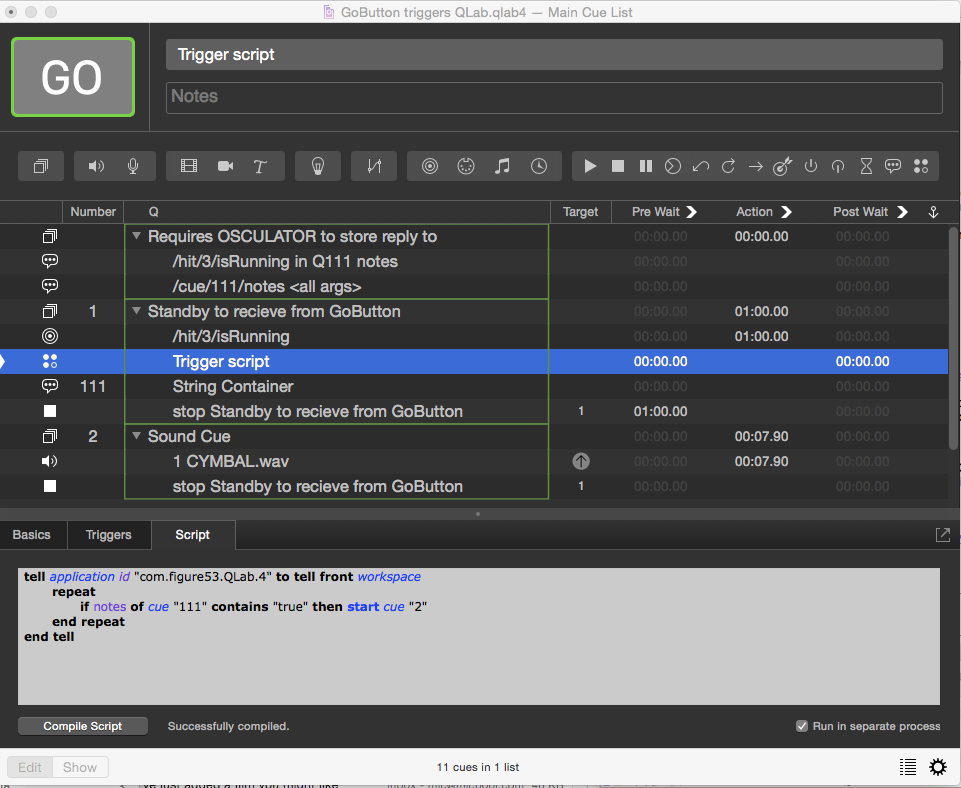
Workspace and Osculator file attached
Mic
On Wednesday, April 10, 2019 at 10:51:45 PM UTC+1, Matt Padden wrote:
There is zero touring knowledge of scripts, command lines or anything computer-based beyond QLab on this extremely tiny show I'm afraid. So any solution needs to be simple enough that I can provide the SM with a startup checklist. If I can coerce OSCulator into making conditional mappings based on JSON string values then that would suffice as I can simply run a predefined OSC mapping document. Anything more complex than that, in this scenario, isn't viable sadly.Matt
On Wed, Apr 10, 2019 at 10:44 PM Bruno Carneiro <bcun...@gmail.com> wrote:
This sounds like a job for Max/MSP, or even a simple python script. Are you comfortable with the command line? It would only require installing the OSC python library. I’ll run some tests on GoButton here and write some instructions for you.
Bruno
--
Contact support anytime: sup...@figure53.com
Follow Figure 53 on Twitter: https://twitter.com/Figure53
User Group Code of Conduct: https://figure53.com/help/code-of-conduct/
---
You received this message because you are subscribed to a topic in the Google Groups "QLab" group.
To unsubscribe from this topic, visit https://groups.google.com/d/topic/qlab/YmXHo1e_euI/unsubscribe.
To unsubscribe from this group and all its topics, send an email to ql...@googlegroups.com.


Bruno Carneiro da Cunha
Apr 10, 2019, 9:37:30 PM4/10/19
to QLab
Mic's solution works perfectly. Beware that while hit 3 is playing on GoButton, QLab will keep firing cue #2 over and over again, you want to stop that /hit/3/isRunning OSC cue if you're firing it only once.
good luck!
Bruno
Bruno
Bruno Carneiro da Cunha
Apr 10, 2019, 9:51:19 PM4/10/19
to QLab
Oh sorry, I had it on preview, lol. It stops as it should! nice
Matt Padden
Apr 11, 2019, 5:19:02 AM4/11/19
to QLab
Excellent; that works a treat. Mic, thank you so much. I'm pretty new to OSCulator but this is a great way in (and keeps things simple for the tour).
To unsubscribe from this group and all its topics, send an email to qlab+uns...@googlegroups.com.
To view this discussion on the web visit https://groups.google.com/d/msgid/qlab/34e5cfa7-d1a6-4e8b-96de-728f6c2da0c3%40googlegroups.com.
micpool
Apr 11, 2019, 6:00:12 AM4/11/19
to QLab
On Thursday, April 11, 2019 at 10:19:02 AM UTC+1, Matt Padden wrote:
Excellent; that works a treat. Mic, thank you so much. I'm pretty new to OSCulator but this is a great way in (and keeps things simple for the tour).
No problem. You probably want to put
set notes of cue "whatever" to ""
before the repeat loop in the script, to clear it. Otherwise if OSCULATOR isn't running the notes will still contain the string "true" from the last time it was run, so the cue the script runs will start immediately.
For completeness, and for anyone coming to this thread in the future, a quick explanation of why the address /cue/playhead/goButtonText replies with unique OSC addresses in the GoButton reply, which OSCULATOR can use to change into other messages and /hit/{number}/isRunning doesn't i.e the address is identical, in the reply, whether the hit is running or not. The data which indicates whether the hit is running is contained in the argument (generally the section of an OSC message after the space)
When GoButton replies to the /cue/playhead/goButtonText it includes the current playhead cue id in the address part of the message before the string argument containing the detailed information, so the address itself is different for every cue and creates a separate message event in OSCULATOR which can be processed as required.
With /hit/{number}/isRunning the address in the reply is identical, because we are addressing a single cue number. The only difference is the "true" and "false" strings which appear in the much longer string argument in the GoButton replies. As we can't process these directly in OSCULATOR we pass the entire string argument to the notes field of the memo cue, and test whether this field contains the string "true" using a repeat loop in an AppleScript.
Mic
Reply all
Reply to author
Forward
0 new messages