
OSC port in use.
445 views
Skip to first unread message

micpool
Feb 17, 2015, 7:44:35 PM2/17/15
to ql...@googlegroups.com
Is there a way to use an OSC data monitor to monitor a port that Qlab uses at the same time as with a MIDI monitor?
If the monitor is open and receiving on port 53000 and I open Qlab then OSC doesn't function on Qlab (including internal Qlab OSC cues).
Would it be possible for Qlab to give a warning if it is unable to open the OSC port on Launch because it is in use?
Conversely if Qlab is open and I launch the monitor it can't see anything on port 53000
Presumably this is to be expected.
I am using OSC Datamonitor (www.kasperkamperman.com) which seems to work very well.
Mic

Lists
Feb 17, 2015, 8:59:50 PM2/17/15
to ql...@googlegroups.com
Wireshark, though it doesn't parse the OSC as cleanly.
https://www.wireshark.org/download.html
"Forms and rhythms in music are never changed without producing changes in the most important political forms and ways" - Plato
Charles Coes
--
--
Change your preferences or unsubscribe here:
http://groups.google.com/group/qlab
Follow Figure 53 on Twitter: http://twitter.com/Figure53
---
You received this message because you are subscribed to the Google Groups "QLab" group.
To unsubscribe from this group and stop receiving emails from it, send an email to qlab+uns...@googlegroups.com.
For more options, visit https://groups.google.com/d/optout.

Andy Lang
Feb 17, 2015, 11:50:14 PM2/17/15
to ql...@googlegroups.com
On Tue, Feb 17, 2015 at 7:44 PM, micpool <m...@micpool.com> wrote:
> Conversely if Qlab is open and I launch the monitor it can't see anything on
> port 53000
> Presumably this is to be expected.
>
> I am using OSC Datamonitor (www.kasperkamperman.com) which seems to work
> very well.
I'd say that's a major design oversight on Datamonitor's part, and not
> Conversely if Qlab is open and I launch the monitor it can't see anything on
> port 53000
> Presumably this is to be expected.
>
> I am using OSC Datamonitor (www.kasperkamperman.com) which seems to work
> very well.
at all an expected result. As Charles mentioned, Wireshark can monitor
network data transparently, as can many other packet sniffers. They
just don't parse OSC.
-Andy

Chris Ashworth
Feb 18, 2015, 10:14:37 AM2/18/15
to micpool, ql...@googlegroups.com
On February 17, 2015 at 7:44:37 PM, micpool (m...@micpool.com) wrote:
Would it be possible for Qlab to give a warning if it is unable to open the OSC port on Launch because it is in use?

Pierre-Luc Brunet
Feb 18, 2015, 11:14:37 AM2/18/15
to ql...@googlegroups.com
On Tuesday, February 17, 2015 at 11:50:14 PM UTC-5, Andy Lang wrote:
On Tue, Feb 17, 2015 at 7:44 PM, micpool <m...@micpool.com> wrote:
> Conversely if Qlab is open and I launch the monitor it can't see anything on
> port 53000
> Presumably this is to be expected.
>
> I am using OSC Datamonitor (www.kasperkamperman.com) which seems to work
> very well.
I'd say that's a major design oversight on Datamonitor's part, and not
at all an expected result.
Is it though? Or is it just not possible to have more than one software listening to the same OSC port on one computer? From my fairly short experience with OSC, that seems to be the case unfortunately.
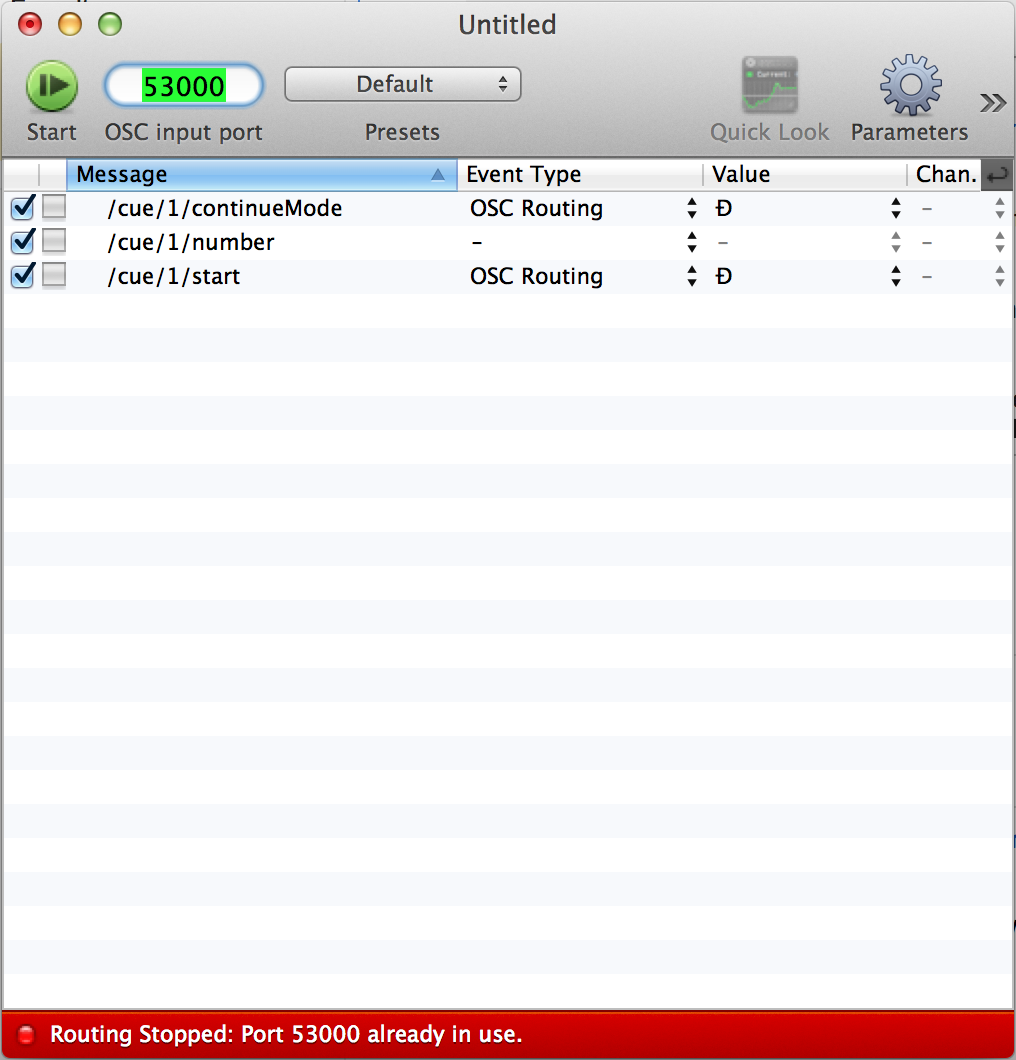
Mic, I had the exact same issue / question the other day. The only solution I found so far is to send the data to another port (say 53005) to an OSC monitor software which can re-route it to QLab on port 53000. I've just been able to do this with OSCulator.
Here are a few screen shots of the setting I've done to make this work. The last screen shot show that OSCulator also cannot listen to a port which is already in use.
Pierre-Luc Brunet
Feb 18, 2015, 11:25:07 AM2/18/15
to ql...@googlegroups.com
Unfortunately OSCulator is not as good as a monitor as OSC Datamonitor. (www.kasperkamperman.com).
I too wish there was a way to have multiple software listen on the same port.
micpool
Feb 18, 2015, 11:52:39 AM2/18/15
to ql...@googlegroups.com, m...@micpool.com
That build works for me
On a related thing. Should there be some indication on the main screen that OSC or MIDI is disabled by the Master Override controls. If that window is shut then there is no clue that this may be the culprit if MIDI or OSC cues aren't working
Mic

Sam Kusnetz
Feb 18, 2015, 12:19:04 PM2/18/15
to ql...@googlegroups.com, m...@micpool.com
Mic (and all...)
Here's a little app I built for monitoring incoming OSC messages and
forwarding them to QLab:
https://www.dropbox.com/s/maxw837e87ju7dr/OSC%20Monitor.zip?dl=0
(apologies for the large file size... Max/MSP builds apps in a sort of
brute-force way...)
Set TouchOSC to send to port 53053 and my app will display the incoming
OSC and forward it to port 53000.
Let me know if this works for you, and/or if there's anything else I can
make the app do for you.
Sam
--
Sam Kusnetz | Figure 53 Field Operative
s...@figure53.com
Here's a little app I built for monitoring incoming OSC messages and
forwarding them to QLab:
https://www.dropbox.com/s/maxw837e87ju7dr/OSC%20Monitor.zip?dl=0
(apologies for the large file size... Max/MSP builds apps in a sort of
brute-force way...)
Set TouchOSC to send to port 53053 and my app will display the incoming
OSC and forward it to port 53000.
Let me know if this works for you, and/or if there's anything else I can
make the app do for you.
Sam
--
Sam Kusnetz | Figure 53 Field Operative
s...@figure53.com
micpool
Feb 18, 2015, 12:32:23 PM2/18/15
to ql...@googlegroups.com, m...@micpool.com
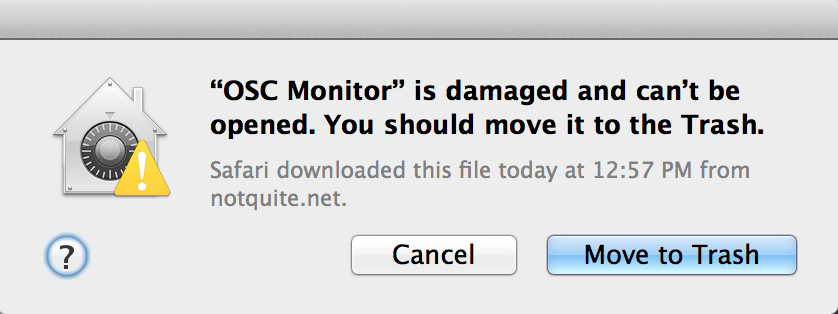
That's unzipping to a damaged file for me. Tried downloading twice.
Mic
Sam Kusnetz
Feb 18, 2015, 12:33:21 PM2/18/15
to ql...@googlegroups.com
AARgh.
uploading a new copy... stand by...
micpool wrote:
> That's unzipping to a damaged file for me. Tried downloading twice.
uploading a new copy... stand by...
micpool wrote:
> That's unzipping to a damaged file for me. Tried downloading twice.
Sam Kusnetz
Feb 18, 2015, 12:53:33 PM2/18/15
to ql...@googlegroups.com
All right...
Here's a new download link:
http://notquite.net/downloads/
Click "OSC Monitor" and away you go.
Cheers
Sam
Here's a new download link:
http://notquite.net/downloads/
Click "OSC Monitor" and away you go.
Cheers
Sam

That's unzipping to a damaged file for me. Tried downloading twice.Mic
On Wednesday, February 18, 2015 at 5:19:04 PM UTC, sam kusnetz wrote:
--
--
Change your preferences or unsubscribe here:
http://groups.google.com/group/qlab
Follow Figure 53 on Twitter: http://twitter.com/Figure53
---
You received this message because you are subscribed to the Google Groups "QLab" group.
To unsubscribe from this group and stop receiving emails from it, send an email to qlab+uns...@googlegroups.com.
For more options, visit https://groups.google.com/d/optout.

Mic (and all...)
Here's a little app I built for monitoring incoming OSC messages and forwarding them to QLab:
https://www.dropbox.com/s/maxw837e87ju7dr/OSC%20Monitor.zip?dl=0
(apologies for the large file size... Max/MSP builds apps in a sort of brute-force way...)
Set TouchOSC to send to port 53053 and my app will display the incoming OSC and forward it to port 53000.
Let me know if this works for you, and/or if there's anything else I can make the app do for you.
Sam
That build works for meOn a related thing. Should there be some indication on the main screen that OSC or MIDI is disabled by the Master Override controls. If that window is shut then there is no clue that this may be the culprit if MIDI or OSC cues aren't working
Mic
On Wednesday, February 18, 2015 at 3:14:37 PM UTC, Christopher Ashworth wrote:
--
--
Change your preferences or unsubscribe here:
http://groups.google.com/group/qlab
Follow Figure 53 on Twitter: http://twitter.com/Figure53
---
You received this message because you are subscribed to the Google Groups "QLab" group.
To unsubscribe from this group and stop receiving emails from it, send an email to qlab+uns...@googlegroups.com.
For more options, visit https://groups.google.com/d/optout.

On February 17, 2015 at 7:44:37 PM, micpool (m...@micpool.com) wrote:Sure thing, here’s a build that will do that:
http://figure53.com/temp/QLab-3.1.9-b1.zip
-C
--
--
Change your preferences or unsubscribe here:
http://groups.google.com/group/qlab
Follow Figure 53 on Twitter: http://twitter.com/Figure53
---
You received this message because you are subscribed to the Google Groups "QLab" group.
To unsubscribe from this group and stop receiving emails from it, send an email to qlab+uns...@googlegroups.com.
For more options, visit https://groups.google.com/d/optout.
Is there a way to use an OSC data monitor to monitor a port that Qlab uses at the same time as with a MIDI monitor?If the monitor is open and receiving on port 53000 and I open Qlab then OSC doesn't function on Qlab (including internal Qlab OSC cues).
Would it be possible for Qlab to give a warning if it is unable to open the OSC port on Launch because it is in use?
Conversely if Qlab is open and I launch the monitor it can't see anything on port 53000Presumably this is to be expected.I am using OSC Datamonitor (www.kasperkamperman.com) which seems to work very well.Mic
--
--
Change your preferences or unsubscribe here:
http://groups.google.com/group/qlab
Follow Figure 53 on Twitter: http://twitter.com/Figure53
---
You received this message because you are subscribed to the Google Groups "QLab" group.
To unsubscribe from this group and stop receiving emails from it, send an email to qlab+uns...@googlegroups.com.
For more options, visit https://groups.google.com/d/optout.
Pierre-Luc Brunet
Feb 18, 2015, 1:17:43 PM2/18/15
to ql...@googlegroups.com
On Wednesday, February 18, 2015 at 12:53:33 PM UTC-5, sam kusnetz wrote:
All right...
Here's a new download link:
http://notquite.net/downloads/
Click "OSC Monitor" and away you go.
Cheers
Sam
Sam, that seems like exactly what's needed. Unfortunately it still doesn't work over here... Sorry. Oh the joy of bundling and sending max patches... I'm on Mavericks 10.9.5.
But I can certainly survive without it. Now that I understand OSCulator better I can easily switch between sending all of the OSC addresses to one program (QLab) to another (OSC Data Monitor).
micpool
Feb 18, 2015, 5:28:59 PM2/18/15
to ql...@googlegroups.com
I think its the zip that's broken not the server. Still no joy. try rar?
Mic


Rich Walsh
Feb 18, 2015, 5:42:10 PM2/18/15
to ql...@googlegroups.com
App opens fine if you disable Gatekeeper.
Zuul?
Rich
Pierre-Luc Brunet
Feb 19, 2015, 11:22:13 AM2/19/15
to ql...@googlegroups.com
On Wednesday, February 18, 2015 at 5:42:10 PM UTC-5, Rich Walsh wrote:
App opens fine if you disable Gatekeeper.Zuul?Rich
Well look at that! It does work if one "Allows app downloaded form anywhere."
Thanks guy.
Reply all
Reply to author
Forward
0 new messages