
Re: [QLab] audio not working
4,687 views
Skip to first unread message

Christopher Ashworth
Jan 28, 2013, 4:25:11 PM1/28/13
to ql...@googlegroups.com
Hi Cynthia,
Can you provide some more information? e.g.:
What specific versions are you using?
What errors are you encountering? Red X's? Something else?
What specific steps have you tried, and at what specific points do they produce unexpected results?
When you say you "did the updates", what does that mean?
On Jan 28, 2013, at 4:02 PM, Cynthia <cynthia...@gmail.com> wrote:
> I'm very new to QLab. Ever since I did the updates, my older QLab program is not playing sound. Can anyone help?
> Thanks,
> Cynthia
Can you provide some more information? e.g.:
What specific versions are you using?
What errors are you encountering? Red X's? Something else?
What specific steps have you tried, and at what specific points do they produce unexpected results?
When you say you "did the updates", what does that mean?
On Jan 28, 2013, at 4:02 PM, Cynthia <cynthia...@gmail.com> wrote:
> I'm very new to QLab. Ever since I did the updates, my older QLab program is not playing sound. Can anyone help?
> Thanks,
> Cynthia

Cynthia
Jan 28, 2013, 6:30:07 PM1/28/13
to ql...@googlegroups.com
Christopher, hi,
It's QLab 2.3.8. There are red X's next to each cue and no sound when I hit the space bar.
I'm not sure what the updates were, but I remember my friend telling me to NOT do the updates because they wouldn't work with the version she used to create this QLab (or I believe that's what she said--I've not been able to reach her). Of course, I only remembered this after I hit "Update" or whatever.
Thanks so much--I hope this is the info you requested.

Andrew Nagy
Jan 28, 2013, 6:31:20 PM1/28/13
to ql...@googlegroups.com
If you hover over the red x's with your mouse it should give you some hint of what the problem is.
Let us know what it says.
Sent from my iPhone
Sent from my iPhone
--
--
Change your preferences or unsubscribe here:
http://groups.google.com/group/qlab
Follow Figure 53 on Twitter: http://twitter.com/Figure53
---
You received this message because you are subscribed to the Google Groups "QLab" group.
To unsubscribe from this group and stop receiving emails from it, send an email to qlab+uns...@googlegroups.com.
For more options, visit https://groups.google.com/groups/opt_out.
Cynthia
Jan 28, 2013, 6:45:59 PM1/28/13
to ql...@googlegroups.com
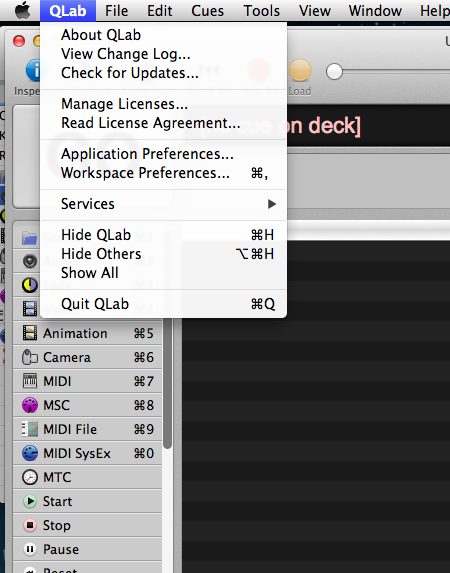
right...it doesn't have a "valid audio output device" so I went down to the Output Patch and there are no options other than "no output device" eight times.

Angus Turner
Jan 28, 2013, 6:48:31 PM1/28/13
to ql...@googlegroups.com
Have you double checked your output device is patched properly in the preferences? When you move computers and the like these become unpatched...

raymond soly
Jan 28, 2013, 6:49:58 PM1/28/13
to ql...@googlegroups.com
In Qlab go to Qlab workspace preferences and select a device for audio

Ray
raymond soly
Jan 28, 2013, 6:52:30 PM1/28/13
to ql...@googlegroups.com
Cynthia
Jan 28, 2013, 6:55:34 PM1/28/13
to ql...@googlegroups.com
Thanks, everyone! The sound is back! I appreciate all your help...
Cynthia
Reply all
Reply to author
Forward
0 new messages