
How to run ONLY one cue at a time?
1,072 views
Skip to first unread message

Andrew Broughton
Apr 5, 2022, 5:00:06 PM4/5/22
to QLab
Super basic question...
How do I set Qlab so that ONLY one cue can run at a time? Basically locking out any triggering of other cues until the current running cue is finished or stopped/panic-stopped?

micpool
Apr 5, 2022, 5:18:32 PM4/5/22
to QLab
Andrew Broughton
Apr 5, 2022, 5:23:20 PM4/5/22
to QLab
Thank you. So the only way to do this is with a script?
micpool
Apr 5, 2022, 7:19:31 PM4/5/22
to QLab
The simplest way is for the operator to sit on their hands while they can hear a cue playing, the next simplest is to use a script. There are other ways, but they would necessitate using lots of additional cues to arm/disarm a Go Cue whenever a cue was played or auto following a completed cue, , and would be prone to error if the ESC key was used instead of a trigger for a custom stop cue.
Mic
Mic
micpool
Apr 5, 2022, 7:43:28 PM4/5/22
to QLab
Here's a screenshot of the arm/disarm method.
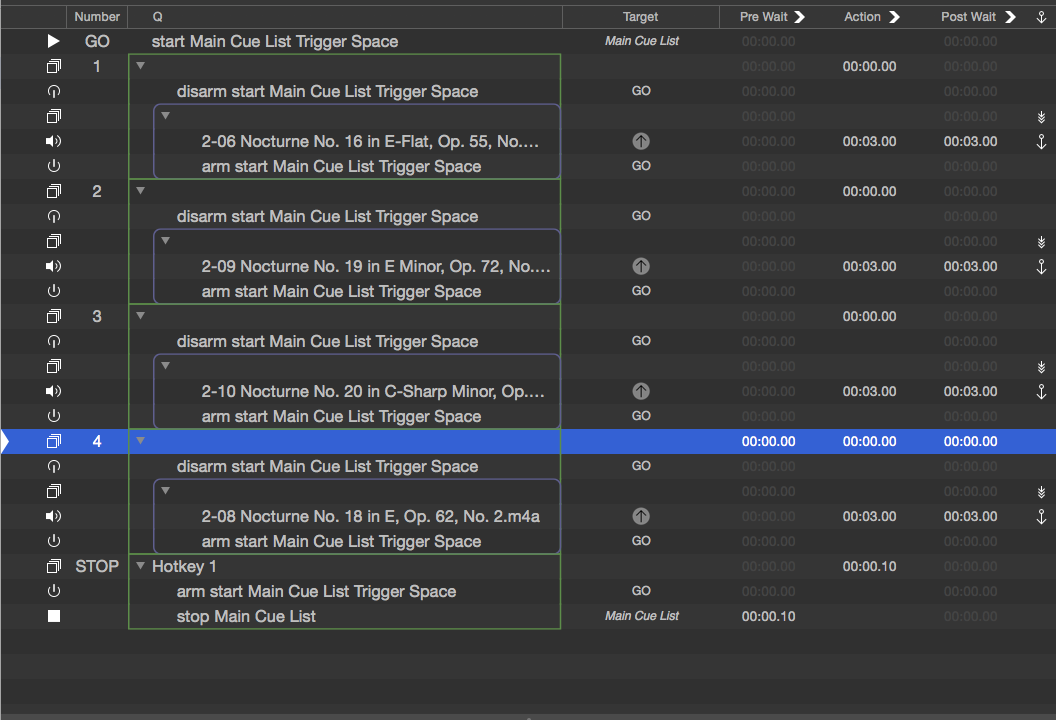
You can just copy and paste a timeline group cue and drag a new audio file on top of the duplicate audio file to make additional cues.
You can just copy and paste a timeline group cue and drag a new audio file on top of the duplicate audio file to make additional cues.
Deselect the space bar from GO in settings/keymap
Space Triggers cue GO
1 triggers cue StOP
If you press ESC then you will need to press 1 to reset the GO cue before you can use the space bar again.
Mic
Andrew Broughton
Apr 17, 2022, 2:01:10 PM4/17/22
to QLab
Figured out another way.
Add a goto cue at the end of the group, with a small pre-delay (a millisecond works) that targets the same group. Group cues are set to 2nd trigger does nothing, so repeatedly triggering does nothing but the goto.
At the end of the group add another goto with a pre-delay the same as the group's cue length that's a goto to the next cue or group. Seems to work!
Andrew Broughton
Apr 17, 2022, 2:16:48 PM4/17/22
to QLab
Actually not, if there's another following cue after the group. Doesn't seem to "stay" in the cue.
micpool
Apr 18, 2022, 3:08:21 AM4/18/22
to QLab
That shouldn't make any difference
Message has been deleted
micpool
Apr 18, 2022, 1:05:00 PM4/18/22
to QLab
The main disadvantage of your goto method is that if you cut and paste a group to create a new audio cue, you have to change the file the audio cue targets and also the cue the second goto targets. If you have a license that lets you use OSC you can use /playhead/nextSequence instead of the second goto to avoid the goto retargeting malarkey.

MIc
MIc

TMS
Apr 18, 2022, 4:47:12 PM4/18/22
to QLab
Another script approach: a script nested in a fire first group that continuously evaluates if any audio cues are currently playing, and after finding none, will fire the next cue -
--this script cue should have second trigger hard stops and restarts checked
tell application id "com.figure53.QLab.4" to tell front workspace
--declarations
--this script wants to be the first item in your group cue
set thisscript to last item of (active cues as list)
set parentofme to parent of thisscript
set thecues to active cues as list
set counter to 0
--doing things
repeat with eachCue in thecues
if q type of eachCue is "audio" then
set counter to counter + 1
end if
end repeat
if counter < 1 then
-- moveSelectionDown might be helpful here
go
--this script wants to be the first item in your group cue
set thisscript to last item of (active cues as list)
set parentofme to parent of thisscript
set thecues to active cues as list
set counter to 0
--doing things
repeat with eachCue in thecues
if q type of eachCue is "audio" then
set counter to counter + 1
end if
end repeat
if counter < 1 then
-- moveSelectionDown might be helpful here
go
end if
if counter < 0 then
start parentofme
end if
end tell

0 new messages