
EXIF data and AppleScript?
942 views
Skip to first unread message

Jeremy Lee
Jun 24, 2015, 3:48:45 AM6/24/15
to ql...@googlegroups.com
Hi all,
I did a binaural recording of an event while taking a few hundred pictures on my DSLR. I'd like to align the images with the audio track. Is there any way to write an AppleScript that looks at the EXIF metadata in an image and creates a simple slideshow based in that timing data?
Thanks!
- Jeremy Lee's mobile device
I did a binaural recording of an event while taking a few hundred pictures on my DSLR. I'd like to align the images with the audio track. Is there any way to write an AppleScript that looks at the EXIF metadata in an image and creates a simple slideshow based in that timing data?
Thanks!
- Jeremy Lee's mobile device

Rich Walsh
Jun 24, 2015, 8:04:55 PM6/24/15
to ql...@googlegroups.com
This form will return a text variable along the lines of "2015:04:17 11:51:33":
tell application "Image Events"launchset eachImage to open eachFiletell eachImage to set exifDate to value of metadata tag "creation"close eachImageend tell
Although this probably works just as well:
tell application "Image Events" to set exifDate to (value of metadata tag "creation" of (open eachFile))
Then I guess you need to parse that text into a time, maybe like this:
set {h, m, s} to {word 4, word 5, word 6} of exifDateset daySeconds to 60 * 60 * h + 60 * m + s
You could then deduct the smallest time from all of them and use the remainder to set pre waits, or whatever?
Rich
--
--
Change your preferences or unsubscribe here:
http://groups.google.com/group/qlab
Follow Figure 53 on Twitter: http://twitter.com/Figure53
---
You received this message because you are subscribed to the Google Groups "QLab" group.
To unsubscribe from this group and stop receiving emails from it, send an email to qlab+uns...@googlegroups.com.
For more options, visit https://groups.google.com/d/optout.

micpool
Jun 24, 2015, 8:17:46 PM6/24/15
to ql...@googlegroups.com
Ha
I had come up with roughly the same method. Be aware though that EXIF tag "creation" can change if you batch edit the original photos. I can't find an exif tag for Date and Time (original) that works.
This attached workspace is 90 percent complete in terms of generating the whole slideshow. At the moment you need to move all the group cues into the master fire all group manually. I haven't got time at the moment to make this automatic but it shouldn't be too difficult
Mic
Jeremy Lee
Jun 25, 2015, 2:53:15 AM6/25/15
to ql...@googlegroups.com
Mic and Rick- I bow in humbleness to the masters of the script! I'll try this first thing when I get back to my computer.
There's apparently also an EXIF tag for "sub second time". This would make the creation of the timeline even more accurate if it actually works!
I'll say it again- this is the most amazing listserve on the planet.
Best,
Jeremy
- Jeremy Lee's mobile device
<EXIF DATA Slideshow.cues>
micpool
Jun 25, 2015, 7:13:09 PM6/25/15
to ql...@googlegroups.com
Attached is a complete solution which does everything with a single click of a button.
Image events is quite limited in the data types it reads.
Attached is a list of recognised tags
Mic

luckydave
Jun 25, 2015, 9:40:00 PM6/25/15
to ql...@googlegroups.com
Do you use Aperture? If so, it has AppleScript hooks for EXIF key/value pairs. You could experiment with what you find there, and then apply your findings to pre-waits for a QLab slide show.
--
luckydave
luckydave
Jeremy Lee
Jun 26, 2015, 1:37:42 AM6/26/15
to ql...@googlegroups.com
Thanks Mic!
That is definitely a reduced set of exif data. Good to know what's accessible.
- Jeremy Lee's iSlab
- Jeremy Lee's iSlab
<Tags recognised by Image events.jpg>
<EXIF DATA Slideshow v0.95.zip>
Jeremy Lee
Jun 30, 2015, 2:11:13 PM6/30/15
to ql...@googlegroups.com
Hi all,
So, with some further digging, I found that an application called "A Better Finder Rename" can use more EXIF data than the Image Events in OS X. I was able to automatically change all of the file names to HH.MM.SS.msc.JPG for example: "02.06.35.000.JPG". It appears that the millisecond parameter recorded by the Canon 7D is not actually milliseconds, but hundredths of a second.
So I'm going to try and take Mic's scripts and parse out the new fils names for the times. I'll let you know how it goes.
Thanks again!
jeremy


John Leonard
Jun 30, 2015, 5:54:11 PM6/30/15
to Q Lab
I’ve been using this program for years: it’s very versatile and very fast. Highly recommended.
John
John
micpool
Jul 2, 2015, 12:19:59 PM7/2/15
to ql...@googlegroups.com
For those following along at home….
Here's my previous solution adapted to use Jeremy Lee's inspired discovery, to rename the files by 'A Better File Rename' to recover the original camera date and times, instead of using image events which can only recover the last modified date and time.
First you take your image files and process them using A Better Finder Rename.
In my example you will see that the original files all ended up with the same time when they were converted from RAW.
ABFR has recovered the original camera EXIF dates and times. In my example I am formatting them to HH MM SS

The renamed files are now dragged into the attached QLab workspace.
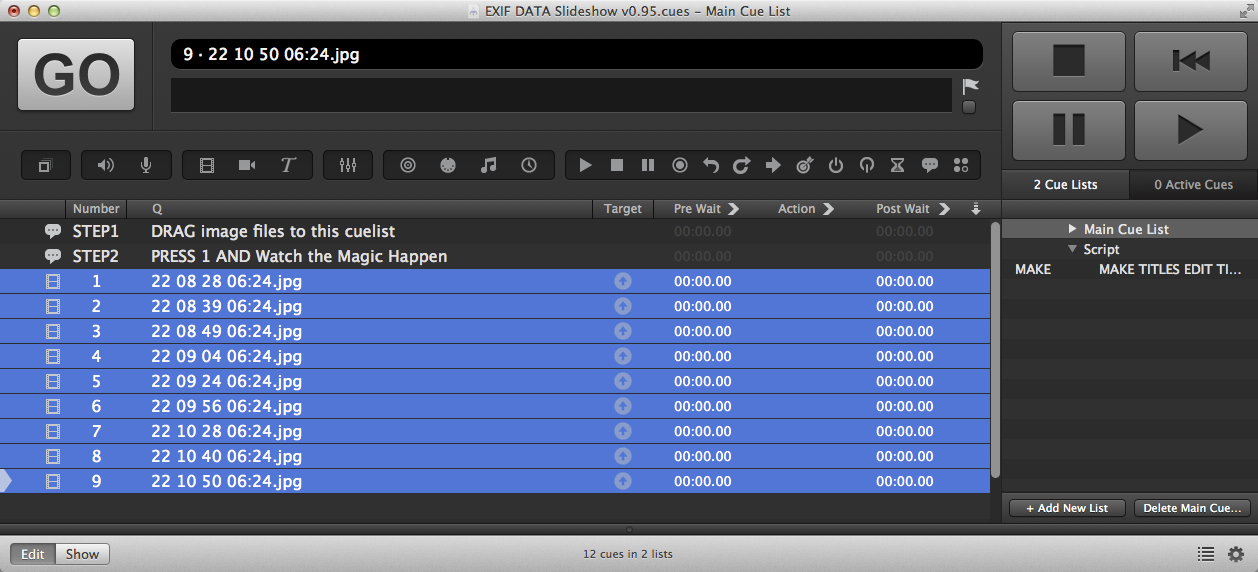
Press Key 1 and the workspace generates a slideshow using the original camera times as pre waits.

Using this script, which could probably more elegant (being a cut and shunt of 3 previous projects with clever bits by Rich Walsh ) but does the job.
set userUpTime to 2 -- Time for images to fade up in
set userDownTime to 2 -- Time for images to fade down in
set userHoldTime to 0 -- Time to wait between starting fade down and starting fade up
-- Declarations
set notFirstCue to false
-- Main routine
tell application id "com.figure53.qlab.3" to tell front workspace
set selectedCues to every cue whose q type is "video" as list
set thecue to first item of selectedCues
set thetime to the q default name of thecue
set thehour to word 1 of thetime
set theminute to word 2 of thetime
set thesecond to word 3 of thetime
set thefirsttime to ((thehour * 3600) + (theminute * 60) + thesecond) as number
repeat with eachcue in selectedCues
set thecue to eachcue
set thetime to the q default name of thecue
set thehour to word 1 of thetime
set theminute to word 2 of thetime
set thesecond to word 3 of thetime
set thetime to ((thehour * 3600) + (theminute * 60) + thesecond) as number
set thetime to thetime - thefirsttime
set the pre wait of thecue to thetime
-- Make a fade out cue (not for the first cue)
if notFirstCue then
make type "Fade" -- Cue numbers and names not altered from QLab defaults
set fadeOutCue to last item of (selected as list)
set cue target of fadeOutCue to previousCue
set duration of fadeOutCue to userDownTime
set do opacity of fadeOutCue to true
set opacity of fadeOutCue to 0
set stop target when done of fadeOutCue to true
end if
-- Make a fade in cue
make type "Fade" -- Cue numbers and names not altered from QLab defaults
set fadeInCue to last item of (selected as list)
set opacity of eachcue to 0
set cue target of fadeInCue to eachcue
set pre wait of fadeInCue to userHoldTime
set duration of fadeInCue to userUpTime
set do opacity of fadeInCue to true
-- Make a Group Cue (have to do this here to get round QLab's auto-grouping of selections ≥ 2 cues)
make type "Group" -- Cue numbers not altered from QLab defaults
set groupCue to last item of (selected as list)
set mode of groupCue to fire_all
set q name of groupCue to "Crossfade to " & q list name of eachcue
set pre wait of groupCue to pre wait of eachcue
set pre wait of eachcue to 0
-- Move cues into right place
move cue id (uniqueID of eachcue) of parent of eachcue to end of groupCue
if notFirstCue then move cue id (uniqueID of fadeOutCue) of parent of fadeOutCue to end of groupCue
move cue id (uniqueID of fadeInCue) of parent of fadeInCue to end of groupCue
-- Setup variables for next pass
set previousCue to eachcue
set notFirstCue to true
end repeat
set thecuelist to current cue list
set selectedCues to every cue
repeat with eachcue in selectedCues
if q type of eachcue is in {"Group", "Video", "Fade"} then
set the q number of eachcue to ""
end if
end repeat
set thecuenumber to 1
set selectedCues to every cue in front cue list whose q type is "Group"
repeat with eachcue in selectedCues
set the q number of eachcue to thecuenumber
set thecuenumber to thecuenumber + 1
end repeat
set selectedCues to every cue of cue list 1 whose q type is "Group"
if (count selectedCues) is not 0 then
make type "Group"
set groupCue to last item of (selected as list)
set groupCueIsIn to parent of groupCue
repeat with eachcue in selectedCues
if contents of eachcue is not groupCueIsIn then -- Skip a Group Cue that contains the new Group Cue
set eachCueID to uniqueID of eachcue
move cue id eachCueID of parent of eachcue to end of groupCue
end if
end repeat
end if
set groupCue to last item of (selected as list)
set mode of groupCue to fire_all
set q name of groupCue to "EXIF Timed Sequence"
end tell
Mic
Jeremy Lee
Jul 6, 2015, 10:38:19 AM7/6/15
to ql...@googlegroups.com
Hi all,
The final video is here: https://youtu.be/d1Y0DJ5AXfU?t=1195
I captured it with Screenflow. The timings didn't totally line up exactly. I'm not sure if that's because the EXIF data is slightly off, the calculations I made are somewhat off, QLab lost sync somehow (not too likely), or what. But for the purpose of this video, they are just fine.
Script Below:
-- Assumes that file name is in the format: HH.MM.SS.msc.JPG (the last bit is actually hundredths of a second)- this can be performed using the application A Better Finder Rename
set userUpTime to 0.1 -- Time for images to fade up in
set userDownTime to 2 -- Time for images to fade down in
set userHoldTime to 0
-- Time to wait between starting fade down and starting fade up
-- Declarations
set notFirstCue to false
-- Main routine
-- Find out the time of the first cue based on the file name
tell application id "com.figure53.qlab.3" to tell front workspace
set selectedCues to every cue whose q type is "video" as list
set thecue to first item of selectedCues
set thetime to the file target of thecue as string
set AppleScript's text item delimiters to {":"}
-- Extract filename from full path
set thetime to the last text item of thetime as string
set AppleScript's text item delimiters to {"."}
set thehour to text item 1 of thetime
set theminute to text item 2 of thetime
set thesecond to text item 3 of thetime
set themilisecond to text item 4 of thetime
set thefirsttime to ((thehour * 3600) + (theminute * 60) + thesecond + (themilisecond / 100))
-- display dialog "The starting time is: " & thefirsttime & " seconds."
-- Start creating the sequence
repeat with eachcue in selectedCues
set thecue to eachcue
--set the prewait to the time based on the file name
set thetime to the file target of thecue as string
set AppleScript's text item delimiters to {":"}
-- Extract filename from full path
set thetime to the last text item of thetime as string
set AppleScript's text item delimiters to {"."}
set thehour to text item 1 of thetime
set theminute to text item 2 of thetime
set thesecond to text item 3 of thetime
set themilisecond to text item 4 of thetime
set thetime to ((thehour * 3600) + (theminute * 60) + thesecond + (themilisecond / 100))
set thetime to thetime - thefirsttime
set the pre wait of thecue to thetime
-- display dialog "The Prewait of this cue is " & thetime & " seconds."
start cue "NUMB"
end tell
Jeremy Lee
Jul 6, 2015, 12:51:58 PM7/6/15
to ql...@googlegroups.com
PS- there's an amazing terminal command for the batch processing of image files. "sips". Go to the Terminal and type "man sips" for the lowdown.
Jeremy
Reply all
Reply to author
Forward
0 new messages