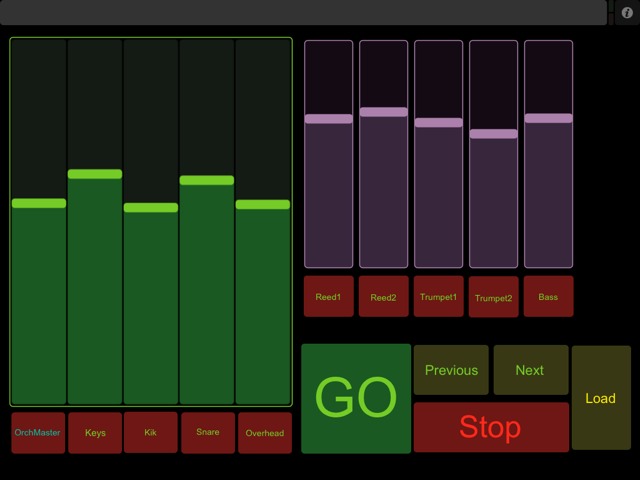
[QLab] A Cool little QLAB remote plus 10 channels of MIO using Touch OSC

1,688 views
Skip to first unread message

Steven Devino

unread,
Jul 25, 2010, 7:35:37 PM7/25/10
to Discussion and support for QLab users.
Ran a show today using this little TouchOSC file I built on my iPad.   It gave me remote control of QLAB plus ten channels of MIO.  I think I'll make a page with my DAW faders from the MIO so I have full live control of QLAB volume (via the MIO). 

This form factor for fader control on the touch surface is very very nice IMO.

Steve

*

unread,
Jul 27, 2010, 1:16:56 PM7/27/10
to Discussion and support for QLab users.
could you feasibly set up X triggers for X number of cues as well Steve?

For example, midi triggers for qlab 10 cues, each with a box on the screen?

*

On Sun, July 25, 2010 6:35 pm, Steven Devino wrote:
> Ran a show today using this little TouchOSC file I built on my iPad. It
> gave me remote control of QLAB plus ten channels of MIO. I think I'll
> make a page with my DAW faders from the MIO so I have full live control of
> QLAB volume (via the MIO).


________________________________________________________
WHEN REPLYING, PLEASE QUOTE ONLY WHAT YOU NEED. Thanks!
Change your preferences or unsubscribe here:
http://lists.figure53.com/listinfo.cgi/qlab-figure53.com

Steven Devino

unread,
Jul 27, 2010, 1:30:09 PM7/27/10
to Discussion and support for QLab users.
Yeah it might take like 5 minutes but yes its very straight forward.

*

unread,
Jul 27, 2010, 1:33:41 PM7/27/10
to Discussion and support for QLab users.
& is there any feedback possibility?

For instance, could you make it where you know the cue is going?

Or in the case of a fader, I presume that if you move the fader on the
computer, the IPAD shows the change as well?

*

On Tue, July 27, 2010 12:30 pm, Steven Devino wrote:
> Yeah it might take like 5 minutes but yes its very straight forward.

Steven Devino

unread,
Jul 27, 2010, 1:54:20 PM7/27/10
to Discussion and support for QLab users.
On Jul 27, at  Jul 27, 2010 1:33 PM, * wrote:

& is there any feedback possibility?
not sure. It handles scripts and Sysex so if it can be done that way then perhaps. Maybe someone else could research that. 


Or in the case of a fader, I presume that if you move the fader on the
computer, the IPAD shows the change as well?

MIO faders yes. QLAB faders I don't think so. 

Steve

*

unread,
Jul 27, 2010, 2:05:05 PM7/27/10
to Discussion and support for QLab users.
Most importantly, can you currently tell that QLab is GOing with your
current rig? Meaning is there some way to know you actually pushed GO on
the IPAD?

How accurate does the QLAB trigger part of it appear to be? How big or
small is the margin of error around the graphic buttons?

For example, if you are close to GO but also close to NEXT, how easy is it
to accidentally NOT trigger GO?

*

On Tue, July 27, 2010 12:54 pm, Steven Devino wrote:
>
> On Jul 27, at Jul 27, 2010 1:33 PM, * wrote:
>
>> & is there any feedback possibility?
> not sure. It handles scripts and Sysex so if it can be done that way then
> perhaps. Maybe someone else could research that.
>

Steven Devino

unread,
Jul 27, 2010, 2:17:34 PM7/27/10
to Discussion and support for QLab users.
Its just a user configurable button interface to OSC or MIDI. You add the buttons and place them where you want and make them as big as you want. You can download TouchOSC Editor for free on your mac to get a sense of what you can layout.

The button is very good in that it will not double trigger so you can combine that with QLAB prefs to help avoid double triggers.

You know it worked by listening. I am not sure if you can create a feedback mechanism or not. Its just not important to me so I won't be working on that. But it basically just gives you a set of buttons or faders on your iPAd (which you design). On the host program on the Mac you assign actions to the button or fader actions. Possible actions are MIDI commands, OSC commands or Apple Scripts.

I never use scripts so I will let someone else assess the applicability in that regard.

I like it mainly because it is MIDI and it works whether or not QLAB is in the foreground or background so I am usually sitting in front of the the monitor when using it so I see feedback on the MAc screen. I just like the interaction of the iPad much better than using the mouse. Plus the iPad is multitouch so I can move faders and fire Go's all at once.

Steve

Andy Leviss

unread,
Jul 27, 2010, 4:47:09 PM7/27/10
to Discussion and support for QLab users.
On Tue, Jul 27, 2010 at 2:17 PM, Steven Devino <sde...@gmail.com> wrote:
> The button is very good in that it will not double trigger so you can combine that with QLAB prefs to help avoid double triggers.

Unless something's changed or I'm totally misremembering, QLab's
double go protection only applies to keyboard triggers and the
on-screen go button, and not to MIDI triggers. Chris/Sean/luckydave?

This is one of the reasons I am very particular about the choice of
button and the debounce timing in my hardware remotes.

--Andy

Eric Stahlhammer

unread,
Jul 27, 2010, 4:56:55 PM7/27/10
to Discussion and support for QLab users.
I use TouchOSC for a front end for some of my remotes and I can program double go parameters into the client that takes to QLab or whatever device. The way it is now has been really reliable in that department but the ability to tweak it is there should we need it. 

I could set up a client to act as an intermediary for MIDI commands to prevent double go. We would have to test for latency but my guess is that it would be negligible.

Eric


----
Eric Stahlhammer
Greater Than Designs LLC
Sound Designer


Sean Dougall

unread,
Jul 27, 2010, 5:17:09 PM7/27/10
to Discussion and support for QLab users.
The double-go protection should apply to anything that sends the workspace a "go" message -- which includes the GO button, the keyboard shortcut for GO, and the MIDI message set to fire a GO. What it doesn't apply to, though, is any trigger set on an individual cue (whether hotkey or MIDI or anything else).

Sean

On Jul 27, 2010, at 1:47 PM, Andy Leviss wrote:

> Unless something's changed or I'm totally misremembering, QLab's
> double go protection only applies to keyboard triggers and the
> on-screen go button, and not to MIDI triggers. Chris/Sean/luckydave?

________________________________________________________

Andy Leviss

unread,
Jul 27, 2010, 5:33:59 PM7/27/10
to Discussion and support for QLab users.
On Tue, Jul 27, 2010 at 5:17 PM, Sean Dougall <se...@figure53.com> wrote:
> The double-go protection should apply to anything that sends the workspace a "go" message -- which includes the GO button, the keyboard shortcut for GO, and the MIDI message set to fire a GO. What it doesn't apply to, though, is any trigger set on an individual cue (whether hotkey or MIDI or anything else).

That's what it was...I was thinking of it not applying to a MIDI
trigger set to a specific cuelist rather than the entire workspace.
(In my case, a click track list where the MD had his own go button;
easily solved by having him trigger a secondary cuelist, which
triggered the click track list and then disarmed the start cue for a
set amount of time.)

Thanks for the correction/clarification, Sean!

--A

pascal....@gmail.com

unread,
Mar 12, 2015, 9:35:53 AM3/12/15
to ql...@googlegroups.com, ql...@lists.figure53.com, se...@figure53.com
HI  guys ! 

 I'm new to OSC and Qlab. I made a ''GO'' button on my iphone using ''/go" but it fired 2 go instead of one. Can you help me?

Sorry for my english...

Chris Ashworth

unread,
Mar 12, 2015, 9:50:41 AM3/12/15
to pascal....@gmail.com, ql...@googlegroups.com
Hi Pascal,

What program did you use to make the go button on your phone?  If it is Touch OSC I believe it is in the habit of sending a message for both the press and the release of a button.

Best,
Chris

Pascal Harvey

unread,
Mar 12, 2015, 9:56:50 AM3/12/15
to ql...@googlegroups.com, pascal....@gmail.com
Hi Chris !!!

Yes it is Touch OSC. That is what i tough. What would be the way around it ?

THanks  

Pascal


-- 
-- 

Change your preferences or unsubscribe here: 
http://groups.google.com/group/qlab
 
Follow Figure 53 on Twitter: http://twitter.com/Figure53

--- 
You received this message because you are subscribed to the Google Groups "QLab" group.
To unsubscribe from this group and stop receiving emails from it, send an email to qlab+uns...@googlegroups.com.
For more options, visit https://groups.google.com/d/optout.

micpool

unread,
Mar 12, 2015, 10:04:07 AM3/12/15
to ql...@googlegroups.com, pascal....@gmail.com
In this scenario it should just work

Create a push button in OSC. Leave everything at the default settings

In Qlab OSC controls capture that button.

It captures something like /1/push1 1

This will work, as the argument 1 is present which means it will only  fire on presses.

The problem Chris alludes to is only relevant when using custom osc in Touch OSC as any argument in the custom message will be sent twice once when pressed and once when released.

In your app did you change the default OSC message to include a custom argument.


Mic


On Thursday, March 12, 2015 at 1:56:50 PM UTC, Pascal Harvey wrote:
Hi Chris !!!

Yes it is Touch OSC. That is what i tough. What would be the way around it ?

THanks  

Pascal

Le 2015-03-12 à 09:50, Chris Ashworth <ch...@figure53.com> a écrit :

Hi Pascal,

What program did you use to make the go button on your phone?  If it is Touch OSC I believe it is in the habit of sending a message for both the press and the release of a button.

Best,
Chris

Chris Ashworth

unread,
Mar 12, 2015, 10:04:54 AM3/12/15
to Pascal Harvey, ql...@googlegroups.com, pascal....@gmail.com
Hi Pascal,

I suppose that’s a Touch OSC question, since it will require finding a way to send only one message. I’m not especially familiar with TouchOSC, but taking a glance at their documentation it looks like you could at least use a toggle button as an alternative to a push button:

Drew Schmidt

unread,
Mar 12, 2015, 10:09:42 AM3/12/15
to ql...@googlegroups.com, pascal...@videotron.ca, pascal....@gmail.com
I'll put this out here again.


This is a Python script that will interact with TouchOSC and Qlab. This will prevent the second GO on release. 

Another "middle man" alternative would be OSCulator which can be set to pass a message along only if the value is increasing (Press = 1, Release = 0)

But personally, when I just need a GO button on my phone for a presentation, I'll use the Double-GO protection built into Qlab

Chris Ashworth

unread,
Mar 12, 2015, 10:10:57 AM3/12/15
to micpool, ql...@googlegroups.com, pascal....@gmail.com
Ah, heh, yes, that would be a smarter way! I forgot what features I’ve added to my own program sometimes….

-C

micpool

unread,
Mar 12, 2015, 10:15:56 AM3/12/15
to ql...@googlegroups.com, pascal...@videotron.ca, pascal....@gmail.com
Just in case people are confused!

If you just want to make a simple remote in Touch OSC, you don't need any middleman software.

Create your push buttons and leave the OSC messages at default.

Then capture each button in Qlab settings/OSC controls.

You will only get single triggers for each button.

Mic

Pascal Harvey

unread,
Mar 12, 2015, 11:05:11 AM3/12/15
to ql...@googlegroups.com, pascal...@videotron.ca, pascal....@gmail.com
Double-GO protection works fine. 

Thank you very much for your help.

micpool

unread,
Mar 12, 2015, 11:21:29 AM3/12/15
to ql...@googlegroups.com, pascal...@videotron.ca, pascal....@gmail.com
On Thursday, March 12, 2015 at 3:05:11 PM UTC, Pascal Harvey wrote:
Double-GO protection works fine. 


Only if you take your finger off the button before the protection time!


Pascal Harvey

unread,
Mar 12, 2015, 11:28:39 AM3/12/15
to ql...@googlegroups.com, pascal...@videotron.ca, pascal....@gmail.com
I did set it to 1 sec.  Unless i fall asleep...  I'M experimenting for now. i may end up bying the real thing from fig53.

micpool

unread,
Mar 12, 2015, 12:09:48 PM3/12/15
to ql...@googlegroups.com, pascal...@videotron.ca, pascal....@gmail.com
Just to complete the discussion.

A TouchOSC push button sends a message on push (the first value in the range is appended as the argument) and on release (the second value in the range is the argument)

In the case of  /go the argument is ignored by Qlab so it responds to both the push and the release message. i.e GO's on both.

If you use a toggle button in OSC instead then only one message is sent on each press, but the messages are only sent on the button release which is not really any good for a Go button

Similar OSC messages without arguments which would all suffer from the same double problem (only the go is protected by double go protection) include:

/playhead/next   

/playhead/previous

cue/1/start

If you use a toggle button in OSC instead then only one message is sent on each press, but the messages are only sent on the button release which is often not ideal.

Some Qlab OSC commands have a numerical argument, and they can be used with Touch OSC. for instance:

  /cue/selected/infiniteLoop

If you don't alter the range this won't do anything. When you press the button it will send  /cue/selected/infiniteLoop 1 and set the loop and when you take your finger off it will send  /cue/selected/infiniteLoop 0 and you will be back where you started.

In this case you want to create 2 pushbuttons. One to set the loop on and one to set the loop off. The loop on button would have both range fields set to 1 and the off button  would have both range fields set to 0


My recommendations would be:

If you are just creating a Qlab remote button box using Touch OSC, then capturing  the default button OSC (and argument) in Qlab settings/ OSC Controls  is the best method.

If you are creating anything more complicated, then it is worth considering Liine LEMUR instead of Touch OSC. This allows you to define the button state changes  that will trigger messages, has expressions and  a full scripting language , and most importantly, the Mac editor updates the iPad App continuously so any changes are on the iPad instantly.

Pascal Harvey

unread,
Mar 13, 2015, 10:39:20 AM3/13/15
to ql...@googlegroups.com, pascal...@videotron.ca, pascal....@gmail.com
I'M so knew to all that. But i'm learning so much. It is really exiting.

thanks a lot Mic !

Pascal Harvey

unread,
Mar 18, 2015, 8:21:54 AM3/18/15
to ql...@googlegroups.com, pascal....@gmail.com
Thanks !  Now i'm trying to start a cue from time code(LTC). Is there an internal clock ? The Sync source button leaves me with2 options: NONE or Built-in mic ?

Chris Ashworth

unread,
Mar 18, 2015, 9:01:47 AM3/18/15
to Pascal Harvey, ql...@googlegroups.com, pascal....@gmail.com
HI Pascal,

No, there is not an internal timecode clock. If you’re trying to trigger cues from timecode that are not following external timecode, we don’t recommend doing that. Try a group set to start-all-simultaneously mode, and use pre-waits to set the time each cue starts.

Best,
Chris

Pascal Harvey

unread,
Mar 18, 2015, 11:11:58 AM3/18/15
to ql...@googlegroups.com, pascal....@gmail.com
Good idea !

Thanks !

Pascal Harvey

unread,
Mar 18, 2015, 4:31:11 PM3/18/15
to ql...@googlegroups.com, pascal...@videotron.ca, pascal....@gmail.com
Could i use my iphone as a remote camera ?

micpool

unread,
Mar 18, 2015, 6:10:59 PM3/18/15
to ql...@googlegroups.com, pascal...@videotron.ca, pascal....@gmail.com
On Wednesday, March 18, 2015 at 8:31:11 PM UTC, Pascal Harvey wrote:
> Could i use my iphone as a remote camera ?
>

That's probably the start of a new thread!

Air Beam Pro allows you to do this

Mic

Pascal Harvey

unread,
Mar 18, 2015, 6:12:41 PM3/18/15
to ql...@googlegroups.com, pascal...@videotron.ca, pascal....@gmail.com
Let's say i want to hookup 4 cameras to QLAB. wath would be the device between them and my mac ?

micpool

unread,
Mar 18, 2015, 6:37:04 PM3/18/15
to ql...@googlegroups.com, pascal...@videotron.ca, pascal....@gmail.com
On Wednesday, March 18, 2015 at 10:12:41 PM UTC, Pascal Harvey wrote:
> Let's say i want to hookup 4 cameras to QLAB. wath would be the device between them and my mac

It depends on so many things. If you want to mix 4 HD broadcast cameras to a 2K projector output then you will need something very different to what you would need to switch 4 cctv cameras to small on set monitors. It also depends what latency is acceptable.

Mic

Pascal Harvey

unread,
Mar 18, 2015, 7:39:35 PM3/18/15
to ql...@googlegroups.com, pascal...@videotron.ca, pascal....@gmail.com
OK !  I have downloaded Air Beam. In the camera setting i see:  patch #1 FACE TIME HD CAMERA. From there, how do i patch my iphone in patch #2 ?

Again, sorry for my english... i'm a frenchy from Québec, Canada.

Pascal Harvey

unread,
Mar 18, 2015, 7:56:01 PM3/18/15
to ql...@googlegroups.com, pascal...@videotron.ca, pascal....@gmail.com
By the way, do i need to have air beam on my mac too ?

micpool

unread,
Mar 18, 2015, 8:17:37 PM3/18/15
to ql...@googlegroups.com, pascal...@videotron.ca, pascal....@gmail.com

iphone:

Launch Airbeam

camera


Mac

Launch Airbeam Pro

Monitor

click on play symbol on iPhone


Qlab 

Camera Cue

Airbeam Pro should now be in the Camera List. (Airbeam Pro creates a syphon input)

Run the Camera cue


That's it

micpool

unread,
Mar 18, 2015, 8:42:19 PM3/18/15
to ql...@googlegroups.com, pascal...@videotron.ca, pascal....@gmail.com
Screenshot of entire setup attached.
AirBeam Pro Setup.jpg

Pascal Harvey

unread,
Mar 18, 2015, 8:58:46 PM3/18/15
to ql...@googlegroups.com, pascal...@videotron.ca, pascal....@gmail.com
WORKING !!!  I'M having a lot of fun !  

THANKS a LOT !
Reply all
Reply to author
Forward
0 new messages