Groups
Groups
Sign in
Groups
Groups
QGIS初心者質問グループ
Conversations
About
Send feedback
Help
属性で太さを変える
170 views
Skip to first unread message
Satoshi Itoh
unread,
Sep 14, 2022, 7:15:23 PM
9/14/22
Reply to author
Sign in to reply to author
Forward
Sign in to forward
Delete
You do not have permission to delete messages in this group
Copy link
Report message
Show original message
Either email addresses are anonymous for this group or you need the view member email addresses permission to view the original message
to QGIS初心者質問グループ
いつもお世話になっております。
下記いろいろ探しましたが見つかりませんのでご教示ください。
ラインデータ シンポロジーで属性の数値によって太さを変えることは出来るでしょうか?
福岡
unread,
Sep 14, 2022, 11:00:15 PM
9/14/22
Reply to author
Sign in to reply to author
Forward
Sign in to forward
Delete
You do not have permission to delete messages in this group
Copy link
Report message
Show original message
Either email addresses are anonymous for this group or you need the view member email addresses permission to view the original message
to QGIS初心者質問グループ
Satoshi Itoh 様
こんにちは
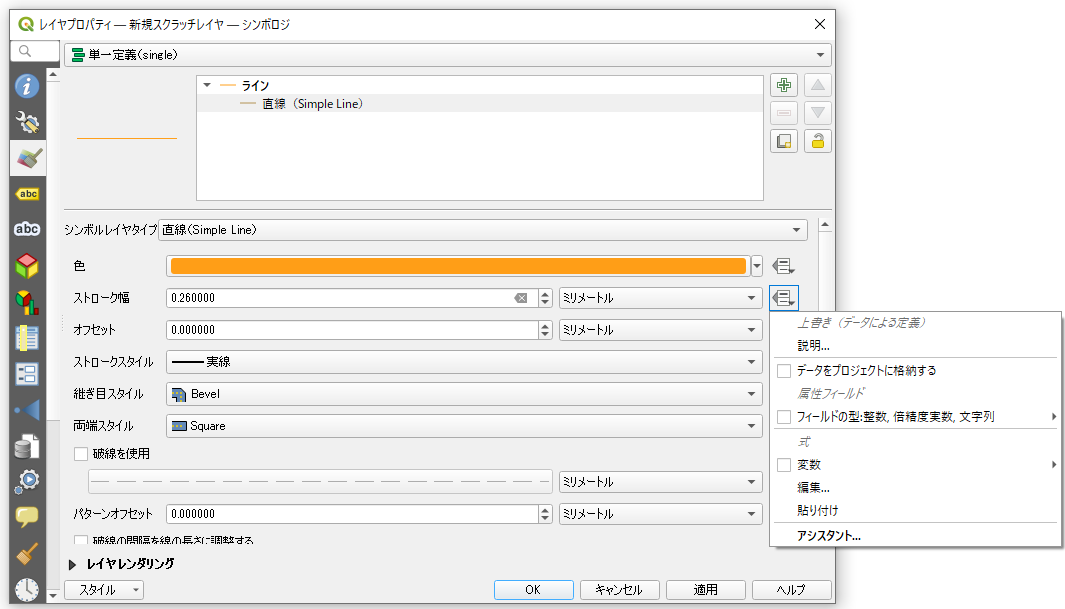
「ストローク幅」の右端にある「電卓の形をしたアイコン」をクリックしてください。
ここで色々な設定が可能となっています。
属性テーブルに、そのままストローク幅として使えるフィールドがある場合は「フィールドの型:整数、倍精度実数、文字列」という項目をクリックして対象フィールドを指定します。
ある程度の操作が必要な場合(例えば数値の1/10)は、「編集」をクリックして数式を入力してコントロールします。
2022年9月15日木曜日 8:15:23 UTC+9 Satoshi Itoh:
いつもお世話になっております。
下記いろいろ探しましたが見つかりませんのでご教示ください。
ラインデータ シンポロジーで属性の数値によって太さを変えることは出来るでしょうか?
Satoshi Itoh
unread,
Sep 21, 2022, 7:00:46 PM
9/21/22
Reply to author
Sign in to reply to author
Forward
Sign in to forward
Delete
You do not have permission to delete messages in this group
Copy link
Report message
Show original message
Either email addresses are anonymous for this group or you need the view member email addresses permission to view the original message
to QGIS初心者質問グループ
福岡様
おそくなりましたが、ストローク幅を数式(("数"/5000)+1)で編集し希望のスタイルになりました。
ありがとうございます。
2022年9月15日木曜日 12:00:15 UTC+9 福岡:
Reply all
Reply to author
Forward
0 new messages