
Solving (or more accurately, working around) the USB lock-up issue
287 views
Skip to first unread message

Richard Truran
Aug 11, 2017, 12:16:15 PM8/11/17
to pywws
Approximately a year and half ago I upgraded my weather station from a WH1080 to a WS3080 to start record solar data. The upgrade went very smoothly and pywws functioned seamlessly as I knew it would, however after a few weeks my weather station stopped logging data.
Upon restart the daemon it became apparent that pywws was unable to detect the station, power cycling the weather station solved the issue but caused issues with duplicated data.
The continued for approximately a year with on and off USB lockups which as time passed I learnt from this forum and other sites on the internet was a common problem with these weather stations.
Approximately 4 months ago I decided to try and fix things to limit the impact of the lock ups, I found a remotely switchable USB hub (https://www.yepkit.com/products/ykush) that I could use to switch off the power to the weather station (I obviously removed the batteries from the weather station).
This didn't solve the lock ups but did mean I could remotely log in to the system and power cycle the weather station, I created a short script to power cycle to station, zero the memory and restart the daemon.
However the lock ups continued, it was at this time I posted to the forum regarding the USB hub and Jim suggested not using the daemon but to run a cron job every 20 mins or so to log the data, this had two benefits it reduced the frequency of the lock up and provided a log file that was reset every time pywws was ran which meant I could use a script to run pywws then check the log file to see if the USB was causing an error and if so perform a power cycle and memory zero automatically.
I then realising the power of cron (sorry I'm new to all this) set up my Pi to auto update with apt-get every week and to perform a power cycle every night (I'm sure it is bad practice, but it appears to work and hasn't caused an issue yet). Since then I haven't had a USB lock up for over 4 months, which is by far the longest time.
If anyone is interested I can try to load up the script files I've created.
Regards
Richard
Richard Truran
Aug 15, 2017, 3:02:44 PM8/15/17
to pywws
Attached are the scripted files I use to run the hourly logging function of pywws and check if everything is OK
The two log files will need to be visible to your web server, if you are not hosting your website on your raspberry Pi you will need to FTP these files to the same data directory as your template outputs (graphs and tables), this could be done at the end of the hourly_pywws.sh file.
hourly_pywws.sh is the script whichs runs pywws and checks the log file, I run this with crontab every 20 mins
reset_pywws.sh is the script which runs if hourly_pywws.sh detects that a USB lock up has occurred
Weekly_LogFile_Reset.sh emails the summary log to and resets it, this stops the file becoming too large.
My crontab entries are as follows:
10 2 * * 0 sudo apt-get update && sudo apt-get upgrade -y && sudo apt-get dist-upgrade -y && sudo apt-get autoremove -y
56 1 * * * sudo reboot now
5,25,45 * * * * cd /script/file/location && sudo sh hourly_pywws.sh
0 10 * * 0 mpack -s "Weekly Weather Station Log" /log/file/location/pywws_hourly_run.log name@email.com
2 10 * * 0 cd /script/file/location && sh Weekly_LogFile_Reset.sh
I have a private website which is based on the nature template from Weather by You (http://weatherbyyou.com/pywws/template/)
I have a page which I use to display the log files, here are excerpt from my index.php:
<div id="page"> <div id="header"> <!-- Text to be adapted for your site name and slogan --> <div id="header_part1">pywws<br /><span>Python software for USB Wireless WeatherStations</span></div> <div id="header_part2"></div> </div> <!-- Section for main menu, all grey bar long --> <div id="menubar"> <div id="header_left"> <!-- Script to insert today's date --> <script type="text/javascript"> <!-- var CurrentDate = new Date(); var DateCur = CurrentDate.getDate(); var DayNumber = CurrentDate.getDay(); var MonthNumber = CurrentDate.getMonth(); var Year = CurrentDate.getFullYear(); document.write(DayName[DayNumber] + ", " + DateCur + " " + MonthName[MonthNumber] + " " + Year); //--> </script> </div> <a id="home" href="index.php"> >> Home</a> <div id="nav"> <li> <a href="index.php?page=LogFile" >Log Files</a> </li></script> <?php if (!isset($_GET['page'])) { require_once('index.txt'); } else { $page = $_GET['page']; // echo '<h1>'.$page.'</h1>'; switch ($page) { case "LogFile":
echo '<h2>Most Recent Log File</h2>'; echo '<p class="scroll_1">'; $lines = file('/location/of/your/logfile/hourly_log.log'); foreach ($lines as $line) { echo $line.'<br />'."\n"; } echo '</p>'; echo '<h2>Current Weekly Summary Log File</h2>'; echo '<p class="scroll_2">'; $lines = file('/location/of/your/logfile/pywws_hourly_run.log'); foreach ($lines as $line) { echo $line.'<br />'."\n"; } echo '</p>'; break;The two log files will need to be visible to your web server, if you are not hosting your website on your raspberry Pi you will need to FTP these files to the same data directory as your template outputs (graphs and tables), this could be done at the end of the hourly_pywws.sh file.
RegardsRichard

Igg
Dec 10, 2018, 4:29:06 AM12/10/18
to pywws
I was aware of the USB lockup problem, but didn't appreciate how frequently it occurs, so I went with an Aercus WS3083 as a recent replacement. What is the current state of play with living with these lockups? Has anything changed since Richard's post? It's rather annoying having to reset things on the display console, since mine doesn't have a RC clock, and there are definite discontinuities at about the time the lockup occurs (I need to reset my relative pressure offset, but there are also temperature and humidity changes).
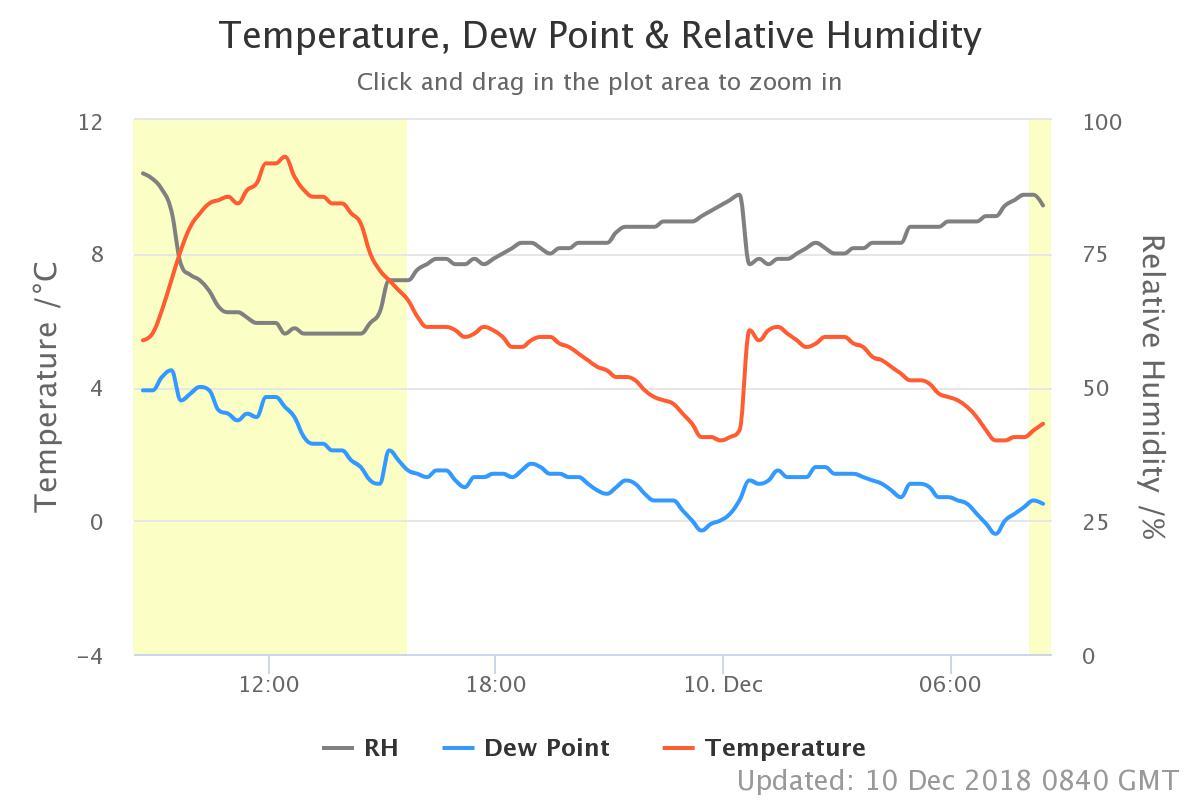 You can see them on this screenshot at about midnight (above where it says "10 Dec"). This obviously shows data that pywws has caught up with after I've reset the console .... no readings after the event until after the first 5 mins, and then the values are shifted. I don't understand why this occurs.
You can see them on this screenshot at about midnight (above where it says "10 Dec"). This obviously shows data that pywws has caught up with after I've reset the console .... no readings after the event until after the first 5 mins, and then the values are shifted. I don't understand why this occurs.Ian Sutherland
Richard Truran
Dec 10, 2018, 6:41:48 AM12/10/18
to pywws
Dear Ian,
This is the duplication of data error I mentioned in my original post.
I think this is caused by pywws calculating the number of missed records based on the time the last successful read of data and the current time, it then imports that number of records from the base station, however as the system has locked up and had not read any new records from the sensors it causes data to be duplicated, I hope that makes sense.
I always clear the station memory after a pick-up to avoid this problem using the following command:
pywws-setweatherstation -z
I've also found that sometimes the logging interval gets reset to the factory default value of 30 minutes so I run:
pywws-setweatherstation -r 5
Hope this is of help.
R

Jim Easterbrook
Dec 10, 2018, 7:04:38 AM12/10/18
to py...@googlegroups.com
On 10/12/2018 09:29, Igg wrote:
> I was aware of the USB lockup problem, but didn't appreciate how
> frequently it occurs, so I went with an Aercus WS3083 as a recent
> replacement. What is the current state of play with living with these
> lockups? Has anything changed since Richard's post?
In May 2018 I added "solar clock" tracking to the USB avoidance strategy
> I was aware of the USB lockup problem, but didn't appreciate how
> frequently it occurs, so I went with an Aercus WS3083 as a recent
> replacement. What is the current state of play with living with these
> lockups? Has anything changed since Richard's post?
in an attempt to reduce the problem with 3080 class stations.
It's rather
> annoying having to reset things on the display console, since mine
> doesn't have a RC clock, and there are definite discontinuities at about
> the time the lockup occurs (I need to reset my relative pressure offset,
> but there are also temperature and humidity changes).
>
> at about midnight (above where it says "10 Dec"). This obviously shows
> data that pywws has caught up with after I've reset the console .... no
> readings after the event until after the first 5 mins, and then the
> values are shifted. I don't understand why this occurs.
It looks like a repeat of the data, instead of the expected missing
> data that pywws has caught up with after I've reset the console .... no
> readings after the event until after the first 5 mins, and then the
> values are shifted. I don't understand why this occurs.
data. Earlier stations always reset the data pointer and count when you
reset the console, but if the count doesn't get reset pywws may fetch
data from before the lockup thinking it's valid for the time between the
lockup and the reset.
--
Jim Easterbrook <http://www.jim-easterbrook.me.uk/>
Jim Easterbrook
Dec 10, 2018, 7:07:19 AM12/10/18
to py...@googlegroups.com
pywws-setweatherstation -r 5 -z
As I said in my other email, earlier stations zero the count when they
are reset. The 3080 class stations do not appear to have been designed
with the same care as the earlier 1080 types.
Igg
Dec 10, 2018, 7:32:17 AM12/10/18
to pywws
Thank you both for clearing that up.
Ian
Jim Easterbrook
Dec 12, 2018, 4:07:27 AM12/12/18
to py...@googlegroups.com
On 10/12/2018 12:04, Jim Easterbrook wrote:
> On 10/12/2018 09:29, Igg wrote:
>> I was aware of the USB lockup problem, but didn't appreciate how
>> frequently it occurs, so I went with an Aercus WS3083 as a recent
>> replacement. What is the current state of play with living with these
>> lockups? Has anything changed since Richard's post?
>
> In May 2018 I added "solar clock" tracking to the USB avoidance strategy
> in an attempt to reduce the problem with 3080 class stations.
If you're using a recent version of pywws and still getting frequent USB
> On 10/12/2018 09:29, Igg wrote:
>> I was aware of the USB lockup problem, but didn't appreciate how
>> frequently it occurs, so I went with an Aercus WS3083 as a recent
>> replacement. What is the current state of play with living with these
>> lockups? Has anything changed since Richard's post?
>
> In May 2018 I added "solar clock" tracking to the USB avoidance strategy
> in an attempt to reduce the problem with 3080 class stations.
lockups then it seems my "cure" is not working. Can you look at your log
files and check the solar clock drift figures? They should be consistent
and smallish numbers, like the other two clocks.
Richard Truran
Dec 12, 2018, 8:58:48 AM12/12/18
to pywws
Dear Jim,
From my own personal experience since the introduction of the solar clock the stability of my set-up is much improved, I only rarely experience a USB lock-up now. I have also moved back to running pywws as a daemon (still not ready for systemd...) and happy with the results.
Thanks
Richard
Igg
Dec 12, 2018, 1:52:59 PM12/12/18
to pywws
I can't vouch one way or the other for the "solar clock" mod, as my sensor isn't working ... sigh ... waiting for replacement from supplier, though funnily enough they want to replace transmitter not the solar sensor. I'll reserve comments until I try it.
I've just received a powered USB hub from Amazon (https://www.amazon.co.uk/gp/product/B00006B7DA), which I can control power to the ports with Uhubctl (https://github.com/mvp/uhubctl), so I'll pull some solution together based on your scripts Richard (thank you very much for making them available).
Ian
Igg
Dec 14, 2018, 7:37:47 AM12/14/18
to pywws
The port switching USB hub works well, but I still have the problem that after resetting the console, the relative pressure and time have also been reset.
Two quick questions:
(1) I can get the last value of the pressure in a bash script (using jq) from the last set of readings, but how do I pass this to the python script 'pywws-setweatherstation -p value'? Or is it easier just to do the whole thing in python, rather than mixing things together?
(2) Is it possible to set the time and data on the console from python?
Getting there :)
Ian Sutherland
Jim Easterbrook
Dec 14, 2018, 7:47:13 AM12/14/18
to py...@googlegroups.com
On 14/12/2018 12:37, Igg wrote:
> The port switching USB hub works well, but I still have the problem that
> after resetting the console, the relative pressure and time have also
> been reset.
>
> Two quick questions:
>
> (1) I can get the last value of the pressure in a bash script (using jq)
> from the last set of readings, but how do I pass this to the python
> script 'pywws-setweatherstation -p value'? Or is it easier just to do
> the whole thing in python, rather than mixing things together?
The pressure offset is stored in weather.ini. You could try calling
> The port switching USB hub works well, but I still have the problem that
> after resetting the console, the relative pressure and time have also
> been reset.
>
> Two quick questions:
>
> (1) I can get the last value of the pressure in a bash script (using jq)
> from the last set of readings, but how do I pass this to the python
> script 'pywws-setweatherstation -p value'? Or is it easier just to do
> the whole thing in python, rather than mixing things together?
pywws.setweatherstation.main() from a Python script but it's probably
easier to do in a bash script. This is only to make the console reading
correct anyway.
> (2) Is it possible to set the time and data on the console from python?
Richard Truran
Dec 14, 2018, 7:50:12 AM12/14/18
to pywws
Dear Igg,
To try to answer your questions:
1) Do you have the pressure offset in your weather.ini file? See here https://pywws.readthedocs.io/en/latest/guides/getstarted.html#set-some-configuration-options for more information.
I leave the console showing absolute pressure and leave pywws to convert to relative pressure to ensure consistency.
2) I've given up trying to get the clock set correctly on the console, so I just leave it now. It doesn't affect the timestamp of the data within pywws.
Thanks
R
Igg
Dec 14, 2018, 10:34:34 AM12/14/18
to pywws
I'm overthinking this aren't I? Leave pressure in console as absolute (yes, offset is working fine in pywws) , since it's not that a big a difference here, and forget the clock. I might have to tape over them though, or turn the console round, because it irritates me a bit to see things not right :D
Jim Easterbrook
Dec 14, 2018, 10:40:25 AM12/14/18
to py...@googlegroups.com
it didn't matter.
(My console shows more than twice the actual rainfall because of my
added funnel. I can't correct that.)
Richard Truran
Dec 14, 2018, 12:26:00 PM12/14/18
to pywws
I forgot to mention that I also actually find it useful that the time zeros on reset.
I think of this as a display of how long the console has ran without a reset rather than the time.
Also if you end up using a script to restart the console on lock-up you can use the setweatherstation command to reset the relative pressure within that script.
I think of this as a display of how long the console has ran without a reset rather than the time.
Also if you end up using a script to restart the console on lock-up you can use the setweatherstation command to reset the relative pressure within that script.
R
Igg
Dec 14, 2018, 2:39:10 PM12/14/18
to pywws
Yep, this is all true. @Richard I was originally going to reset the relative pressure via a bash call of pywws-setweatherstation -p value, but I couldn't get the value in a format that the python script would accept ... bash doesn't have variable types .. and as you/I said absolute pressure on the console is fine.
It'll be fine, and incidentally I haven't had a lock up since connecting up the powered hub .... I did read in a few places that this alone was potentially a way of minimising lock ups .. I'll wait a bit longer before drawing conclusions on that one.
Thanks again both of you,
Ian
Igg
Dec 22, 2018, 3:02:10 PM12/22/18
to pywws
Well, since powered USB hub, no lock up still .. 8 days later. The water is muddied though, since I have also replaced the transmitter (solar sensor wasn't working) in the last few days ... so combination of the two seems to be working :)
Anyway, happy to be recording data consistently, happy Christmas to everyone,
Ian

Chris Bruce
Dec 29, 2018, 9:31:58 AM12/29/18
to pywws
I must be one of the lucky ones here. I suffered from the usb hang problem on a Rpi2 and then a Rpi zero W and because of it I was talking to someone and they advised me to dump the Rpi and grab an Opi (It`s not just pywws that has the usb problem)
Since I changed from Raspberry over to a knockoff Orange pi zero W I have never had any usb problems and it has been running for over a year. The only thing I have to do is sort the data when I change batteries and that will be rectified later this year once I am back on my feet ( I Hope ) with a remote located 3.5v power supply that should provide 3.2v at the battery compartment.
It may be pure luck that both my cheapo Fleabay Chinese Orange Pi Zero (H2+) and no longer available to buy, work sweet as a nut
The newer versions have slightly tweaked hardware so they might work just the same.
It runs Armbian and is just about the same as Raspbian to setup, comes with Python 3.6 (if i remember correctly) so will run the latest python 3 builds from Jim.
If the usb bug is gettting to you maybe grab an Orange Pi Zero (for Hardwired Lan) or Orange Pi Zero W if wifi is required and have a try running one.
256mb version is £11.20 from china and the 512mb version is £12.50 from china (if you buy from the uk they will rip you off for £40.00 upwards)
Chris
Richard Truran
Dec 30, 2018, 11:17:10 AM12/30/18
to pywws
Dear Ian,
Thanks for the information, the Orange Pi looks interesting and at ~£12 it is worth a go to see if I can emulate your success at avoiding USB lock-ups.
BTW, just looked at your website and I'm really impressed by your use of highcharts, looks really good. I just wish I could use highcharts so well...
R
Thanks for the information, the Orange Pi looks interesting and at ~£12 it is worth a go to see if I can emulate your success at avoiding USB lock-ups.
BTW, just looked at your website and I'm really impressed by your use of highcharts, looks really good. I just wish I could use highcharts so well...
R

Sebastian Jäkel
Jan 10, 2019, 3:04:57 AM1/10/19
to pywws
That's "funny", I encountered nearly the opposite:
USB lock-ups on my Orange Pi One with Armbian and no lock-ups on my Raspberry Pi 2 Model
B Rev 1.1 with Raspian.
Chris Bruce
Jan 10, 2019, 10:10:12 AM1/10/19
to pywws
the orange pi one and the orange pi zero are different breads just like the rpi3 and the rpi zero. they share some common parts but others are different.
The person that told me to try the opi zero did explain to me why but it was a while ago and I can not remember exactly what he said.( I think it was something to do with the way the h2+ addressed the chip that controls lan, bluetooth and wifi is different than the way the orange pi one does it or something along those lines. I managed to screw my ini trying to get sftp working 4 days ago and had to copy the original ini back and reboot the opi and its been running sweet again with no pywws errors and an up time of 4 days 12hours.
It maybe one piece of software that can cause problems , it could be lots of different things thats the pleasures of computing, My system is as bare as I can make it. just enough software to make it do what I need. No desktop env, python 3, pip3, pywws and its support files and that it.
Richard Truran
Jan 28, 2019, 1:09:46 PM1/28/19
to pywws
Dear Chris,
I read with interest your post on the Orange Pi Zero eliminating the USB lock-up error.
I have purchased one from China and set it up with a minimal Armbian install and installed all the various dependencies for pywws.
It is now running and seems to be functioning correctly generating the correct graphs and tables along with uploading to my private website correctly.
Obviously it is far too early to judge if it has made a difference, but at least it hasn't broken anything.
I read with interest your post on the Orange Pi Zero eliminating the USB lock-up error.
I have purchased one from China and set it up with a minimal Armbian install and installed all the various dependencies for pywws.
It is now running and seems to be functioning correctly generating the correct graphs and tables along with uploading to my private website correctly.
Obviously it is far too early to judge if it has made a difference, but at least it hasn't broken anything.
R
Igg
Jan 29, 2019, 7:12:02 AM1/29/19
to pywws
Aren't we talking about two completely different lockup issues here? I have never had issues with a RPi causing lockups, nor the Odroid C2 which I have used for the last two years. My USB lockup was caused by the weather station console itself. Since following Richard's advice on the powered hub about 7 weeks ago, it has been completely stable & I have not even needed to power cycle it. I have also been contacted by someone who claims to have eliminated this console USB lockup by the inclusion of a resistor somewhere (I haven't looked up details, because I haven't needed it).
Ian
Richard Truran
Jan 29, 2019, 7:32:54 AM1/29/19
to pywws
Dear Ian,
I'm not sure, however I suspect we are talking about the same issue, but investigating different routes to a solution. For me the issue is that the weather console will lock-up stopping communication with pywws and only a power cycle will restore normal operation, it appears to happen randomly.
There seems to be some incompatibility between the Raspberry Pi USB port and the console. For you the inclusion of a powered USB hub has fixed it and for Chris the use of an Orange Pi Zero has fixed it.
For me personally using a powered USB hub (Kepkit YKUSH) has meant I can reboot the console automatically when it locks up and Jim's inclusion of the solar clock has also helped but neither have solved the issue completely.
I am therefore investigating the use of an Orange Pi Zero to see if that resolves the issue.
I would be interested in the details of the resistor based solution you received, as it may help to understand what is locking-up the console.
Thanks, hoping your solution is permanent.
R
Igg
Feb 4, 2019, 2:46:15 PM2/4/19
to pywws
Hi Richard,
I did ask for details about the pull-up resistor, but I am still awaiting a reply.
Ian
P.S. Had my first console lockup since using the powered hub, a couple of days ago.
richar...@gmail.com
Feb 23, 2019, 4:27:13 AM2/23/19
to pywws
Dear Ian,
Sorry to hear your station locked up recently. I switched over to using an OrangePi Zero on 27 January 2019 and haven't had a lock-up since. Not the longest time without a lock-up yet, but getting close. I'll keep you posted.
Igg
Feb 24, 2019, 4:08:24 AM2/24/19
to pywws
On Saturday, 23 February 2019 09:27:13 UTC, richar...@gmail.com wrote:
Dear Ian,Sorry to hear your station locked up recently. I switched over to using an OrangePi Zero on 27 January 2019 and haven't had a lock-up since. Not the longest time without a lock-up yet, but getting close. I'll keep you posted.
Hi Richard, good to hear that you're running trouble-free so far with your OrangePi, but as I said previously, I think there are two causes of USB lockups here (the RPi & the console itself). I can rule the first one out in my case, because I use an Odroid C2.
The pull-up resistor solution is described on the Cumulus forums here
Reply all
Reply to author
Forward
0 new messages