
Evenly spaced ellipse(s) when scaling
16 views
Skip to first unread message

johancc
Oct 11, 2022, 2:31:54 PM10/11/22
to Python Programming for Autodesk Maya
Hey all. So I need to keep the same space when duplicating and scaling a nurbs circle(turned into ellipse). The curves on the right of the image are the target(tweaked manually). On the left I just duplicated and scaled uniformly. I wonder what is the math to keep them with even width and height. Something to do with aspect ratio maybe? Thanks.
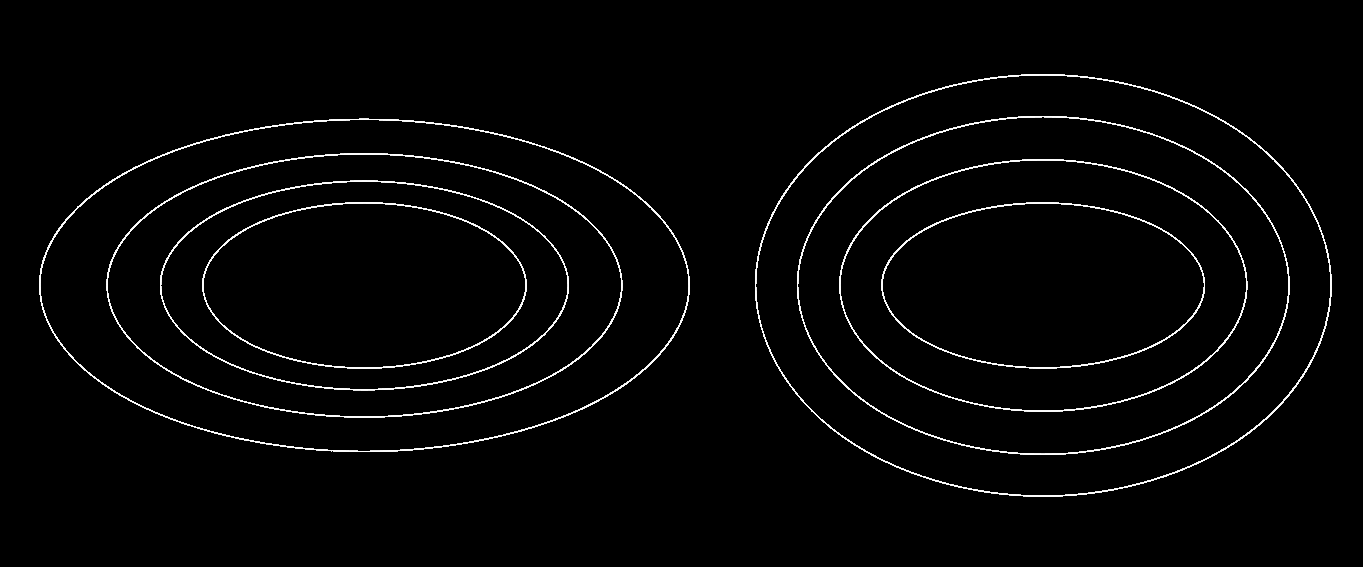
for i in range(4):
my_circle = cmds.circle()
cmds.scale(7*i,3*i,my_circle, xy=1)
for i in range(4):
my_circle = cmds.circle()
cmds.scale(7*i,3*i,my_circle, xy=1)
johancc
Oct 11, 2022, 6:48:52 PM10/11/22
to Python Programming for Autodesk Maya
Looks like I needed to add the iterator instead of multiplying, noob mistake.
width = 7
height = 3
for i in range(4):
my_circle = cmds.circle()
cmds.scale(width+i,height+i,my_circle, xy=1)
width = 7
height = 3
for i in range(4):
my_circle = cmds.circle()
Cheers
Reply all
Reply to author
Forward
0 new messages