
Using QtGui.QGraphicsProxyWidget
760 views
Skip to first unread message

Kitty
Jul 22, 2014, 8:17:29 AM7/22/14
to pyqt...@googlegroups.com
Hello, Luke! Could you help me with the following problem: I use QtGui.QGraphicsProxyWidget and set pg.PlotWidget as its widget. PlotWidget MouseDragEvent works but WheelEvent doesn't. Here is the code:
from PyQt4 import QtGui, QtCore
import sys
import pyqtgraph as pg
app = QtGui.QApplication(sys.argv)
wdg = pg.GraphicsView()
proxyWdg = QtGui.QGraphicsProxyWidget()
plt = pg.PlotWidget()
proxyWdg.setWidget(plt)
wdg.addItem(proxyWdg)
wdg.show()
app.exec_()

Luke Campagnola
Jul 22, 2014, 10:53:47 AM7/22/14
to pyqt...@googlegroups.com
I confirm the bug, but is there a reason you are using QGraphicsProxyWidget? Could you just use pg.PlotItem with no PlotWidget / proxy instead?
Kitty
Jul 23, 2014, 12:57:30 AM7/23/14
to pyqt...@googlegroups.com
We have a class Track that serves for curves visualization. It is inherited from pg.GrahicsLayoutWidget and contains pg.PlotItem. And we have a class TracksGroup (inherited from QtGui.QWidget) that represents a container for Track instances. The task is to visualize some polylines above TracksGroup. The only way we found is to use QGraphicsProxyWidget. May be you could suggest better way? I attached a picture to clarify the problem.
вторник, 22 июля 2014 г., 20:53:47 UTC+6 пользователь Luke Campagnola написал:

вторник, 22 июля 2014 г., 20:53:47 UTC+6 пользователь Luke Campagnola написал:
Luke Campagnola
Jul 23, 2014, 12:13:22 PM7/23/14
to pyqt...@googlegroups.com
On Wed, Jul 23, 2014 at 12:57 AM, Kitty <zhiber...@gmail.com> wrote:
We have a class Track that serves for curves visualization. It is inherited from pg.GrahicsLayoutWidget and contains pg.PlotItem. And we have a class TracksGroup (inherited from QtGui.QWidget) that represents a container for Track instances. The task is to visualize some polylines above TracksGroup. The only way we found is to use QGraphicsProxyWidget. May be you could suggest better way?
My recommendation is to make Track inherit from pg.GraphicsLayout, rather than GraphicsLayoutWidget. Then you can place Track instances directly inside TrackGroup, without the use of a proxy. See pg.MultiPlotItem and pg.MultiPlotWidget for inspiration..
Let me know if this still causes you trouble.

Jasper
Jul 31, 2014, 7:41:33 AM7/31/14
to pyqt...@googlegroups.com
Hello Luke,
Op dinsdag 22 juli 2014 16:53:47 UTC+2 schreef Luke Campagnola:
I've been working with Qgraphics (view/scenes/items) for the past weeks. Currently I'm trying to add some nice dynamic graphs to my application using Pyqtgraph. My current application plots other QGraphicsItems, a timeline, some blocks etc on a QgraphicsScene, now I simply want to include a Pyqt graph showing data, title axis etc. to this scene. I figured this simple example would work:
class ExampleDialog(QDialog):
def __init__(self,parent=None):
super(ExampleDialog,self).__init__(parent)
layout=QHBoxLayout()
self.setLayout(layout)
self.scene = QGraphicsScene()
self.view= QGraphicsView()
self.view.setDragMode(QGraphicsView.ScrollHandDrag) #so we can move around if we increase size of scene
self.view.setScene(self.scene)
layout.addWidget(self.view)
self.plt1=pg.PlotWidget() # or pg.PlotItem()
self.createHist() #custom function to plot some data on plt1
self.scene.addWidget(self.plt1) #or .addItem(self.plt1)
Now, if I use a PlotWidget the scroll behavior is incorrect, sometimes the wheel event is picked up, sometimes it zoomes only horizontally or vertically, or it doesn't react at all, depending on where you are with your mouse in the plot. If I add a PlotItem, the wheel event is only picked up by the axis, but it's not translated to the graph. Also, dragging doesn't work.
Am I doing something wrong/approaching this in the wrong way? Is there some work around? Or are the Pyqtgraphs 'graphs' commonly not mixed with normal Qgraphicscenes and items?
ps. sorry if I posted the message in a wrong place, not really used to google...:)
Op dinsdag 22 juli 2014 16:53:47 UTC+2 schreef Luke Campagnola:
Jasper
Aug 2, 2014, 9:02:18 AM8/2/14
to pyqt...@googlegroups.com
Allright, i figured out that Pyqt graph calculates the ev.screenPos wrongly if you add a Pyqt Plotwidget to a QGraphicsScene. Probably, also other widgets and items have the same problem. Now, i'm trying to fix it. To get the context menu popup in the right place, I changed the following:
Op donderdag 31 juli 2014 13:41:33 UTC+2 schreef Jasper:
In the file ViewBox.py ( ....\Python27\Lib\site-packages\pyqtgraph\graphicsItems\ViewBox\ViewBox.py)
change line 1076 (pos = ev.screenPos()) into: pos=QtGui.QCursor.pos()
Working on the zoom behavior right now...
Op donderdag 31 juli 2014 13:41:33 UTC+2 schreef Jasper:
Jasper
Aug 2, 2014, 12:38:19 PM8/2/14
to pyqt...@googlegroups.com
Update: Solution to get the popup menu at the correct mouse when you use a pg.PlotWidget as a proxywidget on a QGraphicsScene I did the following:
Change the screenpos there where pyqtgraph has reimplemented the mouse events, which is in the file ...\Python27\Lib\site-packages\pyqtgraph\GraphicsScene\GraphicsScene.py. Here I've added the following line on top in every reimplementation of a mouse events (doubleclick, pressed etc.):
Op zaterdag 2 augustus 2014 15:02:18 UTC+2 schreef Jasper:
ev.setScreenPos(QtGui.QCursor.pos())
This is a more general solution than what I described above about changing line 1076 in ViewBox.py, so forget that one. But changing both, will off course still work.
Unfortunately, adding aboves lines does not correct the zoom behavior. The wheelEvent is received in the ..\site-packages\...\GraphicsView.py file and passed on, however it is not received in the ..\site-packages\...\ViewBox.py file, probably, because the signals get blocked. I solved this by setting the wheelEvent.screenPos to the scenePos. Now it is a bit tricky to do this inside ...\site-packages\...\GraphicsScene.py since the zoom does work when you don't use a proxywidget. So I just reimplemented the proxywidget class in my application as follows;
class proxyJasper(QGraphicsProxyWidget):
def wheelEvent(self, event):
event.setScreenPos(event.scenePos().toPoint())
QGraphicsProxyWidget.wheelEvent(self,event)
This will give the correct zoom behavior. Note that you cannot use QGraphicsScene.addWidget, because it returns a normal QGraphicsProxyWidget, so you can only use Kitty's method.
Op zaterdag 2 augustus 2014 15:02:18 UTC+2 schreef Jasper:

Justin Weber
Aug 26, 2015, 8:47:47 AM8/26/15
to pyqtgraph
Sorry to dig up an old post, however I am trying to something similar. I wrote my own flowchart code so that I could have Nodes with widgets (QGraphicsProxyWidgets) in them. Mouse events get propagated correctly to the built-in widgets (lineEdit, Combobox, etc.) however the mouse events are not being propagated correctly to the pg.PlotWidget(). If I double click on the PlotWidget, then the PlotWidget receives a single mousePressedEvent...
Widget structure:
QGraphicsView -> QgraphicsScene -> QGraphicsProxyWidget -> QWidget -> QVBoxLayout -> pg.PlotWidget
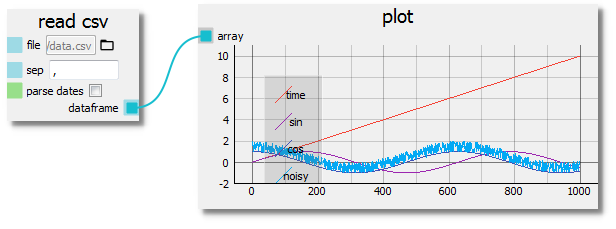
Any Ideas?
Reply all
Reply to author
Forward
0 new messages