
Need held for crosshair in pyqtgraph called from a Qtgui
659 views
Skip to first unread message

Paul, Hsieh-Fu Tsai
Oct 12, 2015, 9:49:30 AM10/12/15
to pyqtgraph
Hi Guys,
I am really novice to python. Basically i am trying to write my own python program for my own graduate research.
i had used python and matplotlib before but is troubled by the plotting and i have been learning about pyqtgraph in my current project.
It's really great!!
However i'm running into trouble trying to put the same crosshair in the example to show real time x and y information depending on the mouse position.
But I don't really understand the mapSceneToView and the evt.
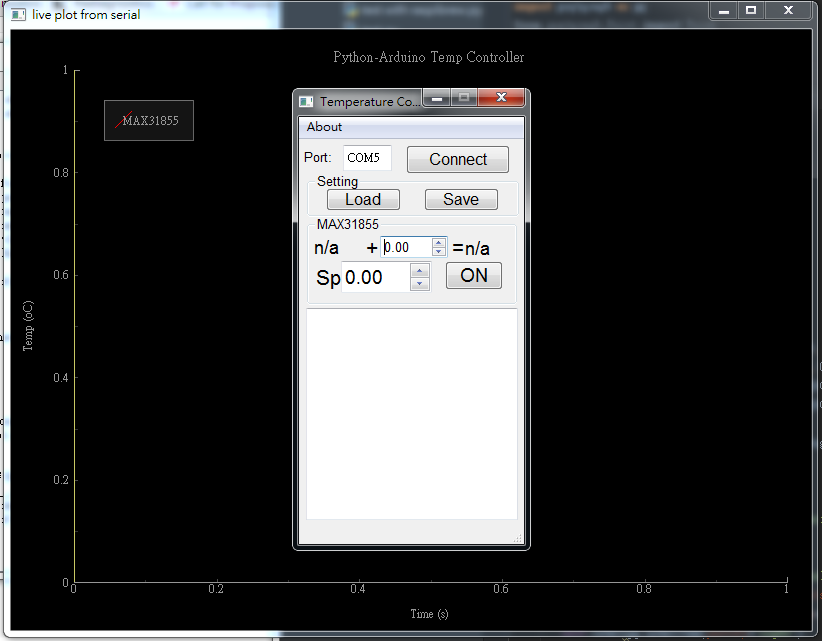
It look like this. I am calling a control gui i generated by qtdesigner.
in the __init__ of the QMainWindow i try to generate the pyqtgraph window
self.win=pg.GraphicsWindow()
self.win.setWindowTitle('live plot from serial')
self.p = self.win.addPlot()
self.p.addLegend()
self.p.setTitle('Python-Arduino Temp Controller')
self.p.setLabel('bottom', text='Time', units='s')
self.p.setLabel('left', text='Temp', units='oC')
self.label=pg.LabelItem(justify='right')
self.win.addItem(self.label)
#self.label.setText("<span style='font-size:12pt'>test")
self.curve_max = self.p.plot(pen='r', name='MAX31855')
#adding of crosshair from pyqtgraph examples
self.vLine = pg.InfiniteLine(angle=90, movable=False)
self.hLine = pg.InfiniteLine(angle=0, movable=False)
self.p.addItem(self.vLine, ignoreBounds=True)
self.p.addItem(self.hLine, ignoreBounds=True)
self.vb=self.p.vb
self.p.scene().sigMouseMoved.connect(self.mouseMoved)
And the last code can link the movemenet into a def mouseMoved(self, evt) in the same class.
But i am really stuck as to how to get the position of the mouse and then set the position of the crosshair to the mouse position.
I don't really understand the evt.
if i start with pos=evt[0] as in the example.
it returns QPointF object does not supper indexing
I also tried directly looking for the mousepoint by
mousePoint = self.p.vb.mapSceneToView(self.win)
I do have to admit that i read i should point to a viewbox but i don't know what that will be in my system .
Sorry I am really not good at this.
Any help is greatly appreciated.
best,
Paul
Paul, Hsieh-Fu Tsai
Oct 13, 2015, 3:22:20 PM10/13/15
to pyqtgraph
Wow,
I found a solution my self.
there is a self.vb =self.p.vb
by
def mouseMoved(self, pos):
mousePoint = self.vb.mapSceneToView(pos)
does the trick
Thanks

Anthony Torlucci
Oct 22, 2015, 8:48:24 PM10/22/15
to pyqtgraph
For those interested, I have a working example of crosshairs and mouse interaction in a pyqt app on github: https://github.com/threecubed/simpleUIs/blob/master/SimpleCosineWaveUI/MainWindow.py
The UI is just a simple cosine wave, but it is a good starting point for beginners (like myself!).
Sidenote: I avoid matplotlib whenever possible. Thank you Luke for building pyqtgraph. This is the best graphics library for python I have worked with.
Tony T.
The UI is just a simple cosine wave, but it is a good starting point for beginners (like myself!).
Sidenote: I avoid matplotlib whenever possible. Thank you Luke for building pyqtgraph. This is the best graphics library for python I have worked with.
Tony T.

Poul Riis
Oct 23, 2015, 3:09:00 PM10/23/15
to pyqtgraph
Would you mind to put a small working example of using your window class here?
Poul Riis
Paul, Hsieh-Fu Tsai
Oct 28, 2015, 9:58:28 AM10/28/15
to pyqtgraph
Hi Poul,
Sorry for the late reply i have been on a conference trip.
I cleaned up some of the codes that's really not related.
I cleaned up some of the codes that's really not related.
But i didn't do it cleanly so there a lot universal variables left in delaration. hope you can forgive me.
But i hope my code just show it's pretty much a very direct implementation of what Luke prepared in the examples.
I'm sure what i used is probably not the best approach but so far it worked out for me.
(one of the files are ui python script and the other is the real code.)
Best,
Paul
Paul, Hsieh-Fu Tsai
Oct 28, 2015, 9:58:45 AM10/28/15
to pyqtgraph
Great share Anthony!
Reply all
Reply to author
Forward
0 new messages