
How to make an object (sprite) follow the clicks of the mouse?
157 views
Skip to first unread message

Alex Nieto
Jul 24, 2018, 2:14:41 PM7/24/18
to pyglet-users
I have a code with a grid of sprites loaded but I want to give it movement with the mouse click and I have doubts about how to do it with the mouse events so that the sequence of sprites follows the clicks of the mouse. If someone can help me, I would appreciate it.

Benjamin Moran
Jul 25, 2018, 5:44:22 AM7/25/18
to pyglet-users
Hi Alex,
Do you want to move individual sprites, or do you want to scroll the entire screen?
Alex Nieto
Jul 25, 2018, 1:06:30 PM7/25/18
to pyglet-users
Hi Benjamin, thanks for answering. I want to move around the screen as in an RPG game format, I show you the code that I have. In this code I try to move it with the keyboard and it gives me an error, but in reality I want to move it with mouse clicks.
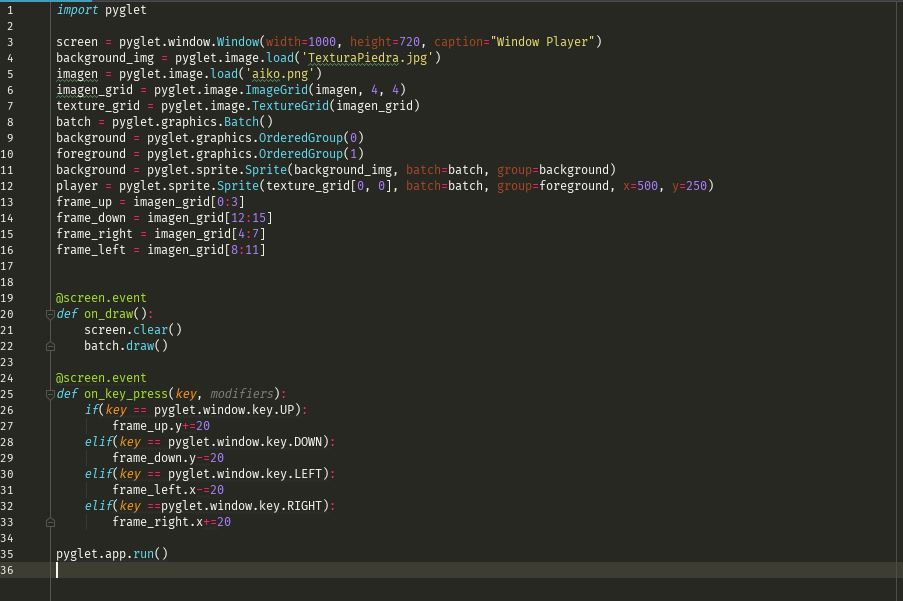
This is the result is a 4x4 grid sprite where the initial position is [0, 0]

and the error it gives when trying to move the sprite is this. (AttributeError: 'List' object has not attribute 'y') so on go pressing the directional keys, but as I mentioned earlier my intention is to move it with the mouse clicks this was just a test

Benjamin Moran
Jul 26, 2018, 8:12:09 AM7/26/18
to pyglet-users
Hi Alex, there are a few issues I can see. First of all, the "frame_up", "frame_down", etc., are just lists. And ImageGrid just makes it easy to get lists of images. What you want to do, is create an Animation. You can use the `pyglet.image.Animation.from_image_sequence(sequence, period)` method to create an Animation from that.
Then, when you move, you want to update the `player.image = new_animation`.
To move the sprite, you can update it's x, y, or position attributes. For example "player.x += 5"
Alex Nieto
Jul 27, 2018, 12:35:22 AM7/27/18
to pyglet-users
ok, thanks for your answer but in that case how would the movements that the sprite follow the clicks of the mouse?
Benjamin Moran
Aug 4, 2018, 9:25:23 AM8/4/18
to pyglet-users
Hi Alex,
Sorry for the slow reply. As you can tell, moving with the mouse is not as straightforward as the keyboard. You'll first want to start by adding an event to capture the mouse clicks:
@screen.event
def on_mouse_press(x, y, button, modifiers):
    ## update something with x and y
You'll now be able to tell where you clicked. This information should be stored in a variable. After that, you will need your character to walk towards this point. You don't want it to happen instantly, so you'll need a function that does the following:
1. Compares the click position with the sprite's current position.
2. Determine how you want to move towards the goal. X axis first, then Y, or both at once?
3. Move towards the goal by a certain amount of pixels per frame.
4. You now know which direction you are moving, so you can update the sprite.image attribute with the appropriate animation when you change directions.
One way you can do this is by creating a function, and then scheduling it with `pyglet.clock.schedule_interval(some_function, interval)`
def update_position(dt):
    x_difference = target_x - player.x
    y_difference = target_y - player.y
    if not x_difference or not y_difference:
        return     # Already at position
    # put logic here
Schedule it at 30fps (or whatever you want).
pyglet.clock.schedule_interval(update_position, 1/30)
(Please note that this simple example assumes you are moving by 1 pixel each time. If you're not, you'll have to do some better checking to determine if the player has reached the target).
Reply all
Reply to author
Forward
0 new messages