
Dashboard app no longer works for database admin?
234 views
Skip to first unread message

donal...@gmail.com
Jan 2, 2022, 6:24:58 AM1/2/22
to py4web
For me the dashboard app is now broken in that I always get database is locked when trying to do an edit - for example register a user in scaffold app and attempt to update the record doesn't actually work. Gives a database is locked error.
If I revert to before this commit all seems to work fine and updates are actually applied
version 1.20211208.1 - require threadsafevariable 1.2
Regards
Donald

Massimo DiPierro
Jan 2, 2022, 10:38:14 AM1/2/22
to donal...@gmail.com, py4web
Will look into this today. Any help to try reproduce?
--
You received this message because you are subscribed to the Google Groups "py4web" group.
To unsubscribe from this group and stop receiving emails from it, send an email to py4web+un...@googlegroups.com.
To view this discussion on the web visit https://groups.google.com/d/msgid/py4web/22f6cfcc-b024-429f-87a3-e3db673cb2e9n%40googlegroups.com.
Massimo
Jan 2, 2022, 12:16:51 PM1/2/22
to py4web
I cannot reproduce the problem. Could you post your code and steps to reproduce? Maybe send it to me privately.
donal...@gmail.com
Jan 3, 2022, 12:07:53 PM1/3/22
to py4web
There hopefully isn't any of my code involved here. I update to the latest version of py4web via git pull and sign-up a user in the scaffold app say. I then expect to go via dashboard into the db.auth_user table and say change the first_name in the record. On screen it will look like this has worked but the write-back to the database now fails with a 500 error in the browser and the console says this - there is no actual ticket created either which doesn:
ERROR:root:Traceback (most recent call last):
File "/home/ubuntu/py4web/py4web/core.py", line 916, in wrapper
ret = func(*func_args, **func_kwargs)
File "/home/ubuntu/py4web/py4web/core.py", line 867, in wrapper
ret = func(*args, **kwargs)
File "/home/ubuntu/py4web/apps/_dashboard/__init__.py", line 366, in api
data = RestAPI(db, policy)(
File "/home/ubuntu/.local/lib/python3.8/site-packages/pydal/restapi.py", line 37, in wrapper
data = func(*args, **kwargs)
File "/home/ubuntu/.local/lib/python3.8/site-packages/pydal/restapi.py", line 241, in __call__
data = table.validate_and_update(id, **post_vars).as_dict()
File "/home/ubuntu/.local/lib/python3.8/site-packages/pydal/objects.py", line 942, in validate_and_update
response.updated = myset.update(**new_fields)
File "/home/ubuntu/.local/lib/python3.8/site-packages/pydal/objects.py", line 2783, in update
ret = db._adapter.update(table, self.query, row.op_values())
File "/home/ubuntu/.local/lib/python3.8/site-packages/pydal/adapters/base.py", line 586, in update
raise e
File "/home/ubuntu/.local/lib/python3.8/site-packages/pydal/adapters/base.py", line 581, in update
self.execute(sql)
File "/home/ubuntu/.local/lib/python3.8/site-packages/pydal/adapters/__init__.py", line 69, in wrap
return f(*args, **kwargs)
File "/home/ubuntu/.local/lib/python3.8/site-packages/pydal/adapters/base.py", line 468, in execute
rv = self.cursor.execute(command, *args[1:], **kwargs)
sqlite3.OperationalError: database is locked
I seem to have essentially same behaviour on windows, linux and pythonanywhere - however I have not tried a completely clean install - but equally I have not modified anything in these areas that I am aware of.
File "/home/ubuntu/py4web/py4web/core.py", line 916, in wrapper
ret = func(*func_args, **func_kwargs)
File "/home/ubuntu/py4web/py4web/core.py", line 867, in wrapper
ret = func(*args, **kwargs)
File "/home/ubuntu/py4web/apps/_dashboard/__init__.py", line 366, in api
data = RestAPI(db, policy)(
File "/home/ubuntu/.local/lib/python3.8/site-packages/pydal/restapi.py", line 37, in wrapper
data = func(*args, **kwargs)
File "/home/ubuntu/.local/lib/python3.8/site-packages/pydal/restapi.py", line 241, in __call__
data = table.validate_and_update(id, **post_vars).as_dict()
File "/home/ubuntu/.local/lib/python3.8/site-packages/pydal/objects.py", line 942, in validate_and_update
response.updated = myset.update(**new_fields)
File "/home/ubuntu/.local/lib/python3.8/site-packages/pydal/objects.py", line 2783, in update
ret = db._adapter.update(table, self.query, row.op_values())
File "/home/ubuntu/.local/lib/python3.8/site-packages/pydal/adapters/base.py", line 586, in update
raise e
File "/home/ubuntu/.local/lib/python3.8/site-packages/pydal/adapters/base.py", line 581, in update
self.execute(sql)
File "/home/ubuntu/.local/lib/python3.8/site-packages/pydal/adapters/__init__.py", line 69, in wrap
return f(*args, **kwargs)
File "/home/ubuntu/.local/lib/python3.8/site-packages/pydal/adapters/base.py", line 468, in execute
rv = self.cursor.execute(command, *args[1:], **kwargs)
sqlite3.OperationalError: database is locked
I seem to have essentially same behaviour on windows, linux and pythonanywhere - however I have not tried a completely clean install - but equally I have not modified anything in these areas that I am aware of.
Donald

Nico Zanferrari
Jan 4, 2022, 11:40:58 AM1/4/22
to donal...@gmail.com, py4web
Hi,
I've reproduced the bug (on Linux, py3.9 and "Installing from source (locally)" - with the _scaffold app.
Let me add that the first change seems succesfull (but it's not really written on disk!) while all the others fail with the same error until the framework is restarted.
nico
To view this discussion on the web visit https://groups.google.com/d/msgid/py4web/4607185a-1f3e-4450-a2e1-3064a691ce62n%40googlegroups.com.
Nico Zanferrari
Jan 5, 2022, 12:09:29 PM1/5/22
to donal...@gmail.com, py4web
Massimo
Jan 6, 2022, 1:17:45 AM1/6/22
to py4web
I posted a new version. Please help me check if the problem persists.
I was able to reproduce it but not with this version.
The problem was actually introduced when table.field.represent was made into a threadsafevariable. It created problems that were addressed by the change in the threadsafevariable module itself. I cannot say I fully understand (yet) what is going on but that logic is very complicated and assumes the values of a threadsafevariable does not itself contain thread.local objects. table.field.represent for reference type fields defaults to an object which stores a reference to the db object which has thread.local members. So when one app in one thread (dashboard) makes a query it uses a field attribute pointing to a db defined in another thread (_scaffold). I am not surprised it breaks. I am just not sure of the details of how it happens.
Before the change to threadsafevariable this was not a problem because nothing worked as intended anyway. Do not revert to threadsafevariable 1.1.
The bigger problem is that I am not sure this works well with table.field.requires either since those objects are validators and IS_NOT_IN_DB contains a reference to db too.
I will get to the bottom of this. But I cannot exclude that all this threadsafevariable logic was a bad idea to begin with and maybe we should abandoned it for all field attributes. just to be safe and prevent weird side-effects. Some times simpler is better.
Massimo
Nico Zanferrari
Jan 6, 2022, 5:32:22 AM1/6/22
to Massimo, py4web
I'm sorry, but this nasty bug is still there ;-(
You don't have any more error on the GUI, but changes are not saved on the db and you've occasionally the "sqlite3.OperationalError: database is locked" error on console.
BTW, you can check it even easier by trying to change the data of the examples app, with the dashboard, editing the 'person' table.
Nico
To view this discussion on the web visit https://groups.google.com/d/msgid/py4web/d51617cf-a985-49ff-bafc-b2c6c5837d62n%40googlegroups.com.

Kevin Keller
Jan 6, 2022, 5:36:01 AM1/6/22
to Nico Zanferrari, Massimo, py4web
I can confirm this exact behaviour.

Just tested it as well.
Also the values of what fields you are editing do not seem to appear anymore ..
To view this discussion on the web visit https://groups.google.com/d/msgid/py4web/CAAE8D_DvMGQHc2KWaGT3yfL%2BVdi1As7_KTE0pR2-RHL2ZLDn7g%40mail.gmail.com.
Kevin Keller
Jan 6, 2022, 5:37:21 AM1/6/22
to Nico Zanferrari, Massimo, py4web
The database is locked error also applies when using GRID and FORM.
Kevin Keller
Jan 6, 2022, 5:41:47 AM1/6/22
to Nico Zanferrari, Massimo, py4web
Just a note for reproduction.. it does not always happen instantly.. sometimes the app needs to run a bit for it to happen.. sometimes it happens instantly after launching py4web..
Massimo DiPierro
Jan 6, 2022, 11:09:07 AM1/6/22
to Kevin Keller, Nico Zanferrari, py4web
It depends on which threads serves the app.
I will do more investigating later today but we may have to rip off the threadsafevariable logic and it may not be a bad thing.
donal...@gmail.com
Jan 6, 2022, 2:37:17 PM1/6/22
to py4web
Can you check the commit you did as the change to represent in core.py line 396 is commented out - so it doesn't look like the fix actually changed the code in any way ??
Donald
Massimo
Jan 7, 2022, 12:42:36 AM1/7/22
to py4web
Are you saying that you can lock the database even if you are not accessing it from the dashboard?
Massimo
Jan 7, 2022, 12:59:56 AM1/7/22
to py4web
Definitively there was a bug in _dashboard and it would not close (commit/rollback) transactions using db from other apps. I fixed that now (1.20220106.1). I also restored the use of threadsafevariable for represent. I was wrong. That was not the issue just a trigger for the issue.
Mind if you are not running from source you need to upgrade _dashboard:
- rm -rf apps/_dashboard
- python3 -m pip install -U py4web
- ./py4web setup apps
- confirm reinstalling of _dashboard
Please let me know if you encounter other issues.
Massimo
Nico Zanferrari
Jan 7, 2022, 2:27:43 AM1/7/22
to Massimo, py4web
I'm sorry Massimo, but I've tested it again and it doesn't seem resolved ;-(
On Ubuntu, py3.9 and "Installing from source (locally)" using the Dashboard on the 'examples' tables. I'm sure the framework and apps are freshly downloaded.
Nico
To view this discussion on the web visit https://groups.google.com/d/msgid/py4web/5a8435f2-ec5b-4b71-afbf-f65a608952c3n%40googlegroups.com.
Massimo DiPierro
Jan 7, 2022, 8:45:03 AM1/7/22
to Nico Zanferrari, py4web
Can you list step by step how to Reproduce this? I could before but i cannot anymore.
Anyway definitively there was a but that was fixed. Maybe there is another one.
Nico Zanferrari
Jan 7, 2022, 8:55:08 AM1/7/22
to Massimo DiPierro, py4web
Well,
it's quite simple:
- fresh install ("Installing from source (locally)" on Ubuntu with py 3.9) with venv
- ./py4web setup apps + set_password + run apps
- open the Dashboard app on the browser
- select the example app
- modify some values on the related 'person' table (changing names or deleting entry)
Changes are never actually written on the db. Sometimes I have errors on the GUI or the console.
nico
Massimo DiPierro
Jan 7, 2022, 9:09:56 AM1/7/22
to Nico Zanferrari, py4web
I never tried accessing an app db from dashboard before accessing the app directly after startup. Maybe there is some work with that. Will check tonight. I am more confident now this is fixable.
Massimo
Jan 7, 2022, 10:25:28 AM1/7/22
to py4web
I just did exactly this (but python 3.8) and cannot reproduce any problem.
Massimo
Jan 7, 2022, 10:31:04 AM1/7/22
to py4web
I installed python3.9 but pip install -r requirements.txt results in
Building wheel for threadsafevariable (setup.py) ... error
ERROR: Command errored out with exit status 1:
command: /home/mdp/Dropbox/py4web/venv/bin/python3.9 -u -c 'import sys, setuptools, tokenize; sys.argv[0] = '"'"'/tmp/pip-install-5r9shrnn/threadsafevariable/setup.py'"'"'; __file__='"'"'/tmp/pip-install-5r9shrnn/threadsafevariable/setup.py'"'"';f=getattr(tokenize, '"'"'open'"'"', open)(__file__);code=f.read().replace('"'"'\r\n'"'"', '"'"'\n'"'"');f.close();exec(compile(code, __file__, '"'"'exec'"'"'))' bdist_wheel -d /tmp/pip-wheel-8j3fq6za
cwd: /tmp/pip-install-5r9shrnn/threadsafevariable/
Complete output (6 lines):
usage: setup.py [global_opts] cmd1 [cmd1_opts] [cmd2 [cmd2_opts] ...]
or: setup.py --help [cmd1 cmd2 ...]
or: setup.py --help-commands
or: setup.py cmd --help
error: invalid command 'bdist_wheel'
----------------------------------------
ERROR: Failed building wheel for threadsafevariable
ERROR: Command errored out with exit status 1:
command: /home/mdp/Dropbox/py4web/venv/bin/python3.9 -u -c 'import sys, setuptools, tokenize; sys.argv[0] = '"'"'/tmp/pip-install-5r9shrnn/threadsafevariable/setup.py'"'"'; __file__='"'"'/tmp/pip-install-5r9shrnn/threadsafevariable/setup.py'"'"';f=getattr(tokenize, '"'"'open'"'"', open)(__file__);code=f.read().replace('"'"'\r\n'"'"', '"'"'\n'"'"');f.close();exec(compile(code, __file__, '"'"'exec'"'"'))' bdist_wheel -d /tmp/pip-wheel-8j3fq6za
cwd: /tmp/pip-install-5r9shrnn/threadsafevariable/
Complete output (6 lines):
usage: setup.py [global_opts] cmd1 [cmd1_opts] [cmd2 [cmd2_opts] ...]
or: setup.py --help [cmd1 cmd2 ...]
or: setup.py --help-commands
or: setup.py cmd --help
error: invalid command 'bdist_wheel'
----------------------------------------
ERROR: Failed building wheel for threadsafevariable
Massimo
Jan 7, 2022, 10:33:07 AM1/7/22
to py4web
Despite the error below on install it works and I cannot repro with python 3.9 either.
Massimo
Jan 7, 2022, 10:36:08 AM1/7/22
to py4web
can you please confirm that
1) you have this code https://github.com/web2py/py4web/blob/master/apps/_dashboard/__init__.py#L368
2) on_request and on_success are called when saving from dashboard https://github.com/web2py/py4web/blob/master/py4web/core.py#L379
Nico Zanferrari
Jan 7, 2022, 10:46:38 AM1/7/22
to Massimo, py4web
I'm really sorry, it was my fault ... I git-cloned my fork of the repository instead of the official one ;-(
I can confirm it works fine!
Thanks a lot,
Nico
To view this discussion on the web visit https://groups.google.com/d/msgid/py4web/67b4eb62-7d41-44b4-96de-d5ffbbd551a2n%40googlegroups.com.
Massimo DiPierro
Jan 7, 2022, 11:22:37 AM1/7/22
to Nico Zanferrari, py4web
Thanks for confirming. This is my fault. I made a relatively change to dashboard that broke it but we did not notice until this week.

Jacinto Parga
Jan 7, 2022, 12:02:42 PM1/7/22
to py4web
Hello,
I have installed it from pip and updated _dashboard. This is the error I got in _default and some other apps
File "/home/jacinto/.pyenv/versions/py4web382/lib/python3.8/site-packages/py4web/core.py", line 1300, in import_app
module = importlib.machinery.SourceFileLoader(
File "<frozen importlib._bootstrap_external>", line 462, in _check_name_wrapper
File "<frozen importlib._bootstrap_external>", line 962, in load_module
File "<frozen importlib._bootstrap_external>", line 787, in load_module
File "<frozen importlib._bootstrap>", line 265, in _load_module_shim
File "<frozen importlib._bootstrap>", line 702, in _load
File "<frozen importlib._bootstrap>", line 671, in _load_unlocked
File "<frozen importlib._bootstrap_external>", line 783, in exec_module
File "<frozen importlib._bootstrap>", line 219, in _call_with_frames_removed
File "/home/jacinto/PROGRAMACION/TESTS/py4webtest/apps/_default/__init__.py", line 6, in <module>
def index():
File "/home/jacinto/.pyenv/versions/py4web382/lib/python3.8/site-packages/py4web/core.py", line 961, in __call__
func = bottle.route(path[:-6] or "/", **self.kwargs)(func)
File "/home/jacinto/.pyenv/versions/py4web382/lib/python3.8/site-packages/ombott/ombott.py", line 133, in decorator
self.add_route(rule, method, callback, name, overwrite=overwrite)
File "/home/jacinto/.pyenv/versions/py4web382/lib/python3.8/site-packages/ombott/ombott.py", line 125, in add_route
return self.router.add(rule, method, handler, name, overwrite=overwrite)
File "/home/jacinto/.pyenv/versions/py4web382/lib/python3.8/site-packages/ombott/router/radirouter.py", line 245, in add
return self._add(rule, methods, handler, name, meta=meta, overwrite=overwrite)
File "/home/jacinto/.pyenv/versions/py4web382/lib/python3.8/site-packages/ombott/router/radirouter.py", line 390, in _add
route.add_method(methods, handler, meta)
File "/home/jacinto/.pyenv/versions/py4web382/lib/python3.8/site-packages/ombott/router/radirouter.py", line 144, in add_method
self._raise_if_registred(method)
File "/home/jacinto/.pyenv/versions/py4web382/lib/python3.8/site-packages/ombott/router/radirouter.py", line 137, in _raise_if_registred
raise RouteMethodError(
ombott.router.errors.RouteMethodError: Handler is already registred for `['GET']`
Nico Zanferrari
Jan 7, 2022, 12:16:19 PM1/7/22
to Jacinto Parga, py4web
Hi Jacinto,
could this be related? It seems quite similar ...
Nico
To view this discussion on the web visit https://groups.google.com/d/msgid/py4web/bc7d37df-5066-4a2c-8d38-2cfc6b6fe887n%40googlegroups.com.
Jacinto Parga
Jan 7, 2022, 1:05:38 PM1/7/22
to py4web
Hi Nico,

I don't think so because I even have updated _default with py4web setup apps. There is no @unantenticated in _default
It is strange because _scaffold works fine in the new version 1.20220106.1
This is the load

This is the _dashboard. Simpletable loads as _default

Jim Steil
Jan 7, 2022, 2:58:57 PM1/7/22
to py4web
Can you change it so simple_table doesn't load as _default?
-Jim
Jim Steil
Jan 7, 2022, 3:01:23 PM1/7/22
to py4web
I'm wondering if the 'index' action in __init__.py is conflicting with the 'index' action in controllers.py in simple_table. ...assuming you're using the simpe_table app I'd created a while back.
-Jim
donal...@gmail.com
Jan 7, 2022, 3:35:53 PM1/7/22
to py4web
Many thanks for getting this fixed - I confirm all good for me in latest version.
Donald
Jacinto Parga
Jan 7, 2022, 4:32:48 PM1/7/22
to py4web
Hi, Jim, Yes it was!!
Thanks, it's been very i instructive
Jim Steil
Jan 7, 2022, 4:44:17 PM1/7/22
to py4web
Since the switch from bottle to ombott, this is a common error. Bottle allowed you to define endpoints multiple times (bad). ombott throws up an error if you have one defined mutliple times.
-Jim

Alexander Beskopilny
Jan 7, 2022, 6:11:29 PM1/7/22
to py4web
It would be nice to have
a list of multiple route-endpoints in error-message
Jim Steil
Jan 7, 2022, 7:31:00 PM1/7/22
to py4web
If you read through the error message you can see the route in this line:
File "/home/jacinto/PROGRAMCION/TEST/py4webtest/apps/_default/__init__.py", line 6, in <module>
def index():
def index():
-Jim

Andrew Gavgavian
Jan 7, 2022, 8:43:21 PM1/7/22
to Jim Steil, py4web
I’m not sure if Val is down for it, but looking through the router class there a path instance variable that would contain the url associated with it that could be inserted into the error message.
I’m not sure if there are hidden issues with using that but it would allow the message to say something like “… at route: /_scaffold/index” or something like that.
~ Andrew
To view this discussion on the web visit https://groups.google.com/d/msgid/py4web/cfb4fd8a-6fc0-4f8f-a4a6-39afd35791a9n%40googlegroups.com.

kbo...@gmail.com
Jan 9, 2022, 6:00:07 AM1/9/22
to py4web, Jim Steil
Hi all
can someone tell me what's wrong here
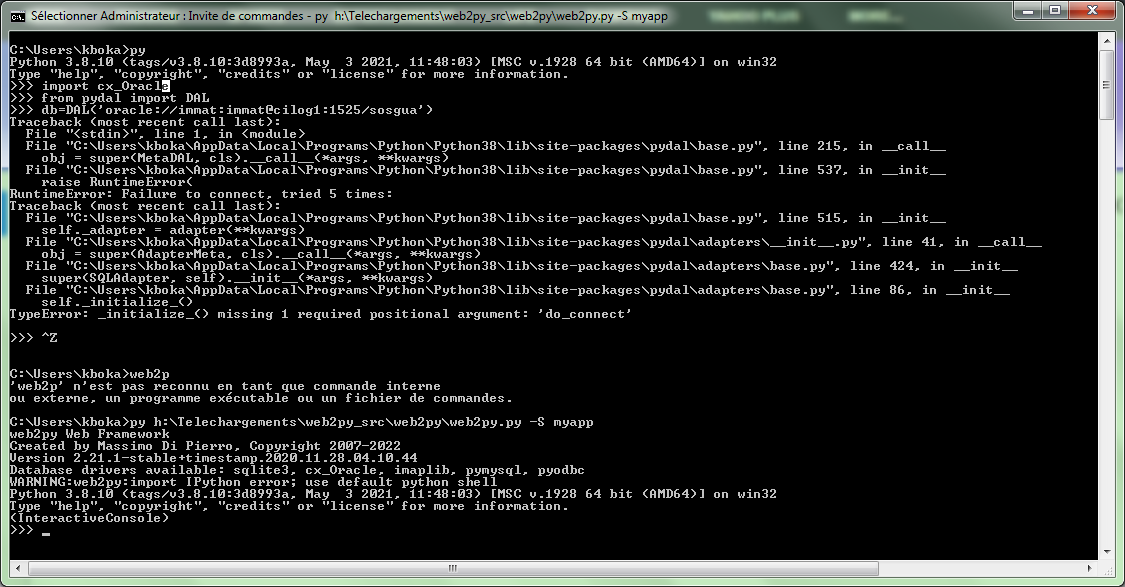
what about this issue :
"TypeError: _initialize_() missing 1 required positional argument: 'do_connect' "
thks a lot
Reply all
Reply to author
Forward
0 new messages