
Como asignar un nombre de tabla + campo a control source de textbox?
851 views
Skip to first unread message

Saul Piña Hernandez
Nov 1, 2015, 1:15:58 PM11/1/15
to Comunidad de Visual Foxpro en Español
Buenos dias.
Al iniciar el sistema, asigno a una variable publica el nombre de una tabla para así utilizarla en cualquier momento. Pero tengo una duda:
Esta bien que el siguiente codigo se pueda utilizar para un controlsource de un textbox y así me muestre el contenido de campo de dicha tabla?
ejemplo:
En el ControlSource de Text1
donde pTablaConfig = "Configuracion"
Gracias por su ayuda.
Al iniciar el sistema, asigno a una variable publica el nombre de una tabla para así utilizarla en cualquier momento. Pero tengo una duda:
Esta bien que el siguiente codigo se pueda utilizar para un controlsource de un textbox y así me muestre el contenido de campo de dicha tabla?
ejemplo:
En el ControlSource de Text1
(pTablaConfig)+".leyenda"donde pTablaConfig = "Configuracion"
Gracias por su ayuda.

arquinav
Nov 2, 2015, 8:06:20 AM11/2/15
to Comunidad de Visual Foxpro en Español
mirando la ayuda de vfp
Object.ControlSource[ = cName]
no necesitas utilizar una expresión de nombre:(pTablaConfig)
Object.ControlSource = pTablaConfig +".leyenda"

Fidel Charny
Nov 2, 2015, 3:42:51 PM11/2/15
to Comunidad de Visual Foxpro en Español
Saúl:
Lo más practico y seguro es usar .ControlSource="Tabla.Campo".
Thisform.Text1.ControlSource = "Configuracion.Leyenda"
Recuerda que cualquier modificación del Textbox modificará la tabla y si se mueve el puntero en el cursor, el valor se actualiza con thisform.text1.refresh
Si lo que ocurre es que no sabes a qué tabla se refiere (pueden ser cursores de distinto nombre, etc.,) tampoco necesitas una variable pública, sino pasar como parámetro el nombre del cursor.
[ Init del Form ]
LPARAMETERS tcCursor
Thisform.Text1.ControlSource = tcCursor+".Leyenda"
Lo más practico y seguro es usar .ControlSource="Tabla.Campo".
Thisform.Text1.ControlSource = "Configuracion.Leyenda"
Recuerda que cualquier modificación del Textbox modificará la tabla y si se mueve el puntero en el cursor, el valor se actualiza con thisform.text1.refresh
Si lo que ocurre es que no sabes a qué tabla se refiere (pueden ser cursores de distinto nombre, etc.,) tampoco necesitas una variable pública, sino pasar como parámetro el nombre del cursor.
[ Init del Form ]
LPARAMETERS tcCursor
Thisform.Text1.ControlSource = tcCursor+".Leyenda"

Saúl Piña
Nov 3, 2015, 11:32:00 AM11/3/15
to Comunidad de Visual Foxpro en Español
Oks, las respuestas me sirven de mucho, ahora bien, para complementar el asunto, voy a explicar un poco mas a detalle y uds me avisan si es correcto o no lo que estoy realizando
1. En el prg inicial del programa ejecuto otro prg llamado Detecta_ejecucion.prg
El prg Detecta_ejecucion.prg me sirve para identificar si el sistema se está ejecutando de manera Local o Remota (Red LAN)
el contenido de Detecta_ejecucion.prg es:
Allí inicia la variable publica pTablaConfig
2. La forma del porqué decidí tener dos tablas para config es simple, porque el sistema cuando se ejecuta en RED, toma los valores de config y alli tengo los datos de impresora, opciones tales como elegir si existe bascula electronica, entre otros. y si me tomaba los datos configurados de la pc server o pc 1, marcaba error. es por eso que tengo 2 tablas para esta tarea.
Pregunta: Así sería correcto? aunque supongo que no, ya que si se decide tener una PC mas en red, se debería de crear una tercera tabla config y así sucesivamente...supongo..
Cual sería una mejor forma de trabajar para tener controlado las configuraciones tales como el nombre de impresora, puertos, etc de cada pc?
Entonces volviendo al tema de la variable pConfigTabla, entonces como deberia de tener escrito en el "ControlSource" del text ?
por el momento lo tengo de esta manera:
Thisform.txtTitulo.Value=(pConfigTabla)+."leyenda"
Pero me doy cuenta que en tiempo de diseño se muestra normal, pero ya en ejecucion se ve claramente que el valor de txtTitulo es "Config.Leyenda"
Gracias por su apoyo..
1. En el prg inicial del programa ejecuto otro prg llamado Detecta_ejecucion.prg
El prg Detecta_ejecucion.prg me sirve para identificar si el sistema se está ejecutando de manera Local o Remota (Red LAN)
el contenido de Detecta_ejecucion.prg es:
If _vfp.StartMode = 0  && running inside the Visual FoxPro IDE
    MiRuta = Left(Sys(16,0), Rat("\", Sys(16,0), 2))
Else
    MiRuta = Addbs(Justpath(Sys(16,1)))
Endif

if  OCCURS('\\', MiRuta) > 0
    WAIT WINDOW "Ejecutando Sistema en Red" TIMEOUT .8
    admin10=1
    pMipc=ALLTRIM(SYS(0))
    pTablaConfig='Config_Red'
else
   WAIT WINDOW "Ejecutando sistema Localmente" TIMEOUT .8
   admin10=0
   pMipc=ALLTRIM(SYS(0))
   pTablaConfig='Config'
endif
Allí inicia la variable publica pTablaConfig
2. La forma del porqué decidí tener dos tablas para config es simple, porque el sistema cuando se ejecuta en RED, toma los valores de config y alli tengo los datos de impresora, opciones tales como elegir si existe bascula electronica, entre otros. y si me tomaba los datos configurados de la pc server o pc 1, marcaba error. es por eso que tengo 2 tablas para esta tarea.
Pregunta: Así sería correcto? aunque supongo que no, ya que si se decide tener una PC mas en red, se debería de crear una tercera tabla config y así sucesivamente...supongo..
Cual sería una mejor forma de trabajar para tener controlado las configuraciones tales como el nombre de impresora, puertos, etc de cada pc?
Entonces volviendo al tema de la variable pConfigTabla, entonces como deberia de tener escrito en el "ControlSource" del text ?
por el momento lo tengo de esta manera:
Thisform.txtTitulo.Value=(pConfigTabla)+."leyenda"
Pero me doy cuenta que en tiempo de diseño se muestra normal, pero ya en ejecucion se ve claramente que el valor de txtTitulo es "Config.Leyenda"
Gracias por su apoyo..
Saúl Piña
Nov 3, 2015, 11:34:46 AM11/3/15
to Comunidad de Visual Foxpro en Español
Saludos Fidel,
Nunca he escrito para crear parametros desde un PRG a un Form, como sería un ejemplo?
(Suponiendo que estoy en el PRG Detecta_Ejecución.prg y en lugar de crear la variable publica, tener un parametro. ) ??
Nunca he escrito para crear parametros desde un PRG a un Form, como sería un ejemplo?
(Suponiendo que estoy en el PRG Detecta_Ejecución.prg y en lugar de crear la variable publica, tener un parametro. ) ??
Fidel Charny
Nov 3, 2015, 6:07:07 PM11/3/15
to Comunidad de Visual Foxpro en Español
Saúl:
Por lo que entiendo, Detecta_Ejecución podría ser un PROCEDURE alojado en el mismo Main.prg y debería retornar el valor correspondiente a la tabla de configuración.
LOCAL lcTablaConfig
lcTablaConfig = Detecta_Ejecucion()
DO FORM frmConfig WITH lcTablaConfig
* En el Init del frmConfig (o como se llame)
LPARAMETERS tcTablaConfig
* Acá debería abrirse la tabla
ADDPROPERTY("MITABLA", tcTablaConfig ) && agrego una propiedad al form con el nombre de la tabla, que usaré para cerrarla en el Destroy.
USE (lcTablaConfig) IN 0 SHARED | EXCLUSIVE && Acá supongo que la tabla está en la misma carpeta que el ejecutable o que configurase SET PATH o SET DEFAULT.
Thisform.Text1.ControlSource = tcTablaConfig+".Leyenda"
La tabla no debe cerrarse hasta el Destroy del form.
* Destroy
IF USED(this.mitabla)
USE IN SELECT(This.MiTabla)
ENDIF
El uso de ControlSource tiene sentido si vas a permitir la edición del campo.
Caso contrario, si es solamente para mostrar, es mejor asignar por Value:
Thisform.Text1.Value = Evaluate(tcTablaConfig+".Leyenda")
*Esto permite cerrar la tabla inmediatamente y no sería necesario agregar una propiedad al form.
USE IN SELECT(tcTablaConfig)
Por lo que entiendo, Detecta_Ejecución podría ser un PROCEDURE alojado en el mismo Main.prg y debería retornar el valor correspondiente a la tabla de configuración.
LOCAL lcTablaConfig
lcTablaConfig = Detecta_Ejecucion()
DO FORM frmConfig WITH lcTablaConfig
* En el Init del frmConfig (o como se llame)
LPARAMETERS tcTablaConfig
* Acá debería abrirse la tabla
ADDPROPERTY("MITABLA", tcTablaConfig ) && agrego una propiedad al form con el nombre de la tabla, que usaré para cerrarla en el Destroy.
USE (lcTablaConfig) IN 0 SHARED | EXCLUSIVE && Acá supongo que la tabla está en la misma carpeta que el ejecutable o que configurase SET PATH o SET DEFAULT.
Thisform.Text1.ControlSource = tcTablaConfig+".Leyenda"
La tabla no debe cerrarse hasta el Destroy del form.
* Destroy
IF USED(this.mitabla)
USE IN SELECT(This.MiTabla)
ENDIF
El uso de ControlSource tiene sentido si vas a permitir la edición del campo.
Caso contrario, si es solamente para mostrar, es mejor asignar por Value:
Thisform.Text1.Value = Evaluate(tcTablaConfig+".Leyenda")
*Esto permite cerrar la tabla inmediatamente y no sería necesario agregar una propiedad al form.
USE IN SELECT(tcTablaConfig)
Saul Piña Hernandez
Nov 3, 2015, 8:55:35 PM11/3/15
to Comunidad de Visual Foxpro en Español
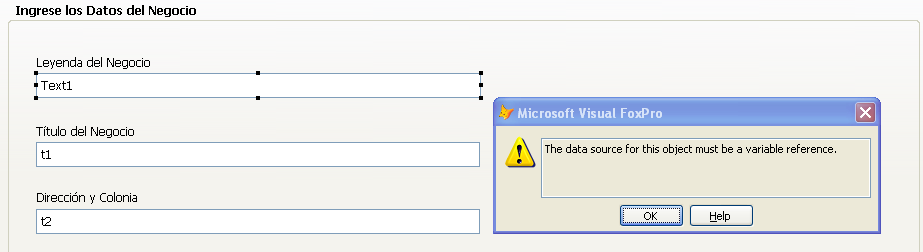
Nuevamente Saludos,
pero si lo escirbo asi:
Thisform.Text1.ControlSource = tcTablaConfig+".Leyenda"
me aparece el error de:
Saul Piña Hernandez
Nov 3, 2015, 9:32:09 PM11/3/15
to Comunidad de Visual Foxpro en Español
Bueno, lo intente de muchas maneras y nada, lo que se me ocurrio por hacer fue lo siguiente:
como los textbox estan en un pageframe, el codigo que escribi fue en el evento Activate de cada Page
select (pTablaConfig)
y ya en el controlsource de cada textbox:
Thisform.txtTitulo.ControlSource=leyenda
etc.
Es decir solo el nombre del campo en cuestion.
Saludos.
como los textbox estan en un pageframe, el codigo que escribi fue en el evento Activate de cada Page
select (pTablaConfig)
y ya en el controlsource de cada textbox:
Thisform.txtTitulo.ControlSource=leyenda
etc.
Es decir solo el nombre del campo en cuestion.
Saludos.

Antonio Meza
Nov 3, 2015, 9:43:40 PM11/3/15
to Comunidad de Visual Foxpro en Español
Hola Saul!!
El detalle es que lo reconoce como una variable y no como una Cadena, prueba poniéndolo entre paréntesis y si no funciona usa evaluate()
ejemplo:
Thisform.Text1.ControlSource = (tcTablaConfig+".Leyenda")
Thisform.Text1.ControlSource = (tcTablaConfig+".Leyenda")
otro
Thisform.Text1.ControlSource = evaluate(tcTablaConfig+".Leyenda")
saludos
saludos
Antonio Meza

ZeRoberto
Nov 4, 2015, 1:28:13 AM11/4/15
to publice...@googlegroups.com
Antonio pero si lo pone asi el controlsource va adquirir el valor del campo mas no el campo como referencia.
Fidel Charny
Nov 4, 2015, 7:19:31 AM11/4/15
to Comunidad de Visual Foxpro en Español
En realidad, el error que comentas lo debería producir esto:
select (lcTabla)
Thisform.txtTitulo.ControlSource=leyenda
Salvo que (y en ese caso estabas escondiendo algo) "Leyenda" no sea ningún campo del archivo, sino una variable cuyo contenido es un campo del archivo.
*Si Leyenda es una variable que supuestamente contiene el nombre del campo de la tabla
Afields(laFields,lcTabla)
Leyenda = laFields[3,1]
* El código para ControlSource deberá ser
Thiform.TxtTitulo.ControlSource = lcTabla+"."+Leyenda
Si "leyenda" es un campo del archivo (y no una variable) podría ser ControlSource = "LEYENDA"
Te comento sobre el peligro de poner eso así:
Supongamos que tengo abiertas dos tablas (Clientes y Proveedores) y ambas tienen el campo "NOMBRE"
SELECT CLIENTES
THISFORM.Text1.ControlSource="NOMBRE"
* Hasta acá todo bien, me aparece el nombre del cliente del puntero de registro.
SKIP
thisform.text1.Refresh && todo bien, muestra el siguiente
SELECT PROVEEDORES
THISFORM.REFRESH && UPS!!!!. Ahora me aparece el nombre del PROVEEDOR!!!!!
Si abro una tabla Personal (que tambien tiene el campo Nombre)
USE PERSONAL IN 0
SELECT PERSONAL
THISFORM.REFRESH && Me Vuelvo Loco!!!!!!!! Ahora me aparece el nombre del empleado !!!!!!! ?? ? !! ? !?
select (lcTabla)
Thisform.txtTitulo.ControlSource=leyenda
Salvo que (y en ese caso estabas escondiendo algo) "Leyenda" no sea ningún campo del archivo, sino una variable cuyo contenido es un campo del archivo.
*Si Leyenda es una variable que supuestamente contiene el nombre del campo de la tabla
Afields(laFields,lcTabla)
Leyenda = laFields[3,1]
* El código para ControlSource deberá ser
Thiform.TxtTitulo.ControlSource = lcTabla+"."+Leyenda
Te comento sobre el peligro de poner eso así:
Supongamos que tengo abiertas dos tablas (Clientes y Proveedores) y ambas tienen el campo "NOMBRE"
SELECT CLIENTES
THISFORM.Text1.ControlSource="NOMBRE"
* Hasta acá todo bien, me aparece el nombre del cliente del puntero de registro.
SKIP
thisform.text1.Refresh && todo bien, muestra el siguiente
SELECT PROVEEDORES
THISFORM.REFRESH && UPS!!!!. Ahora me aparece el nombre del PROVEEDOR!!!!!
Si abro una tabla Personal (que tambien tiene el campo Nombre)
USE PERSONAL IN 0
SELECT PERSONAL
THISFORM.REFRESH && Me Vuelvo Loco!!!!!!!! Ahora me aparece el nombre del empleado !!!!!!! ?? ? !! ? !?
Saúl Piña
Nov 4, 2015, 9:44:42 AM11/4/15
to Comunidad de Visual Foxpro en Español
Explico de nuevo el contenido de controlsource, con la finalidad de si hay algo que modificar hacerlo de una vez.
Tengo dos tablas para configurar
Config.dbf (Esta en mi opinion es para tener los parametros del server o pc local)
Config_Red.dbf (Este es para la Pc2 que se conecta en red a la pc1)
El asunto de tener dos tablas (y es aqui donde me gustaria sus opiniones) es que las tablas Config y Config_Red tienen los mismos campos y en ellos se guarda por ejemplo si el sistema y la pc trabajará con una bascula electronica, que impresora está conectada y que busque el logo del negocio.
En la Pc Server o Pc Local existe una bascula electrónica conectada, pero en el Pc2 (RED) no, entonces pensé que lo mejor sería tener guardados los parametros en dos tablas.
(Pero con ciertas dudas de que si así es correcto)
Entonces, los pasos para llegar a la pantalla "Configuracion.scx" son las siguientes:
1. Arranca el MAIN del Programa
2. Dentro del Main se ejecuta "DTablas.prg" que es donde se abren todas las tablas en modo SHARED (entre ellas se abre Config y Config_Red)
3. En el Main se ejecuta el prg "Detecta_ejecucion.prg"
4. Si se detecta que se ejecuta como local, entonces en la "variable publica" pTablaConfig se almacena el nombre de la tabla "Config" si se ejecuta en red, entonces se almacena en la variable publica pTablaConfig el nombre "Config_Red".
5. Ya para este momento y si el usuario abre la pantalla "Configuracion.scx" ya debe estar la variable pTablaConfig con el nombre de la tabla segun sea el tipo de ejecucion (local o Red)
Habiendo aclarado lo anterior, se entenderá que en el siguiente codigo:
Thisform.txtTitulo.ControlSource=(pTablaConfig)+".leyenda"
Al controlsource le estoy diciendo que tome el campo "leyenda" que viene en la tabla Config o Config_Red, entonces sería asi:
Thisform.txtTitulo.ControlSource=Config.leyenda &&En otras palabras, lo que quiero que se muestre es el campo "leyenda" de la tabla Config o Config_Red
Como podría lograrlo?
Como sería otra manera de detectar si se está como Local o Red que parametros tendrá cada PC ?
Gracias por sus sugerencias..
Tengo dos tablas para configurar
Config.dbf (Esta en mi opinion es para tener los parametros del server o pc local)
Config_Red.dbf (Este es para la Pc2 que se conecta en red a la pc1)
El asunto de tener dos tablas (y es aqui donde me gustaria sus opiniones) es que las tablas Config y Config_Red tienen los mismos campos y en ellos se guarda por ejemplo si el sistema y la pc trabajará con una bascula electronica, que impresora está conectada y que busque el logo del negocio.
En la Pc Server o Pc Local existe una bascula electrónica conectada, pero en el Pc2 (RED) no, entonces pensé que lo mejor sería tener guardados los parametros en dos tablas.
(Pero con ciertas dudas de que si así es correcto)
Entonces, los pasos para llegar a la pantalla "Configuracion.scx" son las siguientes:
1. Arranca el MAIN del Programa
2. Dentro del Main se ejecuta "DTablas.prg" que es donde se abren todas las tablas en modo SHARED (entre ellas se abre Config y Config_Red)
3. En el Main se ejecuta el prg "Detecta_ejecucion.prg"
4. Si se detecta que se ejecuta como local, entonces en la "variable publica" pTablaConfig se almacena el nombre de la tabla "Config" si se ejecuta en red, entonces se almacena en la variable publica pTablaConfig el nombre "Config_Red".
5. Ya para este momento y si el usuario abre la pantalla "Configuracion.scx" ya debe estar la variable pTablaConfig con el nombre de la tabla segun sea el tipo de ejecucion (local o Red)
Habiendo aclarado lo anterior, se entenderá que en el siguiente codigo:
Thisform.txtTitulo.ControlSource=(pTablaConfig)+".leyenda"
Al controlsource le estoy diciendo que tome el campo "leyenda" que viene en la tabla Config o Config_Red, entonces sería asi:
Thisform.txtTitulo.ControlSource=Config.leyenda &&En otras palabras, lo que quiero que se muestre es el campo "leyenda" de la tabla Config o Config_Red
Como podría lograrlo?
Como sería otra manera de detectar si se está como Local o Red que parametros tendrá cada PC ?
Gracias por sus sugerencias..
Fidel Charny
Nov 4, 2015, 4:53:56 PM11/4/15
to Comunidad de Visual Foxpro en Español
Saúl:
Dejemos por un momento de lado el tema de las dos tablas y de la variable pública.
Lo que tenés que tener en claro es la sintaxis de ControlSource, que es la misma que utilizas para los controles Grid.
This.pgfFrame.Pagex.Text_x.ControlSource="Tabla.Campo" && entre comillas.
Pero también vale lo siguiente:
lcControlSource = "Tabla.Campo"
This.pgfFrame.Pagex.Text_x.ControlSource= lcControlSource
Ahora, si la parte de "Tabla" es una variable:
lcControlSource = lcCursor + ".Campo"
This.pgfFrame.Pagex.Text_x.ControlSource= lcControlSource ó This.pgfFrame.Pagex.Text_x.ControlSource= lcCursor + ".Campo"
Lo que no funciona es esto:
Thisform.txtTitulo.ControlSource=(pTablaConfig)+".leyenda"
Pero sí te funcionaría
.ControlSource = "&pTablaConfig..Leyenda" De donde surge reemplazar por .ControlSource = pTablaConfig+".Leyenda"
Tal vez te quede más claro con una propiedad
Supongamos:
Addproperty(thisform,"MiLeyenda", Evaluate(pTablaConfig+".leyenda") )
Thisform.Text1.ControlSource = "Thisform.MiLeyenda" && como vez, siempre es entre comillas.
Finalmente, no coincido con Ze Roberto. La expresión propuesta por Antonio no es admitida porque no es una referencia variable. En cambio, si funciona con Value.
Te muestro un ejemplo donde todo es variable (tabla y campo). El método Fill_Container crea un Container y lo rellena con objetos label, Textbox y Checkbox, con algunas simplificaciones. Se evitan aquí los campos Memo, solamente porque la inserción de un EditBox complica un poco la distribución de cuadros. Pero lo que te interesa aquí son los ControlSource.
En este código hay alguna redundancia en cuanto al array lafields() y variables como lcName, lcType, etc, pero es solamente para mayor claridad del código.
Ah, este Evl(tcCursor , "CLIENTES") es solamente por comodidad [ Thisform.fill_container() ]
Dejemos por un momento de lado el tema de las dos tablas y de la variable pública.
Lo que tenés que tener en claro es la sintaxis de ControlSource, que es la misma que utilizas para los controles Grid.
This.pgfFrame.Pagex.Text_x.ControlSource="Tabla.Campo" && entre comillas.
Pero también vale lo siguiente:
lcControlSource = "Tabla.Campo"
This.pgfFrame.Pagex.Text_x.ControlSource= lcControlSource
Ahora, si la parte de "Tabla" es una variable:
lcControlSource = lcCursor + ".Campo"
This.pgfFrame.Pagex.Text_x.ControlSource= lcControlSource ó This.pgfFrame.Pagex.Text_x.ControlSource= lcCursor + ".Campo"
Lo que no funciona es esto:
Thisform.txtTitulo.ControlSource=(pTablaConfig)+".leyenda"
Pero sí te funcionaría
.ControlSource = "&pTablaConfig..Leyenda" De donde surge reemplazar por .ControlSource = pTablaConfig+".Leyenda"
Tal vez te quede más claro con una propiedad
Supongamos:
Addproperty(thisform,"MiLeyenda", Evaluate(pTablaConfig+".leyenda") )
Thisform.Text1.ControlSource = "Thisform.MiLeyenda" && como vez, siempre es entre comillas.
Te muestro un ejemplo donde todo es variable (tabla y campo). El método Fill_Container crea un Container y lo rellena con objetos label, Textbox y Checkbox, con algunas simplificaciones. Se evitan aquí los campos Memo, solamente porque la inserción de un EditBox complica un poco la distribución de cuadros. Pero lo que te interesa aquí son los ControlSource.
En este código hay alguna redundancia en cuanto al array lafields() y variables como lcName, lcType, etc, pero es solamente para mayor claridad del código.
Ah, este Evl(tcCursor , "CLIENTES") es solamente por comodidad [ Thisform.fill_container() ]
* Método Fill_Container
LPARAMETERS tcCursor

tcCursor = EVL(tcCursor,"CLIENTES")

LOCAL lnTop,;
    lnLeft,;
    lnHeight,;
    lnMaxWidth,;
    i,;
    lnfields,;
    lcName,;
    lctype,;
    lcCampo

This.NewObject("cnt_Per","Container")
WITH This.cnt_per
    .top = 1
    .left = 1
    .Width = This.Width - 2
    .Height = This.Height - 2
    .backcolor = RGB(220,228,224)
    .Visible = .t.
ENDWITH

lnTop = 5
lnLeft = 100
lnHeight = 20
lnMaxWidth = 0
SELECT (tcCursor)
lnfields = AFIELDS(laFields,tcCursor)
FOR i=1 TO lnFields
    lcName="Text"+TRANSFORM(i)
    lcCampo = laFields[i,1]
    lcType = lafields[i,2]
    IF lcType ="M"
        LOOP
    ENDIF
    lnWidth = ICASE(lcType="D",62,LcType="L",20,(lafields[i,3]+laFields[i,4])*6.5)
    lcBaseClass = IIF(lctype="L","Checkbox","Textbox")
    lcName = IIF(lcType = "L" ,"Check" , "Text")+TRANSFORM(i)
    lcLabel = "lbl_"+lcCampo
    IF !PEMSTATUS(This.cnt_per,lcLabel,5)
        This.cnt_per.newobject(lcLabel,"Label")
    ENDIF
    WITH This.cnt_Per.&lcLabel
        .Caption = PROPER(lcCampo)
        .top = lnTop + 3
        .Left = lnLeft - 90
        .FontSize = 8
        .Height = 17
        .BackStyle = 0
        .Width = 88
        .visible = .t.
    ENDWITH
    IF !PEMSTATUS(This.cnt_per,lcName,5)
        This.cnt_per.newobject(lcName,lcBaseClass)
    ENDIF
    WITH This.cnt_Per.&lcName
        .left = m.lnLeft
        .top = m.lntop
        .Height = m.lnHeight
        .Width = MAX(m.lnWidth , 20 )
        .Fontsize = 8
        .ControlSource = tcCursor+"."+lcCampo
        IF lcBaseClass == "Checkbox"
            .caption = ""
            .backstyle = 0
        ENDIF
        .visible = .t.
    ENDWITH
    lnMaxWidth = MAX(lnMaxWidth , lnWidth)
    lnTop = m.lntop + m.lnHeight
    IF (lnTop + lnHeight + 4) > This.cnt_per.Height
        lnLeft = lnLeft + lnMaxWidth + 110
        lntop = 5
        lnMaxWidth = 0
    ENDIF
NEXT
lnMaxWidth = 0
FOR EACH ocontrol IN this.cnt_per.controls
    lnMaxWidth = MAX(m.lnMaxWidth , ocontrol.left + ocontrol.Width )
ENDFOR
This.cnt_per.Width = lnMaxWidth + 2
This.Width = This.cnt_Per.Width + 1Reply all
Reply to author
Forward
0 new messages