
Stitching drone mapping images
279 views
Skip to first unread message

Garry Lawson
Sep 19, 2021, 12:51:57 AM9/19/21
to PTGui Support
Hello, I am trying to determine if PTGUI can be made to correctly process drone mapping images. As you likely know, drone mapping images are not shot from a single location, but rather numerous (hundreds) overlapping downward facing images from evenly spaced locations throughout the specified area. I have tried with the PTGUI PRO trial version, and some parts are acceptable, and some are a mess. If this should be working, can you supply whatever settings would be needed? After 4 1/2 hours of trial and error, I'm not getting anywhere. Thanks.

John Houghton
Sep 19, 2021, 3:30:58 AM9/19/21
to PTGui Support
Garry Lawson
Sep 19, 2021, 3:37:25 PM9/19/21
to pt...@googlegroups.com
John, I followed the stitch mosaics instructions exactly, but get an immediate error when I click RUN OPTIMIZER: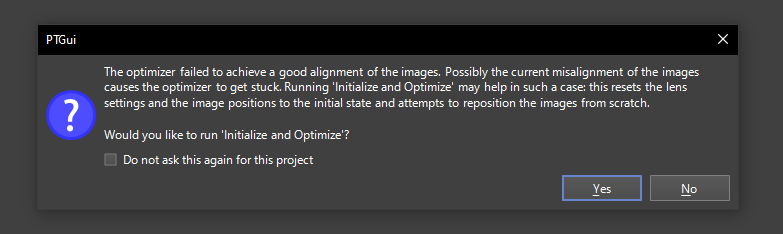
The photos were taken with a DJI Mavic Air 2 drone flying at 200 feet with the camera pointed straight down. The camera model/type is DJI FC3170.
The 123 photos are located at https://drive.google.com/drive/folders/15DBWuxsqkJ5PXgNnZ2c_-Uh3XzNnwiOG?usp=sharing if you wish to try for yourself.
--
You received this message because you are subscribed to the Google Groups "PTGui Support" group.
To unsubscribe from this group and stop receiving emails from it, send an email to ptgui+un...@googlegroups.com.
To view this discussion on the web visit https://groups.google.com/d/msgid/ptgui/17ad2970-b5ab-461c-8d75-caa5d4db3a85n%40googlegroups.com.
Garry Lawson
John Houghton
Sep 19, 2021, 11:45:30 PM9/19/21
to pt...@googlegroups.com
Garry, I got a decent stitch, but the rather low altitude inevitably results in visible parallax errors on features poking up from the ground. For the mosaic method I disabled some options on the Project Settings tab: unchecked "Roughly arrange images first" in the Align Images behaviour section, and several entries in the Miscellaneous section including "Position images automatically using metadata...". Then I loaded in the images and set the lens focal lengthg to a small value of 0.5 degrees on the Lens sttings tab. Running Align Images then gave a goodish result:

Download the PTGui Pro V12 project file and full size panorama from https://we.tl/t-lZjVyyWlVC .
John
To view this discussion on the web visit https://groups.google.com/d/msgid/ptgui/CABMGohcw5LkyOUAbVb7VA%3DmuBxoZnFh2SPNHbfLFeJZE_FFkHw%40mail.gmail.com.
Reply all
Reply to author
Forward
0 new messages