
No space left on device despite free disk space
1,172 views
Skip to first unread message

Flav T
Sep 9, 2022, 3:36:07 AM9/9/22
to Prometheus Users
Hi all,
I'm running a Prometheus docker container, and I've run into an issue regarding disk space. Despite having hundreds of MB of free disk space, if I attempt to call the API snapshot endpoint `curl -XPOST http://localhost:9090/api/v1/admin/tsdb/snapshot` I receive an error message:
`create snapshot: snapshot head block: populate block: write chunks: preallocate: no space left on device`
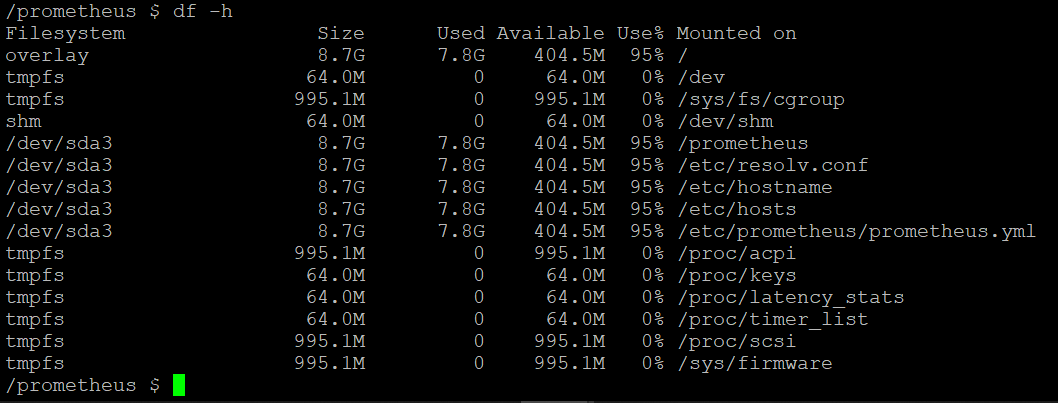
Output of `df -h` inside my prometheus container:

With around 518 MB free, I am able to call the snapshot endpoint. However, with less free space than this, the snapshot endpoint returns the error regarding no space left on device.
size of my /data folder:

I see from this thread that potentially 100's of MB free disk space is required to take a snapshot. I am a little surprised that (from what it looks like) at least 500 MB are required to take a single snapshot. Is this expected/intended behaviour of prometheus, or could there be something on my end (perhaps docker related) that is contributing to this issue?
Thank you!

Brian Candler
Sep 9, 2022, 5:05:48 AM9/9/22
to Prometheus Users
Which filesystem are you using on the docker host?
If it's ext4: many systems by default configure it to reserve a minimum of 5% free space (i.e. space that only 'root' can use).
Check with:
tune2fs -l /dev/sda1 # or whatever device your root partition is in
and look at the ratio of "Reserved block count" to "Block count". e.g. on one system I have here, I see
Block count: 5242880
Reserved block count: 262144
Reserved block count: 262144
262144/5242880 = 0.05
It can be changed with the -m option to tune2fs.
If it's btrfs: there's a whole can of worms around what constitutes "free space" in btrfs :-)
But looking at your figures, where you're at 94% full, I think it's most likely you're hitting the ext4 reserved blocks limit.
Brian Candler
Sep 9, 2022, 5:24:17 AM9/9/22
to Prometheus Users
Oh and I should add, the other place to look is prometheus metrics :-)
node_exporter reports both "node_filesystem_avail_bytes" and "node_filesystem_free_bytes". The former excludes space reserved for root, so you'll see that hit zero sooner, and that'll be when prometheus thinks the disk is "full".
You can of course graph:
node_filesystem_avail_bytes / node_filesystem_size_bytes
node_filesystem_free_bytes / node_filesystem_size_bytes
Flav T
Sep 9, 2022, 8:02:11 PM9/9/22
to Prometheus Users
Hi Brian,
Thank you for the reply, I did some investigating as you suggested:
My partition is using ext4 filesystem, and with `tune2fs` I confirmed that 5% free space is reserved. However, my understanding of the `df` output is that it is not counting this reserved disk space under "available". I confirmed this by running the suggested prometheus metrics as well:
"node_filesystem_avail_bytes" gives me 518 MiB as well for the above, which correlates to the "available" space according to `df`. Accordingly,
"node_filesystem_free_bytes" shows a larger remaining disk space, as would be expected since this includes reserved space as well.
So according to this, it seems to me prometheus is indeed seeing 518 MiB remaining, and yet for values just a bit lower than this (i.e. below 500 MiB), I start getting the 'no space left on device' error.
Message has been deleted
Flav T
Sep 9, 2022, 8:40:44 PM9/9/22
to Prometheus Users
I thought I'd include some pictures as well, showing the snapshots failing around 405 MiB free disk space:
Prometheus metrics query showing ~405 MiB remaining

df also showing ~405 MiB remaining
Calling snapshot endpoint from another Docker container, showing no space left on device:

Brian Candler
Sep 10, 2022, 4:02:44 AM9/10/22
to Prometheus Users
My apologies, you're right. Tested here with -m25 to make it clearer, and a 100MB virtual block device with 50MB then 90MB filled.
# truncate -s 100000000 test.img
# mke2fs -i 262144 -m 25 test.img
# mount -o loop test.img /mnt
# dd if=/dev/urandom bs=1000000 count=50 of=/mnt/test.dat
# df -k /mnt
Filesystem 1K-blocks Used Available Use% Mounted on
/dev/loop8 97572 48908 24252 67% /mnt
# dd if=/dev/urandom bs=1000000 count=40 of=/mnt/test2.dat
Filesystem 1K-blocks Used Available Use% Mounted on
/dev/loop8 97572 48908 24252 67% /mnt
# dd if=/dev/urandom bs=1000000 count=40 of=/mnt/test2.dat
# df -k /mnt
Filesystem 1K-blocks Used Available Use% Mounted on
/dev/loop8 97572 88016 0 100% /mnt
Filesystem 1K-blocks Used Available Use% Mounted on
/dev/loop8 97572 88016 0 100% /mnt
# umount /mnt
# rm test.img
The "Available" and "Use%" do take into account the reserved space.
It would have been a bit clearer if you'd use "df -k" instead of "df -h" in your original post, since the "humanized" values have very low resolution - but it still shows roughly 1.0GiB of total free space, compared to 518MiB available space.

jaouad zarrabi
Sep 25, 2022, 6:25:08 PM9/25/22
to Prometheus Users
BullionStar is Singapore's Premier Bullion Dealer For Sell : GOLD / SILVER / BARS / COINS
- Over 1,000 Different Products
- Cash & Bullion Account
- Attractive Prices
- Quick & Easy
-Tax Free Bullion
- Financial Strength
- Global Reach
- Multi-Jurisdiction
https://www.bullionstar.com/?r=27869
- Over 1,000 Different Products
- Cash & Bullion Account
- Attractive Prices
- Quick & Easy
-Tax Free Bullion
- Financial Strength
- Global Reach
- Multi-Jurisdiction
https://www.bullionstar.com/?r=27869
Reply all
Reply to author
Forward
0 new messages