
RF22 Wireless Temperature Sensor - Log Data in MySQL

CN

Gadjet Nut
CN
These scripts will assume you've already installed\configured MySQL 5.4+, mysql-client package, PHPMyAdmin (if you prefer the graphical interface to MySQL), Python, python-serial package, and have a fully-built\communicating RF22 wireless sensor. For help on this, please refer to the many tutorials on PrivateEyePi and online.
- With MySQL installed, create a user that can access a database. You can use root, but for better security, you can create one user per database.
- Create a database that the user can manage. I named my database [pi_temp]
- Create a table in the [pi_temp] database. I named it [temp_a].
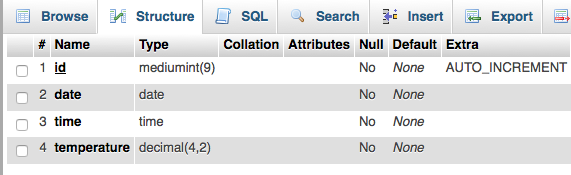
- In the [temp_a] table, create the following columns with these options:
- id: MEDIUMINT type, NOT NULL, AUTO_INCREMENT, PRIMARY KEY
- date: DATE type
- time: TIME type
- temperature: DECIMAL(4,2) type
- Create a python script named get_temp.py (FYI, this was modified from rfthermtest.py that comes from PrivateEyePi).
- Paste the get_temp.py script from below into the file. Save.
- sudo chmod 755 get_temp.py
- Create a python script name pitemp.py
- Paste the pitemp.py script from below into the file
- Modify the variables to match your MySQL data. Save.
- sudo chmod 755 pitemp.py
- Create bash script to query the database, named sensor_temps.sh
- Paste the sensor_temp.sh script from below into the file
- Modify the variables to match your MySQL data. Save.
- sudo chmod 755 sensor_temps.sh
- You can run get_temp.py by itself to see if it returns data from your RF22
- sudo python get_temp.py
- This should return the temperature
- The script waits 5 minutes 30 seconds to receive
- If it does not return the temperature, it will put an error into /var/log/syslog, and quit
- Make sure pitemp.py and get_temp.py are in the same folder.
- Try running pitemp.py to see if it can connect to your MySQL database
- sudo python pitemp.py
- pitemp.py requires temperature from get_temp.py. If this doesn't work, pitemp.py will quit out.
- If successful, you won't see any output
- If it has the ability to connect to the MySQL database, it will insert a row.
- sudo python pitemp.py
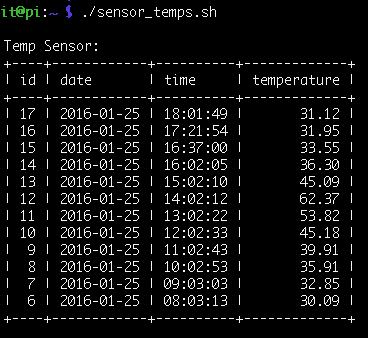
- Run sensor_temps.sh to view your data in the database
- ./sensor_temps.sh
- Create a cron job to automatically schedule pitemp.py
- I wanted the script to record temperatures once an hour
- sudo crontab -e
- At the bottom paste in this line: 0 * * * * python /path/to/pitemp.py
- Save file
- Reboot machine and at the top of every hour, the script will run
get_temp.py
"""
get_temp.py 1.03 modified from rfthermtest.py 1.00 PrivateEyePi RF Temperature Test Program
---------------------------------------------------------------------------------
Visit projects.privateeyepi.com for full details
J. Evans October 2013
THE SOFTWARE IS PROVIDED "AS IS", WITHOUT WARRANTY OF ANY KIND, EXPRESS OR
IMPLIED, INCLUDING BUT NOT LIMITED TO THE WARRANTIES OF MERCHANTABILITY,
FITNESS FOR A PARTICULAR PURPOSE AND NONINFRINGEMENT. IN NO EVENT SHALL THE
AUTHORS OR COPYRIGHT HOLDERS BE LIABLE FOR ANY CLAIM, DAMAGES OR OTHER LIABILITY,
WHETHER IN AN ACTION OF CONTRACT, TORT OR OTHERWISE, ARISING FROM, OUT OF OR IN
CONNECTION WITH THE SOFTWARE OR THE USE OR OTHER DEALINGS IN THE SOFTWARE.
Revision History
V1.00 - Release
V1.01 - Added 5 minute script limit, and quits after results are found - CN
V1.02 - Added syslog error notification if no results received - CN
V1.03 - Added lines to convert Celsius to Fahrenheit - CN
-----------------------------------------------------------------------------------
"""
import serial
import time
import sys
import signal
import syslog
from time import sleep
def handler(signum, frame):
# Sets up time limit for script. If signal.alarm() time is met, script quits
# Puts error message in system syslog
syslog.syslog(syslog.LOG_ERR, "ERROR: Did not receive temp after 5.5 mins - check sensor")
exit(0)
def main():
# declare to variables, holding the com port we wish to talk to and the speed
port = '/dev/ttyAMA0'
baud = 9600
# open a serial connection using the variables above
ser = serial.Serial(port=port, baudrate=baud)
# wait for a moment before doing anything else
sleep(0.2)
# Install signal handler
signal.signal(signal.SIGALRM, handler)
# Set alarm for 5 minutes 30 seconds; if time limit reached, script quits
signal.alarm(330)
# print "Please wait max 5 mins for the temperature transmitter to transmit..."
while True:
while ser.inWaiting():
# read a single character
char = ser.read()
# check we have the start of a LLAP message
if char == 'a':
# start building the full llap message by adding the 'a' we have
llapMsg = 'a'
# read in the next 11 characters form the serial buffer
# into the llap message
llapMsg += ser.read(11)
# now we split the llap message apart into devID and data
devID = llapMsg[1:3]
data = llapMsg[3:]
# print "Device Number : " + devID
# print "Temperature data : " + data
# Strips the "TMPA" string from the output and converts to float for temp conversion
ctemp = float(data.strip('TMPA'))
# convert celsius to fahrenheit, round to 2 decimal points
ftemp = round(ctemp * 1.8 + 32,2)
# print data
print ftemp
# Comment out the 2 ftemp lines above and uncomment the "print ctemp" line
# if you want temperatures in celsius
# print ctemp
sleep(0.2)
sys.exit()
if __name__ == "__main__":
main()
pitemp.py
#!/usr/bin/python
import time
import MySQLdb
import sys
import subprocess
dbhost="localhost" # Enter hostname of MySQL database
dbuser="your_db_user" # Enter MySQL user
dbpass="your_db_pass" # Enter MySQL user password
pidb="your_mysql_db" # Enter MySQL database
pitable="your_mysql_table" # Enter MySQL database table
gettemp="/path/to/get_temp.py" # Enter path to get_temp.py
# Pull temp from temp sensor with get_temp.py
# Can take up to 5 minutes 30 seconds
temp = subprocess.check_output(('python',gettemp))
if not temp:
# If no temp was received from get_temp.py, quit script
print "No temperature received from get_temp.py...quitting."
sys.exit()
# If get_temp.py returns a temperature, attempt db write
else:
#connect to database
db = MySQLdb.connect(host=dbhost,user=dbuser,passwd=dbpass,db=pidb)
curs=db.cursor()
#insert into database
try:
# Inserts date, time, temperature (id should auto increment) into database table entered above
curs.execute ("INSERT INTO " + pitable + " (id, date, time, temperature) VALUES (NULL, CURDATE(), CURTIME(), %s) """, (temp,))
db.commit()
except db.Error, e:
# Reports back an error if insert fails and rolls back change
print "Error %d: %s" % (e.args[0],e.args[1])
db.rollback()
db.close()
sensor_temps.sh
#!/bin/bash
dbuser="your_db_user" # Enter MySQL database user
dbpass="your_db_pass" # Enter MySQL database password
pidb="your_mysql_db" # Enter MySQL database name
pitable="your_mysql_table" # Enter MySQL table name
dbrows="12" # Number of rows to return
# lists latest temps from PrivateEyePi Temp Sensor
echo ""
echo "Temp Sensor:"
mysql --user=$dbuser --password=$dbpass -e "SELECT * FROM $pidb.$pitable ORDER BY id desc LIMIT $dbrows;"
echo ""
CN
- Launch the mysql client and log in with a privileged account:
mysql --user=username --password=password - Create a database named "pi_temp" at the mysql> prompt:
CREATE DATABASE pi_temp; - Select the pi_temp database:
USE pi_temp - Create the "temp_a" table:
CREATE TABLE temp_a (id MEDIUMINT NOT NULL AUTO_INCREMENT, date DATE, time TIME, temperature DECIMAL(4,2), PRIMARY KEY (id)); - Done.
The table looks like this in PHPMyAdmin:
Also FYI, here's what the sensor_temps.sh script looks like when it queries the database and returns temp results (mine are in Fahrenheit):
Gadjet Nut

Matthew Pook
Just following your instructions however running into a few issues. I'm getting an error when I can the get_temp.py script:
pi@raspberrypi:/tmp $ sudo python get_temp.py
Please wait max 5 mins for the temperature transmitter to transmit...
Temperature data : AWAKE----
Traceback (most recent call last):
File "get_temp.py", line 92, in <module>
main()
File "get_temp.py", line 76, in main
ctemp = float(data.strip('TMPA'))
I assume it's trying to strip the incorrect value? Did you manage to get around this? It works with the standard serial_mon.py script..
Thanks!
CN
# print "Temperature data : " + data
I would delete the # symbols in front then run the script again manually. It should show what data is returned by the variables. The "Temperature data" should be a number.
It's possible the firmware has been updated on devices and the data received is changed. If the data is text, then it will break the rest of the script. I seem to remember the temperature sensor would output text if the battery was dying for example. If they are numbers, or have spaces in the data, you may have to mess with these lines to change how the text is split up:
devID = llapMsg[1:3]
data = llapMsg[3:]
CN
devID = llapMsg[1:3] - this means it reads the string (which starts at 0), then takes character 1 and 2, and assigns them the "devID" variable (start at 1, stop at 3).
data = llapMsg[3:] - this line reads the string starting at character 3, and puts everything else into the "data" variable.

Marko Kääriäinen
CN
The python code could be modified to say IF OUTPUT IS LIKE "TMPA" THEN proceed to chop up the output. Unfortunately I am no longer using the serial sensor so I can't test it.
