
Polymer core-icon is not displaying on Firefox but on Chrome
28 views
Skip to first unread message

niladri...@gmail.com
Apr 22, 2015, 2:21:51 AM4/22/15
to polym...@googlegroups.com
I am facing a strange problem with Polymer core-icon. Below is my snippet:
...
...
<link rel="import" href="../bower_components/core-icons/iconsets/social-icons.html">
...
...
<post-card id="card-1">
  <div>Something in bold!</div>
  <h2>My first post-card element with core-icon</h2>
  <p>Core-icon is not rendering properly on Firefox...Please help!</p>
  <core-icon class="large-icon" icon="android"></core-icon>
</post-card>
And my post-card element looks like this:
...
<div class="card-header" layout horizontal center>
  <content select="img"><img src="images/{{imgsrc}}" alt="" /></content>
  <content select="h2">{{heading}}</content>
</div>
<content select="p">{{para}}</content>
<content></content>
...
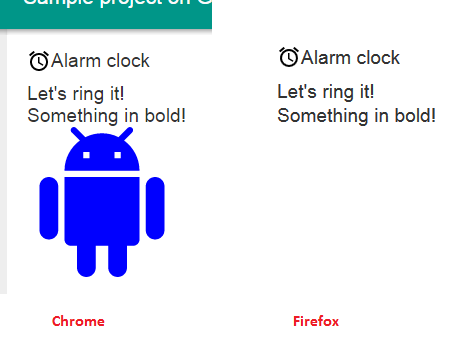
When I am running the above in Chrome the icon is rendering fine but on Firefox the icon is only flashing once and then disappears!
Rest of the content placed inside insertion point are rendering OK on both browsers.
Following screenshot shows what I have on different browsers:
For creating post-card element I have referred the following link: https://www.polymer-project.org/0.5/docs/start/tutorial/step-2.html
I have started with Polymer recently. Looking forward to expert help.
Thanks in advance!
Reply all
Reply to author
Forward
0 new messages