
paper-input broken in template repeat
86 views
Skip to first unread message

Silver Techar
Aug 15, 2014, 12:17:07 PM8/15/14
to polym...@googlegroups.com
Hi polymers,
When an paper-input is bound to values of an array in a template repeat, both my styles and paper-input internal elements are disrupted when array.pop().
Try following on the example below:
in this example styles are applied and elements are fine when I pop(), when I push("c") they're disrupted.
In my application however it's the other way around, they're disrupted when pop() and fine again when push("c"). Nevertheless, the example below shows same behaviour.
This magic happens at ~line: 1096 in TemplateBinding.js at
Before POP (no styles)
After POP (styles are there and broken elements, I especially mind #inputClone that is displayed and takes space)
When an paper-input is bound to values of an array in a template repeat, both my styles and paper-input internal elements are disrupted when array.pop().
Try following on the example below:
 document.querySelector("paper-input-nostyle").myarray.pop();
 document.querySelector("paper-input-nostyle").myarray.push("c");
in this example styles are applied and elements are fine when I pop(), when I push("c") they're disrupted.
In my application however it's the other way around, they're disrupted when pop() and fine again when push("c"). Nevertheless, the example below shows same behaviour.
This magic happens at ~line: 1096 in TemplateBinding.js at
extractInstanceAt: function(index) { ... instance.appendChild(parent.removeChild(node)); ...
Before POP (no styles)
After POP (styles are there and broken elements, I especially mind #inputClone that is displayed and takes space)

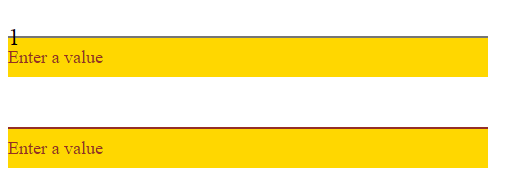
Thanks, //Techar
Silver Techar
Aug 15, 2014, 12:18:07 PM8/15/14
to polym...@googlegroups.com
and the code of course heh:
<script src="http://.../bower_components/platform/platform.js" type="text/javascript"></script>

<link rel="import" href="http://.../bower_components/polymer/polymer.html">
<link rel="import" href="http://.../bower_components/core-input/core-input.html">
<link rel="import" href="http://.../bower_components/paper-input/paper-input.html">

<polymer-element name="paper-input-nostyle">
    <style>
        paper-input-nostyle /deep/ #underlineContainer{
            margin-top: -18px;
        }

        paper-input-nostyle /deep/ #error{
            background-color: gold;
        }
    </style>

    <template>
        <template repeat="{{ value in myarray }}">
            <div>
                <paper-input value="{{value}}" required="true" error="Enter a value"></paper-input>
            </div>
            <content></content>
        </template>
    </template>

    <script>
        Polymer({
            ready: function () {
                this.myarray = ["1", "", "2"];
            }
        });
    </script>
</polymer-element>
Steve Orvell
Aug 18, 2014, 11:45:10 AM8/18/14
to Silver Techar, polym...@googlegroups.com
Hmm, I'm not able to reproduce any problem.
See this example: http://jsbin.com/wiqoqu/1/edit.
To view this discussion on the web visit https://groups.google.com/d/msgid/polymer-dev/5dddd478-eae3-43a7-b9be-74be4efce4c4%40googlegroups.com.
Follow Polymer on Google+: plus.google.com/107187849809354688692
---
You received this message because you are subscribed to the Google Groups "Polymer" group.
To unsubscribe from this group and stop receiving emails from it, send an email to polymer-dev...@googlegroups.com.
Reply all
Reply to author
Forward
0 new messages