
How should we implement dictionary order changing through strokes?

Ted Morin
- As a stenographer who types in multiple domains, I'd like to be able to switch dictionaries using only strokes so that I don't have to use the GUI.
- As a stenographer who is building a dictionary, I want to be able to disable specific dictionaries so that it's easier to tell when a stroke isn't defined in my new dictionary.

Achim Siebert
All this could make use of existing code for adding and removing dictionaries. I'd probably just ignore invalid paths - the user can check if his entry works as expected by looking at the Plover config window after stroking it. And just do nothing if there's a syntax error.

Di

Hantuchblau
I almost feel like certain predefined setups are more generally useful than micromanaging which ones are activated. Otherwise you get problems where you need to take care of the current active ones before doing your actual selection which'd make automation more difficult.
It does mean that you might get significantly more stroke combination depending on how many setups you want. I generally'd use English + Commands as default, English + Language Specific Stuff + Commands for programming, possibly some special case stuff for things like normal mode vim and Other Language + Commands or Other Language + English + Commands if I ever get around to trying that out.
Ideally there would be some sort of ipc interface to automatically switch everything applicable for you, like changing programs, modes or files. A special stroke that forces something like 'next word is from dictionary x' would be very cool as well but I am not sure about the edge cases that might cause.
Anyway, quick and dirty version is actually super easy. ~10 lines of code - I also changed the DictionaryLoadingManager around slightly so that it keeps currently unused dictionaries cached so changes are basically instant after the dictionaries are loaded for the first time.
2015-10-26 13:12:42,243 INFO: Stroke(H- T-)
2015-10-26 13:12:42,246 INFO: Translation((u'TH',) : this)
2015-10-26 13:12:47,595 INFO: Stroke(* -B -U -G -E -T K- T-)
2015-10-26 13:12:47,595 INFO: Translation((u'TK*EUBGT',) : {PLOVER:CHANGE_DICT commands.json})
2015-10-26 13:12:48,651 INFO: Stroke(H- T-)
2015-10-26 13:12:48,651 INFO: Translation((u'TH',) : None)
2015-10-26 13:12:52,051 INFO: Stroke(* -B -U -G -E -T K- T- -D)
2015-10-26 13:12:52,052 INFO: Translation((u'TK*EUBGTD',) : {PLOVER:CHANGE_DICT commands.json main.json})
2015-10-26 13:12:53,089 INFO: Stroke(H- T-)
2015-10-26 13:12:53,092 INFO: Translation((u'TH',) : this)
Doesn't do anything like updating the UI yet, though. An 'make default' button probably would be a good idea as well.
Theodore Morin
--
You received this message because you are subscribed to the Google Groups "Plover" group.
To unsubscribe from this group and stop receiving emails from it, send an email to ploversteno...@googlegroups.com.
For more options, visit https://groups.google.com/d/optout.

Mirabai Knight
StenoKnight CART Services
917 576 4989
m...@stenoknight.com
http://stenoknight.com
Theodore Morin
Di

Glen Warner
Most of the CAT software I've used are set up the way Plover is now when it comes to dictionary management, so I'm used to doing it that way. I don't mind a change in how that's done, as long as I have the choice to either go with the new way, or stick with the old way, if that makes sense.
--gdw
Achim Siebert

Theodore Morin
Theodore Morin

Glen Warner
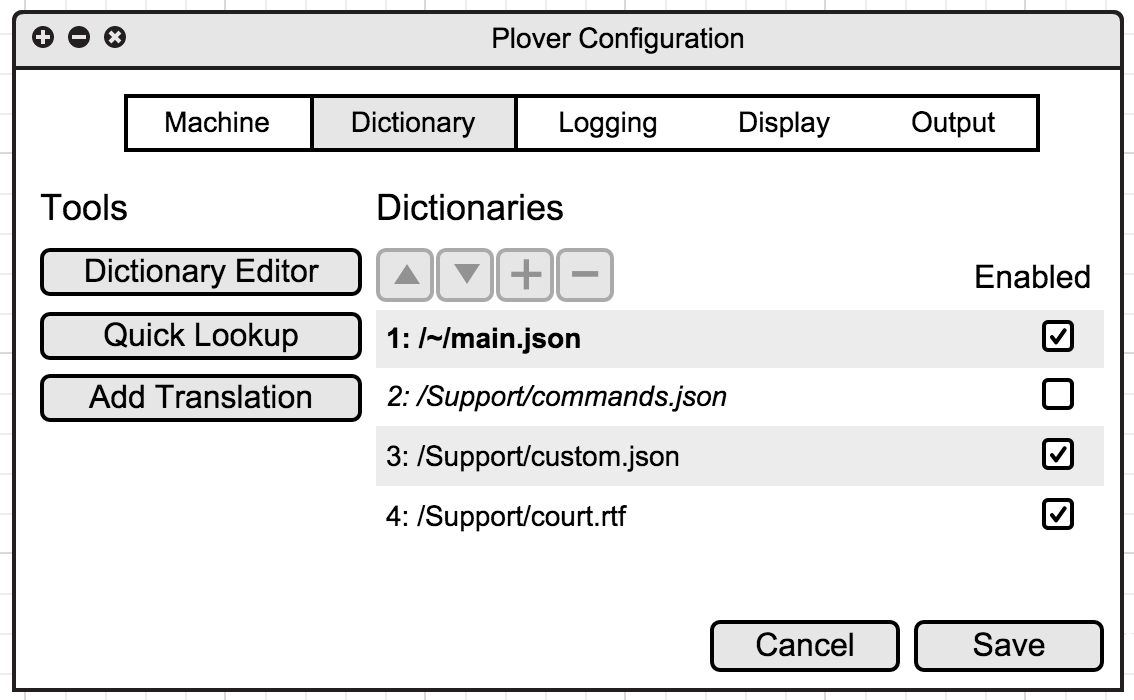
If I understand what I'm seeing there with the dictionaries, I'm curious as to whether or not the Stroke Suggestion window would display entries from the de-selected dictionaries.
That would come in handy if you have the dictionary for the theory you learned as your main dictionary, and, say, the Magnum Steno theory dictionary in the list but not selected, so that you could glean suggestions from it, which you can then add to your own dictionary.
Hope that makes sense ... there's not a lot of caffeine in this ice cream!
--gdw
Di
Achim Siebert
Theodore Morin


Hantuchblau
Is there a functional difference between disabling a dictionary and removing it from the list or is that just a nicer way to toggle quickly?
Theodore Morin
Yeah, the idea is that you could quickly enable and disable dictionaries with strokes, too, in case that's your thing.
Quite like that layout!
Is there a functional difference between disabling a dictionary and removing it from the list or is that just a nicer way to toggle quickly?
Hantuchblau
Anyway, never really thought about this but I generally always would use the same order with activating/deactivating the ones not needed. Might be tricky when using two language dictionaries at the same time, though?
Mirabai Knight
A lot of people like to keep their dictionaries on a flash drive or in a Dropbox folder, so I don't think we should require them to be placed in the config directory.
Would it make sense to do away with adding/removing dictionaries completely, then, and just add all .json and .rtf file that lie under the config dir?
Anyway, never really thought about this but I generally always would use the same order with activating/deactivating the ones not needed. Might be tricky when using two language dictionaries at the same time, though?
--
Achim Siebert
Di
Di

Karl Hegbloom
The configuration window lets you add new phrases and scripts, and to bind them to menu items from the system tray icon's drop down menu, or to keyboard keystrokes. Perhaps a new configuration tab could be added to Plover that allows the definition of Python scripts in a similar fashion, and then a syntax defined for the Plover dictionary right-hand-side that can call one of those scripts? Inside a script, it can import any Python modules you need, and then do whatever you want. So for dictionary switching, you'd import that module and call on it's published API functions to do what you need.
I think that the script is wrapped by an implicit "main()". I don't know what it's inputs are, if any... Thing at point? But that implies something like an input method extension (IME) as in Android or ibus, that can be made aware of the contents of the edit buffer. Plover as it sits does not have that capacity. ie, if you move the cursor to the previous or next paragraph, Plover presently can not see the text around `point' (using Emacs parlance, as in "thingatpt.el".) Ibus and Android IME have the capability to be context-aware. That's how the Google Voice typing IME can underline phrases and let you pick a choice from a drop-down.
I like the "minimize to system tray" thing for Plover, as a configurable option.
I like the ibus context awareness and possibility for a dynamic stroke-suggestions pop-up. To see what that's like, install ibus-table and the ibus-table-compose or ibus-table-latex input methods, add them, and try them out. You can set your IM to "compose" then type << and >> to get guillimotes, or to LaTeX and type \Sigma to get an uppercase greek sigma. After you press the \ key and the first letter after it, a pop-up menu is displayed that narrows as you continue to type, showing possible completions. Ibus-table is also used for some chinese input methods, including pinyin... and looking at the internals of it is very interesting wrt comparison with Plover. I think that a subclass of ibus-table would be doable as a Stenographic input method.
Ibus-table has a utility program run during the build process that turns a specially-headered text file into a database that is used at runtime for the dictionary table lookups during input. It also has provision for adding new entries, offering multiple choices that match given input with a quick means of selecting an item, the items are ordered by use frequency, and pushing the input accept key (usually spacebar or enter) selects the default or top item. It also supports a configuration interface that's worth a look at.
I wish I had full-time to dedicate to this. It is very interesting to me... however, I'm presently embroiled in a set of lawsuits (child custody and civil rights complaints), and have to stop myself from spending too much time escaping from those stresses by digging into Plover, ibus, autokey, TeXmacs, and Juris-M. With any luck, I'll win some money with the settlement, and then I'll be able to take much more time and allocate it to the things I'd rather be doing than trying to be my own lawyer and law firm.
Karl Hegbloom
When I type things in TeXmacs, or in whatever editor entering LaTeX, perhaps I'd want some things to be transformed differently upon entry; escaping certain spaces, like after the period of an abbreviation, but not after the period at the end of a sentence... and movement and editting command sets could change depending on whether the specific application uses Emacs, vi, or CUA style keybindings.
For each item in autokey, you can set abbrevs, a hot-key, and a window filter.