Troubles Compiling Plastimatch

355 views
Skip to first unread message

Matthew Strugari

unread,
Apr 28, 2014, 5:24:26 PM4/28/14
to plast...@googlegroups.com
Hi there,

I recently tried compiling Plastimatch on Ubuntu 12.04 but I have run into an error.

I have built ITK 4.5.2 as well as DCMTK 3.6.0. I have also built VTK 5.6.1.

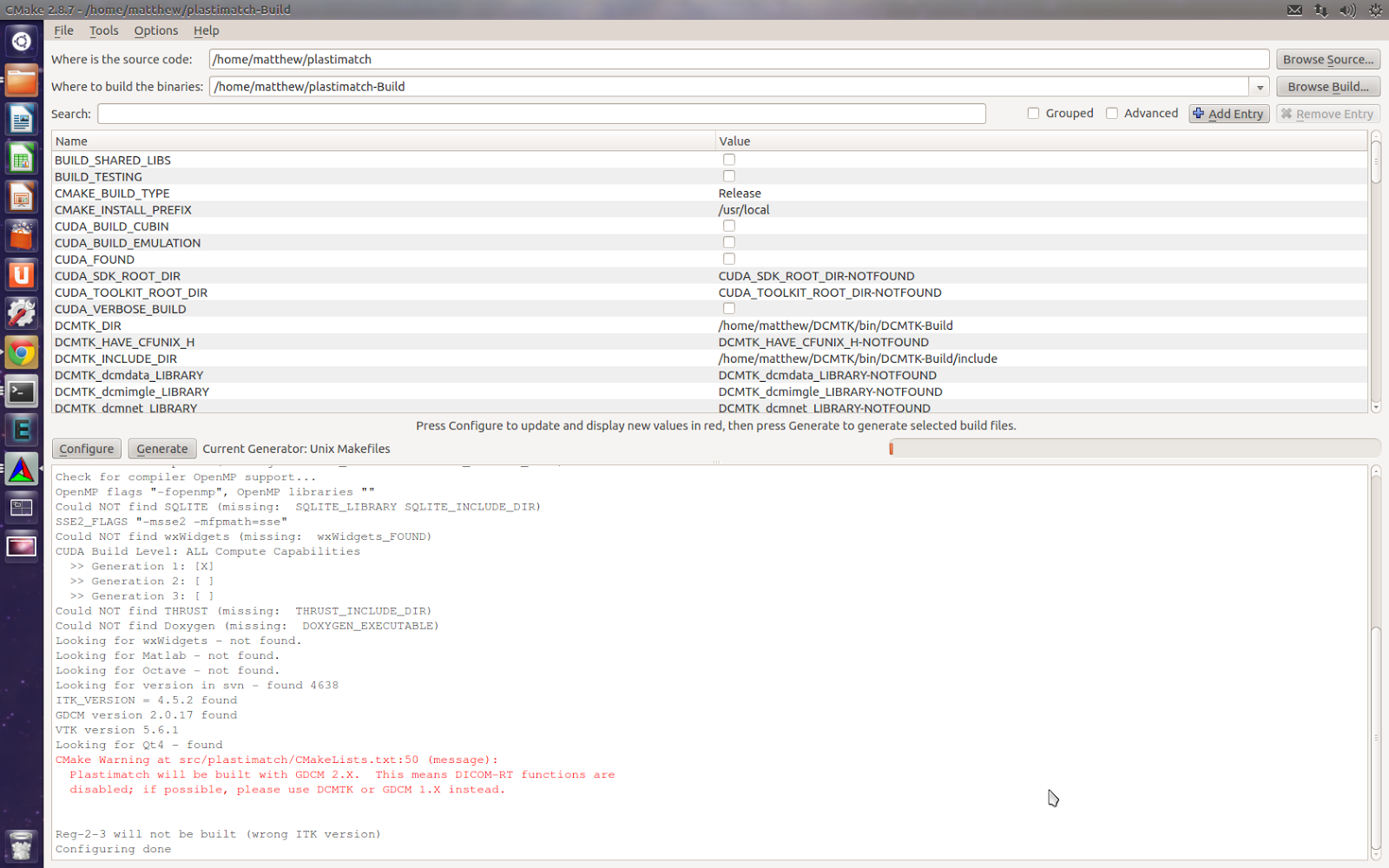
When I tried to compile Plastimatch I was confused about the command line instructions since I am fairly new with Linux. I used the cmake-gui to compile Plastimatch but I ran into problems relating to DCMTK and ITK. A warning was produced stating "Plastimatch will be built with GDCM 2.X. This means DICOM-RT functions are disabled; if possible, please use DCMTK or GDCM 1.X instead." as well as "Reg-2-3 will not be built (Wrong ITK version)."

Is it possible that the ITK version is too recent? Also, why is DCMTK not recognized?

I am looking to use the plastimatch command line tools to automate a deformable registration technique of the prostate which had previously been performed using Plastimatch in 3D Slicer.

Any help would be greatly appreciated.

Thanks.
Matthew, SCA


Paolo Zaffino

unread,
Apr 28, 2014, 6:48:01 PM4/28/14
to plast...@googlegroups.com
Hi Matthew,
which of those packages were installed by ubuntu repository?
Did you install something from source?
Could you attach the CMakeCache.txt file that you find into the compiling folder?

Reg-2-3 compiling is disable if you are using ITK4.

HTH.

Paolo
--
You received this message because you are subscribed to the Google Groups "Plastimatch" group.
To unsubscribe from this group and stop receiving emails from it, send an email to plastimatch...@googlegroups.com.
For more options, visit https://groups.google.com/d/optout.

Matthew Strugari

unread,
Apr 29, 2014, 10:43:15 AM4/29/14
to plast...@googlegroups.com
Hi Paolo,

None of the packages were installed using the repository.

DCMTK was installed from http://dicom.offis.de/dcmtk.php.en
VTK was installed from vtk.org
ITK was installed from itk.org

If I am only registering MR images with MR images, would ITK3.20 suffice for all of my needs? If that was the case then VTK and DCMTK would not be required.

Matthew
CMakeCache.txt

Paolo Zaffino

unread,
Apr 29, 2014, 11:48:07 AM4/29/14
to plast...@googlegroups.com
Hi Matthew,

it seems to me that it doesn't find the libraries into the system (or at least not all that it expects to find).
Did you run "make install" after make?

VTK is required just for visualization purpose (reg2-3 and other tools), so it is not mandatory for plastimatch.
DCMTK is required only to manage dicomRT (so radiotherapy stuff as plan, contour), if you don't use that files I think that you can avoid to have DCMTK.
Of course for your purpose ITK3.20.X is ok (even if ITK3.20.2 is recommended).

It's also possible to install plastimatch by ubuntu repository (sudo apt-get install plastimatch) even though I think it is an older version (so some features/bug fixes can be missing).

Let me know if you are able to fix it.

Paolo

Matthew Strugari

unread,
Apr 30, 2014, 11:48:41 AM4/30/14
to plast...@googlegroups.com
Hi Paolo,

I rebuilt everything again using make and make install. The libraries are properly recognized now until I build Plastimatch. At 21% I get the error "/<myloc>/plastimatch/src/plastimatch/base/cxt_extract.cxx:10:46: fatal error: itkContourExtractor2DImageFilter.h: No such file or directory
compilation terminated."

The file is located in /<myloc>/ITK/src/InsightToolkit-4.5.2/Modules/Nonunit/Review/include but I am not sure why it is unable to find it.

Matthew

Sharp, Gregory C.

unread,
Apr 30, 2014, 11:53:10 AM4/30/14
to plast...@googlegroups.com

Hi Matthew,


In ITK 4.5, one of the required options changed.

It used to be one called ITK_USE_REVIEW.

But now it is called Module_ITKReview.

Please enable that option when building ITK.


Sorry this change is not yet documented, I will correct it.


Greg

--

You received this message because you are subscribed to the Google Groups "Plastimatch" group.
To unsubscribe from this group and stop receiving emails from it, send an email to plastimatch...@googlegroups.com.
For more options, visit https://groups.google.com/d/optout.

The information in this e-mail is intended only for the person to whom it is
addressed. If you believe this e-mail was sent to you in error and the e-mail
contains patient information, please contact the Partners Compliance HelpLine at
http://www.partners.org/complianceline . If the e-mail was sent to you in error
but does not contain patient information, please contact the sender and properly
dispose of the e-mail.

Matthew Strugari

unread,
Apr 30, 2014, 12:42:33 PM4/30/14
to plast...@googlegroups.com, gcs...@mgh.harvard.edu
Hi Greg,

I do not see Module_ITKReview as one of my options when I build ITK 4.5. Below are all the options brought up by ccmake and my current settings which I have selected.

Matthew


Sharp, Gregory C.

unread,
Apr 30, 2014, 1:05:25 PM4/30/14
to Matthew Strugari, plast...@googlegroups.com

Hi Matthew,


Could you please hit “t” ?  That will bring up the advanced options.


Greg


From: Matthew Strugari [mailto:matt.s...@gmail.com]
Sent: Wednesday, April 30, 2014 12:43 PM
To: plast...@googlegroups.com
Cc: Sharp, Gregory C.
Subject: Re: [Plastimatch] Troubles Compiling Plastimatch


Hi Greg,


I do not see Module_ITKReview as one of my options when I build ITK 4.5. Below are all the options brought up by ccmake and my current settings which I have selected.


Matthew


The information in this e-mail is intended only for the person to whom it is

Matthew Strugari

unread,
Apr 30, 2014, 5:49:02 PM4/30/14
to plast...@googlegroups.com, Matthew Strugari, gcs...@mgh.harvard.edu
Thanks for all of the help Paolo and Greg!

Everything compiled properly. Now to begin using it.

Paolo Zaffino

unread,
May 2, 2014, 9:16:38 AM5/2/14
to plast...@googlegroups.com
Glad to hear that!
Welcome in the Plastimatch world!
If you have doubts/trouble/advices/comments the mailing list is the right place!

Enjoy!
Paolo


On 30/04/2014 23:49, Matthew Strugari wrote:
Thanks for all of the help Paolo and Greg!

Everything compiled properly. Now to begin using it.

Matthew Strugari

unread,
May 7, 2014, 4:15:35 PM5/7/14
to plast...@googlegroups.com
Hi there,

Sorry to keep bugging you guys! 

Since compiling Plastimatch, I have written a command file in order to perform my registration. This worked well until I realized that I was using Plastimatch 1.5.5 which was installed from the Ubuntu repository. When I try to use Plastimatch 1.5.16, I get an error which states "plastimatch: error while loading shared libraries: libplmsegment.so: cannot open shared object file: No such file or directory". When I look in the build directory, the libplmsegment.so file is present. This occurs for any command that I try to use.

Does anyone have any ideas what I should do to fix this or what I may have done wrong?

Thanks.
Matthew

Gregory Sharp

unread,
May 7, 2014, 4:46:49 PM5/7/14
to plast...@googlegroups.com, matt.s...@gmail.com

Hi Matthew,

Here is my suggestion for debugging.

(1) Make sure which plastimatch you are actually invoking.

$ which plastimatch
/PHShome/gcs6/build/plastimatch-shared/plastimatch

(2) Find out where that specific plastimatch is looking for its libplmsegment.

$ ldd /PHShome/gcs6/build/plastimatch-shared/plastimatch |grep libplmsegment
libplmsegment.so => /PHShome/gcs6/build/plastimatch-shared/libplmsegment.so
(0x00007f986adbe000)

Maybe after doing the above it will be obvious, but if not please post
your results.

Greg

Matthew Strugari

unread,
May 8, 2014, 12:52:49 PM5/8/14
to plast...@googlegroups.com, matt.s...@gmail.com, gcs...@mgh.harvard.edu
Hi Greg,

I removed the old Plastimatch 1.5.5 but now I am having more problems. When I enter "which plastimatch" nothing is returned. Within the Plastimatch-Build folder I have created, entering ./plastimatch returns the full list of modules and the current info (plastimatch version 1.5.16-beta). It appears as though Plastimatch did not properly install since any command that I enter now prompts me to install Plastimatch from the Ubuntu repository. 

Since then I have tried rebuilding Plastimatch by downloading the code and building everything again using ccmake, make, make install but I have not had any success.

Matthew

Sharp, Gregory C.

unread,
May 8, 2014, 12:59:35 PM5/8/14
to plast...@googlegroups.com

Hi Matthew,


Actually, you seem in good shape.   Since you didn’t get an error running ./plastimatch, it means your

shared libraries are being found correctly.


The only remaining thing is to add your plastimatch build directory to your path. 

For example, if you use bash, you can add the following to your $HOME/.bashrc


export PATH=$PATH:/path/to/Plastimatch-Build


(Of course change the above to match your actual path, wherever you built it). 

Then restart bash by closing the terminal and opening a new terminal.


Greg


From: plast...@googlegroups.com [mailto:plast...@googlegroups.com] On Behalf Of Matthew Strugari
Sent: Thursday, May 08, 2014 12:53 PM
To: plast...@googlegroups.com
Cc: matt.s...@gmail.com; Sharp, Gregory C.
Subject: Re: [Plastimatch] Troubles Compiling Plastimatch


Hi Greg,

--

You received this message because you are subscribed to the Google Groups "Plastimatch" group.
To unsubscribe from this group and stop receiving emails from it, send an email to plastimatch...@googlegroups.com.
For more options, visit https://groups.google.com/d/optout.

The information in this e-mail is intended only for the person to whom it is

Matthew Strugari

unread,
May 9, 2014, 10:26:55 AM5/9/14
to plast...@googlegroups.com, gcs...@mgh.harvard.edu
Hi Greg,

I could not figure out how to use bash from the terminal. However, I was able to find the .bashrc file in my home folder so I just added the export PATH... line to the bottom of the file. Everything seems to be working perfectly now!

Thanks so much for all of your help!

Matthew
Reply all
Reply to author
Forward
0 new messages