(Now hopefully with images ;-) Picochess Version 1.0 finally released!

845 views
Skip to first unread message

Dirk

unread,
Dec 17, 2018, 2:24:58 PM12/17/18
to PicoChess
I had to split my posting into several single one because of too many pictures... 


Picochess Version 1.0 finally released!


I hope you don’t mind that I try to bring this forum back to life with this clickbait headline ;-)


Sorry to disappoint you but there is no official free Picochess 1.0 version yet (for newer versions you can join Jürgens’ picochess club).


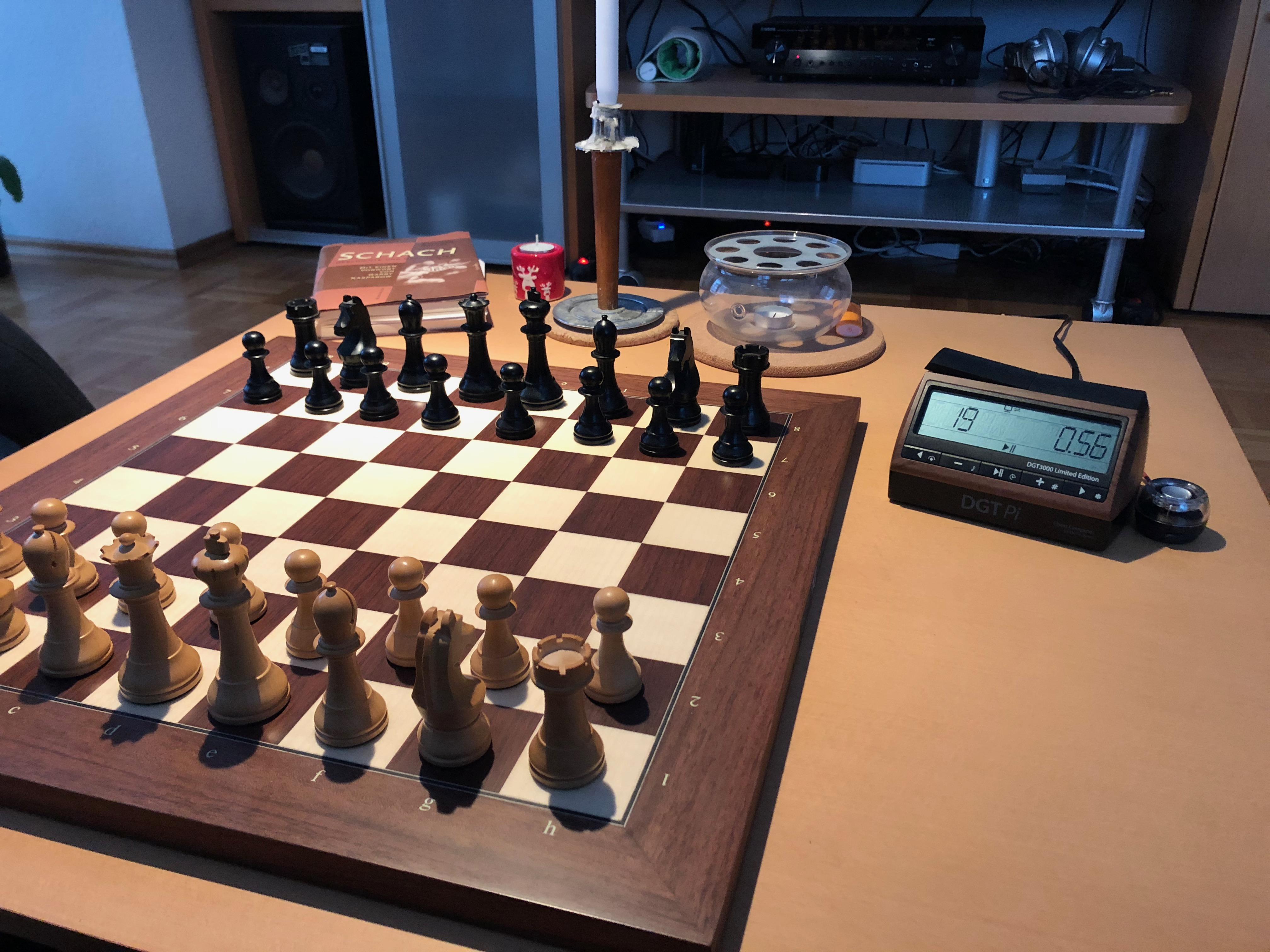
I am still enjoying and using my -in the meantime upgraded to RASP 3B+ - limited edition DGTPI with picochess more than ever.


IMG_0053.jpeg


Show me one chess computer (or even Android chess app with DGT support ;-) which offers engines like the original TuroChamp paper engine, Bernstein - the very first running computer program, Konrad Zuses Plankalkül or even  Leela side by side on one system.


IMG_4224.jpeg


 If you like old historic engines/chess computers like me, see my posting below about SARGON…


And with my new flexible ponder mode you can analyze positions and variants even more directly and easily than with any other chess computer I think (the good old TASC R30 chess computer offered similar analysis options).


Personal Picochess 1.0 Release


What I actually did is creating a personal 1.0 release for my own pleasure trying to enhance some of the things which really have bothered me since some time and still bother me in version 0.9N.


Maybe your are interested in these enhancements as well so I thought I would share my changes - but I take no responsibility for damaging your Raspberry Pi or DGTPI if you use any of these modifications ;-)


By the way 0.9N in general is a very good working Picochess version - so no need to really change something if you are happy with it.


I just have learned Python some months ago and although I still don’t understand the picochess code  in all details and although I am not a really good python programmer at all I have changed the following things:


Smaller enhancements:


  • Voice move announcements even if remaining time is less than 1 minute
  • Possibility to continue playing even if computer or player runs out of time
  • Bugfix for the original remote function (without the room/nickname handling): Now remote mode works again by simply switching to remote mode on the DGTPi/clock and playing against an opponent via the webserver (if you forward the port (8080) in your router you can even play via internet - I have checked this and It works perfectly. 

IMG_4228.jpeg


Just enter the remote mode on the clock/DGTPI and the opponent can enter his moves directly via the webserver:


IMG_4229.jpeg


Pasted Graphic.jpg


The webserver move is transferred to the clock and displayed like the answer move of the engine. 

IMG_4230.jpeg


Dirk

unread,
Dec 17, 2018, 2:27:49 PM12/17/18
to PicoChess

Bigger enhancements:


  • Fast moves/Pre-Move: Now you can play the engine move and your own move as fast as possible (even in the wrong sequence!) That was the main reason I started with these enhancements and with this enhancement I enjoy planing with my DGTPI even more!


Example:

Computer answers with move Nf6 which is displayed:


IMG_4234.jpeg


You can execute your answer move even before executing the computer move:


e5 played before Nf6


IMG_4235.jpeg


Picochess agrees ;-)


IMG_4242.jpeg


Dirk

unread,
Dec 17, 2018, 2:31:18 PM12/17/18
to PicoChess
  • Flexible Ponder Mode (that was a tough one until it finally worked): Possibility to set up positions without pressing any buttons and doing moves independent if they are legal or not and possibility to change the side which should move next. Of course the resulting position itself must always be a legal one. By this one can analyze and quickly positions and different variations of a specific position (eg. You might ask what if it is the run of the other side (simply other side would be

IMG_4211.jpeg


Example:


Staring with start position and this (stockfish) evaluation:

IMG_4214.jpeg


Just remove the rock on h1 and wait&see what happens:


IMG_4215.jpeg


After having set up a position this way it could be necessary to change the player’s turn. That’s why I have implemented the Switching Turn function to the lever (it had no function at all in analysis modes) so that you can easily control who’s turn it is. 


  • A new historic engine: (Almost) Original SARGON chess program from 1978 (see P.S:)

IMG_4219.jpeg


Here is the github repository  where you can download all my changes (actually it is a copy of the 0.9N version plus my enhancements)


https://github.com/tosca07/picochess


Files to update (just copy/rename your original files and replace these with the following 3 files):


  • in /opt/picochess:        picochess.py, utilities.py
  • In /opt/picochess/dgt: menu.py


At the moment I won’t publish the changes to the original picochess master branch because these are personal enhancements which can not be switched off and not all users might be happy with these changes.


Enjoy the holidays & Picochess and I wish you all a happy new year!

Dirk


P.S. A litte Xmas gift:


A blast from the past: New historic engine for picochess: SARGON (1978)


Would you like to play against the original SARGON chess program written by Kathe & Dan Spracklen in 1978 on your picochess computer?


Now you can.


Somebody (converted the original assembler code to the Lua language (similar to python), see https://github.com/Chessforeva/Lua4chess


Like I have posted the way to include python engines we are also able to include Lua chess engines.

Just copy the file sargon_uci.lua to the engine directory and create a symbolic link with name sargon_uci to it (see my posting for adding python engines but you don’t need to copy/clone the whole Lua chess reporsitory). Furthermore you need the sargon.uci file as well which you have to create manually, see below. 


Of course the original code did not know anything about uci so together with the help of Martin (author of the PyTuroChamp  engine/Github project, see https://github.com/mdoege/PyTuroChamp ) we have written a uci wrapper for the  original engines: sargon_uci.lua in Github repository https://github.com/tosca07/Lua4chess


It was very difficult because the original engine has no FEN string handling at all. Nevertheless I tried to even add simple (just one move) take back functionality bit of course because of the missing FEN handling you can’t set up a position and pondering/brain is also not possible. 

But for a straight forward game it’s perfect and really fun to play with (even though it is not strong at all at the original level).


sargon.uci


[Original]

Plymax = 2

NoBook = FALSE

NoRandom = FALSE


[1 - Level]

Plymax = 1

NoBook = FALSE

NoRandom = FALSE


[2 - Level]

Plymax = 2

NoBook = FALSE

NoRandom = FALSE


[3 - Level]

Plymax = 3

NoBook = FALSE

NoRandom = FALSE


[4 - Level]

Plymax = 4

NoBook = FALSE

NoRandom = FALSE


Philip

unread,
Dec 18, 2018, 7:36:43 AM12/18/18
to PicoChess
Thank you!

I'm looking forward to playing via the web server!

Dirk

unread,
Dec 18, 2018, 8:22:57 AM12/18/18
to PicoChess
Regarding the remote play option via webserver:

Unfortunately because of the on going maintenance action on side of the database server for the book and game history information the remote play also does not work at the moment.

I have no idea why problems with the database information server for the pico webserver can cause a problem for the (local) remote play option.

Anyway when the database backend maintenance has been finished it should work again (actually without an Internet connection to the outside world it does work already - very strange)

Dirk
Message has been deleted

Scally

unread,
Dec 18, 2018, 8:35:18 AM12/18/18
to PicoChess
Hi Dirk,

Great work!!

I had the privilege to test your pre-move and remote play enhancements recently, but your flexible Ponder mode was a complete surprise to me. I have now added your enhancements and together with your bonus Sargon engine, they all work a treat.

I’ll post a picture in desktop mode after this post.


Thanks again,

Al.
Message has been deleted

Al

unread,
Dec 18, 2018, 8:43:48 AM12/18/18
to PicoChess
3E2ECFA5-7F2F-48BD-B069-DB178BFBD47A.jpeg

Jürgen Precour

unread,
Dec 18, 2018, 9:33:21 AM12/18/18
to PicoChess
Hi Dirk,

GOOD LUCK!
Finally someone picks up the staff and keeps running.

May i propose something?
- you dont need to delete & recreate files with git
- version should be 1.00 not 1.0 cause the "." can only be made this way on dgt clocks

And who is "molly"??? :-)

Jürgen

Message has been deleted

Al

unread,
Dec 18, 2018, 9:47:19 AM12/18/18
to PicoChess
Hi Jürgen,

Yeah that looks better.

My photos keep posting upside down?

Al.
69A476C8-B03E-4D3D-989C-3B49BDE95377.jpeg

Dirk

unread,
Dec 18, 2018, 10:12:07 AM12/18/18
to PicoChess
Thanks Jürgen - nice to here from you, really!

This could only be possible because of your great and other developers great work in the past!

I am still learning - so don't look at my code changes too closely ;-)

Dirk

Wardy

unread,
Dec 18, 2018, 1:53:53 PM12/18/18
to PicoChess
Great work! Now how do I tweak this to run on a nondgt pi?

Edit the picochess.ini I can see, anything else?

Al

unread,
Dec 18, 2018, 2:04:19 PM12/18/18
to PicoChess
Hi Paul,

You have Rev2, it can emulate the DGT Pi menu

Al.

Al

unread,
Dec 18, 2018, 2:08:14 PM12/18/18
to PicoChess
.... email sent.

Al.

DJ Dekker

unread,
Dec 18, 2018, 3:53:32 PM12/18/18
to PicoChess
Hi Dirk,

Thank you very much for making your Picochess 1.00 available to all of us! I have installed it on my DGTPi. It works like a charm.

I'm happy especially with the 'pre-move' function that has come back now. It makes bullet games possible again!

Cheers,
DJ


Op maandag 17 december 2018 20:24:58 UTC+1 schreef Dirk:

Dirk

unread,
Dec 18, 2018, 5:19:48 PM12/18/18
to PicoChess
Hi DJ,

glad that especially you like the pre-move function - your videos in my issue thread on Github kept me working on this because saw that it must be possible ;-)

This enhancement has changed completely the user experience with my DGTPI  - it is now really a joy for me to play (not only Blitz and bullet games - obviously I was a very fast mover...

When the database backend changes have been finished the remote play option via the remote server should also be possible again.

I keep you all updated...

Enjoy 
Dirk  

Dirk

unread,
Dec 22, 2018, 3:02:49 AM12/22/18
to PicoChess
Some updates:

1. Remote Play Option in Webserver

I have implemented a short work around so that an error while calling the backend database for the game information won't stop the remote move from being transferred to the clock/DGT Pi.

If you want to use the remote play option then please also update the file 

app.js

in /opt/picochess/web/picocweb/static/js


Furthermore I have added the possibility to switch sides in remote mode (the lever had no function in remote play). Now you can switch sides also in remote play mode.


2. Flexible Ponder Mode

I did a few bugfixes which should make the detection of a new position more solid.

Just update the picochess.py file in /opt/picochess folder.


Keep in mind that ponder modes (analyze, kiebitz, (flexible)ponder only work with engines which fully support the ponder option (otherwise you will get strange results, eg even the newest Leela lc0 does not support it fully). I suggest/use stockfish for this.

The flexible ponder mode works like the old ponder mode except if you do an illegal move (because you want to set up a new position etc.) picochess will register the new position (this can last up to 3 or so seconds by the way) and starts the best move search again.

You can see if picochess detected a a new position because you won't get the confirmation message (ok player if have set on) and the move count starts again from number 1 on and no automatic switch of the current side to play will happen (otherwise if you do a legal move it will continue counting and switching sides).

If the new position would be illegal it would automatically switch to the other side (eg. when white king would be in check and black to play it would switch to white). If also the position with the other players turn would be illegal(eg both kings are in check) then you would get a "set pieces" message.

If you would like to switch the players turn then just press the lever. 


3. SARGON engine

As the Sargon engine written in lua has only basic uci support (the FEN string handling is missing/not possible) you have to switch off picochess opening books and of course ponder/brain is not possible at all. 


Wishing you all happy holidays and perhaps some nice play with picochess 1.0 ;-)

Regards
Dirk

Dirk

unread,
Dec 22, 2018, 3:03:51 AM12/22/18
to PicoChess

Dirk

unread,
Dec 22, 2018, 3:05:29 AM12/22/18
to PicoChess
and I always forget to mention:


A big Thanks to Al for his testing - thank you so much...

DJ Dekker

unread,
Dec 24, 2018, 5:16:30 AM12/24/18
to PicoChess
Hi Dirk,

There seems to be an incompatibility with python-chess 0.24.1 (the Python 3.x-only version).

After playing 1.e4 the engine's clock starts running and no move is announced anymore. From the log file I gather that something is wrong with the FEN processing.

In the meantime I downgraded python-chess to 0.23.10 and Picochess is working again.

Here is my log (using python-chess 0.24.1):

2018-12-24 10:54:11.139   DEBUG      board - _process_board_message: 
rnbqkbnr
pppppppp
........
........
....P...
........
PPPP.PPP
RNBQKBNR
2018-12-24 10:54:11.141   DEBUG      board - _process_board_message: raw fen [rnbqkbnr/pppppppp/8/8/4P3/8/PPPP1PPP/RNBQKBNR]
2018-12-24 10:54:11.144   DEBUG    display - run: received message from msg_queue: MSG_DGT_FEN
2018-12-24 10:54:11.154   DEBUG    display - _process_fen: DGT-Fen [rnbqkbnr/pppppppp/8/8/4P3/8/PPPP1PPP/RNBQKBNR]
2018-12-24 10:54:11.160   DEBUG  picochess - main: received event from evt_queue: EVT_FEN
2018-12-24 10:54:11.164    INFO  picochess - process_fen: standard move detected
2018-12-24 10:54:11.167    INFO  picochess - user_move: user move [e2e4] sliding: False
2018-12-24 10:54:11.173   DEBUG    display - run: received message from msg_queue: MSG_CLOCK_STOP
2018-12-24 10:54:11.184   DEBUG dispatcher - run: received command from dispatch_queue: DGT_CLOCK_STOP devs: i2c,web,ser
2018-12-24 10:54:11.187   DEBUG dispatcher - run: (i2c) max timer not running => processing command: DGT_CLOCK_STOP
2018-12-24 10:54:11.189   DEBUG dispatcher - _process_message: (i2c) handle DgtApi: DGT_CLOCK_STOP
2018-12-24 10:54:11.193   DEBUG dispatcher - run: (ser) max timer not running => processing command: DGT_CLOCK_STOP
2018-12-24 10:54:11.194   DEBUG      iface - _process_message: (i2c) handle DgtApi: DGT_CLOCK_STOP started
2018-12-24 10:54:11.196   DEBUG dispatcher - _process_message: (ser) handle DgtApi: DGT_CLOCK_STOP
2018-12-24 10:54:11.197   DEBUG      iface - _process_message: (i2c) clock is already stopped
2018-12-24 10:54:11.199   DEBUG dispatcher - _process_message: (ser) clock still not registered => ignore DGT_CLOCK_STOP
2018-12-24 10:54:11.200   DEBUG      iface - _process_message: (i2c) handle DgtApi: DGT_CLOCK_STOP ended
2018-12-24 10:54:11.573    INFO  picochess - stop_search_and_clock: engine already waiting
2018-12-24 10:54:11.575    INFO timecontrol - add_time: before internal time w:(0, 1, 1) - b:(0, 1, 1)
2018-12-24 10:54:11.576    INFO timecontrol - add_time: after internal time w:(0, 1, 2) - b:(0, 1, 1)
2018-12-24 10:54:11.584    INFO  picochess - user_move: starting think()
2018-12-24 10:54:11.589    INFO timecontrol - start_internal: start internal time w:(0, 1, 2) - b:(0, 1, 1) [ign]
2018-12-24 10:54:11.591   DEBUG picotalker - run: announcing USER_MOVE_DONE [e2e4]
2018-12-24 10:54:11.606    INFO timecontrol - start_internal: received clock time w:(0, 1, 2) - b:(0, 1, 1) [use]
2018-12-24 10:54:11.606    INFO         pi - _process_incoming_clock_forever: (i2c) clock new time received l:[0, 1, 1] r:[0, 1, 1]
2018-12-24 10:54:11.600   DEBUG    display - run: received message from msg_queue: MSG_USER_MOVE_DONE
2018-12-24 10:54:11.619   DEBUG timecontrol - start_internal: internal timer started - color: False run: None active: False
2018-12-24 10:54:11.622   DEBUG    display - run: received message from msg_queue: MSG_DGT_CLOCK_TIME
2018-12-24 10:54:11.631   DEBUG    display - run: received message from msg_queue: MSG_CLOCK_START
2018-12-24 10:54:11.642   DEBUG dispatcher - run: received command from dispatch_queue: DGT_CLOCK_SET devs: i2c,web,ser
2018-12-24 10:54:11.645   DEBUG dispatcher - run: (i2c) max timer not running => processing command: DGT_CLOCK_SET
2018-12-24 10:54:11.647   DEBUG dispatcher - _process_message: (i2c) handle DgtApi: DGT_CLOCK_SET
2018-12-24 10:54:11.652   DEBUG dispatcher - run: (ser) max timer not running => processing command: DGT_CLOCK_SET
2018-12-24 10:54:11.653   DEBUG      iface - _process_message: (i2c) handle DgtApi: DGT_CLOCK_SET started
2018-12-24 10:54:11.654   DEBUG dispatcher - _process_message: (ser) handle DgtApi: DGT_CLOCK_SET
2018-12-24 10:54:11.656   DEBUG         pi - set_clock: (i2c) clock received last time from clock l:(0, 1, 1) r:(0, 1, 1) [ign]
2018-12-24 10:54:11.657   DEBUG dispatcher - _process_message: (ser) clock still not registered => ignore DGT_CLOCK_SET
2018-12-24 10:54:11.658   DEBUG         pi - set_clock: (i2c) clock sending set time to clock l:(0, 1, 2) r:(0, 1, 1) [use]
2018-12-24 10:54:11.660   DEBUG dispatcher - run: received command from dispatch_queue: DGT_CLOCK_START devs: i2c,web,ser
2018-12-24 10:54:11.662   DEBUG      iface - _process_message: (i2c) handle DgtApi: DGT_CLOCK_SET ended
2018-12-24 10:54:11.664   DEBUG dispatcher - run: (i2c) max timer not running => processing command: DGT_CLOCK_START
2018-12-24 10:54:11.667   DEBUG dispatcher - _process_message: (i2c) handle DgtApi: DGT_CLOCK_START
2018-12-24 10:54:11.672   DEBUG dispatcher - run: (ser) max timer not running => processing command: DGT_CLOCK_START
2018-12-24 10:54:11.674   DEBUG      iface - _process_message: (i2c) handle DgtApi: DGT_CLOCK_START started
2018-12-24 10:54:11.675   DEBUG dispatcher - _process_message: (ser) handle DgtApi: DGT_CLOCK_START
2018-12-24 10:54:11.676   DEBUG         pi - start_clock: (i2c) clock sending start time to clock l:(0, 1, 2) r:(0, 1, 1)
2018-12-24 10:54:11.678   DEBUG dispatcher - _process_message: (ser) clock still not registered => ignore DGT_CLOCK_START
2018-12-24 10:54:11.684   DEBUG      iface - _process_message: (i2c) handle DgtApi: DGT_CLOCK_START ended
2018-12-24 10:54:12.622    INFO         pi - _process_incoming_clock_forever: (i2c) clock new time received l:[0, 1, 2] r:[0, 1, 1]
2018-12-24 10:54:12.626   DEBUG    display - run: received message from msg_queue: MSG_DGT_CLOCK_TIME
2018-12-24 10:54:13.357    INFO  picochess - expired_fen_timer: wrong fen rnbqkbnr/pppppppp/8/8/8/8/PPPP1PPP/RNBQKBNR for 3secs

Greetings,
DJ

Scally

unread,
Dec 24, 2018, 5:31:03 AM12/24/18
to PicoChess
Hi DJ,

Yes with other programs installed on my DGT Pi, my python-chess had been upgraded recently.

PicoChess requirements.txt is not up to date, as Jürgen has stopped coding. When I had similar problems to you I ran:
sudo pip3 install --upgrade -r requirements.txt

this put my python-chess back to 0.22.1, not ideal, but PicoChess worked again.

There’s obviously some PicoChess program changes required before we update requirements.txt


Al.

Dirk

unread,
Dec 24, 2018, 5:40:23 AM12/24/18
to PicoChess
Hello,

do you think it is a specific Picochess 1.0 or a general problem?

I have not changed the standard FEN processing logic in normal playing mode.

And like Al I also did "sudo pip3 install --upgrade -r requirements.txt" and now I am on python-chess 0.22.1 and did not encounter any FEN problems.

At the moment  I am on a holiday trip so I can't check...

Dirk

Scally

unread,
Dec 24, 2018, 5:48:22 AM12/24/18
to PicoChess
Hi Dirk,

I’m pretty sure my problems were prior to your v1.00 release, so I think it’s a general PicoChess problem not with your changes.

There’s probably something new with python-chess 0.24.1 that will require a minor tweak in the PicoChess code. These are the sort of things Jürgen picked up on and he would also update requirements.txt.


Al.

DJ Dekker

unread,
Dec 24, 2018, 8:20:31 AM12/24/18
to PicoChess
Hi Dirk and Al,

The problem is not typical for PicoChess 1.00. I have just tested PicoChess 0.9n from the 'official' Github repository with python-chess 0.24.1 and found the same result: no answer after White's first move.

I think Al is correct in suggesting that the PicoChess code needs some minor tweak to make it compatible.

Greetings,
and Merry Christmas!
DJ


Op maandag 24 december 2018 11:48:22 UTC+1 schreef Scally:

Dirk

unread,
Dec 31, 2018, 8:16:28 AM12/31/18
to PicoChess
Yep, 0.23.11 is the last python version which works with the current picochess code.

Looks like Niklas renamed some chess class methods in 0.24.0 and with 0.24.1 he got rid of the aliases which pointed to the old names.

Unfortunately I was not able to figure out at a first glance which picochess routines might be broken because of this...

So for now we have to be happy with release 0.23.11 ;-)


Happy new year to all picochess users!

Dirk

josc...@gmail.com

unread,
Jan 2, 2019, 10:44:29 AM1/2/19
to PicoChess
Hi Dirk,

your PicoChess 1.0 is now also working on my DGTPi without any problems so far. Thank you to you and all contributors!
And by the way, happy new year to everyone.

-Joscho

Dott. Geol. Fabio Facciaroni

unread,
Jan 2, 2019, 10:47:13 AM1/2/19
to pico...@googlegroups.com
Does it function on Raspberry 2 or 3 ? Or only on DGT Pi?
Thank you and happy new year

--
You received this message because you are subscribed to the Google Groups "PicoChess" group.
To unsubscribe from this group and stop receiving emails from it, send an email to picochess+...@googlegroups.com.
For more options, visit https://groups.google.com/d/optout.


--
Dott. Geol. Fabio Facciaroni
Studio in: via Annèo Lucano, 26 - 00136 Roma
via di Monte Rosso, 4 - 00060 Sacrofano
think before you print: 3 sheets of A4 paper = 1 litre of water

Dirk

unread,
Jan 2, 2019, 12:20:58 PM1/2/19
to PicoChess
Thanks for the feedback Joscho - good to know that some pico users tried this version and maybe find it even useful ;-)
Dirk

Dirk

unread,
Jan 2, 2019, 12:25:19 PM1/2/19
to PicoChess
My enhancements should work with every Rasp.on which version 0.9N ran - I have not used any specific DGTPI hardware functions...
Dirk

Shivkumar Shivaji

unread,
Jan 2, 2019, 12:46:02 PM1/2/19
to pico...@googlegroups.com
I tried 1.0 and installed it for my father on the non DGTPI clock with the USB board during the holidays.

The new books/engines, and other feature updates are great!

Shiv

--

Shivkumar Shivaji

unread,
Jan 2, 2019, 12:48:45 PM1/2/19
to pico...@googlegroups.com
Minor comments: 

1. I think we should have wifi and webserver by default on Picochess.
2. The algebraic notation is hard to read for new users (lower case letters are hard), maybe we can switch to upper case only for long notation, e.g. E2E4

3. The takeback feature is just great!!
4. Games should be automatically emailed after setting up Picochess.


Dirk

unread,
Jan 12, 2019, 2:03:20 PM1/12/19
to PicoChess
Hello,

I just did a small bug fix regarding my premove/fast move handling for the BRAIN mode in case of a ponder hit. If you have a ponder hit and in addition you did a premove or very fast sequence of the computer & your own move, picochess could crash (the engine task - time would continue to run).

I fixed that.

Just replace the picochess.py file in /opt/picochess with the updated version from Github: https://github.com/tosca07/picochess


Thanks
Dirk


P.S.

This is what I am working at the moment ;-)


Vicente O

unread,
Jan 14, 2019, 8:49:48 AM1/14/19
to PicoChess
Hello Dirk,
Are you planning to add an online playing feature? I would find it fantastic. Playing with other Picochess users or Lichess users.
Regards
Vicente

Dirk

unread,
Jan 16, 2019, 4:10:25 AM1/16/19
to PicoChess
Hi Vicente,

sorry, no plans yet.

Actually I think picochess (or any other chess program) with a standard DGT Board is not the best system for playing online - at least this is my experience when I played online via Fritz or the acid ape chess app.

It is almost impossible to play rapid or even blitz games and even with longer game times you will get trouble in phases of Zeitnot because in online chess time is running continuously and won't stop for doing the opponent move and you always first have to listen to the opponents move or read it from the clock before executing it.

I think board LEDs would definitely help so Revelation II owners might have better experiences.

Furthermore the spartan clock interface is also not the best option for online play especially if you would like to match a specific player etc.

If you want to play against a friend via internet you could do this already via the remote play mode but of course that's not the same like playing on a chess server platform like lichess.

And the main reason: I still don't have enough programming skill to do this ;-)  - although in future I might look into a more simple telnet connection to the FICS server...

Dirk

Jürgen Precour

unread,
Feb 12, 2019, 5:21:35 AM2/12/19
to PicoChess
Hi Dirk,

concerning your python-chess problem (v24 and higher):

you must change:

choice = bookreader.weighted_choice(game_copy, self.excludemoves)

to

choice = bookreader.weighted_choice(game_copy, exclude_moves=self.excludemoves)


I call this my goodbye gift :-)

Jürgen

Topschach Benny

unread,
Feb 12, 2019, 5:53:09 AM2/12/19
to PicoChess
Thanks! :-)

You're the MAN!

Jürgen Precour

unread,
Feb 12, 2019, 11:21:34 AM2/12/19
to PicoChess
not REALLY....cause i missed:

bit_board = Board(message.fen, message.uci960)
to
bit_board = Board(message.fen, chess960=message.uci960)

Might be more similar issues...
I leave this as homework & easy start point to get used the bad guy coding, ha.

Jürgen

Dirk

unread,
Feb 13, 2019, 1:31:04 AM2/13/19
to PicoChess
Thank you Jürgen for the hints regarding upgrading to higher python-chess versions.
I will have a look when I have some time but it is really a great help to find all places to be changed.

I remember that also the web server always displayed an ERROR status message when I tried a v24...there might be more players but I will check when I have time...

Thanks!

Dirk
Reply all
Reply to author
Forward
0 new messages