
Bluetooth manager not working in the GUI - bluetooth adapter and DGT board detected - no pairing
164 views
Skip to first unread message

Santiago Torres
May 24, 2015, 4:39:47 PM5/24/15
to pico...@googlegroups.com
Dear friends,
I installed all the updates for raspberry pi2 and picochess 0.33. When, I tried to get the bluetooth connection working, the sub menus of bluetooth manager did not work in the GUI. I could check that the bluetooth dongle seems to work and also the DGT board is detected, however I am unable to pair both devices (nor using the window terminal). When I try to pair via window terminal, it appears many error msgs. Please, maybe some of you have some solution.
Thanks in advance for your help.
Best regards,
Santiago
I installed all the updates for raspberry pi2 and picochess 0.33. When, I tried to get the bluetooth connection working, the sub menus of bluetooth manager did not work in the GUI. I could check that the bluetooth dongle seems to work and also the DGT board is detected, however I am unable to pair both devices (nor using the window terminal). When I try to pair via window terminal, it appears many error msgs. Please, maybe some of you have some solution.
Thanks in advance for your help.
Best regards,
Santiago

DJ Dekker
May 28, 2015, 10:44:21 AM5/28/15
to pico...@googlegroups.com
What board and clock are you using?
Op zondag 24 mei 2015 22:39:47 UTC+2 schreef Santiago Torres:
What error messages do you get?
Do you see this in the Bluetooth Manager window?
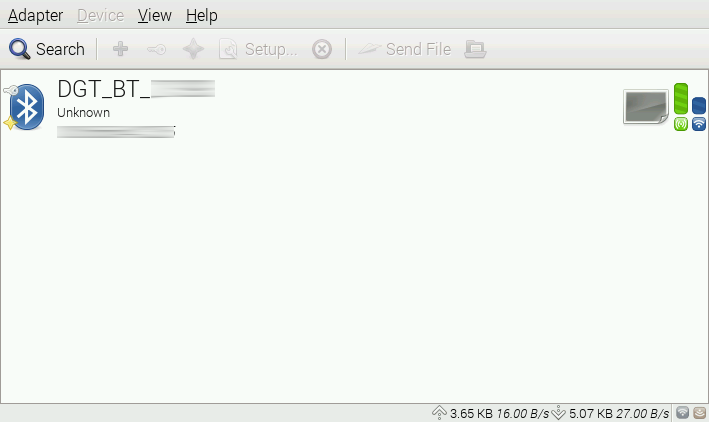
Op zondag 24 mei 2015 22:39:47 UTC+2 schreef Santiago Torres:
Santiago Torres
May 28, 2015, 12:57:23 PM5/28/15
to pico...@googlegroups.com
Thanks friend,
I am using a DGT Bluetooth Chess board with the DGT 3000. When I use picochess with usb it works normal. When I enter into the GUI, I can not see that window with the device. In fact, I can not enter to the sub menus of the Bluetooth manager. In the weekend I will send pictures about what exacltly I am getting.
I typed some commands in the terminal window and could check that the DGT board is detected by the bluetooth device; only that. I will print the error msg from the terminal window in the weekend.
I dont know if the upgrade that I did to the bluetooth drivers (according to one threat in this forum from Wardy) and the fimware ugrade has something to do with the problem.?
The initial image that I used was 0.33 with Raspberry Pi2. Now, picochess shows 0.39 version.
Best Regards,
Santiago
I am using a DGT Bluetooth Chess board with the DGT 3000. When I use picochess with usb it works normal. When I enter into the GUI, I can not see that window with the device. In fact, I can not enter to the sub menus of the Bluetooth manager. In the weekend I will send pictures about what exacltly I am getting.
I typed some commands in the terminal window and could check that the DGT board is detected by the bluetooth device; only that. I will print the error msg from the terminal window in the weekend.
I dont know if the upgrade that I did to the bluetooth drivers (according to one threat in this forum from Wardy) and the fimware ugrade has something to do with the problem.?
The initial image that I used was 0.33 with Raspberry Pi2. Now, picochess shows 0.39 version.
Best Regards,
Santiago

Shivkumar Shivaji
May 28, 2015, 1:00:17 PM5/28/15
to pico...@googlegroups.com
For bluetooth, you don’t need to do anything. It should work automatically when using the downloaded image. However, if you upgraded the firmware, it will fail. What kernel version do you now have? The latest raspberry pi kernels break bluetooth support.
Shiv
--
You received this message because you are subscribed to the Google Groups "PicoChess" group.
To unsubscribe from this group and stop receiving emails from it, send an email to picochess+...@googlegroups.com.
For more options, visit https://groups.google.com/d/optout.
Santiago Torres
May 28, 2015, 1:14:02 PM5/28/15
to pico...@googlegroups.com
I am not at home right now, but I did that firmware upgrade with the following command
sudo rpi-update
and also the app upgrade using
sudo apt-get update
and also this one
sudo apt-get install bluetooth bluez-utils blueman
Is there a way to re-do that?? Maybe installing the original 0.33 img??
Best regards,
Santiago
sudo rpi-update
and also the app upgrade using
sudo apt-get update
and also this one
sudo apt-get install bluetooth bluez-utils blueman
Is there a way to re-do that?? Maybe installing the original 0.33 img??
Best regards,
Santiago

bostermann
May 28, 2015, 2:49:09 PM5/28/15
to pico...@googlegroups.com
Hallo,
try this:
hcitool scan
so you get the adress of your DGT Board (Example 00:06:66:04:FD:17)
sudo bluez-simple-agent hci0 *Adress of your DGT Board"
now your are asked for a pairing pin
0000
now edit the rfcomm0 file
sudo nano /etc/bluetooth/rfcomm.conf
change the Adress inside the File to the Adress of your Board
rfcomm0 {
bind yes;
device *Adress of your DGT Board";
channel 1;
Comment "DGT Bluetooth Board";
}
sudo reboot
This worked for me.
Bernd
Shivkumar Shivaji
May 28, 2015, 3:47:29 PM5/28/15
to pico...@googlegroups.com
For the hcitool stuff to work, you need to downgrade the image or go back whatever is on image. If you upgrade the raspberry pi kernel, then bluetooth will break. This is due to a linux kernel bug on certain versions.
Shiv
Santiago Torres
May 30, 2015, 10:16:21 AM5/30/15
to pico...@googlegroups.com
Hi friends, I had to re-install the 0.33 picochess image and update or download the bluetooth default drivers. Then I did what bostermann said in the last email. Now my bluetooth functionality is working. I am seeing PIC 0.39 version. The response is a little bit slow maybe because of the bluetooth connection.
Thanks to all,
Regards,
Santiago
Thanks to all,
Regards,
Santiago
Shivkumar Shivaji
May 30, 2015, 3:05:45 PM5/30/15
to pico...@googlegroups.com
If you reinstalled the image from picochess 0.33, you don't have to do anything with the GUI, it should just work on boot.
Curious why you had to.
Sent from my iPhone
Sent from my iPhone
DJ Dekker
May 30, 2015, 3:12:10 PM5/30/15
to pico...@googlegroups.com
Op zaterdag 30 mei 2015 21:05:45 UTC+2 schreef sshivaji:
If you reinstalled the image from picochess 0.33, you don't have to do anything with the GUI, it should just work on boot.Curious why you had to.
The image seems to contain the Mac address of Jonas' DGT board. Similarly, it contains the SSID of two wireless networks that nobody else is likely to have. :)
Shivkumar Shivaji
May 30, 2015, 3:16:26 PM5/30/15
to pico...@googlegroups.com, pico...@googlegroups.com
It should attempt to scan and pair with any Bluetooth dgt board , not just Jonas's. We can fix this.
Wireless ssid, though they should not be on the image, won't affect Bluetooth pairing :)
Shiv
Sent from my iPhone
Sent from my iPhone
--
Santiago Torres
May 30, 2015, 3:26:51 PM5/30/15
to pico...@googlegroups.com
Before updating the bluetooth drivers and doing anything, I tried scanning the board and the see if the dgt board was paired with the bluetooth dongle, but it did not work. Therefore, I had to update (or install) the bluetooth drivers. Maybe my dongle was not detected by the original drivers on 0.33 image. I did not have problems setting the wifi network, even when there are two settings there, they did not affect anything.
Santiago
Santiago

Jonas Žnidaršič
May 30, 2015, 6:47:20 PM5/30/15
to pico...@googlegroups.com
Dne sobota, 30. maj 2015 21.12.10 UTC+2 je oseba DJ Dekker napisala:
The image seems to contain the Mac address of Jonas' DGT board.
Oops, did I forget to delete the /etc/bluetooth/rfcomm.conf? This will break auto bluetooth connection. AAAAAAARGH ...
If you delete this file, your bluetooth dongle should connect to the board on first boot without setting or installing anything.
I'll release a new (0.39) image pronto.
Similarly, it contains the SSID of two wireless networks that nobody else is likely to have. :)
Both are my home wireless networks, but as they don't interfere with Picochess operation when away, I don't bother to delete them before releasing the images.
But /etc/bluetooth/rfcomm.conf has to go.
-Izmet Fekali
Reply all
Reply to author
Forward
0 new messages