
How do you confirm WAL is properly streaming?
4,294 views
Skip to first unread message

Jeremiah Petersen
Oct 25, 2016, 3:52:12 PM10/25/16
to Barman, Backup and Recovery Manager for PostgreSQL
I have set up our database cluster like Scenario 2b from the 2.0 docs:
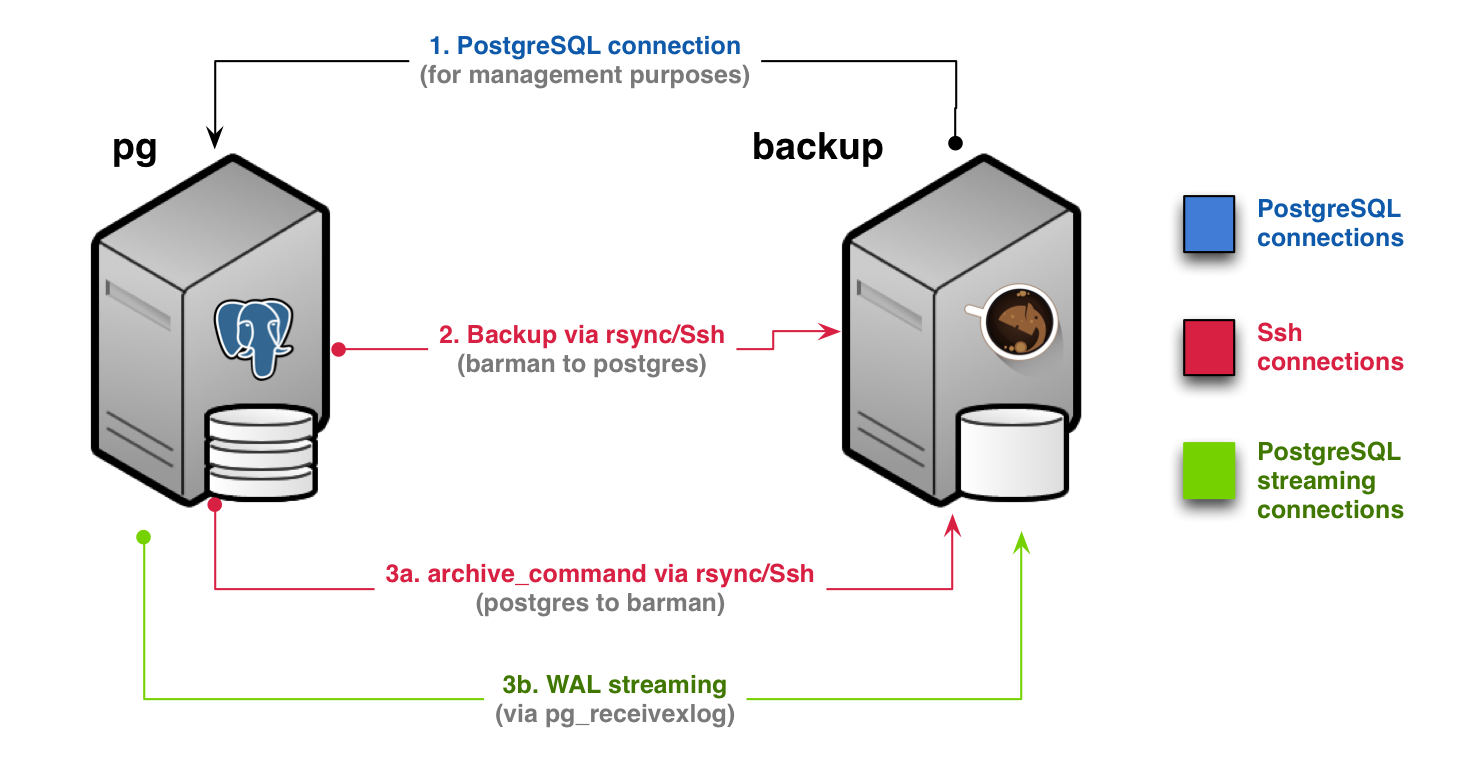
To do this, I set up to servers in the barman config, a ssh-server and a stream-server. I believe that everything is set up correctly, but I am not seeing any the WAL update as I would expect. Checking the logs, I see these two lines repeated:
2016-10-25 19:37:01,764 [5597] barman.wal_archiver INFO: No xlog segments found from file archival for ssh-server.
2016-10-25 19:37:01,774 [5598] barman.wal_archiver INFO: No xlog segments found from streaming for stream-server.
The other line in the log that I find concerning is this:
2016-10-25 17:55:29,256 [2424] barman.wal_archiver INFO: Synchronous WAL streaming for barman_receive_wal: False
When I run check on either server, everything looks ok to me:
>> barman check stream-server
Server stream-server:
PostgreSQL: OK
superuser: OK
PostgreSQL streaming: OK
wal_level: OK
replication slot: OK
directories: OK
retention policy settings: OK
backup maximum age: OK (no last_backup_maximum_age provided)
compression settings: OK
failed backups: OK (there are 0 failed backups)
minimum redundancy requirements: OK (have 2 backups, expected at least 0)
pg_basebackup: OK
pg_basebackup compatible: OK
pg_basebackup supports tablespaces mapping: OK
pg_receivexlog: OK
pg_receivexlog compatible: OK
receive-wal running: OK
archiver errors: OK
>> barman check ssh-api
Server ssh-api:
PostgreSQL: OK
superuser: OK
wal_level: OK
directories: OK
retention policy settings: OK
backup maximum age: OK (interval provided: 1 day, latest backup age: 22 hours, 50 minutes)
compression settings: OK
failed backups: OK (there are 0 failed backups)
minimum redundancy requirements: OK (have 1 backups, expected at least 0)
ssh: OK (PostgreSQL server)
not in recovery: OK
archive_mode: OK
archive_command: OK
continuous archiving: OK
archiver errors: OK
Both incoming wals directories have a directory with files in them:
>> ls -la /var/lib/barman/ssh-server/wals/0000000100000001/
total 2356
drwxr-xr-x 2 barman barman 4096 Oct 25 18:51 .
drwxr-xr-x 3 barman barman 4096 Oct 24 20:47 ..
-rw------- 1 barman barman 27768 Oct 24 20:47 00000001000000010000005E
-rw------- 1 barman barman 27163 Oct 24 20:47 00000001000000010000005F
-rw------- 1 barman barman 205 Oct 24 20:47 00000001000000010000005F.00000028.backup
-rw------- 1 barman barman 2174167 Oct 25 18:22 000000010000000100000060
-rw------- 1 barman barman 27167 Oct 25 18:22 000000010000000100000061
-rw------- 1 barman barman 191 Oct 25 18:22 000000010000000100000061.00000028.backup
-rw------- 1 barman barman 101909 Oct 25 18:50 000000010000000100000062
-rw------- 1 barman barman 27168 Oct 25 18:50 000000010000000100000063
-rw------- 1 barman barman 189 Oct 25 18:50 000000010000000100000063.00000028.backup
>> ls -la /var/lib/barman/stream-server/wals/0000000100000001/
total 2288
drwxr-xr-x 2 barman barman 4096 Oct 25 18:52 .
drwxr-xr-x 3 barman barman 4096 Oct 25 18:22 ..
-rw------- 1 barman barman 2174167 Oct 25 18:22 000000010000000100000060
-rw------- 1 barman barman 27167 Oct 25 18:22 000000010000000100000061
-rw------- 1 barman barman 101909 Oct 25 18:50 000000010000000100000062
-rw------- 1 barman barman 27168 Oct 25 18:50 000000010000000100000063
My thought was that if I made changes to the database (added/updating rows in/to table), then I could watch the barman logs to see it pull the new wal via the cron job, but that doesn't appear to be the case.
How can I tell if I've set it up properly to stream the WAL?
Thanks!
Miah
Leonardo Cecchi
Oct 27, 2016, 12:11:32 PM10/27/16
to pgba...@googlegroups.com
Hi Jeremiah,
If I've understood correctly, you have two Barman configuration
entries for the same PostgreSQL Server: ssh-server and stream-server.
Your streaming configuration is fine, as you can see that from the
output of the `barman check` command, but you don’t need two different
configurations for the same PostgreSQL server.
This is the reason for the “repeated” lines in the Barman log file.
You can have only one Barman configuration entry per PostgreSQL server
enabling both the streaming archiver and the rsync one.
To check if your server is properly configured, you can just use the
`barman check` command, as you have already done. Consult the Barman
documentation (link [1]) for more information about that.
As the line about the “synchronous WAL streaming” is concerned, this
simply means that the PostgreSQL server is streaming WAL files to
Barman asynchronously, and that doesn’t represent an
issue. Synchronous WAL is needed when you want to reduce your RPO
to zero (see link [2] for more information about that).
WAL files are archived only when they are filled and that means that
your database can be correctly working even if it’s not producing new
WAL files. This only means that you are probably not experiencing an
high load on your database server. See the PostgreSQL documentation
for more info about that (link [3]).
Regards,
Leonardo
--
--
You received this message because you are subscribed to the "Barman for PostgreSQL" group.
To post to this group, send email to pgba...@googlegroups.com
To unsubscribe from this group, send email to
pgbarman+unsubscribe@googlegroups.com
For more options, visit this group at
http://groups.google.com/group/pgbarman?hl=en?hl=en-GB
---
You received this message because you are subscribed to the Google Groups "Barman, Backup and Recovery Manager for PostgreSQL" group.
To unsubscribe from this group and stop receiving emails from it, send an email to pgbarman+unsubscribe@googlegroups.com.
For more options, visit https://groups.google.com/d/optout.
Jeremiah Petersen
Oct 27, 2016, 3:50:00 PM10/27/16
to pgba...@googlegroups.com
Hi Leonard,
Thanks for your answers, I think you have a good grasp of what I am attempting to do.
Now I am mildly confused. I thought that I needed two server's because the backup_methods seemed like they needed to be different:
[stream-api]
conninfo = host=pg user=barman dbname=db
streaming_conninfo = host=pg user=streaming_barman dbname=db
backup_method = postgres
streaming_archiver = on
slot_name = barman
[ssh-api]
conninfo = host=pg user=barman dbname=apiv2_1
backup_method = rsync
ssh_command = ssh postgres@pg
reuse_backup = link
archiver = on
retention_policy_mode = auto
retention_policy = RECOVERY WINDOW OF 4 WEEKS
last_backup_maximum_age = 1 DAYS
wal_retention_policy = main
From what you just said though, can I combine them into a single server:
[stream-api]
conninfo = host=pg user=barman dbname=db
streaming_conninfo = host=pg user=streaming_barman dbname=db
backup_method = postgres
streaming_archiver = on
slot_name = barman
ssh_command = ssh postgres@pg
reuse_backup = link
archiver = on
retention_policy_mode = auto
retention_policy = RECOVERY WINDOW OF 4 WEEKS
last_backup_maximum_age = 1 DAYS
wal_retention_policy = main
And this will stream the wal as well as use the archive_command on the postgres server to create point in time backups?
Jeremiah
You received this message because you are subscribed to a topic in the Google Groups "Barman, Backup and Recovery Manager for PostgreSQL" group.
To unsubscribe from this topic, visit https://groups.google.com/d/topic/pgbarman/MVwIwLJsQZo/unsubscribe.
To unsubscribe from this group and all its topics, send an email to pgbarman+unsubscribe@googlegroups.com.
Jeremiah Petersen
Oct 27, 2016, 11:26:25 PM10/27/16
to pgba...@googlegroups.com
Well, my problem has changed slightly. This set up works great in our staging environment (single postgres-node and a barman node), but it doesn't work for our production environment (a master node replicated to a hot standby[1], and a barman node)
I found these instructions[2] that explain how to use the standby unit to create the backups, and after following them, all my checks pass except "WAL archive: FAILED (please make sure WAL shipping is setup)" The failure happens in both streaming and non-streaming modes. Any pointers?
# barman diagnose
{
"global": {
"config": {
"barman_home": "/var/lib/barman",
"barman_user": "barman",
"compression": "gzip",
"configuration_files_directory": "/etc/barman.d",
"errors_list": [],
"log_file": "/var/log/barman/barman.log",
"log_level": "INFO"
},
"system_info": {
"barman_ver": "2.1a1",
"kernel_ver": "Linux postgres-barman-backup 3.19.0-73-generic #81~14.04.1-Ubuntu SMP Wed Oct 19 00:03:45 UTC 2016 x86_64 x86_64 x86_64 GNU/Linux",
"python_ver": "Python 2.7.6",
"release": "Distributor ID:\tUbuntu\nDescription:\tUbuntu 14.04.4 LTS\nRelease:\t14.04\nCodename:\ttrusty",
"rsync_ver": "rsync version 3.1.0 protocol version 31",
"ssh_ver": "OpenSSH_6.6.1p1 Ubuntu-2ubuntu2.8, OpenSSL 1.0.1f 6 Jan 2014"
}
},
"servers": {
"standby-api": {
"backups": {},
"config": {
"active": true,
"archiver": false,
"archiver_batch_size": 0,
"backup_directory": "/var/lib/barman/standby-api",
"backup_method": "postgres",
"backup_options": "concurrent_backup",
"bandwidth_limit": null,
"barman_home": "/var/lib/barman",
"barman_lock_directory": "/var/lib/barman",
"basebackup_retry_sleep": 30,
"basebackup_retry_times": 0,
"basebackups_directory": "/var/lib/barman/standby-api/base",
"check_timeout": 30,
"compression": "gzip",
"conninfo": "host=10.240.0.20 user=postgres",
"custom_compression_filter": null,
"custom_decompression_filter": null,
"description": "Replica of main PostgreSQL DB",
"disabled": false,
"errors_directory": "/var/lib/barman/standby-api/errors",
"immediate_checkpoint": false,
"incoming_wals_directory": "/var/lib/barman/standby-api/incoming",
"last_backup_maximum_age": "1 day",
"minimum_redundancy": 0,
"msg_list": [],
"name": "standby-api",
"network_compression": false,
"path_prefix": null,
"post_archive_retry_script": null,
"post_archive_script": null,
"post_backup_retry_script": null,
"post_backup_script": null,
"pre_archive_retry_script": null,
"pre_archive_script": null,
"pre_backup_retry_script": null,
"pre_backup_script": null,
"recovery_options": "",
"retention_policy": "window 4 w",
"retention_policy_mode": "auto",
"reuse_backup": null,
"slot_name": "pbarman",
"ssh_command": "ssh post...@10.240.0.20",
"streaming_archiver": true,
"streaming_archiver_batch_size": 0,
"streaming_archiver_name": "barman_receive_wal",
"streaming_backup_name": "barman_streaming_backup",
"streaming_conninfo": "host=10.240.0.20 user=postgres",
"streaming_wals_directory": "/var/lib/barman/standby-api/streaming",
"tablespace_bandwidth_limit": null,
"wal_retention_policy": "simple-wal 4 w",
"wals_directory": "/var/lib/barman/standby-api/wals"
},
"status": {
"config_file": "/etc/postgresql/9.5/main/postgresql.conf",
"connection_error": null,
"current_size": 1737758372.0,
"current_xlog": null,
"data_directory": "/var/lib/postgresql/9.5/main",
"hba_file": "/etc/postgresql/9.5/main/pg_hba.conf",
"ident_file": "/etc/postgresql/9.5/main/pg_ident.conf",
"is_superuser": true,
"pg_basebackup_bwlimit": true,
"pg_basebackup_compatible": true,
"pg_basebackup_installed": true,
"pg_basebackup_path": "/usr/bin/pg_basebackup",
"pg_basebackup_tbls_mapping": true,
"pg_basebackup_version": "9.5.4",
"pg_receivexlog_compatible": true,
"pg_receivexlog_installed": true,
"pg_receivexlog_path": "/usr/bin/pg_receivexlog",
"pg_receivexlog_supports_slots": true,
"pg_receivexlog_synchronous": false,
"pg_receivexlog_version": "9.5.4",
"pgespresso_installed": true,
"replication_slot": [
"pbarman",
true,
"1/C5000000"
],
"replication_slot_support": true,
"server_txt_version": "9.5.3",
"streaming": true,
"streaming_supported": true,
"synchronous_standby_names": [
""
],
"systemid": "6305440687906058564",
"timeline": 1,
"wal_level": "hot_standby",
"xlogpos": "1/C58E8F98"
},
"system_info": {
"kernel_ver": "Linux postgres-node-stand-by-0 3.19.0-64-generic #72~14.04.1-Ubuntu SMP Fri Jun 24 17:59:48 UTC 2016 x86_64 x86_64 x86_64 GNU/Linux",
"python_ver": "Python 2.7.6",
"release": "Distributor ID:\tUbuntu\nDescription:\tUbuntu 14.04.4 LTS\nRelease:\t14.04\nCodename:\ttrusty",
"rsync_ver": "rsync version 3.1.0 protocol version 31",
"ssh_ver": "OpenSSH_6.6.1p1 Ubuntu-2ubuntu2.8, OpenSSL 1.0.1f 6 Jan 2014"
}
}
}
}
Leonardo Cecchi
Oct 31, 2016, 7:03:15 AM10/31/16
to pgba...@googlegroups.com
Hi Jeremiah,
Even if you are archiving WALs via streaming connection, it's
perfectly fine to use rsync as your backup method. Streaming connection
and archive_command are just two ways to reach the same goal.
As your production configuration is concerned, this message in the
`barman check` output means that there are no WALs archived in your
Barman node for your PostgreSQL server. There can be several reason
for that, one being the low activity on your DBMS server.
Have you verified that WAL files are correctly arriving in the
`streaming` directory?
Regards,
Leonardo
Reply all
Reply to author
Forward
0 new messages