
sublime text plugin for q
727 views
Skip to first unread message

Komsit Prakobphol
Mar 11, 2016, 3:10:23 AM3/11/16
to Kdb+ Personal Developers
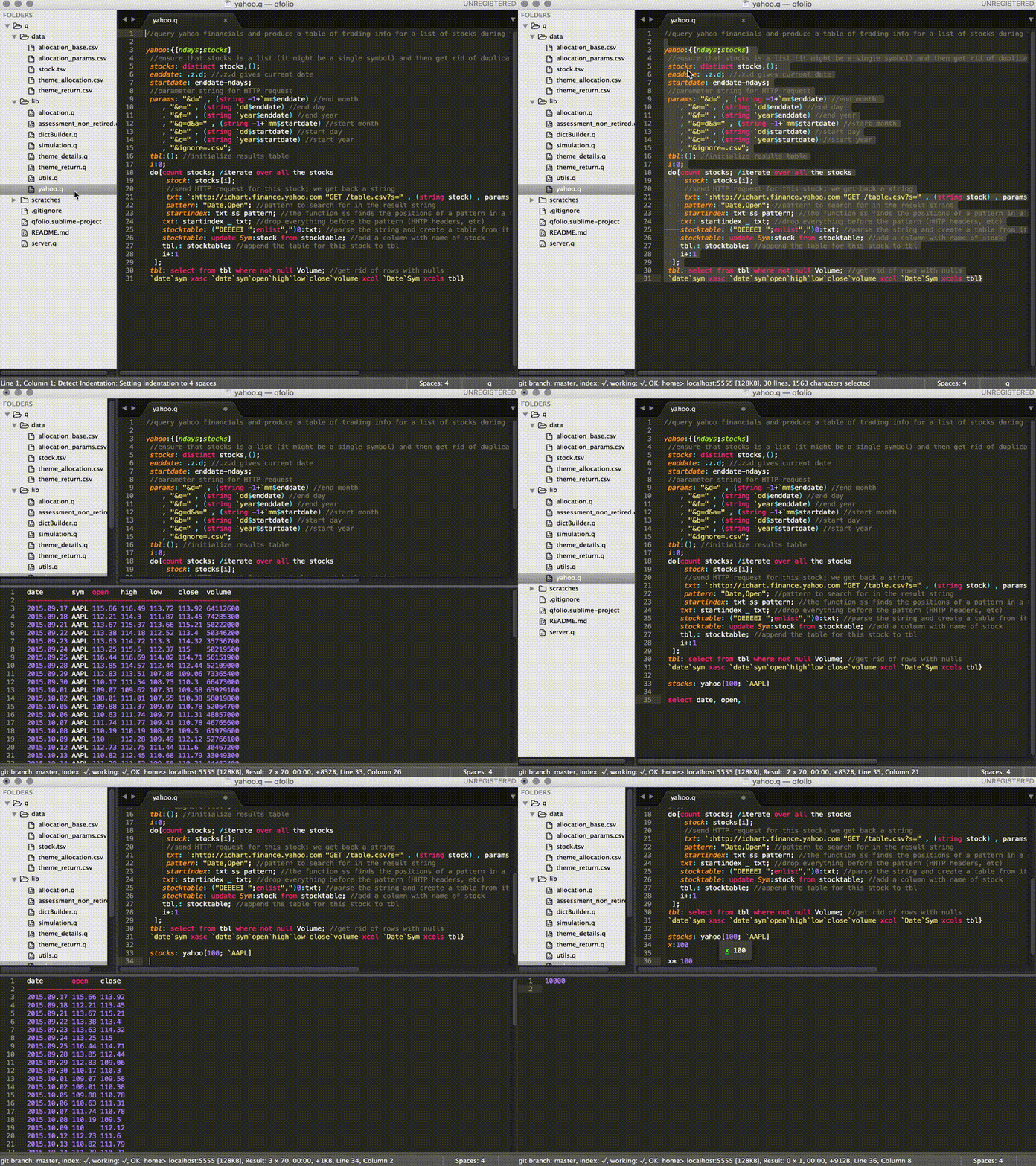
I'm sharing my sublime text plugin which I have been developing using at work and at home for a while. Among many features, I find these most useful:
- syntax highlighting
- REPL
- auto complete
- connection management
- f1-f5 shortcuts for help and print variables, environments
- memory and time stats on status bar
Source code and some documentations are in github:
Hope you find it useful. Let me know if you have any feedbacks or issues!
Komsit

Kim Tang
Mar 11, 2016, 3:58:26 AM3/11/16
to personal...@googlegroups.com
Nice,
Really appreciate your work. I like especially the possibility to install via package control.
Kin
Sent from my iPhone
Sent from my iPhone
--
You received this message because you are subscribed to the Google Groups "Kdb+ Personal Developers" group.
To unsubscribe from this group and stop receiving emails from it, send an email to personal-kdbpl...@googlegroups.com.
To post to this group, send email to personal...@googlegroups.com.
Visit this group at https://groups.google.com/group/personal-kdbplus.
For more options, visit https://groups.google.com/d/optout.

yogesh garg
Mar 11, 2016, 4:13:00 AM3/11/16
to personal...@googlegroups.com
Thanks!
This looks amazing.
Yogesh Garg

Morten Sorensen
Mar 12, 2016, 11:22:42 PM3/12/16
to Kdb+ Personal Developers
Nice one! Can the inline popups be closed by pressing Esc instead of Cmd+E?

Daniel Krizian
Apr 1, 2016, 4:02:42 AM4/1/16
to Kdb+ Personal Developers
Thanks Komsit, just switched!
One question: how can I execute q commands from console within Sublime? I can only see Ctrl+Enter on text in .q file.
Many thanks!
Daniel
Komsit Prakobphol
Apr 7, 2016, 1:04:01 PM4/7/16
to Kdb+ Personal Developers
Hi Daniel - executing q commands from console is not supported. You can only send text from editor.
Komsit
Komsit Prakobphol
Apr 7, 2016, 1:04:03 PM4/7/16
to Kdb+ Personal Developers
Hi Morten,
Thanks! I've added esc shortcut in the latest version.
It should be available in package control in a few hours. After that, package control should automatically upgrade your plugin after you restart sublime text.
Komsit

amir.e....@gmail.com
Aug 7, 2018, 2:24:12 PM8/7/18
to Kdb+ Personal Developers
Hi everyone,
Thanks to Komsit for the very nice package. Very well done
I had two question and appreciate if people here can give me some guidance on:
1) what does it take to add functionality to be able to go to function definition to this package?
2) Or to show the docstring. Btw, does anyone have experience with any how to automatically generate documenation in kdb? I our firm we have something based on Javadoc but I much rather to use an open-source better support tool if available
Thanks
Amir
Reply all
Reply to author
Forward
0 new messages