How to draw a complex CompoundPath

Pere thinkink
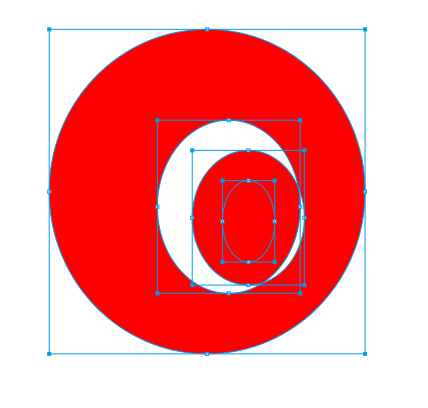
THE EXPECTED:

s_0 =new Segment(851.426666666667,101, -31.7158720519112,0,31.7158720519111,0);/*SMOOTH*/
s_1 =new Segment(908.853333333333,42, 0,32.5848000533333,0,-32.5848000533333);/*SMOOTH*/
s_2 =new Segment(851.426666666667,-17, 31.7158720519111,0,-31.7158720519112,0);/*SMOOTH*/
s_3 =new Segment(794,42, 0,-32.5848000533333,0,32.5848000533333);/*SMOOTH*/
var _0 = new Path(s_0,s_1,s_2,s_3 );
_0.closePath();
s_0 =new Segment(833.333333333333,47.5066666666667, 0,17.3785600284444,0,-17.3785600284444);/*SMOOTH*/
s_1 =new Segment(859.293333333333,16.04, -14.3373120234667,0,14.3373120234667,0);/*SMOOTH*/
s_2 =new Segment(885.253333333333,47.5066666666667, 0,-17.3785600284444,0,17.3785600284444);/*SMOOTH*/
s_3 =new Segment(859.293333333333,78.9733333333333, 14.3373120234667,0,-14.3373120234667,0);/*SMOOTH*/
var _1 = new Path(s_0,s_1,s_2,s_3 );
_1.closePath();
s_0 =new Segment(846,51.5, 0,13.5309762933333,0,-13.5309762933334);/*SMOOTH*/
s_1 =new Segment(866.392801811693,27, -11.2626333823943,0,11.2626333823944,0);/*SMOOTH*/
s_2 =new Segment(886.785603623385,51.5, 0,-13.5309762933334,0,13.5309762933333);/*SMOOTH*/
s_3 =new Segment(866.392801811693,76, 11.2626333823944,0,-11.2626333823943,0);/*SMOOTH*/
var _2 = new Path(s_0,s_1,s_2,s_3 );
_2.closePath();
s_0 =new Segment(866.5,67.6086956521739, -5.24670509333339,0,5.24670509333339,0);/*SMOOTH*/
s_1 =new Segment(876,52.8043478260869, 0,8.17621548869568,0,-8.17621548869562);/*SMOOTH*/
s_2 =new Segment(866.5,38, 5.24670509333339,0,-5.24670509333339,0);/*SMOOTH*/
s_3 =new Segment(857,52.8043478260869, 0,-8.17621548869562,0,8.17621548869568);/*SMOOTH*/
var _3 = new Path(s_0,s_1,s_2,s_3 );
_3.closePath();
_3.fillColor="white"
var compoundPath = new CompoundPath(_0, _1,_2,_3 );compoundPath.fillColor = 'red';
THE RESULT IN paperjs