
Different response time Page Speed online / offline AND very slow response time
89 views
Skip to first unread message

Meik Schmidt
May 11, 2014, 5:36:12 AM5/11/14
to pagespeed-ins...@googlegroups.com
Hello!
Yesterday I had a look into the Google Webmaster Tools. I am confused because Google tells me that my website has become much more slower but I didn't change anything. My (typo3) website runs withount any problems for many years on this server. I also checked the typo3 installation, the server load, network timings ... everything seems to be ok...

It is very strange that Googe Page Speed Insight (online) shows me very high response times which i cannot reproduce. When I browse through my website I cannot say it is slower than before.
Let's take this example url:
When I open this url it seems to be OK. Not to slow and not to fast. This is my feeling...
Let's have a look to the online page speed tool. Page Speed Insights gives me a server response time more than 2,5 seconds!!!!
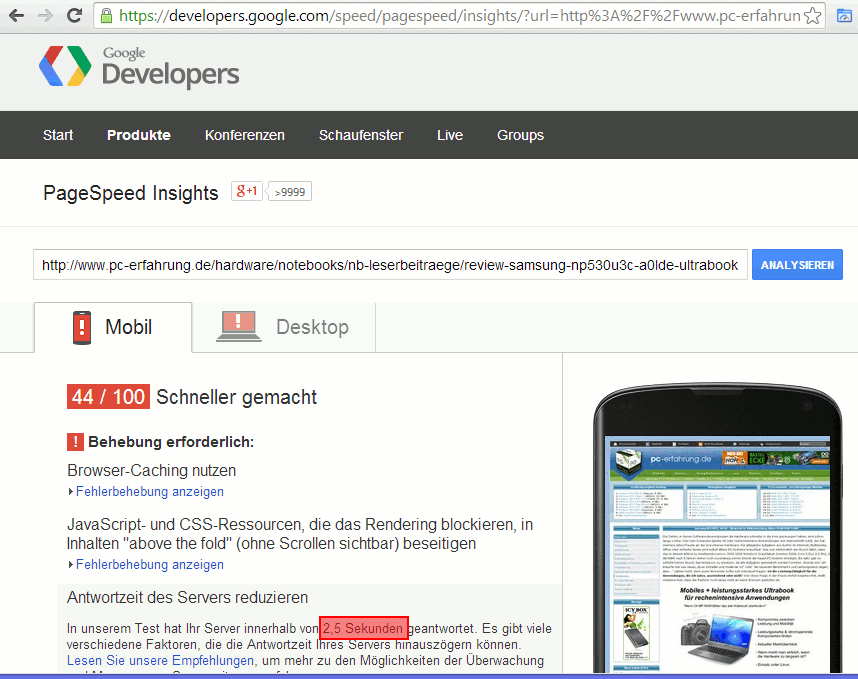
I am wondering about this high time. When I measure the time with the help of the page speed extension in Chrome or Firefox I don't get these high response times.

Can anybody explain me whay there are different values between Page Speed Online and Offline Extensions? Does anybody see the loading problem of my website?
Thank you very much.

Dave Mankoff
May 27, 2014, 5:08:37 PM5/27/14
to pagespeed-ins...@googlegroups.com
Howdy Meik.
I apologize for the difficulty.
When I test your site currently, I do not see a warning about response time. Have you changed anything?
This is a measurement that we discuss frequently on the PageSpeed team. It is obviously important as to the speed of a site, but it can be difficult to measure consistently. It's possible that you were experiencing a transitive problem in network latency or some other hiccup. We try to account for this, but we can guarantee that we will always be successful. Similarly, it's possible that one client (for instance, PageSpeed Insights) will receive a different server time than another (such as yourself) simply due to subtle differences in the code path based on user agents or cookies.
Please let us know if you had to do anything in particular to fix the issue or if we can help you with anything else.
-dave mankoff
Reply all
Reply to author
Forward
0 new messages