
Packer through Jenkins
704 views
Skip to first unread message

Sandeep Sharma
Nov 28, 2015, 12:59:18 AM11/28/15
to Packer
Hi,
I am trying to configure packer through jenkins.
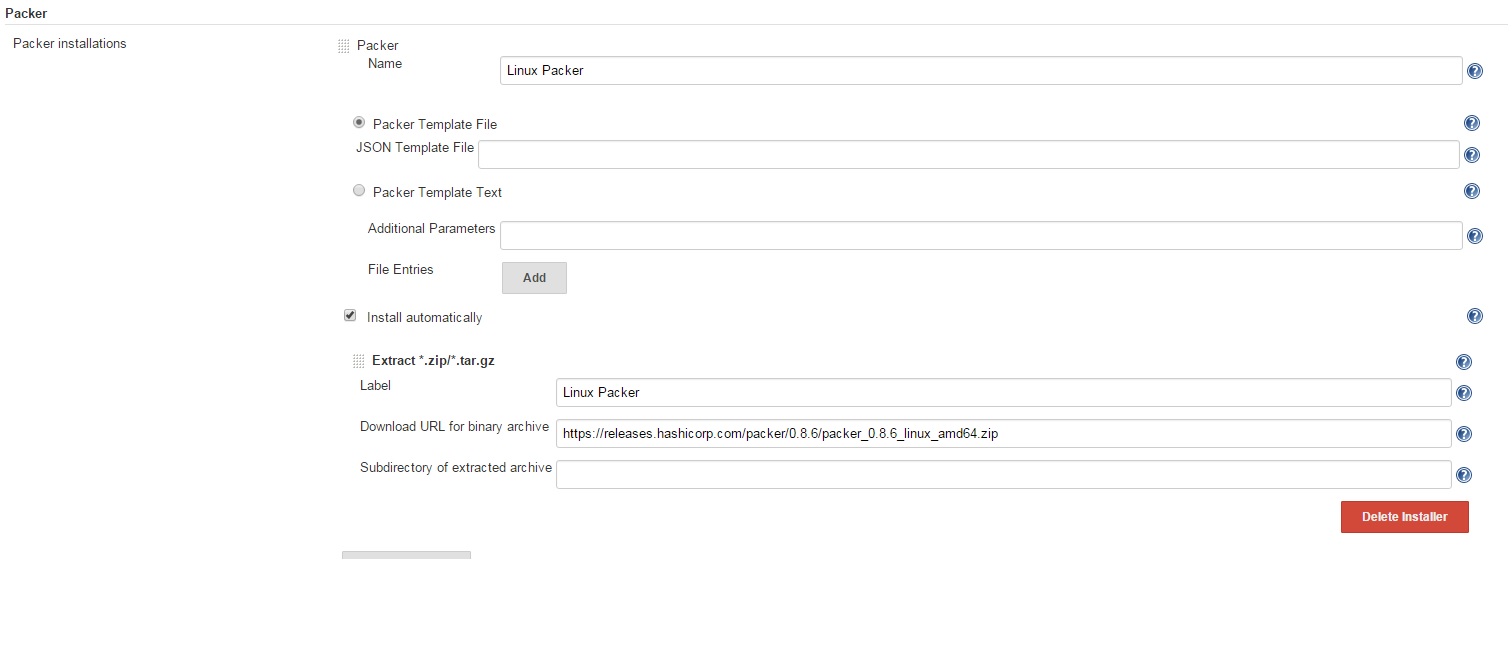
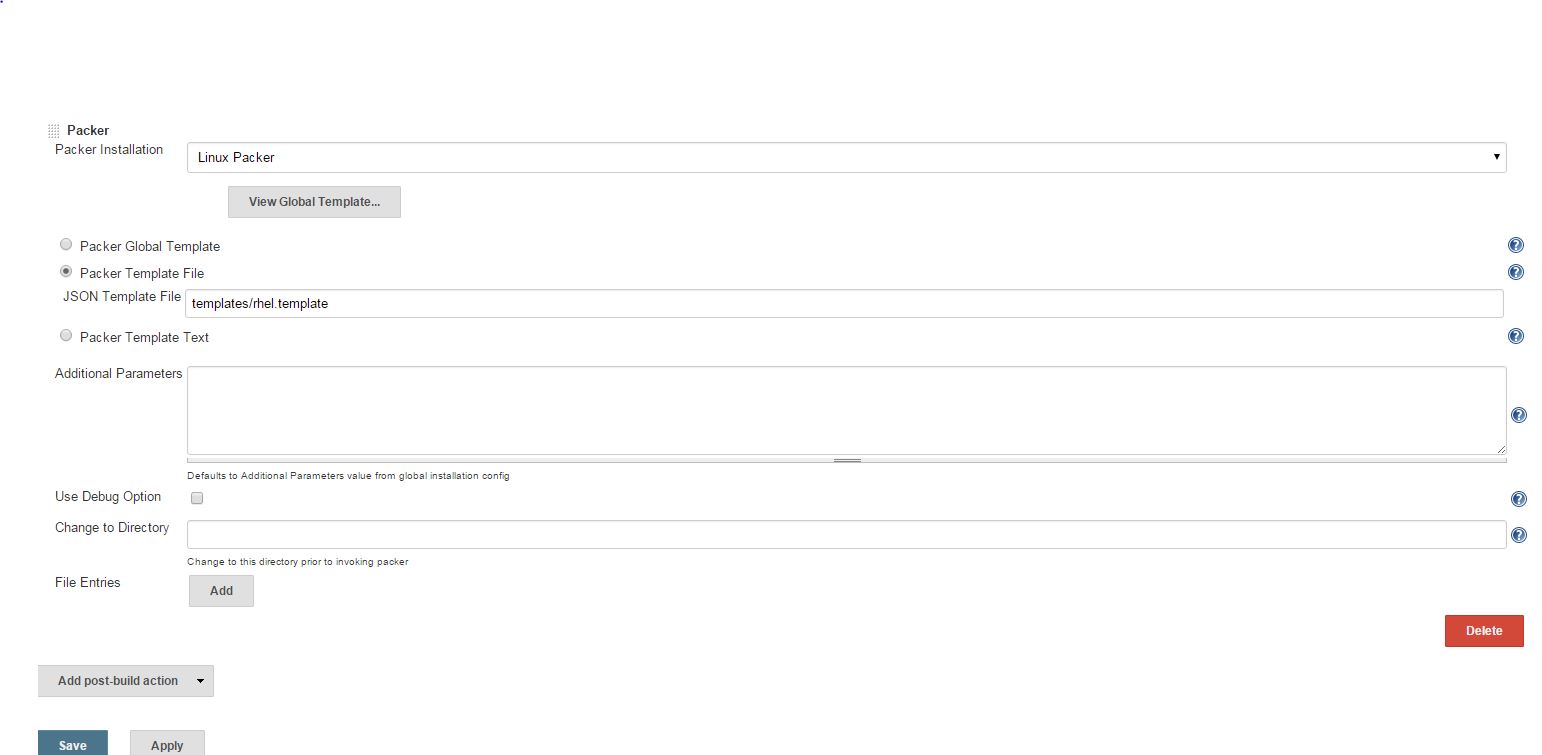
When i do packer deployment through command line then it is working properly but not with jenkins. I have below configuration so please suggest me if any changes are required.
System Configuration
Job Configuration
Jenkins Error


Alvaro Miranda Aguilera
Nov 28, 2015, 2:21:08 AM11/28/15
to packe...@googlegroups.com
do you have access to that jenkins?
is everything installed? virtualbox/vmware?
can you run that same command from the jenkis worker?
packer buold /var/lib/jenkins/workspace/amibuild/templates/rhel.template ?
if you enable the debug checkbox, any more information?
--
This mailing list is governed under the HashiCorp Community Guidelines - https://www.hashicorp.com/community-guidelines.html. Behavior in violation of those guidelines may result in your removal from this mailing list.
GitHub Issues: https://github.com/mitchellh/packer/issues
IRC: #packer-tool on Freenode
---
You received this message because you are subscribed to the Google Groups "Packer" group.
To unsubscribe from this group and stop receiving emails from it, send an email to packer-tool...@googlegroups.com.
To view this discussion on the web visit https://groups.google.com/d/msgid/packer-tool/0e20b74e-cf7f-4452-a30b-86625444b8d5%40googlegroups.com.
For more options, visit https://groups.google.com/d/optout.
Sandeep Sharma
Nov 28, 2015, 2:55:36 AM11/28/15
to packe...@googlegroups.com
Yes i have access on jenkins server.
This build is for Amazon AMI.
Output from Prompt
# pwd
/var/lib/jenkins/workspace/amibuild
# packer build -debug templates/rhel.template
Debug mode enabled. Builds will not be parallelized.
amazon-ebs output will be in this color.
==> amazon-ebs: Prevalidating AMI Name...
==> amazon-ebs: Pausing after run of step 'StepPreValidate'. Press enter to continue.
==> amazon-ebs: Inspecting the source AMI...
This is working. When i do through jenkins then jenkins logs showing below error
Nov 28, 2015 7:47:16 AM org.kohsuke.stapler.RequestImpl injectSetters
WARNING: Tried to set value to templateMode but method public void biz.neustar.jenkins.plugins.packer.PackerPublisher.setTemplateMode(java.lang.String) is missing @DataBoundSetter
Nov 28, 2015 7:47:21 AM hudson.model.Run execute
INFO: amibuild #9 main build action completed: SUCCESS
Nov 28, 2015 7:47:21 AM biz.neustar.jenkins.plugins.packer.PackerPublisher getRemotePackerExec
INFO: Using packer: null
Nov 28, 2015 7:47:21 AM biz.neustar.jenkins.plugins.packer.PackerPublisher perform
INFO: Using FileTemplate
Nov 28, 2015 7:47:21 AM biz.neustar.jenkins.plugins.packer.PackerPublisher getRemoteTemplate
INFO: Using templatePath: /var/lib/jenkins/workspace/amibuild/templates/rhel.template
Nov 28, 2015 7:47:21 AM biz.neustar.jenkins.plugins.packer.PackerPublisher perform
INFO: launch: build -debug /var/lib/jenkins/workspace/amibuild/templates/rhel.template
Nov 28, 2015 7:47:21 AM biz.neustar.jenkins.plugins.packer.PackerPublisher perform
SEVERE: java.io.IOException: Cannot run program "build" (in directory "/var/lib/jenkins/workspace/amibuild"): error=2, No such file or directory
at java.lang.ProcessBuilder.start(ProcessBuilder.java:1048)
at hudson.Proc$LocalProc.<init>(Proc.java:244)
at hudson.Proc$LocalProc.<init>(Proc.java:216)
at hudson.Launcher$LocalLauncher.launch(Launcher.java:815)
at hudson.Launcher$ProcStarter.start(Launcher.java:381)
at hudson.Launcher$ProcStarter.join(Launcher.java:388)
at biz.neustar.jenkins.plugins.packer.PackerPublisher.perform(PackerPublisher.java:340)
at hudson.tasks.BuildStepMonitor$1.perform(BuildStepMonitor.java:20)
at hudson.model.AbstractBuild$AbstractBuildExecution.perform(AbstractBuild.java:782)
at hudson.model.AbstractBuild$AbstractBuildExecution.performAllBuildSteps(AbstractBuild.java:723)
at hudson.model.Build$BuildExecution.post2(Build.java:185)
at hudson.model.AbstractBuild$AbstractBuildExecution.post(AbstractBuild.java:668)
at hudson.model.Run.execute(Run.java:1763)
at hudson.model.FreeStyleBuild.run(FreeStyleBuild.java:43)
at hudson.model.ResourceController.execute(ResourceController.java:98)
at hudson.model.Executor.run(Executor.java:410)
Caused by: java.io.IOException: error=2, No such file or directory
at java.lang.UNIXProcess.forkAndExec(Native Method)
at java.lang.UNIXProcess.<init>(UNIXProcess.java:248)
at java.lang.ProcessImpl.start(ProcessImpl.java:134)
at java.lang.ProcessBuilder.start(ProcessBuilder.java:1029)
... 15 more
Job console output
Building in workspace /var/lib/jenkins/workspace/amibuild
[amibuild] $ /bin/sh -xe /tmp/hudson4748233576130177950.sh
+ export PACKER_LOG=1
+ PACKER_LOG=1
+ export PACKER_LOG_PATH=/var/log/packer.log
+ PACKER_LOG_PATH=/var/log/packer.log
[amibuild] $ build -debug /var/lib/jenkins/workspace/amibuild/templates/rhel.template
FATAL: Execution failed: build -debug /var/lib/jenkins/workspace/amibuild/templates/rhel.template
Finished: FAILURE
Build step 'Packer' marked build as failure
Finished: FAILURE
You received this message because you are subscribed to a topic in the Google Groups "Packer" group.
To unsubscribe from this topic, visit https://groups.google.com/d/topic/packer-tool/Qt5cb7DuzxI/unsubscribe.
To unsubscribe from this group and all its topics, send an email to packer-tool...@googlegroups.com.
To view this discussion on the web visit https://groups.google.com/d/msgid/packer-tool/CAHqq0exfmeeYMzCVkqz_Erq3DsFqR1KhSHjSnzB7-rNFH%3DMysw%40mail.gmail.com.
Alvaro Miranda Aguilera
Nov 28, 2015, 4:24:40 AM11/28/15
to packe...@googlegroups.com
On Sat, Nov 28, 2015 at 8:55 PM, Sandeep Sharma <hotsa...@gmail.com> wrote:
Cannot run program "build" (in directory "/var/lib/jenkins/workspace/amibuild"): error=2, No such file or directory
Hello
is trying to run
build <template>
instead of
packer build <template>
Alvaro.
Sandeep Sharma
Dec 18, 2015, 5:14:20 AM12/18/15
to packe...@googlegroups.com
Thanks Alvaro for hint.
I have configured JAVA SDK in jenkins and then used packer. Now everything is working fine.
Regards
Sandeep Sharma
On Sat, Nov 28, 2015 at 12:51 PM, Alvaro Miranda Aguilera <kik...@gmail.com> wrote:
You received this message because you are subscribed to a topic in the Google Groups "Packer" group.
To unsubscribe from this topic, visit https://groups.google.com/d/topic/packer-tool/Qt5cb7DuzxI/unsubscribe.
To unsubscribe from this group and all its topics, send an email to packer-tool...@googlegroups.com.
To view this discussion on the web visit https://groups.google.com/d/msgid/packer-tool/CAHqq0exfmeeYMzCVkqz_Erq3DsFqR1KhSHjSnzB7-rNFH%3DMysw%40mail.gmail.com.

ZillaYT
Jan 28, 2019, 5:29:40 PM1/28/19
to Packer
I'm Johnny-come-lately on this post.
How can I setup the Packer plugin to use our configured SSH credentials? I don't want to put a private key in the Packer system configuration page.

Rickard von Essen
Jan 29, 2019, 8:45:34 AM1/29/19
to packe...@googlegroups.com
I've never used that plugin, what Packer builder do you target?
If you wan't to use a SSH key configured in Jenkins I don't think there is any support for that in the plugin, but I might be wrong.
--
This mailing list is governed under the HashiCorp Community Guidelines - https://www.hashicorp.com/community-guidelines.html. Behavior in violation of those guidelines may result in your removal from this mailing list.
GitHub Issues: https://github.com/mitchellh/packer/issues
IRC: #packer-tool on Freenode
---
You received this message because you are subscribed to the Google Groups "Packer" group.
To unsubscribe from this group and stop receiving emails from it, send an email to packer-tool...@googlegroups.com.
To view this discussion on the web visit https://groups.google.com/d/msgid/packer-tool/c0d82c5a-1881-4aa1-84e1-898d1c33a8dd%40googlegroups.com.
Reply all
Reply to author
Forward
0 new messages