
Can't create VM on vSphere with packer template
195 views
Skip to first unread message

alif....@verint.com
Apr 17, 2015, 3:38:44 PM4/17/15
to packe...@googlegroups.com
I have the following packer template:
Furthermore, even when I manually do the steps for the boot command, none of my provisioners run on the created VM. The VM has no IP/hostname assigned to it (ifconfig shows 127.0.0.1). I still see the following "Waiting for SSH to become available" message on my console:
{ "variables": { "iso_url": "", "iso_checksum": "", "ssh_username":"", "ssh_password":"", "cookbook_paths":"", "roles_path":"", "http_directory": "", "kickstart_cfg":"", "vm_name": "", "run_list": "", "virtualbox_builder_name":"", "vmware_builder_name":"", "hostname":"" }, "builders": [ { "type": "vmware-iso", "remote_type": "esx5", "remote_host": "our_remote_host", "remote_username": "username", "remote_password": "password", "vmdk_name":"{{user `vm_name`}}", "http_directory": "{{user `http_directory`}}", "boot_command": [ "<tab> text ks=http://172.25.35.96/repo/centos66-ks.cfg<enter><wait>", "hostname={{user `hostname`}} " ], "vnc_port_min": 0, "vnc_port_max": 9000, "boot_wait": "10s", "disk_size":40000, "disk_type_id":"zeroedthick", "guest_os_type": "centos-64", "iso_checksum": "{{user `iso_checksum`}}", "iso_checksum_type": "md5", "iso_url": "{{user `iso_url`}}", "ssh_skip_request_pty": true, "ssh_username":"{{user `ssh_username`}}", "ssh_password":"{{user `ssh_password`}}", "ssh_port": 22, "ssh_wait_timeout": "20m", "shutdown_command": "shutdown -P now", "vmx_data":{ "memsize" : "8192", "numvcpus": "2", "ethernet0.present": "TRUE", "ethernet0.startConnected": "TRUE", "ethernet0.virtualDev": "e1000", "ethernet0.networkName": "VM Network", "ethernet0.addressType": "generated", "ethernet0.generatedAddressOffset": "0", "ethernet0.wakeOnPcktRcv": "FALSE", "ide0:0.fileName": "centos66.vmdk", "ide0:0.present": "TRUE", "ide0:0.redo": "", "scsi0:0.present": "FALSE" }, "remote_datastore": "LocalDS1", "tools_upload_flavor": "linux" } ], "provisioners":[ { "type": "shell", "script": "base.sh" }, { "type": "shell", "script": "users.sh" } ]}With this template I can copy the iso file over to the packer_work directory in the datastore on vCenter and boot the VM. However, the VM fails to load the kickstart configuration file hosted on our repo or configure eth0. The following 2 images are what I see on the console when it boots up:
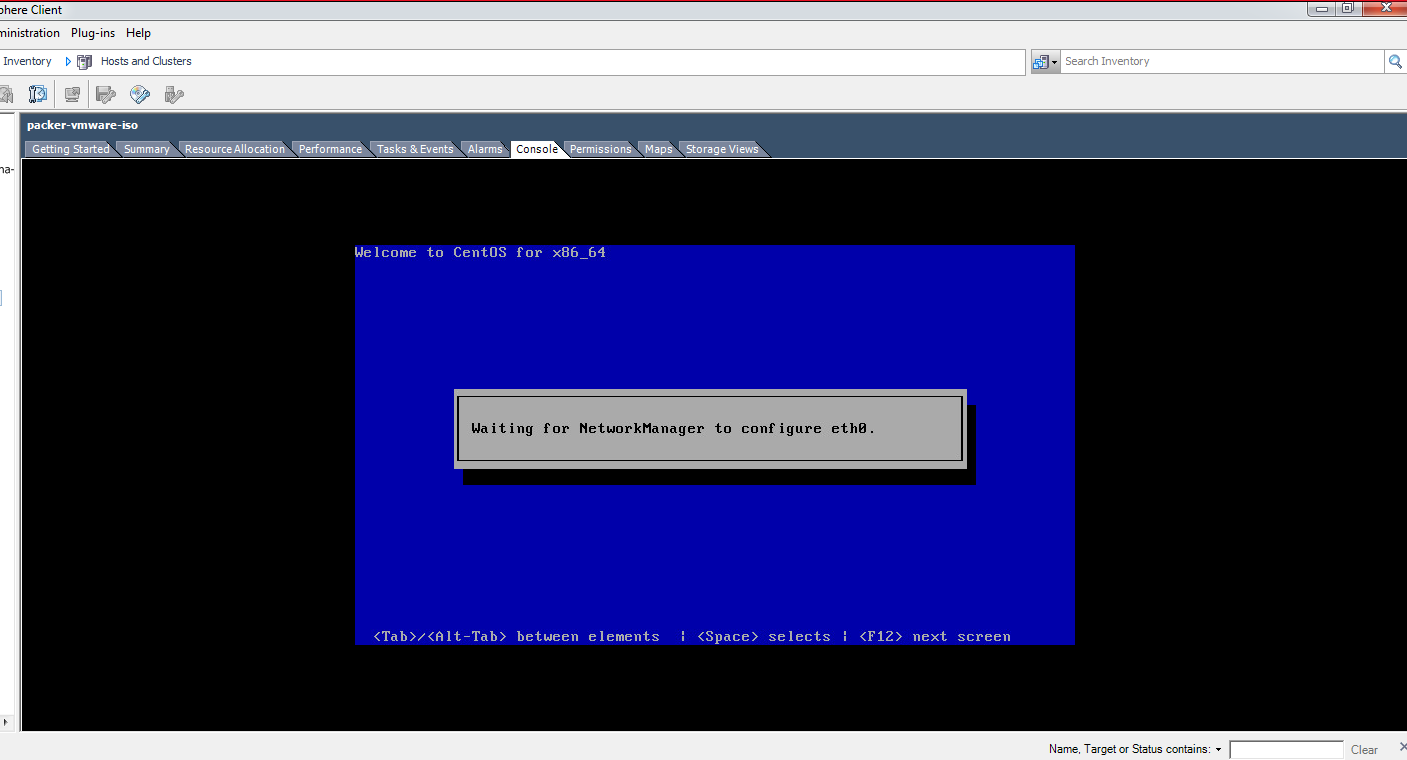

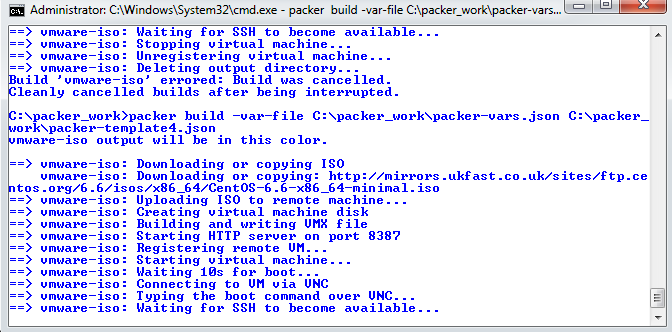
Is there anything I am missing? Any help is appreciated.
alif....@verint.com
Apr 17, 2015, 3:41:29 PM4/17/15
to packe...@googlegroups.com
Also I can access the configuration file from the vCenter host as it downloads when I run "wget http://172.25.35.96/repo/centos66-ks.cfg"

Lokesh Madan
Apr 18, 2015, 1:16:37 AM4/18/15
to packe...@googlegroups.com
I am also facing the same issue. I am running ESX5.1 with update 3.

Piotr Mitoraj
Apr 18, 2015, 4:26:00 PM4/18/15
to packe...@googlegroups.com
Hi
How do you set up the networking? Your boot command is lacking this. Alternatively, ensure it gets IP via DHCP.
Some good starter for this is here: https://access.redhat.com/documentation/en-US/Red_Hat_Enterprise_Linux/6/html/Installation_Guide/ap-admin-options.html#sn-boot-options-network
In the kickstart I create the ssh user with the specified password. After vm boots packer can ssh there to check the status of the installation and run the provisioners.
Regards
Piotr
--
You received this message because you are subscribed to the Google Groups "Packer" group.
To unsubscribe from this group and stop receiving emails from it, send an email to packer-tool...@googlegroups.com.
For more options, visit https://groups.google.com/d/optout.
Reply all
Reply to author
Forward
0 new messages