
ModuleNotFoundError at /export/ No module named
409 views
Skip to first unread message

Juanfran
Mar 30, 2021, 7:36:17 AM3/30/21
to oTree help & discussion
Hello everyone,
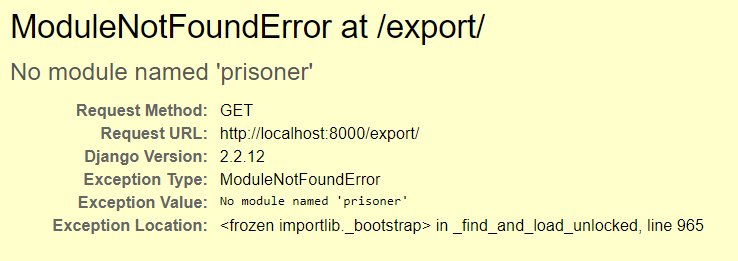
Trying to access the data section when running my experiment in demo mode, a strange error arises. A screenshot of it is:
I suppose that oTree is looking for an old app preinstalled (the prisoner's dilemma one) when I started my project (I started from 0 to do everything), but I deleted all the preinstalled app folders to tidy everything in my PyCharm project.
How can I solve the problem and make oTree not look for non-existing apps?
This is also strange because it only happens when I try to access the data section but not the rest (sessions, rooms, or Server Check).
Thank you all in advance.
Juanfran

Chris @ oTree
Mar 30, 2021, 11:13:16 AM3/30/21
to oTree help & discussion
What version of oTree are you on? This should not happen in the latest oTree. The quick fix would be to add an app called 'prisoner', with "otree startapp prisoner', or if that doesn't work, to add back in the original prisoner app (which you can create through "otree startproject myproject").
Juanfran
Mar 30, 2021, 11:58:00 AM3/30/21
to oTree help & discussion
Many thanks for your fast reply, Chris.
I tried adding an app called 'prisoner', but it leads to the same error with another app (say guess two thirds).
After adding all the apps I deleted before (not only the predetermined ones but also ones I created and then erased) it finally shows me the page. However, after this process, I end with around 50 apps (since it forces me to use all the apps used once), so the data I can download is huge, and the more experiments I do the worse it may be.
I want to access this data option to download the Page times on the apps of my experiment, since the rest of the data should be downloadable from the data section inside the session page (right?).
I would like not to be forced to have all the apps used once each time I want to access this data section in any of my oTree projects (in fact this is weird because with rooms it does not happen).
I considered upgrading oTree, but I won't like to lose the current version I have since from change to change some features are altered, and I am afraid that after updating now I would need to change my whole code, which takes me so much time. Let me know if this is senseless. If it is sensible, is there a way to have 2 different versions of oTree on the same laptop with the same python?
Kind regards,
Juanfran
Chris @ oTree
Mar 30, 2021, 12:43:16 PM3/30/21
to oTree help & discussion
This error just happens because the app was deleted after creating a session containing that app.
If the database doesn't contain any important info, you can just delete your db.sqlite3 (and __temp_migrations if it exists) and start again.
Chris @ oTree
Mar 30, 2021, 1:23:31 PM3/30/21
to oTree help & discussion
By the way, oTree 5 can still run apps with the models.py/pages.py format. And to answer your question, if you know how to use virtualenv, you can try oTree 5 without uninstalling your current version of oTree.
On Tuesday, March 30, 2021 at 11:58:00 PM UTC+8 Juanfran wrote:
Juanfran
Mar 31, 2021, 6:23:47 PM3/31/21
to oTree help & discussion
After deleting the folder and this file, it works! I just checked it in a copied folder to avoid any possible problem (since you mentioned: "If the database doesn't contain any important info"), but I guess this would be the same in the original project. Thank you, Chris!
I would like to understand the point of the solution you provided me. What are the problems that may arise from deleting these 2 files? I don't know very well what these files contain/are created to. How can I quit the session containing the apps I deleted to avoid this behavior again? I suppose that I did something wrong before that led me to this problem, so I would like to know how to avoid this since it seems that deleting the files may be problematic in some cases, so it is better to avoid the problem instead of fixing it.
Regarding the oTree 5, I don't know how to use virtualenv. When I create a project in PyCharm I use the option virtualenv, but then are you saying that if I upgrade oTree in that new project, it will only update it for this new project, preserving my older version in the rest?
Reply all
Reply to author
Forward
0 new messages