
need help adding support for additional keys from SteelSeries Apex Keyboard
332 views
Skip to first unread message

Joey Korkames
Jun 26, 2014, 2:29:19 AM6/26/14
to keyremap...@googlegroups.com
I have a "gaming" keyboard with 28 extra keys that I want to be able to map to other sequences and to launch apps.
SteelSeries made a kext and app for this, but the app is large, slow, and unwieldy - the exact opposite of Karabiner :-)
I wrote userland IOHIDManager apps to configure the LED backlighting and to dump the key codes.
I'll post them to GitHub soon.
The extra keys dump under the same HID page as the the usual keyset, although the keyboard also has a composite device (for configing LED light) & hub.
This is L4 button-down:
device: 0x60800012ca80, page: 0x0007, usage: 0xFFFFFFFF -- value: 171 ( 0 to 255) -- Unknown Key
device: 0x60800012ca80, page: 0x0007, usage: 0x0001 -- value: 0 ( 0 to 1) -- Error Roll Over
device: 0x60800012ca80, page: 0x0007, usage: 0x00AB -- value: 1 ( 0 to 1) -- Apex L4 Key
device: 0x60800012ca80, page: 0x0007, usage: 0xFFFFFFFF -- value: 171 ( 0 to 255) -- Unknown Key
& up:
device: 0x60800012ca80, page: 0x0007, usage: 0xFFFFFFFF -- value: 0 ( 0 to 255) -- Unknown Key
device: 0x60800012ca80, page: 0x0007, usage: 0x0001 -- value: 0 ( 0 to 1) -- Error Roll Over
device: 0x60800012ca80, page: 0x0007, usage: 0x00AB -- value: 0 ( 0 to 1) -- Apex L4 Key
device: 0x60800012ca80, page: 0x0007, usage: 0xFFFFFFFF -- value: 0 ( 0 to 255) -- Unknown Key
Now I am trying to get Karabiner to map the keys. But EventViewer doesn't show the extra keys at all, and putting the keycodes in private.xml does nothing.
I put the kext into debug & debug_devel mode (using "sudo bash; sysctl ...", sudo sysctl did not work).
Here is L4 button-down:
Jun 25 22:36:41 fanboy kernel[0] <Debug>: KeyRemap4MacBook --Debug-- KeyboardEventCallback [ caught]: eventType 12, flags 0x80000000, key 0x00ff, kbdType 40, repeat = 0
Jun 25 22:36:41 fanboy kernel[0] <Debug>: KeyRemap4MacBook --Debug-- An unknown modifier is pressed (KeyCode:0xff, Flags:0x80000000). Ignore it.
& up:
Jun 25 22:36:42 fanboy kernel[0] <Debug>: KeyRemap4MacBook --Debug-- KeyboardEventCallback [ caught]: eventType 12, flags 0x80000000, key 0x00ff, kbdType 40, repeat = 0
Jun 25 22:36:42 fanboy kernel[0] <Debug>: KeyRemap4MacBook --Debug-- An unknown modifier is pressed (KeyCode:0xff, Flags:0x80000000). Ignore it.
it seems all it is catching is that weird 0xFFFFFF key. Any way to get Karabiner to ignore it and keep looking for the extra Apex keys?
my private.xml for the apex:
<pre>
<devicevendordef>
<vendorname>STEELSERIES</vendorname>
<vendorid>0x1038</vendorid>
</devicevendordef>
<deviceproductdef>
<productname>APEX_KEYBOARD</productname>
<!-- <productid>0x1200</productid> -->
<productid>0x1202</productid>
</deviceproductdef>
<symbol_map type="KeyCode" name="SSAPEX_L1" value="0xa8" />
<symbol_map type="KeyCode" name="SSAPEX_L2" value="0xa9" />
<symbol_map type="KeyCode" name="SSAPEX_L3" value="0xaa" />
<symbol_map type="KeyCode" name="SSAPEX_L4" value="0xab" />
<symbol_map type="KeyCode" name="SSAPEX_MX1" value="0xe8" />
<symbol_map type="KeyCode" name="SSAPEX_MX2" value="0xe9" />
<symbol_map type="KeyCode" name="SSAPEX_MX3" value="0xea" />
<symbol_map type="KeyCode" name="SSAPEX_MX4" value="0xeb" />
<symbol_map type="KeyCode" name="SSAPEX_MX5" value="0xec" />
<symbol_map type="KeyCode" name="SSAPEX_MX6" value="0xed" />
<symbol_map type="KeyCode" name="SSAPEX_MX7" value="0xee" />
<symbol_map type="KeyCode" name="SSAPEX_MX8" value="0xef" />
<symbol_map type="KeyCode" name="SSAPEX_MX9" value="0xf0" />
<symbol_map type="KeyCode" name="SSAPEX_MX10" value="0xf1" />
<symbol_map type="KeyCode" name="SSAPEX_M1" value="0xf4" />
<symbol_map type="KeyCode" name="SSAPEX_M2" value="0xf5" />
<symbol_map type="KeyCode" name="SSAPEX_M3" value="0xf6" />
<symbol_map type="KeyCode" name="SSAPEX_M4" value="0xf7" />
<symbol_map type="KeyCode" name="SSAPEX_M5" value="0xf8" />
<symbol_map type="KeyCode" name="SSAPEX_M6" value="0xf9" />
<symbol_map type="KeyCode" name="SSAPEX_M7" value="0xfa" />
<symbol_map type="KeyCode" name="SSAPEX_M8" value="0xfb" />
<symbol_map type="KeyCode" name="SSAPEX_M9" value="0xfc" />
<symbol_map type="KeyCode" name="SSAPEX_M10" value="0xd" />
<symbol_map type="KeyCode" name="SSAPEX_M11" value="0xfe" />
<symbol_map type="KeyCode" name="SSAPEX_M12" value="0xff" />
<item>
<name>SteelSeries Apex (RAW) Keyboard special keys</name>
<identifier>private.steelseriesapex</identifier>
<appendix>MX5 -> 5</appendix>
<device_only>DeviceVendor::STEELSERIES, DeviceProduct::APEX_KEYBOARD</device_only>
<autogen>__KeyToKey__ KeyCode::SSAPEX_MX5, KeyCode::KEY_5</autogen>
<autogen>__KeyToKey__ KeyCode::RawValue::0xec, KeyCode::KEY_5</autogen>
</item>
</pre>

Takayama Fumihiko
Jun 26, 2014, 6:53:12 AM6/26/14
to joey...@gmail.com, keyremap...@googlegroups.com
> Any way to get Karabiner to ignore it and keep looking for the extra Apex keys?
Karabiner hooks keyboard driver to get input events.
Therefore, Karabiner cannot get events which are ignored by the generic keyboard driver.
I think that sending keyboard events by IOHIDPostEvent in your IOHIDManager apps is an easiest way to accomplish your desire.
IOHIDPostEvent example:
https://github.com/tekezo/Karabiner/blob/master/src/core/server/Classes/IOHIDPostEventWrapper.m
--
Takayama Fumihiko <tek...@pqrs.org>
On 2014/06/26 15:29, Joey Korkames wrote:
> I have a "gaming" keyboard with 28 extra keys that I want to be able to map to other sequences and to launch apps.
> apex website <http://steelseries.com/products/keyboards/steelseries-apex-gaming-keyboard>
> You received this message because you are subscribed to the Google Groups "KeyRemap4MacBook" group.
> To unsubscribe from this group and stop receiving emails from it, send an email to keyremap4macbo...@googlegroups.com <mailto:keyremap4macbo...@googlegroups.com>.
> To view this discussion on the web visit https://groups.google.com/d/msgid/keyremap4macbook/86bd44f3-a1f4-4856-8331-92aca2cf7555%40googlegroups.com
> <https://groups.google.com/d/msgid/keyremap4macbook/86bd44f3-a1f4-4856-8331-92aca2cf7555%40googlegroups.com?utm_medium=email&utm_source=footer>.
> For more options, visit https://groups.google.com/d/optout.
Message has been deleted
Joey Korkames
Jun 26, 2014, 5:49:50 PM6/26/14
to keyremap...@googlegroups.com
On Jun 26, 2014, at 3:53 AM, Takayama Fumihiko wrote:
> > Any way to get Karabiner to ignore it and keep looking for the extra Apex keys?
> Karabiner hooks keyboard driver to get input events.
> Therefore, Karabiner cannot get events which are ignored by the generic keyboard driver.
I think I am getting the picture.
So I need to use Seil to patch the additional key codes into IOHIDKeyboard.kext's keymap:
4 of the apex keys are 168-171, the others are 231-255.
Apex's HID descriptor as reported by USB Prober/ioreg/iojones.app seems to identical to the descriptor built into the kext:
USB prober excerpt:
Interface #1 - HID/Boot Interface
Alternate Setting 0
Number of Endpoints 1
Interface Class: 3 (HID)
Interface Subclass; 1 (Boot Interface)
Interface Protocol: 1
HID Descriptor
Descriptor Version Number: 0x0111
Country Code: 0
Descriptor Count: 1
Descriptor 1
Type: 0x22 (Report Descriptor)
Length (and contents): 65
Raw Descriptor (hex) 0000: 05 01 09 06 A1 01 05 07 19 E0 29 E7 15 00 25 01
Raw Descriptor (hex) 0010: 75 01 95 08 81 02 75 08 95 01 81 01 05 07 19 00
Raw Descriptor (hex) 0020: 2A FF 00 15 00 26 FF 00 75 08 95 06 81 00 05 08
Raw Descriptor (hex) 0030: 19 01 29 03 25 01 75 01 95 03 91 02 95 05 91 01
Raw Descriptor (hex) 0040: C0
Parsed Report Descriptor:
Usage Page (Generic Desktop)
Usage (Keyboard)
Collection (Application)
Usage Page (Keyboard/Keypad)
Usage Minimum........... (224)
Usage Maximum........... (231)
Logical Minimum......... (0)
Logical Maximum......... (1)
Report Size............. (1)
Report Count............ (8)
Input................... (Data, Variable, Absolute, No Wrap, Linear, Preferred State, No Null Position, Bitfield)
Report Size............. (8)
Report Count............ (1)
Input................... (Constant, Array, Absolute)
Usage Page (Keyboard/Keypad)
Usage Minimum........... (0)
Usage Maximum........... (255)
Logical Minimum......... (0)
Logical Maximum......... (255)
Report Size............. (8)
Report Count............ (6)
Input................... (Data, Array, Absolute)
Usage Page (LED)
Usage Minimum........... (1)
Usage Maximum........... (3)
Logical Maximum......... (1)
Report Size............. (1)
Report Count............ (3)
Output.................. (Data, Variable, Absolute, No Wrap, Linear, Preferred State, No Null Position, Nonvolatile, Bitfield)
Report Count............ (5)
Output.................. (Constant, Array, Absolute, No Wrap, Linear, Preferred State, No Null Position, Nonvolatile, Bitfield)
End Collection
Takayama Fumihiko
Jun 27, 2014, 12:49:44 AM6/27/14
to jo...@kidfixit.com, keyremap...@googlegroups.com
> Is there a way to have Karabiner react to these posts from userland?
> I don't want these keys to require their own separate remapping program.
Previously, we received the power button event in userland and sent it into kernel space.
Therefore, there is a way to do for apex keys.
But we need to merge your IOHIDManager code into Karabiner.
> So I need to use Seil to patch the additional key codes into IOHIDKeyboard.kext's keymap:
Seil can change only KeyboardOrKeypad page table for now.
Did you change your keys by Seil?
--
Takayama Fumihiko <tek...@pqrs.org>
> <https://groups.google.com/d/msgid/keyremap4macbook/f5c965f3-2c16-49f3-84ef-9b54336bfcc9%40googlegroups.com?utm_medium=email&utm_source=footer>.
> I don't want these keys to require their own separate remapping program.
Previously, we received the power button event in userland and sent it into kernel space.
Therefore, there is a way to do for apex keys.
But we need to merge your IOHIDManager code into Karabiner.
> So I need to use Seil to patch the additional key codes into IOHIDKeyboard.kext's keymap:
Did you change your keys by Seil?
--
Takayama Fumihiko <tek...@pqrs.org>
> --
> You received this message because you are subscribed to the Google Groups "KeyRemap4MacBook" group.
> To unsubscribe from this group and stop receiving emails from it, send an email to keyremap4macbo...@googlegroups.com <mailto:keyremap4macbo...@googlegroups.com>.
> To view this discussion on the web visit https://groups.google.com/d/msgid/keyremap4macbook/f5c965f3-2c16-49f3-84ef-9b54336bfcc9%40googlegroups.com
> You received this message because you are subscribed to the Google Groups "KeyRemap4MacBook" group.
> To unsubscribe from this group and stop receiving emails from it, send an email to keyremap4macbo...@googlegroups.com <mailto:keyremap4macbo...@googlegroups.com>.
> <https://groups.google.com/d/msgid/keyremap4macbook/f5c965f3-2c16-49f3-84ef-9b54336bfcc9%40googlegroups.com?utm_medium=email&utm_source=footer>.
Joey Korkames
Jun 27, 2014, 3:50:27 AM6/27/14
to keyremap...@googlegroups.com
On Jun 26, 2014, at 9:49 PM, Takayama Fumihiko <tek...@pqrs.org> wrote:
> Is there a way to have Karabiner react to these posts from userland?
> I don't want these keys to require their own separate remapping program.
Previously, we received the power button event in userland and sent it into kernel space.
Therefore, there is a way to do for apex keys.
But we need to merge your IOHIDManager code into Karabiner.
It just listens for KeyboardOrKeypad events and filters out anything except the special key code ranges.
- (void) keyboardDriverDidRecieveInputEvent:(NSDictionary *) inputEvent;
{
int usagePage = [(NSNumber *)inputEvent[kInputEventUsagePageKey] intValue];
int usage = [(NSNumber *)inputEvent[kInputEventUsageKey] intValue];
long eventValue = [(NSNumber *)inputEvent[kInputEventValueKey] longValue];
if ( usagePage != kHIDPage_KeyboardOrKeypad || usage == -1 )
return;
if (usage < 168 || usage > 256 ) //Apex special keys
return;
MyLog(@"got APEX key %@: %u (0x%x), (eventValue ? @"DOWN" : @"UP"), usage, usage);
[self.hidPoster postAnyKey:(UInt8)usage UpDown:eventValue]; //pass apex scan code without change
}
{
int usagePage = [(NSNumber *)inputEvent[kInputEventUsagePageKey] intValue];
int usage = [(NSNumber *)inputEvent[kInputEventUsageKey] intValue];
long eventValue = [(NSNumber *)inputEvent[kInputEventValueKey] longValue];
if ( usagePage != kHIDPage_KeyboardOrKeypad || usage == -1 )
return;
if (usage < 168 || usage > 256 ) //Apex special keys
return;
MyLog(@"got APEX key %@: %u (0x%x), (eventValue ? @"DOWN" : @"UP"), usage, usage);
[self.hidPoster postAnyKey:(UInt8)usage UpDown:eventValue]; //pass apex scan code without change
}
a lot of IOHIDManager boilerplate finds the keyboard before this.
I really don’t want to run a looping listener in userland, if Seil can patch the Keyboard kext.
Seil can change only KeyboardOrKeypad page table for now.
Did you change your keys by Seil?
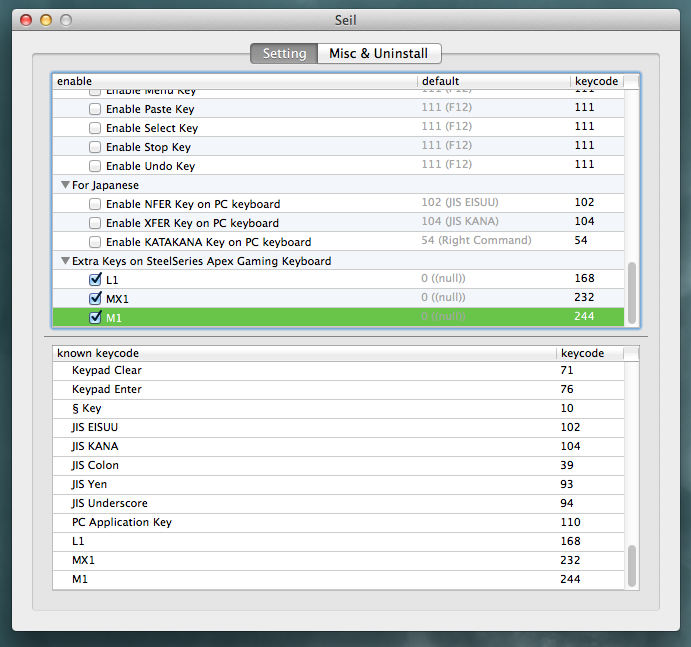
I don’t see a private.xml loader in Seil, so I appended the apex keys to known.xml in Seil.app/Resources:
<item>
<name>Extra Keys on SteelSeries Apex Gaming Keyboard</name>
<expand>true</expand>
<item>
<name>L1</name>
<enable>enable_ssapex_l1</enable>
<keycode>keycode_ssapex_l1</keycode>
<kHIDUsage>kHIDUsage_Keyboard_Reserved</kHIDUsage> <!—0x8a —>
<default>168</default>
</item>
<item>
<name>MX1</name>
<enable>enable_ssapex_mx1</enable>
<keycode>keycode_ssapex_mx1</keycode>
<kHIDUsage>kHIDUsage_Keyboard_Reserved</kHIDUsage> <!— 0xea —>
<default>232</default>
</item>
<item>
<name>M1</name>
<enable>enable_ssapex_m1</enable>
<keycode>keycode_ssapex_m1</keycode>
<kHIDUsage>kHIDUsage_Keyboard_Reserved</kHIDUsage> <!— 0xf4 —>
<default>244</default>
</item>
</item>
<name>Extra Keys on SteelSeries Apex Gaming Keyboard</name>
<expand>true</expand>
<item>
<name>L1</name>
<enable>enable_ssapex_l1</enable>
<keycode>keycode_ssapex_l1</keycode>
<kHIDUsage>kHIDUsage_Keyboard_Reserved</kHIDUsage> <!—0x8a —>
<default>168</default>
</item>
<item>
<name>MX1</name>
<enable>enable_ssapex_mx1</enable>
<keycode>keycode_ssapex_mx1</keycode>
<kHIDUsage>kHIDUsage_Keyboard_Reserved</kHIDUsage> <!— 0xea —>
<default>232</default>
</item>
<item>
<name>M1</name>
<enable>enable_ssapex_m1</enable>
<keycode>keycode_ssapex_m1</keycode>
<kHIDUsage>kHIDUsage_Keyboard_Reserved</kHIDUsage> <!— 0xf4 —>
<default>244</default>
</item>
</item>
and checkbox.xml:
<item><name>L1</name><keycode>168</keycode></item>
<item><name>MX1</name><keycode>232</keycode></item>
<item><name>M1</name><keycode>244</keycode></item>
<item><name>MX1</name><keycode>232</keycode></item>
<item><name>M1</name><keycode>244</keycode></item>
I don’t think it worked, my EventViewer doesn’t pick up any new Apex keys, but existing Seil hacks do work.
should I recompile the client app with the changed xmls?
Is that why default column shows ((null)), or is that from the seil.kext? I don’t have a dev key, so I can’t rebuild and sign it.
Thanks for walking me through these great app’s guts!
Takayama Fumihiko
Jun 30, 2014, 3:08:49 AM6/30/14
to jo...@kidfixit.com, keyremap...@googlegroups.com
> should I recompile the client app with the changed xmls?
Yes.
You should build package with modified xml.
--
Takayama Fumihiko <tek...@pqrs.org>
On 2014/06/27 16:50, Joey Korkames wrote:
> --
> You received this message because you are subscribed to the Google Groups "KeyRemap4MacBook" group.
> To unsubscribe from this group and stop receiving emails from it, send an email to keyremap4macbo...@googlegroups.com <mailto:keyremap4macbo...@googlegroups.com>.
> To view this discussion on the web visit https://groups.google.com/d/msgid/keyremap4macbook/55D484FC-A6B9-4BED-9EE2-EB8636A3C3D1%40kidfixit.com
> You received this message because you are subscribed to the Google Groups "KeyRemap4MacBook" group.
> To unsubscribe from this group and stop receiving emails from it, send an email to keyremap4macbo...@googlegroups.com <mailto:keyremap4macbo...@googlegroups.com>.
> <https://groups.google.com/d/msgid/keyremap4macbook/55D484FC-A6B9-4BED-9EE2-EB8636A3C3D1%40kidfixit.com?utm_medium=email&utm_source=footer>.
Joey Korkames
Jul 2, 2014, 2:09:02 AM7/2/14
to keyremap...@googlegroups.com
On Jun 30, 2014, at 12:08 AM, Takayama Fumihiko <tek...@pqrs.org> wrote:
> > should I recompile the client app with the changed xmls?
> Yes.
> You should build package with modified xml.
Ok, I recompiled with modified xmls. the app and the unsigned kext are running.
> > should I recompile the client app with the changed xmls?
> Yes.
> You should build package with modified xml.
Now the 8 lowest-numbered custom keys (168-173) L1-L4 and two new diagonal arrow keys are showing in keyremap4macbook.debug syslog and they are remappable with keyremap4macbook. Yay!
unfortunately M1-M12 and MX1-MX10 don’t show in the syslog, just in the IOHIDManager app. They come from the same device location, HID usage page, everything same just high key code numbers (232-255).
all generated headers in src/bridge/output/ look good and show no difference between the working and non-working keys.
I’m looking at these kernel sources but I’m not seeing anything to drop these events:
https://github.com/aosm/IOHIDFamily/blob/master/IOHIDFamily/IOHIDKeyboard.cpp#L233
https://github.com/tekezo/Seil/blob/master/src/core/kext/common/Driver.cpp#L41
https://github.com/aosm/IOHIDFamily/blob/master/IOHIDFamily/Cosmo_USB2ADB.c#L37
Is there a way to view the IOLOGs from the Seil kext? or make a debug build?
Takayama Fumihiko
Jul 2, 2014, 11:06:30 PM7/2/14
to jo...@kidfixit.com, keyremap...@googlegroups.com
> they are remappable with keyremap4macbook. Yay!
It's great!
I've merged your changes. (L1-L4 and diagonal arrow keys)
https://github.com/tekezo/Seil/commit/c926cdcfe463224f1190bf549bbadbbf960222d0
> all generated headers in src/bridge/output/ look good and show no difference between the working and non-working keys.
The input events are dropped by other kernel part...
> Is there a way to view the IOLOGs from the Seil kext? or make a debug build?
Therefore, we cannot watch events in kernel.
--
Takayama Fumihiko <tek...@pqrs.org>

jonpa...@gmail.com
Oct 13, 2018, 7:47:20 PM10/13/18
to Karabiner
I know this thread is long dead... But I salvaged one of these from the neighbors move-out trash and it works perfectly (just needed to be cleaned up, the keys were sticking).
@Joey: Did you ever get Seil & Karabiner to recognize all of the extra keys on the SteelSeries? How about the project you mentioned your intention to post to GitHub? I would really love to get this working. I don't have quite the experience you do, although I was able to follow along with the thread.
Any insight that you would be willing to share, or the code needed to get this thing working would be VERY much appreciated! (From what I'm gathering there may be more required than what has been posted here and linked to...)
I would also be thrilled to get control of the LEDs. Like you, I tried the SteelSeries engine but I was so completely dissatisfied I uninstalled it. However, without it running I haven't managed to get anything to recognize the extra keys. I found some little *nix utilities posted by users in the community, but don't have the skills or knowledge to port their functions to MacOS.
Any assistance, guidance, direction or software that you are willing to offer (if you even see this!) would be amazing!
Thank you so much|
(BTW, I'm totally jealous that you have the JIS version! I LOVE extra keys. I was actually looking to pick up a JIS version of this on eBay or something, but didn't find any available last time I checked.)
@Joey: Did you ever get Seil & Karabiner to recognize all of the extra keys on the SteelSeries? How about the project you mentioned your intention to post to GitHub? I would really love to get this working. I don't have quite the experience you do, although I was able to follow along with the thread.
Any insight that you would be willing to share, or the code needed to get this thing working would be VERY much appreciated! (From what I'm gathering there may be more required than what has been posted here and linked to...)
I would also be thrilled to get control of the LEDs. Like you, I tried the SteelSeries engine but I was so completely dissatisfied I uninstalled it. However, without it running I haven't managed to get anything to recognize the extra keys. I found some little *nix utilities posted by users in the community, but don't have the skills or knowledge to port their functions to MacOS.
Any assistance, guidance, direction or software that you are willing to offer (if you even see this!) would be amazing!
Thank you so much|
(BTW, I'm totally jealous that you have the JIS version! I LOVE extra keys. I was actually looking to pick up a JIS version of this on eBay or something, but didn't find any available last time I checked.)
Reply all
Reply to author
Forward
0 new messages