
drone - ostinato client setup
797 views
Skip to first unread message

rishy...@gmail.com
Nov 26, 2014, 1:44:59 AM11/26/14
to osti...@googlegroups.com
Hi,
I am trying to configure ostinato in CentOS 6.6 server, and start the drone.
Intention is to configure the ports from ostinato client running on windows machine.
Drone always sees to start on 0.0.0.0:7878.
Is there anyway to start it on specific IP, to be able to connect from client running on windows machine.
I couldn't find any documentation ,or couldn't figure out from source code.
Apologies for the very basic question.
Regards,
Rishy.

Carlos G Mendioroz
Nov 26, 2014, 5:11:46 AM11/26/14
to rishy...@gmail.com, osti...@googlegroups.com
Hi,
rishy...@gmail.com @ 26/11/2014 03:44 -0300 dixit:
What is that you call "ostinato client" ?
>
> Drone always sees to start on 0.0.0.0:7878.
> Is there anyway to start it on specific IP, to be able to connect from
> client running on windows machine.
Drone accepts an alternate tcp port number as a parameter. It binds to
all available interfaces, it seems.
>
> I couldn't find any documentation ,or couldn't figure out from source code.
> Apologies for the very basic question.
Sorry, I can not figure what is that you are trying to do.
But if you want to run ostinato on windows and drone on linux, then what
is the problem that you are facing ?
>
> Regards,
> Rishy.
>
--
Carlos G Mendioroz <tr...@huapi.ba.ar> LW7 EQI Argentina
rishy...@gmail.com @ 26/11/2014 03:44 -0300 dixit:
> Hi,
>
> I am trying to configure ostinato in CentOS 6.6 server, and start the drone.
> Intention is to configure the ports from ostinato client running on
> windows machine.
What do you mean by "ports from ostinato client" ?
>
> I am trying to configure ostinato in CentOS 6.6 server, and start the drone.
> Intention is to configure the ports from ostinato client running on
> windows machine.
What is that you call "ostinato client" ?
>
> Drone always sees to start on 0.0.0.0:7878.
> Is there anyway to start it on specific IP, to be able to connect from
> client running on windows machine.
all available interfaces, it seems.
>
> I couldn't find any documentation ,or couldn't figure out from source code.
> Apologies for the very basic question.
But if you want to run ostinato on windows and drone on linux, then what
is the problem that you are facing ?
>
> Regards,
> Rishy.
>
--
Carlos G Mendioroz <tr...@huapi.ba.ar> LW7 EQI Argentina

Srivats P
Nov 26, 2014, 8:00:58 AM11/26/14
to rishy...@gmail.com, ostinato
Did you try connecting to drone running on Linux from the Ostinato GUI on Windows? It should work.
The IP address 0.0.0.0 indicates that drone is listening to incoming connections on all IP address (there may be multiple ip addresses assigned to the box)
Srivats
--
Get Ostinato News and Updates on Twitter - Follow @ostinato (http://twitter.com/ostinato)
---------
You received this message because you are subscribed to the Google Groups "ostinato" group.
To post to this group, send email to osti...@googlegroups.com
To unsubscribe from this group, send email to ostinato+u...@googlegroups.com
For more options, visit this group at http://groups.google.com/group/ostinato?hl=en
---
You received this message because you are subscribed to the Google Groups "ostinato" group.
To unsubscribe from this group and stop receiving emails from it, send an email to ostinato+u...@googlegroups.com.
For more options, visit https://groups.google.com/d/optout.
--
http://ostinato.org/
@ostinato
@ostinato
Rishy Kumar
Nov 26, 2014, 11:06:02 PM11/26/14
to osti...@googlegroups.com, rishy...@gmail.com
Yes Srivats, that is what I am trying.
When I started drone in the Linux, these were the messages displayed :
Retrieving the device list from the local machine
0. usbmon1
(USB bus number 1)
cap file = /tmp/qt_temp.J24677
adding dev to all ports list <usbmon1>
1. usbmon2
(USB bus number 2)
cap file = /tmp/qt_temp.T24677
adding dev to all ports list <usbmon2>
2. em3
cap file = /tmp/qt_temp.M24677
adding dev to all ports list <em3>
3. any
(Pseudo-device that captures on all interfaces)
cap file = /tmp/qt_temp.X24677
adding dev to all ports list <any>
4. lo
cap file = /tmp/qt_temp.h24677
adding dev to all ports list <lo>
nlmsg_flags = 301
netlink required buffer size = 3024
buffer size 3024 enough for netlink
if: lo(1)
if: em1(2)
if: em2(3)
netlink required buffer size = 3028
buffer size 3028 enough for netlink
if: p2p1(4)
if: p2p2(5)
if: em3(6)
buffer size 3028 enough for netlink
if: em4(7)
buffer size 3028 enough for netlink
port count = 2
stats for 2 ports setup
ComboProtocol: protoNumber = 208, 0x1d85100 <--> 0x1d85180
ComboProtocol: protoNumber = 206, 0x1d858a0 <--> 0x1d85910
ComboProtocol: protoNumber = 206, 0x1d85990 <--> 0x1d85e20
ComboProtocol: protoNumber = 207, 0x1d85dc0 <--> 0x1d85ea0
ComboProtocol: protoNumber = 305, 0x1d867a0 <--> 0x1d86860
ComboProtocol: protoNumber = 304, 0x1d86a30 <--> 0x1d86af0
ComboProtocol: protoNumber = 303, 0x1d86d50 <--> 0x1d86e10
ComboProtocol: protoNumber = 306, 0x1d87070 <--> 0x1d87130
The server is running on 0.0.0.0: 7878
Version: 0.6
Revision: 2aaa068dcb33@
And the ip config in the Linux server :
ifconfig
em3 Link encap:Ethernet HWaddr B8:CA:3A:64:E0:AC
inet addr:10.11.162.35 Bcast:10.11.162.255 Mask:255.255.255.0
inet6 addr: fe80::baca:3aff:fe64:e0ac/64 Scope:Link
UP BROADCAST RUNNING PROMISC MULTICAST MTU:1500 Metric:1
RX packets:18045754 errors:0 dropped:0 overruns:0 frame:0
TX packets:31155634 errors:0 dropped:0 overruns:0 carrier:0
collisions:0 txqueuelen:1000
RX bytes:1605293078 (1.4 GiB) TX bytes:43763560180 (40.7 GiB)
Memory:dbe80000-dbefffff
lo Link encap:Local Loopback
inet addr:127.0.0.1 Mask:255.0.0.0
inet6 addr: ::1/128 Scope:Host
UP LOOPBACK RUNNING PROMISC MTU:65536 Metric:1
RX packets:1890797 errors:0 dropped:0 overruns:0 frame:0
TX packets:1890797 errors:0 dropped:0 overruns:0 carrier:0
collisions:0 txqueuelen:0
RX bytes:41467675005 (38.6 GiB) TX bytes:41467675005 (38.6 GiB)
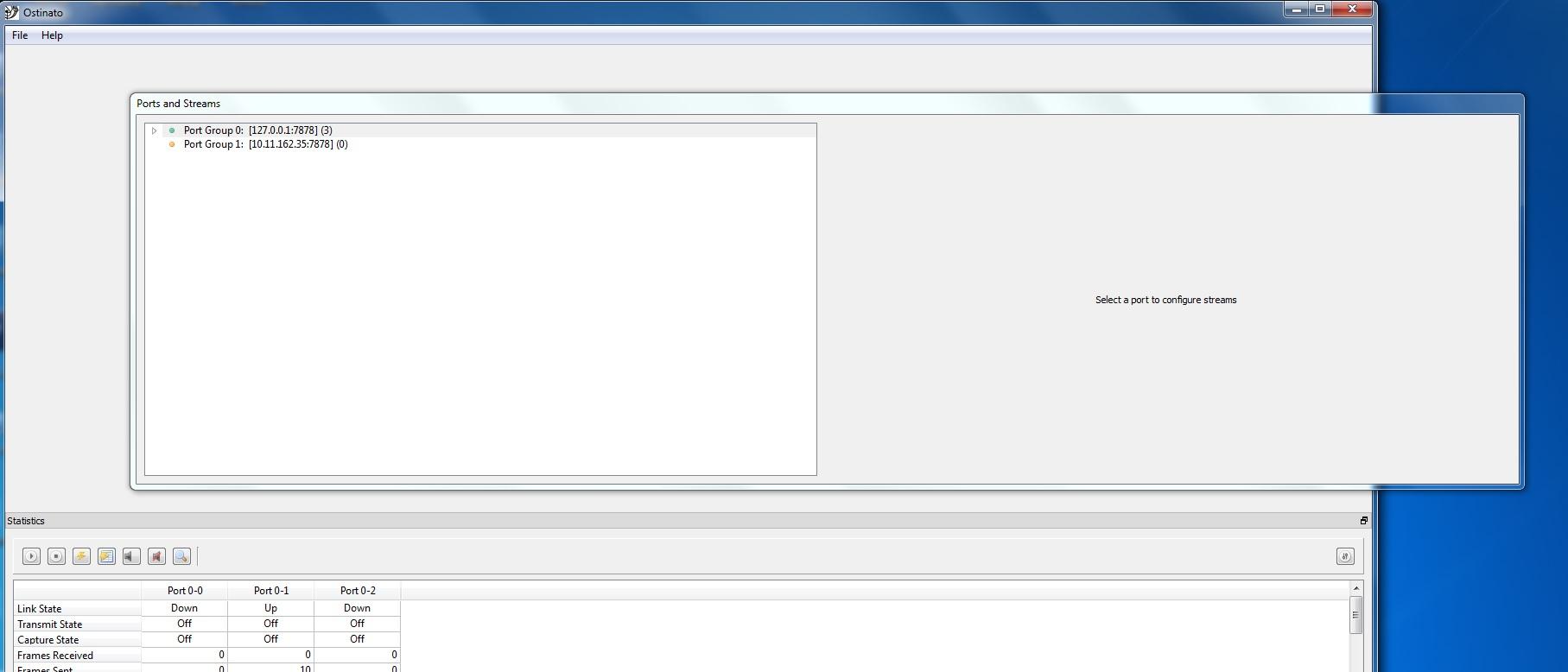
When I create a portgroup from windows GUI it doesn't show any ports.
Please find attached the screenshot.
Regards,
Rishy
Rishy Kumar
Nov 26, 2014, 11:10:55 PM11/26/14
to osti...@googlegroups.com, rishy...@gmail.com
I am able to connect to the Linux box from the windows machine from putty.
Carlos G Mendioroz
Nov 27, 2014, 4:16:52 AM11/27/14
to Rishy Kumar, osti...@googlegroups.com
Can you telnet to :7878 from windows ? Sounds like some filter/firewall
is preventing the connection. Iptables at the linux box ?
Rishy Kumar @ 27/11/2014 01:10 -0300 dixit:
> The server is running on 0.0.0.0 <http://0.0.0.0>: 7878
> <http://0.0.0.0:7878>.
> <https://groups.google.com/d/optout>.
>
>
>
>
> --
> http://ostinato.org/
> @ostinato
is preventing the connection. Iptables at the linux box ?
Rishy Kumar @ 27/11/2014 01:10 -0300 dixit:
>
>
>
>
> --
> http://ostinato.org/
> @ostinato
>
> --
> Get Ostinato News and Updates on Twitter - Follow @ostinato
> (http://twitter.com/ostinato)
> ---------
> You received this message because you are subscribed to the Google
> Groups "ostinato" group.
> To post to this group, send email to osti...@googlegroups.com
> To unsubscribe from this group, send email to
> ostinato+u...@googlegroups.com
> For more options, visit this group at
> http://groups.google.com/group/ostinato?hl=en
> ---
> You received this message because you are subscribed to the Google
> Groups "ostinato" group.
> To unsubscribe from this group and stop receiving emails from it, send
> an email to ostinato+u...@googlegroups.com
> <mailto:ostinato+u...@googlegroups.com>.
> --
> Get Ostinato News and Updates on Twitter - Follow @ostinato
> (http://twitter.com/ostinato)
> ---------
> You received this message because you are subscribed to the Google
> Groups "ostinato" group.
> To post to this group, send email to osti...@googlegroups.com
> To unsubscribe from this group, send email to
> ostinato+u...@googlegroups.com
> For more options, visit this group at
> http://groups.google.com/group/ostinato?hl=en
> ---
> You received this message because you are subscribed to the Google
> Groups "ostinato" group.
> To unsubscribe from this group and stop receiving emails from it, send
> an email to ostinato+u...@googlegroups.com
Rishy Kumar
Nov 27, 2014, 10:30:37 AM11/27/14
to osti...@googlegroups.com, rishy...@gmail.com, tr...@huapi.ba.ar
Would check the telnet and iptables settings and post the findings.
Regards,
Rishy
Rishy Kumar
Dec 5, 2014, 6:14:44 AM12/5/14
to osti...@googlegroups.com, rishy...@gmail.com, tr...@huapi.ba.ar
After adding entries to the iptables, it is working fine.
Thanks Carlos.
Regards,
Rishy.

syk...@gmail.com
Oct 31, 2015, 7:50:53 AM10/31/15
to ostinato, rishy...@gmail.com, tr...@huapi.ba.ar
Hi Rishy,
Can you please tell me which entries were needed to allow Linux drone to communicate with its agent on Windows?
I'm new to Ostinato and Linux server and I'm having the same issues you had. When I disable the firewall on Linux, the port group goes green. But the port group remains disabled even after allowing TCP port 7878 in iptables. What other entries are needed in the iptables?
Thanks,
Su-Yon
Can you please tell me which entries were needed to allow Linux drone to communicate with its agent on Windows?
I'm new to Ostinato and Linux server and I'm having the same issues you had. When I disable the firewall on Linux, the port group goes green. But the port group remains disabled even after allowing TCP port 7878 in iptables. What other entries are needed in the iptables?
Thanks,
Su-Yon
Reply all
Reply to author
Forward
0 new messages