
Image Shrinks when Importing
152 views
Skip to first unread message

Jane Doe
Jul 26, 2022, 7:41:27 PM7/26/22
to OpenToonz Users Forum
I'm attempting to import image sequences into Opentoonz from Clip Studio Paint. Here are the settings I have when exporting the image sequence: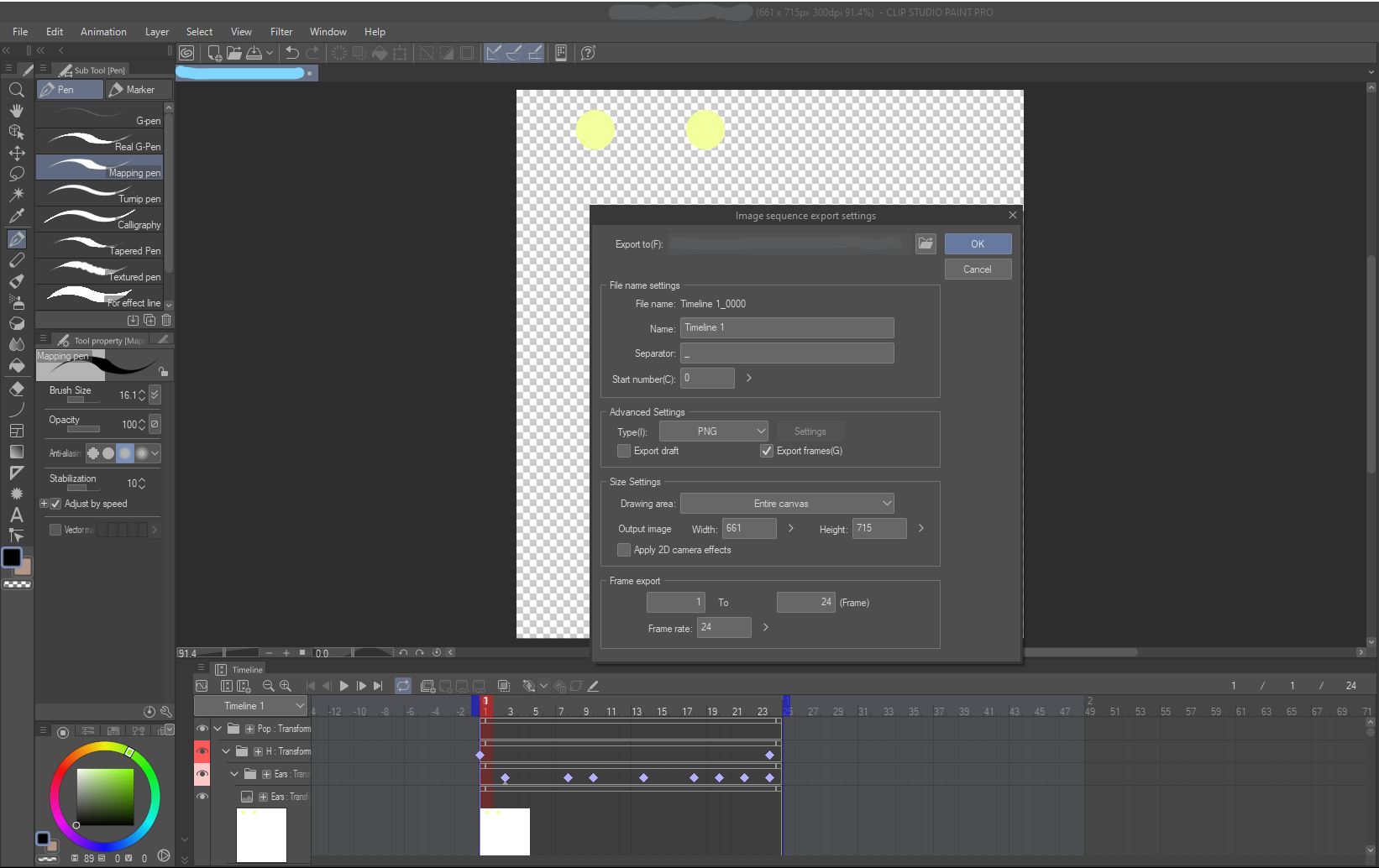


When I drag and drop the image sequence into Opentoonz, I open my files and drag the files needed onto the canvas. Next, I choose to Import and Keep Existing File, choosing to Apply to All. I click No to All Dups and it's visible and functioning as an animation, but the image itself is shrunken.
What I notice is that it still does this even if the file is as big as the canvas.
Why does the image shrink like this when I Import my image sequences in? Thanks to whoever reads and answers this and have a good day!

Artisteacher
Jul 30, 2022, 9:07:23 AM7/30/22
to OpenToonz Users Forum
Are you sure it's actually smaller? The zoom level in the viewer is 51%, so of course the imported image will look smaller than in CSP where you are using a zoom level of 91.4%.
Jane Doe
Aug 1, 2022, 6:24:59 PM8/1/22
to OpenToonz Users Forum
I hadn't considered that, so I tried to adjust the zoom level to match (100%) on both programs, but unfortunately it didn't work. While I tested the zoom level out, I noticed that the image sequence itself decreased in quality when I imported it too, not sure if that's important or if it's just redundant. But thank you for answering, I appreciate you and your time taken to answer this!
Jane Doe
Aug 1, 2022, 7:21:15 PM8/1/22
to OpenToonz Users Forum
More specifically to my last comment, I just now noticed that when I zoom in by 1000%, it's clear and perfectly smooth, but when I zoom out to 100%, the image gets chunky again. I'm very new to this, so I don't know if this is normal or will change in export.
Artisteacher
Aug 1, 2022, 7:45:03 PM8/1/22
to OpenToonz Users Forum
Another consideration could be DPI. Native raster levels in OT are usually 120dpi - unless it's been changed manually. If the dpi in CSP is different, it could explain the difference in display.
Jane Doe
Aug 2, 2022, 10:30:18 PM8/2/22
to OpenToonz Users Forum
I think that might be it- while I'll adjust the DPI to be equal across everything, here's what I found when trying to adjust it on Opentoonz;
For some reason, my photos app on my computer changed the DPI to 350 instead of 300 (what I set as the DPI in Clip Studio Paint); then Opentoonz's Camera's DPI is 120; I can see how the image can get pretty messed up with that. Still, I have to finish adjusting the DPI across everything, and it might take me a couple days to find the time to do so; but I'll definitely get back on here to update on this problem. Thank you very much!
Reply all
Reply to author
Forward
0 new messages