
Horrible PNG Transparency
277 views
Skip to first unread message

Joe Adam
Apr 27, 2016, 11:06:27 PM4/27/16
to opento...@googlegroups.com
So I create and export an image with transparency in GIMP, like the one below:

Notice how the red area is fuzzy; it gradually becomes transparent.
(You can verify that it isn't on a white background if you save the above image.) However, when I import such an image into OpenToonz 1.0.1, the result is
not pretty:

This isn't just true in the editor; this is a final exported image. I'm
currently working on a project that involves imported images with
transparency, but when I try it, the images have white areas around
them, similar to badly-green-screened footage.
Is anyone else having this problem? Anyone know if there's a way to fix it?
Thanks!
EDIT: I'm saved! It works just fine with .tif images with transparency:
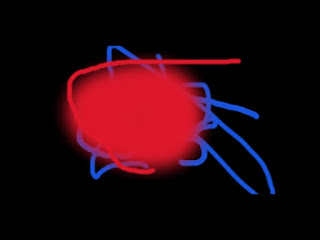
Obviously, it's still a problem if OpenToonz can't handle PNGs, but at least I have a work-around for now...

Juls_3000
Apr 27, 2016, 11:29:38 PM4/27/16
to OpenToonz Users Forum
In OT try pre-multiply in png caracteristics.

Herbert123
Apr 27, 2016, 11:34:20 PM4/27/16
to OpenToonz Users Forum
It does actually work, but you must activate the setting "premultiply" in the level settings.
Right-mouse click the PNG level to change this setting (choose "level settings".
Also, 8bit png are still problematic in TOonz, I believe. Not sure, though.
Right-mouse click the PNG level to change this setting (choose "level settings".
Also, 8bit png are still problematic in TOonz, I believe. Not sure, though.
Joe Adam
Apr 27, 2016, 11:43:33 PM4/27/16
to OpenToonz Users Forum
Thank you both! :) Tifs may work, but the file size leaves much to be desired.... :P
Reply all
Reply to author
Forward
0 new messages