
Unable to ping my PC from a thread node and vice versa
842 views
Skip to first unread message

Joseph DISSISSA
Sep 25, 2020, 5:46:17 AM9/25/20
to openthread-users
Hello, I'm new to openthread and I have a little of trouble understanding it. The image below shows my setup
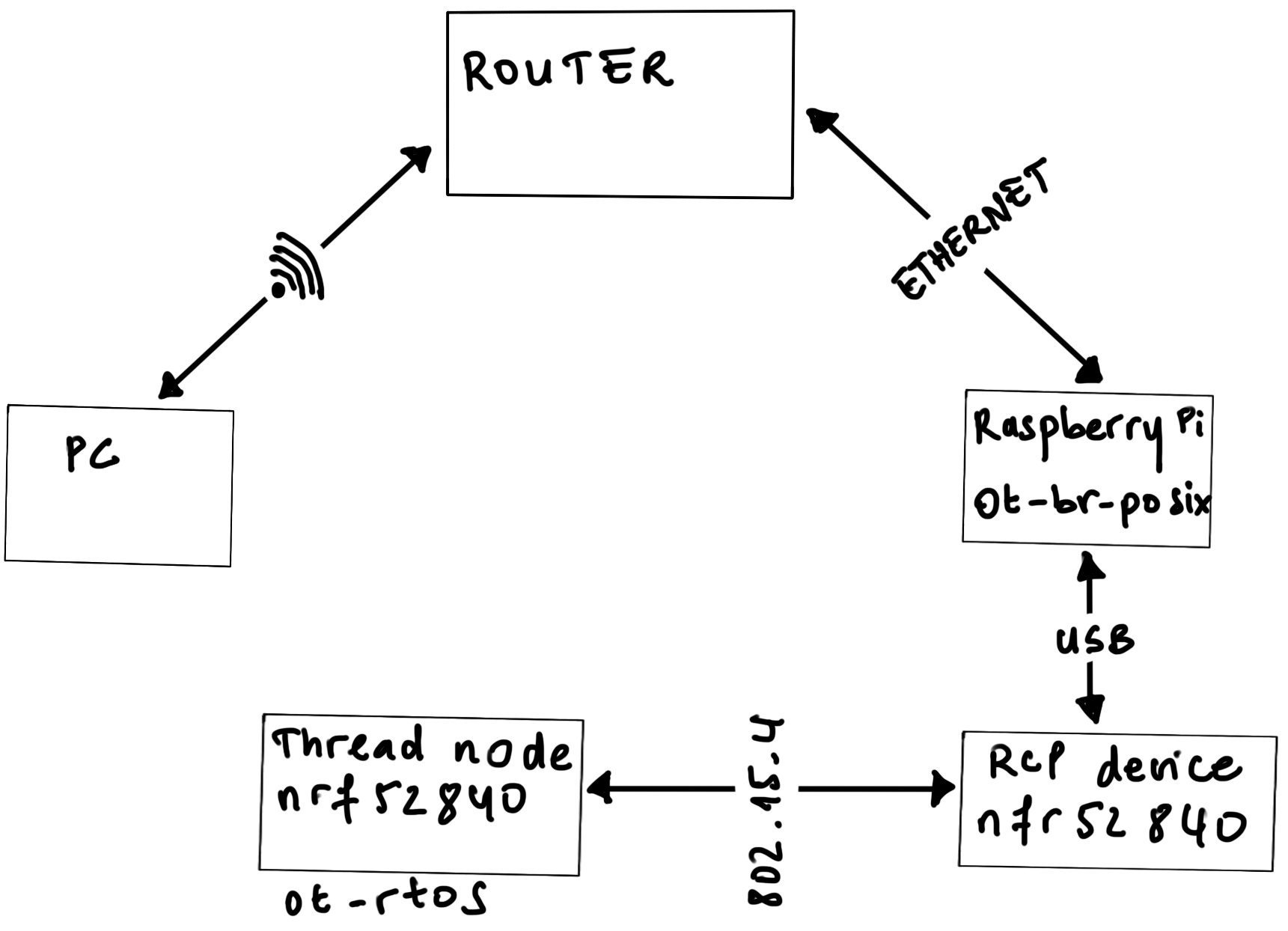
I have followed this guide https://openthread.io/guides/border-router/build?hl=en
and I'm able to form a thread network and all my devices (the raspberry
pi 3 and the thread node) have IP addresses with the proper prefix
(fd11:22).
-My raspberry is able to ping
everybody (the PC wlo1 interface, google IPv6 address and the thread
node) but my PC can only ping my Raspberry eth0 interface and not the
wpan0 interface with the fd11:22 prefix, the PC is also unable ping the
thread node.
The thread node is able to ping the raspberry pî
wpan0 interface but is not able to ping my PC IPv6 address on wlo1 or
google IPv6 address.
The question is can my PC ping the thread node and vice versa ? if yes , how can I do it?
I've seen this conversation https://groups.google.com/u/0/g/openthread-users/c/vHaLaJPMrYw
and after running the ./script/server command and service --status-all,
tayga and NAT64 become active but I'm still unable to ping my PC.
I've also seen this https://openthread.io/guides/border-router/docker/test-connectivity?hl=en
And I'm able to ping a public address by using the IPv4 to IPv6 translator and the 64:ff9b::
prefix but still i'm unable to ping PC and I don't understand why I
need to do this given that my PC and google already have IPv6 addresses.
Is
there anything I'm missing? I know it's a little long and unclear but I
really need help and don't hesitate to ask for precision.
Thank you all!

Jonathan Hui
Sep 25, 2020, 2:30:08 PM9/25/20
to Joseph DISSISSA, openthread-users
On Fri, Sep 25, 2020 at 2:46 AM Joseph DISSISSA <joseph....@smile.fr> wrote:
-My raspberry is able to ping everybody (the PC wlo1 interface, google IPv6 address and the thread node) but my PC can only ping my Raspberry eth0 interface and not the wpan0 interface with the fd11:22 prefix, the PC is also unable ping the thread node.The thread node is able to ping the raspberry pî wpan0 interface but is not able to ping my PC IPv6 address on wlo1 or google IPv6 address.
The `fd11:22::` prefix is a Unique Local Address prefix and is not globally routable. Thread devices cannot ping a global IPv6 address using a Unique Local Address.
The question is can my PC ping the thread node and vice versa ? if yes , how can I do it?
Yes, your PC can ping the Thread node, but you will need to configure an IPv6 address on your PC and configure the following routes:
- On PC, configure a route to the `fd11:22::` prefix via the RPi.
- On RPi, configure a route to the PC IPv6 address via the PC.
If you are using Linux, you may check out Practical Networking for Linux Admins: IPv6 Routing
I've seen this conversation https://groups.google.com/u/0/g/openthread-users/c/vHaLaJPMrYw and after running the ./script/server command and service --status-all, tayga and NAT64 become active but I'm still unable to ping my PC.I've also seen this https://openthread.io/guides/border-router/docker/test-connectivity?hl=enAnd I'm able to ping a public address by using the IPv4 to IPv6 translator and the 64:ff9b:: prefix but still i'm unable to ping PC and I don't understand why I need to do this given that my PC and google already have IPv6 addresses.
The default NAT64 configuration uses the Well-Known Prefix 64:ff9b::/96, but that does not allow communication with private IPv4 addresses. See the TAYGA README for more details.
Hope that helps.
--
Jonathan Hui
Joseph DISSISSA
Sep 30, 2020, 8:57:25 AM9/30/20
to Jonathan Hui, openthread-users
Hi Jonathan, thank you for your response and sorry for my delay.
I have a little bit of trouble understanding.
1 - You said I need to configure an IPv6 @ on my PC, on which interface should I add this IPv6 @?, should that address have the fd11:22:: prefix?
2- You also said "On PC, configure a route to the `fd11:22::` prefix via the RPi, I found this command
sudo ip route add fd11:22:: via fd11:22::2c87:my_RPi_address dev wlo1 (wlo1 is the wifi interface on my PC)
but it's not working, what's wrong with this command?
3- You wrote "On RPi, configure a route to the PC IPv6 address via the PC", I'm guessing it's going to be something like
sudo ip route add my_PC_IPv6_@_that_I_just_created via ???, when you said via the PC, what do you mean?, which address?, which interface?
Basically I just need more details, I'm completely new with networking, so thank you for patience .
Best regards
Joseph
Jonathan Hui
Sep 30, 2020, 3:25:42 PM9/30/20
to Joseph DISSISSA, openthread-users
On Wed, Sep 30, 2020 at 5:57 AM Joseph DISSISSA <joseph....@smile.fr> wrote:
Hi Jonathan, thank you for your response and sorry for my delay.I have a little bit of trouble understanding.1 - You said I need to configure an IPv6 @ on my PC, on which interface should I add this IPv6 @?, should that address have the fd11:22:: prefix?
An IPv6 prefix should uniquely identify a subnet. Because your PC is not directly attached to the Thread network, it should use a prefix different from `fd11:22::/64`, which is assigned to your Thread network.
You can assign an IPv6 address on Linux using:
ip -6 address add 2001:dead::1/64 dev wlan0
2- You also said "On PC, configure a route to the `fd11:22::` prefix via the RPi, I found this commandsudo ip route add fd11:22:: via fd11:22::2c87:my_RPi_address dev wlo1 (wlo1 is the wifi interface on my PC)but it's not working, what's wrong with this command?
You can configure a route using:
ip -6 route add fd11:22::/64 via <otbr-eth0-address> dev wlan0
3- You wrote "On RPi, configure a route to the PC IPv6 address via the PC", I'm guessing it's going to be something likesudo ip route add my_PC_IPv6_@_that_I_just_created via ???, when you said via the PC, what do you mean?, which address?, which interface?
You can configure a route using:
The IPv6 prefix needs to be the one that you assigned to the Wi-Fi interface when configuring the PC's IPv6 address above.ip -6 route add 2001:dead::/64 dev eth0
Basically I just need more details, I'm completely new with networking, so thank you for patience .
Joseph DISSISSA
Oct 4, 2020, 4:49:15 AM10/4/20
to Jonathan Hui, openthread-users
It finally worked!! Thank you so much Jonathan!
Joseph
Jonathan Hui
Oct 4, 2020, 11:38:15 AM10/4/20
to Joseph DISSISSA, openthread-users
Great to hear things are working!
--
Jonathan Hui
Reply all
Reply to author
Forward
0 new messages