
New PNP machine:

The Maker Team

bert shivaan
--
You received this message because you are subscribed to the Google Groups "OpenPnP" group.
To unsubscribe from this group and stop receiving emails from it, send an email to openpnp+u...@googlegroups.com.
To view this discussion on the web visit https://groups.google.com/d/msgid/openpnp/6c9933be-2e61-43e9-992e-baf78416e478n%40googlegroups.com.
The Maker Team
bert shivaan
To view this discussion on the web visit https://groups.google.com/d/msgid/openpnp/07111998-3653-4569-a194-a3c4a5997278n%40googlegroups.com.
The Maker Team
The Maker Team

ma...@makr.zone
Hi
Is this the newest OpenPnP Version i.e. with the axes visible in the Machine Setup tree?
If yes: have you used the Issues & Solutions system to try and find the issue?
https://github.com/openpnp/openpnp/wiki/Issues-and-Solutions
_Mark
To view this discussion on the web visit https://groups.google.com/d/msgid/openpnp/07111998-3653-4569-a194-a3c4a5997278n%40googlegroups.com.
The Maker Team
ma...@makr.zone
Could you send the machine.xml?
To view this discussion on the web visit https://groups.google.com/d/msgid/openpnp/10dc7f2e-0bcd-4ecf-b7c9-5f1d476c2b45n%40googlegroups.com.
ma...@makr.zone
Hi Maker Team
It seems you don't have a Z-axis defined!
Normally one is provided in the default configuration or migrated
from a previous version's machine.xml.
So I guess you must not yet have defined it in the machine.xml
after you switched from the NullDriver to the GcodeDriver, then
migrated to the new version. Or maybe you deleted it somehow,
afterwards?
Btw. in the new version you get a clear Warning now:

So start by defining the Z axis:
https://github.com/openpnp/openpnp/wiki/Machine-Axes
Then assign it to your nozzle:
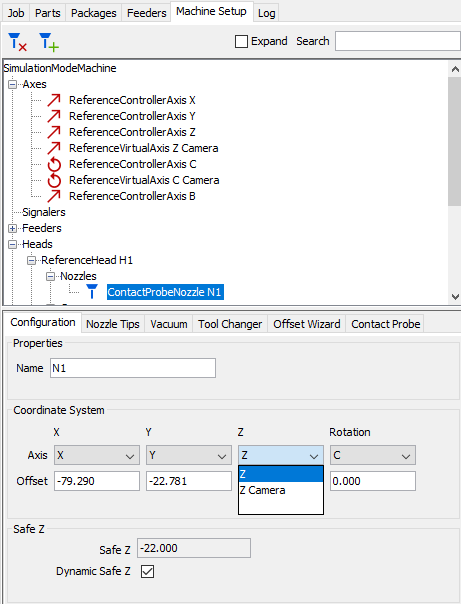
https://github.com/openpnp/openpnp/wiki/Mapping-Axes
_Mark
To view this discussion on the web visit https://groups.google.com/d/msgid/openpnp/19546063-2698-413d-bb24-d3ef0e7577den%40googlegroups.com.
The Maker Team
This OpenPNP was not an upgrade. It was installed from the latest version. I made sure of that by uninstalling it and re-installing the on from https://openpnp.org/downloads/. I got the 64bit version for windows.
As frustration builds here I am considering other options but before I do I want to make sure I have at least given OpenPNP a fair shot.
Should I consider installing Smoothieware on my controller?
Maybe my marlin configuration is not right in some way.
I have looked at the OpenPNP version of Marlin but it is for a Teensy controller and I am not sure what changes have been made to Marlin to support that controller and if my will even work under that configuration.
My controller is a BigTree Tech SVR v1.3 and it does support Soothieware firmware.
I am not new to building machines. I have built several CNC machines and several 3D printers.
I am just new to all this PNP stuff. When it starts asking for RegEX this and RegEX that I am lost lol. Things like this -
2020-12-18 11:16:25.761 GcodeDriver WARNING: Axis ReferenceControllerAxis letter Z missing in POSITION_REPORT_REGEX groups.
Seems very cryptic to me. POSITION_REPORT_REGEX groups I will be honest here. I have no idea what it is talking about or what it is looking for or what I can do to fix it. This is what I got after I added the Z axis.
ma...@makr.zone
Hi Maker Team
Hang in there. You need tons of frustration tolerance to get a DIY Pick & Place going. But you'll also learn tons of stuff and it feels great, afterwards!
First you need to realize that all you're configuring is (for now) in the machine.xml file here:
https://github.com/openpnp/openpnp/wiki/FAQ#where-are-configuration-and-log-files-located
So if you feel you've reached a dead-end or everything so far was
just a trial, you can exit OpenPnP, backup the current machine.xml (in case you reconsider)
and delete it.
When you restart OpenPnP it will create a new machine.xml for you. The default machine
will have created the axes for a single nozzle machine. But
everything else (driver/cameras) is just simulated.
From this you can start setting up your machine.
General note: Whenever you think you've reached a good
intermediate state, make sure to exit OpenPnP or use File /
Safe Configuration and then make a new backup of the machine.xml. You can always go back to
this by restoring the file later. Just make sure to have exited
OpenPnP before doing that (OpenPnP overwrites the file when it
exits).
Unfortunately, the Wiki is currently in transition.
- There is the old way to setup
a machine in the regular table of contents (right side
bar). Most of this still aplies but when it comes to axes, and
drivers and having to hack the machine.xml manually, it is no
longer accurate.
- There is the new way to setup the machine in
the Advanced Motion Control section. At the end of each of
these new pages, you have the toc of the new/changed features.
These replace the similar old features. The Wiki will be
re-integrated in the next weeks/months.
A few first steps to get you going:
You can delete the default driver (NullDriver) and create a
proper GcodeAsyncDriver.
https://github.com/openpnp/openpnp/wiki/GcodeAsyncDriver#for-new-drivers
> My controller is a BigTree Tech SVR v1.3 and it does support Soothieware firmware.
If you can install my firmware, this would give you the best
automatic setup support. However, I don't know if the BigTree Tech
SVR v1.3 is fully hardware compatible with the Smoothieboard. Maybe somebody here on the list knows?
https://makr.zone/smoothieware-new-firmware-for-pnp/500/
With the standard Marlin firmware you can still create a good
single nozzle machine (it is only for the multi.nozzle machines
that stock Marlin is suboptimal). Also, stock Marlin has less
automatic setup support in OpenPnP.
Once you have figured this out, you can use the Issues & Solutions system to guide you through the steps. Be sure to use the [i] button to lead you to the proper Wiki pages.
https://github.com/openpnp/openpnp/wiki/Issues-and-Solutions
It can even propose the Gcode for the most complicated commands
and regular expressions.
Then you can replace the simulated cameras with
OpenPnPCaptureCameras. Etc.
https://github.com/openpnp/openpnp/wiki/Setup-and-Calibration%3A-General-Camera-Setup
I hope this helps as a starter.
_Mark
To view this discussion on the web visit https://groups.google.com/d/msgid/openpnp/666a9046-e751-44c1-af33-7114b38cce83n%40googlegroups.com.
The Maker Team
Mark I want to thank you for all the help you have provided. While I am no where near done with this thing. I can now happily tell you it is now at least moving all the axis's. Of course the problem was indeed something silly as I thought it would be but here is what I found out.
I did a single Y axis move of 100 using the Jog controls and while looking at the Trace of the g-code I noticed it was sending this command - M204 S666.67 G1 Y100 F15491.93. So, it was attempting to set the feed rate and spindle speed followed by the in this case the y axis move of 100 followed by the feedrate of the actual move.
After playing around a bit with the settings I found the issue. Under the Driver in the Gcode settings it has a drop down with six items in it. Mine was set on Constant acceleration. Once it was changed to ToolPathFeedrate it started working because the G-code that was being output changed to G1 Y100.0000 which is correct in my case.
ma...@makr.zone
Hi Maker Team
> I can now happily tell you it is now at least moving all
the axis's.
Cool.
> After playing around a bit with the settings I found the issue. Under the Driver in the Gcode settings it has a drop down with six items in it. Mine was set on Constant acceleration. Once it was changed to ToolPathFeedrate it started working because the G-code that was being output changed to G1 Y100.0000 which is correct in my case.
You should read about these settings and what they mean. They are
the central choice how OpenPnP's new Advanced Motion Control
works.
https://github.com/openpnp/openpnp/wiki/GcodeAsyncDriver#gcodedriver-new-settings
If you set it to ToolpathFeedRate, you have if
effectively dumbed down to nothing. :-(
One of the reasons why you want better Motion Control is for
better speed factors. OpenPnP will control the motion so that for
instance a 50% speed factor results in exactly double the motion
time. But this only works, if acceleration is controlled in
addition to feed-rate.
https://github.com/openpnp/openpnp/wiki/GcodeAsyncDriver#control-of-speed-factors
Tell me if that description is too complicated. It is always hard for me to document something understandably, after having spent so much time thinking about it. ;-)
>This M204 S666.67 was being set along with every move.
> So, of course Marlin would have no idea what it is
talking about here.
The M204 sets the allowed acceleration. Marlin should support it:
https://marlinfw.org/docs/gcode/M204.html
Btw. the reason the feed-fate numbers are so odd (like F15491.93
in your case) is because OpenPnP predicts how fast the machine
will move (peak) for the given length of move. Setting the limit
to the predicted value will make sure the speed control is always
mostly effective, even if the controller is able to apply
optimizations that deviate from the prediction.
_Mark
To view this discussion on the web visit https://groups.google.com/d/msgid/openpnp/adb32cf2-eb9b-4f53-93bd-8a1df029da6en%40googlegroups.com.

Javier Hdez.
The Maker Team
ma...@makr.zone
Hi Maker Team
I have three controller types attached here, but no Marlin controller. Could you help me with testing and improving this?
First thing to try:
Maybe Marlin does not support both a M and G command on the same
line. It should according to the standard (NIST
RS274NGC Interpreter - Version 3, Section 3.3.5 Item Repeats),
but you know how it is.

To test, you need to set it back to ConstantAcceleration in
Driver Settings:

Having it on the same line is a bit faster. Maybe it does support
it on the same line, but it requires a spaces between M and G
words. Again requiring this is not standards conforming, but it
seems likely as e.g. Duet had the same problem (already fixed
there).
So put it back together on one line:

Switch off the Compress Gcode option off:

Test again.
Once you can confirm one of these two work, I will build that into the Issues & Solutions system, so the next user will have the solution ready.
If somebody in/near Switzerland has an
unused Marlin laying around (partly damaged drivers don't
matter), you could help by sending it to me. ;-)
Thanks for helping!
_Mark
To view this discussion on the web visit https://groups.google.com/d/msgid/openpnp/2d6bbe86-459e-4c24-805e-19a7f06d6b36n%40googlegroups.com.