
Basic vision lighting, filters, normalization?
688 views
Skip to first unread message

Jason von Nieda
Feb 24, 2015, 4:18:31 PM2/24/15
to ope...@googlegroups.com, fire...@googlegroups.com
Hi folks,
As I begin to delve deeper into the machine vision aspects of OpenPnP I am wondering if any of you can suggest some basics to help me get going. Mostly I am looking for information about the defaults I should start with in regards to lighting, filters and image normalization. I'm wondering if there are any basic rules I should follow.
For instance: I am using a color camera (the ELP USB camera) and I have a Adafruit NeoPixel ring light attached to it. So I can vary the color and intensity of the lighting.
Should I:
* Use IR or polarizing filters?
* Use a certain color of light?
* Perform any basic image manipulation of the received images?
I realize that much of this will be machine specific and even application specific, but I am wondering if there are some basics that can be applied generally.
For reference, my current focus is on fiducial recognition and I am currently using template matching to accomplish it.
Thanks,
Jason

Cri S
Feb 24, 2015, 6:23:52 PM2/24/15
to ope...@googlegroups.com, fire...@googlegroups.com
Ir light is only useful in two conditions on pnp and on other it gives some problems.
IR light is used for fiducial recognition under solder mask and machines using it have heavy light filtering using special
coated acrylic in order that no ir light passes from outside. On hobby machine type it gives a lot of problems.
The other condition require ccd camera that is difficult to find, so i don't explain it at the moment.
Polarizing filter give advantage if you do ocr, otherwise not really.
Traditionally red color was used for the reason that it works good on greed solder mask and instead of
BGR to Gray conversion, it was taken just the best monochrome channel, the blue channel.
Tecnology changes and now cameras give YUV and so Y channel is used directly as real gray monochrome image.
Using white gives the possibility to have true color images for video.
On current openPnP implementation, it don't give any speed difference.
Opencv have different code for template matching on color and bw images, i prefer bw , other prefer color.
It gives different scores and find different pattern. Color take 3 times long to compute, because the matching is taken
on B G R channel and the highest score wins, but doing it on B G R domain gives really different images as gray image. If you do color template matching, red light gives some advantages.
What you should do is gaussian blur. Further some cams have heavy vignetting. Either you correct it or just use
Roi from that.
You don't use the code that i have send you for fiducial recognition, it don't use template matching anyway.
Eventually, it is thinkable to do as example OTSU thresholding, and then compare the result with you generated
template image. In this case roi should be used to limit FOV (field of view) from the camera in order to produce correct
thresholding. Eventually adaptive thresholding could be better, or thresholding canny image, in order to remove
inappropiate lightning conditions. Without example image and image of with paper it is not possible to do correct answer.
Message has been deleted
Cri S
Feb 24, 2015, 8:16:17 PM2/24/15
to ope...@googlegroups.com

The bw image is the "gray" image from that it extract the circles not using houghCircle.
It uses canny in order to eliminate shading problems, and preprocess it little bit as you can see .

Karl
Feb 24, 2015, 10:18:37 PM2/24/15
to fire...@googlegroups.com, ope...@googlegroups.com
Jason,
With the RaspiCam Noir I run my NeoPixel at 127,63,63 for the following reasons:
1) the Noir seems to like red better for sensitivity
2) only use just enough light--too much light washes out all the shadows when your camera gets close to the bed
3) I don't need any other light or filters
I found it useful to take several reference pictures at different positions in varying lighting. Then I used FireSight to crank the number to see what light worked best. I think you'll find Simon's op-sharpness stage very helpful in doing this. This might be easiest to do with command-line FireSIght (which is how I did all the fpd-vision experiments). The added benefit of starting with Simon's op-sharpness is that you'll be able to determine your ideal focal range.
Jason von Nieda
Feb 24, 2015, 10:51:08 PM2/24/15
to ope...@googlegroups.com, fire...@googlegroups.com
Thanks Cri, your message was very helpful!
Can you explain more about using gaussian blur? What is the purpose of it?
You mentioned code you sent for fiducial recognition. Can you resend it? I checked all my emails from you and the only fiducial stuff I found was the manual process that we talked about some time ago.
I've attached three pictures. In the picture there is a circuit board on the left and white paper on the right. The pictures were each taken with different lighting. One with my ambient office lighting (overhead LED), one with a florescent desk lamp at a low angle and one with the ring LEDs on at RGB 127,63,63 as Karl mentioned in a follow up message.
Jason


--
You received this message because you are subscribed to the Google Groups "OpenPnP" group.
To unsubscribe from this group and stop receiving emails from it, send an email to openpnp+u...@googlegroups.com.
To post to this group, send email to ope...@googlegroups.com.
To view this discussion on the web visit https://groups.google.com/d/msgid/openpnp/b7a22c45-3f11-4cf0-92a4-fff3b4dbedd3%40googlegroups.com.
For more options, visit https://groups.google.com/d/optout.
Jason von Nieda
Feb 24, 2015, 10:55:58 PM2/24/15
to fire...@googlegroups.com, ope...@googlegroups.com
Thanks Karl. Do you think the lighting is just something each person/machine will have to figure out as part of a calibration routine? I was hoping that there would be a sort of "everyone knows this stuff" baseline of things that you should do for machine vision just to get started.
Jason
--
You received this message because you are subscribed to the Google Groups "FirePick" group.
To unsubscribe from this group and stop receiving emails from it, send an email to firepick+u...@googlegroups.com.
To post to this group, send email to fire...@googlegroups.com.
Visit this group at http://groups.google.com/group/firepick.
Cri S
Feb 24, 2015, 11:59:36 PM2/24/15
to ope...@googlegroups.com
Gaussian blur, high quality optics do it on hardware, there is a special plate that using interference causes optical blur.
If you don't have it , it is advisable to do it on SW. 3x3 is usually sufficient. Further some algorithm work better
if additional gaussian blur is added, canny, template-match, ... because gaussian blur improve edge detection.
Adding gaussian blur decrease resolution. On this, 5x5 or 7x7 window is used, but 11x11 or 13x13 is not uncommon,
escpecially when DOG (difference of gaussian) is used as substitute for canny or laplace.
Tecnically speaking, optics have bayer or modified bayer filter. Without such interference plate one light ray
of medium gray can hit only one filter instead of tree, and then on bw it result to light blue as example. Without digital zoom and image enhanchement, the eye don't see this, but if zooming or computational algorithm are used this added noise and color variation create problems. Gaussian blur remove this problem. On pnp optical blur is sometime used,
specially on uplooking camera.

This is first, last and middle image. For template match, the first two works, for fiducial all works.
The last need reduce intensity to 1/3 or better using diffusor, one or two foil of paper as example.
The best is the second, but the angle is too low, it need more direct light. The last have too many direct light.
You could use color histogramEqualize in order to check the images.
The color rows are the led pwm and the shutter that in combination create this pattern.
For direct light intensity, use just white paper , do histogramEqualisation and check the pattern. If the dominant structure disappear, it is right.
Cri S
Feb 25, 2015, 10:48:19 AM2/25/15
to ope...@googlegroups.com
The above image must be clicked to view the third image.
This is java code for fiducial.
Esc key exit from appl.
I have changed some different calling and vision procedures inside feeder and on other parts, so i'm sure Jason don't
like it, because too mutch is changed for doing template matching and fiducial recognition outside the actual feeder dialog.

I have send source code to Jason. Above you see the crop'ed output of
java TestFiducial main Ambient.png x.jpg
Jason von Nieda
Feb 25, 2015, 12:03:32 PM2/25/15
to ope...@googlegroups.com
Code received - thank you Cri. This is very helpful. I have not used findContours before and clearly have a lot to learn.
I'm going to pick up a couple books on OpenCV and computer vision today and see if I can start learning the basics so that I can better understand the reasons for choosing one algorithm over another.
Thanks,
Jason
--
You received this message because you are subscribed to the Google Groups "OpenPnP" group.
To unsubscribe from this group and stop receiving emails from it, send an email to openpnp+u...@googlegroups.com.
To post to this group, send email to ope...@googlegroups.com.
To view this discussion on the web visit https://groups.google.com/d/msgid/openpnp/26d560a2-66f8-45d7-bd46-d67f0d2efde8%40googlegroups.com.

Neil Jansen
Feb 25, 2015, 12:08:30 PM2/25/15
to ope...@googlegroups.com
The O'Reilly book is pretty good and cheap, and has a lot of background on why certain approaches are better than others. There are a few others on Amazon that are also pretty good. Some others are very specific to facial recognition and crap we dont care about, like Mastering OpenCV.
--
To view this discussion on the web visit https://groups.google.com/d/msgid/openpnp/CA%2BQw0jyFhvF86VOHWK96aYGcypiEVUQfiO%3DTyLQ3W-kmEcXWeQ%40mail.gmail.com.
For more options, visit https://groups.google.com/d/optout.
--
Jason von Nieda
Feb 25, 2015, 12:14:37 PM2/25/15
to ope...@googlegroups.com
Thanks Neil. I am going to start with the O'Reilly book and this one: http://www.amazon.com/OpenCV-Essentials-Oscar-Deniz-Suarez-ebook/dp/B00N1X693A/ref=tmm_kin_swatch_0?_encoding=UTF8&sr=8-1&qid=1424882987
To view this discussion on the web visit https://groups.google.com/d/msgid/openpnp/CAKJgtg9erN8wP3ipmRiD7c8KorCtVBZMtcHqvL%3D%2BPQoApYLxWw%40mail.gmail.com.
Jason von Nieda
Feb 25, 2015, 4:00:47 PM2/25/15
to fire...@googlegroups.com, ope...@googlegroups.com
Thanks Jon. I had not seen coaxial lighting before. That's really cool!
In the case of using a colored light, such as red or blue, would the machine typically drop the other channels of input? So for instance, if you are using red lighting would you just drop the blue and green channels from the input images?
Jason
On Wed, Feb 25, 2015 at 9:57 AM, Jon M <jonme...@gmail.com> wrote:
Two options are probably OK:1) use a cloudy day type light ring that is a diffuse typeAs for color often only one color is used with red and blue being common. Basically the goal is to make the camera light much more important than any ambient light for stable, consistent illumination of the part under all ambient light conditions.
--
You received this message because you are subscribed to the Google Groups "FirePick" group.
To unsubscribe from this group and stop receiving emails from it, send an email to firepick+u...@googlegroups.com.
To post to this group, send email to fire...@googlegroups.com.
Visit this group at http://groups.google.com/group/firepick.
Karl
Feb 26, 2015, 10:48:49 AM2/26/15
to fire...@googlegroups.com, ope...@googlegroups.com
Jason,
It will take some time to figure out something that works for everybody. Until then we are all on our own.
This is actually why I am sticking with one camera (RaspiNoir) for now to get something that works. Once Noir works, I'll feel better about applying techniques to other cameras. For example, notice the specular reflection on the NeoPixel image? That's exactly what I am seeing as well. I intend to compensate by angling the camera. Also, your camera seems less sensitive to red than mine, so my RGB ratios won't work for you. The images in XP005 NeoPixel look more white. This vision stuff is tricky and interesting. :D
On Tuesday, February 24, 2015 at 7:55:58 PM UTC-8, jason wrote:
Thanks Karl. Do you think the lighting is just something each person/machine will have to figure out as part of a calibration routine? I was hoping that there would be a sort of "everyone knows this stuff" baseline of things that you should do for machine vision just to get started.Jason
On Tue, Feb 24, 2015 at 7:18 PM, Karl <ka...@firepick.org> wrote:
Jason,With the RaspiCam Noir I run my NeoPixel at 127,63,63 for the following reasons:1) the Noir seems to like red better for sensitivity2) only use just enough light--too much light washes out all the shadows when your camera gets close to the bed3) I don't need any other light or filtersI found it useful to take several reference pictures at different positions in varying lighting. Then I used FireSight to crank the number to see what light worked best. I think you'll find Simon's op-sharpness stage very helpful in doing this. This might be easiest to do with command-line FireSIght (which is how I did all the fpd-vision experiments). The added benefit of starting with Simon's op-sharpness is that you'll be able to determine your ideal focal range.
--
You received this message because you are subscribed to the Google Groups "FirePick" group.
To unsubscribe from this group and stop receiving emails from it, send an email to firepick+unsubscribe@googlegroups.com.
To post to this group, send email to fire...@googlegroups.com.
Visit this group at http://groups.google.com/group/firepick.
Karl
Feb 26, 2015, 10:51:35 AM2/26/15
to fire...@googlegroups.com, ope...@googlegroups.com
Using the Noir, I haven't seen much use for green. The intensity variations are too low. Red seems to work best and I just use blue and green to give the operator an image that "looks like normal lighting".
(and Jon, thanks for the CCS link)

Thomas S. Knutsen
Feb 26, 2015, 12:01:44 PM2/26/15
to openpnp
How would the red do with a red PCB? I would think the PCB colour would be a factor in the detection and the colour of the light used.
BR.
Thomas
--
You received this message because you are subscribed to the Google Groups "OpenPnP" group.
To unsubscribe from this group and stop receiving emails from it, send an email to openpnp+u...@googlegroups.com.
To post to this group, send email to ope...@googlegroups.com.
To view this discussion on the web visit https://groups.google.com/d/msgid/openpnp/dcfd9e6e-0cee-42ce-b78c-9852e6a77855%40googlegroups.com.
Please avoid sending me Word or PowerPoint attachments.
See <http://www.gnu.org/philosophy/no-word-attachments.html>
PDF is an better alternative and there are always LaTeX!
Cri S
Feb 27, 2015, 12:00:11 PM2/27/15
to ope...@googlegroups.com
Il giorno giovedì 26 febbraio 2015 17:01:44 UTC, Thomas S. Knutsen ha scritto:
How would the red do with a red PCB? I would think the PCB colour would be a factor in the detection and the colour of the light used
You have color camera, not BW.
Using red light, you use the blue channel, don't do BGR2GRAY or BGR2HLS extracting the L channel.
You extract the B channel and work with that. On IplImage there was Roi and Coi, setting Coi it manipolated pointers
in order to use determinate color channel as Gray image, Channel of Interest. As i know, this funktioinality was dropped
on C++ interface on Mat. Neverless you could extract the Blue channel using split.
Having red light and using blue channel you got the same effect as coaxial light without the penality of it and without the costs. Penality of coaxial light, if there is no direct reflection, the contrast is very low, image is not usable.
if the pcb is red or green or blue it don't matter. In this case where there is no reflection, you could switch to BGR2GRAY image and use that.
White light is a contrast compromise, but gives the advantage of having true colors, useful for down camera.
I prefer using that and have real colors. Further bad marks are often red and if using red light it don't get recognized
as the red color disappears. For cameras without ir filter, i don't see advantage of using it, and without shielding it
gives many headcaches if ther is reflection of sunlight, or halogen/par light.
Today power leds are available not only in red color.
Annother aspect to consider is not using pwm for leds. Use lm317, dac, current resistors, whatever, not pwm.
PWM if not clock syncronized with camera gives problems.
Jason von Nieda
Feb 27, 2015, 12:53:26 PM2/27/15
to ope...@googlegroups.com
Cri,
Very interesting points. I've noticed the strobing on the PWM as it changes with the intensity.
Can you clarify this: "For cameras without ir filter, i don't see advantage of using it, and without shielding it
gives many headcaches if ther is reflection of sunlight, or halogen/par light."?
Do you mean we should use an IR filter? Or that we should not use red light if not using an IR filter?
Jason
--
You received this message because you are subscribed to the Google Groups "OpenPnP" group.
To unsubscribe from this group and stop receiving emails from it, send an email to openpnp+u...@googlegroups.com.
To post to this group, send email to ope...@googlegroups.com.
To view this discussion on the web visit https://groups.google.com/d/msgid/openpnp/22d0efcc-f03a-45ef-8804-af712e847251%40googlegroups.com.
Cri S
Feb 27, 2015, 1:29:20 PM2/27/15
to ope...@googlegroups.com
Normally cameras have ir- and uv-cut filters. It is possible to remove it or some cameras are sold without it.
Nir cameras are useful for security cameras, and can have diffetent other application. Karl as example use such camera with ir filter removed and AS i remember others have Suggested that it could work better as solder mask and screen printing are not visible with ir illumination.
Nir cameras are useful for security cameras, and can have diffetent other application. Karl as example use such camera with ir filter removed and AS i remember others have Suggested that it could work better as solder mask and screen printing are not visible with ir illumination.
Neil Jansen
Feb 27, 2015, 2:03:37 PM2/27/15
to ope...@googlegroups.com
Most of the M12 cameras I've dealt with have their IR filtering on the lens (small end near the focal point). Jason and I are both using the ELP camera and this is the case.. You can get lenses with and without the filtering.. On m12lenses.con, the "megapixel" lenses seem to have (some but not much) IR filtering, and the other lenses have no IR filtering.
What I'm wondering, is which would be better for up-looking camera, to look at SMT pads, for centering? IR filtered, or no IR filtering? Right now I'm trying both out, and am using both a red LED ring, and a NeoPixel ring.
Normally cameras have ir- and uv-cut filters. It is possible to remove it or some cameras are sold without it.
Nir cameras are useful for security cameras, and can have diffetent other application. Karl as example use such camera with ir filter removed and AS i remember others have Suggested that it could work better as solder mask and screen printing are not visible with ir illumination.
--
You received this message because you are subscribed to the Google Groups "OpenPnP" group.
To unsubscribe from this group and stop receiving emails from it, send an email to openpnp+u...@googlegroups.com.
To post to this group, send email to ope...@googlegroups.com.
To view this discussion on the web visit https://groups.google.com/d/msgid/openpnp/2071a13e-060f-4d99-9f66-511e5508a145%40googlegroups.com.
For more options, visit https://groups.google.com/d/optout.
Cri S
Feb 27, 2015, 2:24:04 PM2/27/15
to ope...@googlegroups.com
Using NIR , ir LEDs should be used.
You can try ir remote for tv.
If you have 5mpix cam and use ir you can use surf, ... Otherwise the keypoints are too less. And other algorithm must be used. If you want I can make ir and normal image and than you see clearly the difference.
Using ir you must shield external ir light, that come from indirect sunlight, or from halogen lamps and other ir sources.
You can try ir remote for tv.
If you have 5mpix cam and use ir you can use surf, ... Otherwise the keypoints are too less. And other algorithm must be used. If you want I can make ir and normal image and than you see clearly the difference.
Using ir you must shield external ir light, that come from indirect sunlight, or from halogen lamps and other ir sources.

Vlad
Mar 14, 2015, 11:31:01 PM3/14/15
to ope...@googlegroups.com, fire...@googlegroups.com
A friend of mine played with a lot of edge detectiona few years back. He told me a lotof what he accomplished but I only understood half of it as machine vision is an abstract dark art in mind. However one of the big points I held onto was color spaces. What I gathered from him was that using HSV rather than RGB color space made it much easier to do edge detection in the real world. namely, it avoided recognizeing shadows as edges, so his program was more tolerant of environmental conditions. on a PNP we are blessed with a lot of control over our setup, but with devices on a populated board or odd feeders maybe it will matter from time to time. hopefully someone can use the above as a jumping off point for a problem they didn't know they had.
Cri S
Mar 16, 2015, 1:07:37 AM3/16/15
to ope...@googlegroups.com
" hopefully someone can use the above as a jumping off point for a problem they didn't know they had."
Wow. In reality:
For me, when i'm able to differentiate full or empty pockets on it's shadows, illumination is ok. Real shadow.
What you referring is different method of color to grayscale conversion.
Taking as example this

If converting it to grayscale, the result is similar to this because it approx the humane eye conversion.

Instead on hsv the max value from r/g/b is used to from the grey image, and as result you get this:

Cri S
Mar 16, 2015, 2:52:46 AM3/16/15
to ope...@googlegroups.com
doing the same with example image from Jason: left is orginal, right is histogram equalized image
Gray TV COEFF


HDTV COEFF
I don't thik this camera using it.


HSV

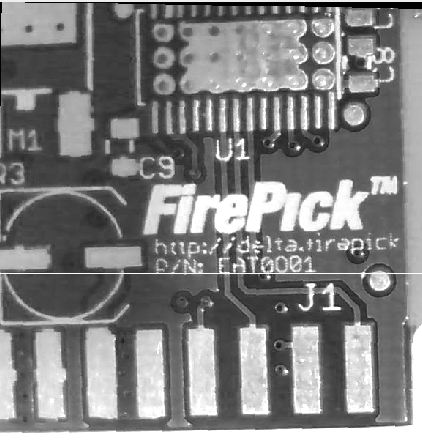

BLUE
You can note the poor illumination.
Using Red leds does brigther white and better contrast.
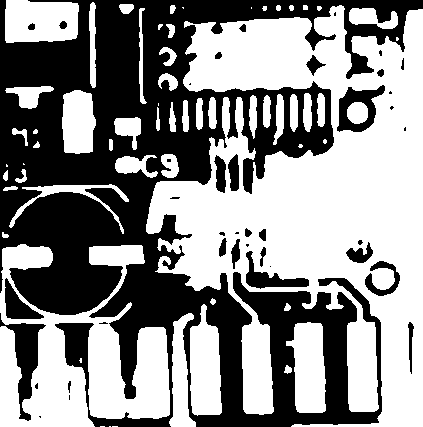
There are artifacts on threshold images resulting from poor illumination.


Cri S
Mar 16, 2015, 3:33:18 AM3/16/15
to ope...@googlegroups.com
Blue images are in wrong order, i'm sure you can associate the correct image type.
Because of the inappropiate illumination the images required preprocessing (brightness-contrast=>gamma at fixed level, no auto parameter)
Without such preprocessing, the blue and hsv threshold images are below.
Further there is one missing required step in the previous images, omitted for better evaluating the image quality on thresholded image.
As you can see, for fiducial recognizing, without such preprocessing blue image is better as hsv, with appropiate preprocessing, hsv is better,
with red illumination, probalby blue is better. Jason, can you post picture of pcb and component on white and red illumination.
Please on both make one additional image of white paper, only the white paper , no component. If you supply that, i can do better correct illumination
issues.
blu -- hsv

Cri S
Mar 16, 2015, 6:18:03 AM3/16/15
to ope...@googlegroups.com
forget to do the same operation on grayscale image, threshold always using automatic threshold
GRAY

Jason von Nieda
Mar 16, 2015, 12:45:23 PM3/16/15
to ope...@googlegroups.com
Hi Cri,
I will post some more images later this week. I have my machine taken apart right now as I upgrade my controller.
Jason
--
You received this message because you are subscribed to the Google Groups "OpenPnP" group.
To unsubscribe from this group and stop receiving emails from it, send an email to openpnp+u...@googlegroups.com.
To post to this group, send email to ope...@googlegroups.com.
To view this discussion on the web visit https://groups.google.com/d/msgid/openpnp/b30893e4-14f2-4302-8c3c-9daea3598ca9%40googlegroups.com.
Karl Lew
Mar 18, 2015, 11:10:52 AM3/18/15
to ope...@googlegroups.com
Wow. I just realized Jason had posted his question to both newsgroups and the threads diverged. Lots of great stuff here to dive into. Cri, thanks for all your advice!
Reply all
Reply to author
Forward
0 new messages