Homing for mid positioned Z axis

132 views
Skip to first unread message

Satya Gupta

unread,
Sep 14, 2024, 4:45:51 AM9/14/24
to OpenPnP
I am building a where: 

The nozzles (2 nozzle) moves up and down using a single stepper motor which has lever attached. Which moves in seesaw motion. And this helps moving either of nozzle up or down.

Now this lever has a notch in the middle which enables a optic sensor which acts as end stop. In short the Z axis has middle position end stop.

If lever is moving on right side i.e. tilted to right then its positive (or max) movement for Z and if its other size then its negative or min movement. In Smoothie configuration the Z axis is set to home_to_min which means the z stepper keeps moving to min until the end stop is triggered.

Hence the stepper keeps moving the lever on left side for homing.


If the lever when machine is started is on tilted on the right side, then end stop is triggered easily since it has to move left and the notch will cross the optic sensor.

But the main trouble is if the lever is on the left size that is the notch on the left side of the optic sensor, now when homing occurs, since homing_to_min is set it keeps moving to left which keeps taking notch away from optic sensor and end stop never triggers.

What needs to be done make sure Z axis moves in both direction while homing 

Satya Gupta

unread,
Sep 14, 2024, 6:42:14 AM9/14/24
to OpenPnP
I am using Smoothieware firmware modified by Mark (https://makr.zone/smoothieware-new-firmware-for-pnp/500/)
Controller board is SKR 1.4 Turbo with TMC 2209 drivers

Will share some pics of the head

a3b88666-e671-4d4c-a87f-f8ba7e0968b0.jpg

bing luo

unread,
Sep 14, 2024, 8:19:20 AM9/14/24
to OpenPnP
        When you power on PNP, openpnp does not know the position of your nozzle, so it cannot move the z-axis motor in the correct direction according to the current position of the nozzle. To return to the homing point,
         It is possible that rotating it to the left or right is in the wrong direction.    Therefore, openpnp's decision is to rotate to the left in a fixed . So you must ensure that the notch is on the right side of the optical sensor before power on.
        Before shut down each time, you need to make openpnp return to homing,This problem won't bother you.  If you suddenly unplug the power plug when the notch is on the left side of the switch, it will become a problem. You can only turn it to the right with your hands.

mark maker

unread,
Sep 14, 2024, 11:26:14 AM9/14/24
to ope...@googlegroups.com

> When you power on PNP, openpnp does not know the position of your nozzle, so it cannot move the z-axis motor in the correct direction according to the current position of the nozzle.

I'm afraid this is not correct 😉

Firstly, it is not OpenPnP's, but entirely the controller's responsibility (or more specifically the firmware's) to do it. OpenPnP is just giving it a completely abstract homing command, it has no notion of how to achieve the homing, whatsoever.

Secondly, if you build the hardware right, the controller does know which way to move after power-on.

The first ingredient to support this is to have a switch, that engages all the way when one nozzle is down. It is easy to build such a hardware, just make sure the switch is pressed by a bar that goes all the way, when the nozzle is going down:
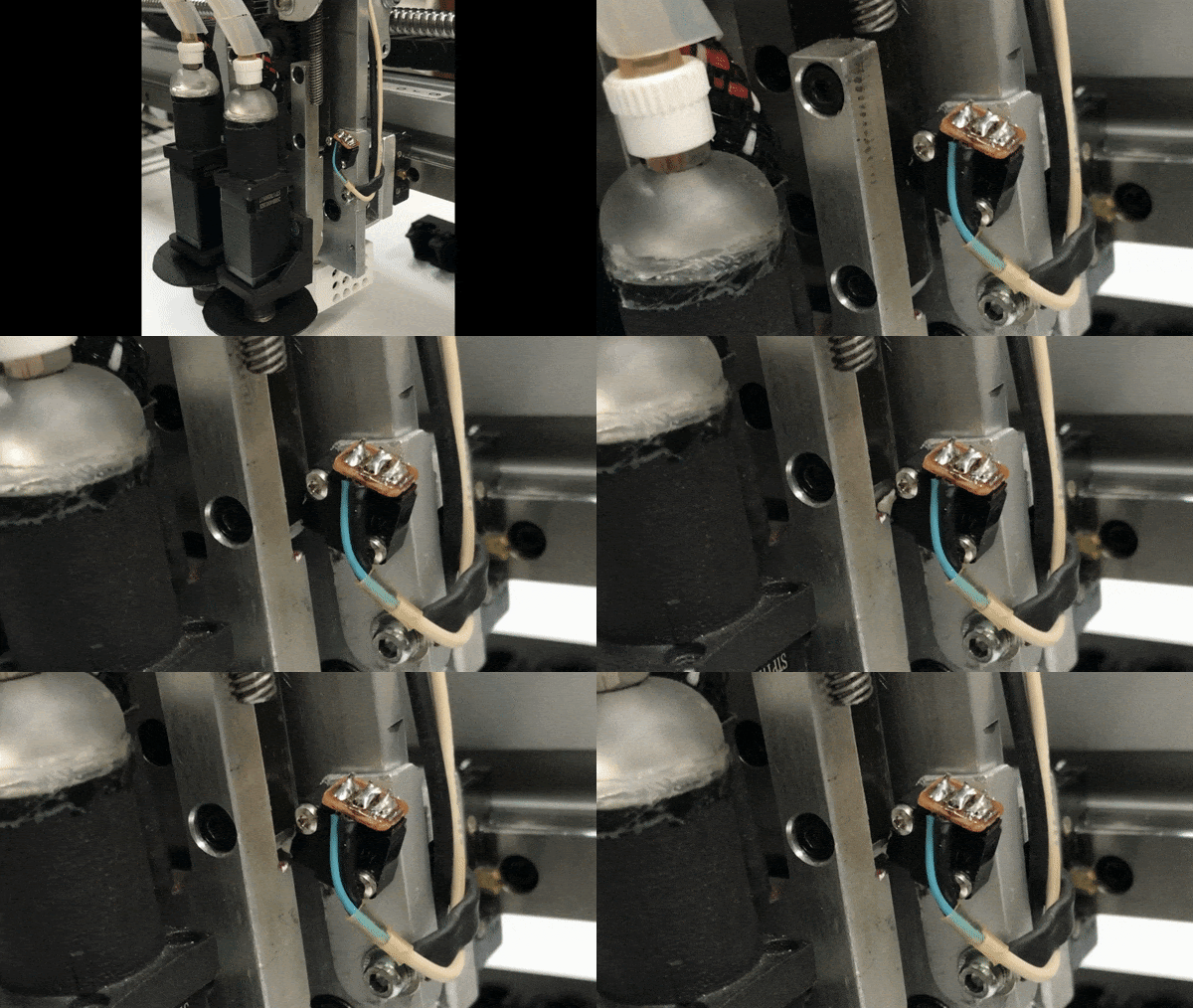
(footage credits: Mike Menci)

The second ingredient is a controller firmware that supports this scenario, i.e., it must support moving to the right side, if the switch is found to be engages initially. In case of Smoothieware, you need my modified firmware, as Satya already mentioned.

https://makr.zone/smoothieware-new-firmware-for-pnp/500/

If you have hardware that just momentarily engages the switch when the nozzles are balanced, then this will not work. One solution is to use springs, and to unpower the motors (there are usually G-code commands to achieve this) to let them snap back to balance. Even if that is not an accurate initial positioning, it is a safe position, i.e., you can then do a deterministic homing cycle from there, i.e. first move to one side a bit, then move back slowly until the switch engages to get a precise position. Again, this is ultimately done by the controller, not by OpenPnP, but you can customize the G-code to do so.

_Mark

--
You received this message because you are subscribed to the Google Groups "OpenPnP" group.
To unsubscribe from this group and stop receiving emails from it, send an email to openpnp+u...@googlegroups.com.
To view this discussion on the web visit https://groups.google.com/d/msgid/openpnp/0f78df66-879e-4d25-958c-54e80a9d520bn%40googlegroups.com.

vespaman

unread,
Sep 14, 2024, 11:45:20 AM9/14/24
to OpenPnP
You can have a look at how a chmt36/48 does it - these machine has the exact same head solution as yours.
I don't think the firmware does anything to help OpenPnP to find the zero, but I could be wrong, I have not had any need to learn how this is actually done in detail.

 - Micael

Satya Gupta

unread,
Sep 14, 2024, 11:39:01 PM9/14/24
to OpenPnP
Thank you all for your replies, i will reply one by one to everyone. 

brother @bing, I know this method but this is tedious. I mean we are humans and we might forget to do it one day and there might be a problem. Hence I wanted better and permanent solution. 

@mark @Micael Thank you guys for your input let me give you a premises of what I am into.

I owned a PnP machine QiHe 802AX which has great hardware but the software to control the hardware is shitty. Anyways long story short, I am using the top plate of the existing machine and power rails but with new controller (SKR 1.4 TURBO with TMC 2209 drivers) and bit of new wiring. 

The main objective is to use the existing machine with OpenPNP. The problem is I cannot change/alter hardware, I need to use as it is. Which is why I cannot add the limit switch, as suggested by @mark. 

@Miceal, the machine I have is basically same as any desktop Chinese PNP. They all use same architecture just different software. I liked how it was implemented earlier, (with original software) when you home the machine, it use to momentarily pull enable of Z driver to high which (due to spring) makes the lever goes back to normal position. And then it used to rock left and right until the end stop is triggered. And that's how I wanted to do it. 

I am not very good with G-Code, I got some macros etc. But I was not sure how to implement it. Then I came across scripting option of OpenPNP which enables you to write the script in JS (Javascript) and Python. And i have over 15 years experience with JS.

I came up with script which does the same thing that my old machine used to do for Z homing. It rocks, 1mm each side 10 times. until the end stop is triggered. This works like a charm, Now only thing I need to find is there any way we can execute this when I do some action. 

I mean when I press the homing button it first runs the script and then homes the machine. 

Let me know guys. 

bing luo

unread,
Sep 15, 2024, 12:44:18 AM9/15/24
to OpenPnP
Install an MPU6050 gyroscope on the lever, and when powered on, you can  get  the angle of the lever   first.     Then  rotate the Z-axis stepper motor in the correct direction to return the lever to the right.
微信图片_20240915124306.jpg

Satya Gupta

unread,
Sep 15, 2024, 12:57:03 AM9/15/24
to OpenPnP
Good suggestion but isn't this a little too much brother? 

Jarosław Karwik

unread,
Sep 15, 2024, 2:31:32 AM9/15/24
to ope...@googlegroups.com

Please show picture of the mechanism. There might be some easier waya


Mike Menci

unread,
Sep 15, 2024, 5:12:57 AM9/15/24
to ope...@googlegroups.com
You can find details and video at this link; 
Tween shared axis homing;

LS are on top of the Head for easy access - red are the brackets triggering homeing LS 
image0.png
Mike 
Sent from my iPhone

On 15 Sep 2024, at 08:31, Jarosław Karwik <jarosla...@gmail.com> wrote:


vespaman

unread,
Sep 15, 2024, 12:54:11 PM9/15/24
to OpenPnP
So, this is how it is done on chmt, not sure who came up with this, but maybe @jan did the Z offset stuff?

  <command type="HOME_COMMAND">
      <text><![CDATA[G92.1 ; remove any previously applied offsets]]></text>
      <text><![CDATA[G0 Z40 ; move Z-axis into free space to allow good homing]]></text>
      <text><![CDATA[G28 Z ; home Z first and apply an offset to compensator for unbalanced z homing position]]></text>
      <text><![CDATA[G92 Z2.4 ; apply Z offset to compensator for unbalanced z homing position]]></text>
      <text><![CDATA[G28 X Y ; home X and Y axes]]></text>
   </command>

This gives the result shown here

I don't think there's any FW magic for this, just setup the endpoint sensor, which I guess you have already done, given your script.

 - Micael

Jarosław Karwik

unread,
Sep 15, 2024, 1:18:32 PM9/15/24
to OpenPnP
I modified CHM-T36VA like that - to be able to home directly without relaxing motors and using springs.
It uses "Half moon" encoding, so you always know which side you are (there used to be notch only)
And then it is easy to look for edge.
head.png
Reply all
Reply to author
Forward
0 new messages