Implementing Color Widget for iOS Client

220 views
Skip to first unread message

Pablo Romeu

unread,
Mar 28, 2013, 3:30:52 AM3/28/13
to ope...@googlegroups.com
Hi everyone!

I will have some spare time next week so I hope to update some of the Apps I have. The first one is the openHAB Client and I want to include the color widget. 

How are the up/down buttons intended to work? What should they send? Up and down?

And the color picker, what should send?

@Victor, how did you implement the color picker in Android?

Pablo Romeu

unread,
Mar 28, 2013, 3:41:35 AM3/28/13
to ope...@googlegroups.com
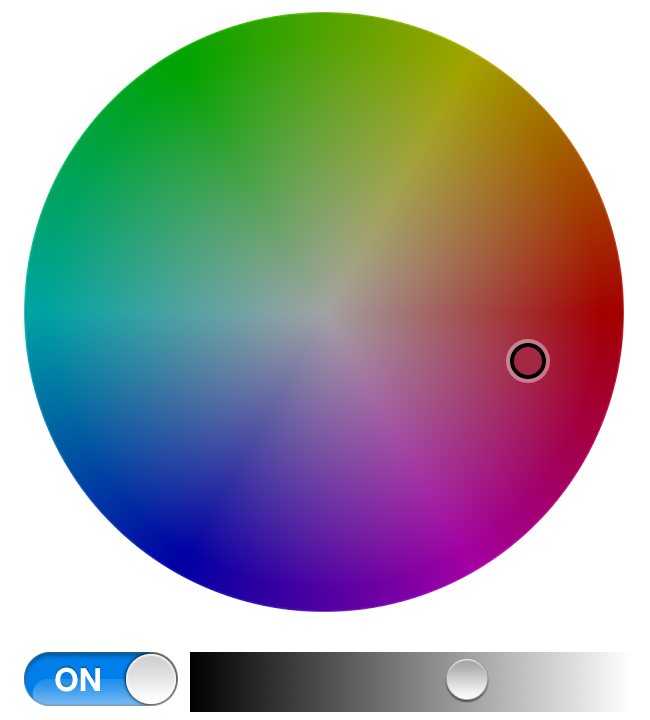
BTW: I found a couple of native colorpicker libraries in iOS: Do you like any of them? I could modify them to fit the App look&feel:


Kai Kreuzer

unread,
Mar 28, 2013, 4:00:50 AM3/28/13
to ope...@googlegroups.com
Good morning Pablo,

Great to see you back here :-)

The up/down buttons should behave the same way as the buttons in the Classic UI for a normal dimmer item (as the Classic UI does not render a slider for them) - this means:
- short press sends ON/OFF
- long press sends INCREASE/DECREASE
This allows to quickly use an RGB lamp like a normal one, i.e. turn it on and off and dim it.

The colorpicker is supposed to send values of the new HSBType, which are in serialized format the three values for hue, saturation and brightness seperated by comma, i.e.
<hue 0-360>,<saturation 0-100>, brightness<0-100>

Example:
0,100,100 is a bright red
120,50,30 is a light blue dimmed to 30%

From the colorpickers you have found, I like the second one a lot, but I would leave out the buttons at the bottom (so only as in the attached screenshot). That should do nicely!

Let me know, if you have any further questions!

Regards,
Kai

--
You received this message because you are subscribed to the Google Groups "openhab" group.
To unsubscribe from this group and stop receiving emails from it, send an email to openhab+u...@googlegroups.com.
To post to this group, send email to ope...@googlegroups.com.
Visit this group at http://groups.google.com/group/openhab?hl=en.
For more options, visit https://groups.google.com/groups/opt_out.


Victor Belov

unread,
Mar 30, 2013, 5:30:16 PM3/30/13
to ope...@googlegroups.com
Hi,

Pablo, most important is to understand this HSB thing. Hue is the
degree on the colour ring, which basically sets which colour to use,
saturation is colour richness which is the colour itself when
saturation is 0 and white when saturation is 100. Brightness is
brightness as usual.
Be careful, cause many of HSB implementations I've seen expect to see
saturation and brightness as 0-1 float, not 0-100 int. Kai described
everything else.

Best regards,
Victor Belov

Pablo Romeu

unread,
Apr 1, 2013, 5:03:49 AM4/1/13
to ope...@googlegroups.com
Hi victor,

I don't get the point on the "hue" value. I am used to RGB or CMYK values, but hue? How do you define a color with hue?

BTW: Is there something else I should modify for the next openHAB version? So I do all the work now :)

Kai Kreuzer

unread,
Apr 1, 2013, 5:19:06 AM4/1/13
to ope...@googlegroups.com
Hi Pablo,

For the explanation of hue see http://en.m.wikipedia.org/wiki/HSB

Regarding other issues: There were many reports of timeout errors when using a GSM connection.
Also, you should not require to download complete sitemaps anymore, only single pages should be fine.

Regards,
Kai

Pablo Romeu <pablo...@gmail.com> schrieb:

Kai Kreuzer

unread,
Apr 1, 2013, 10:35:12 AM4/1/13
to ope...@googlegroups.com
Regarding other issues: There were many reports of timeout errors when using a GSM connection.
Also, you should not require to download complete sitemaps anymore, only single pages should be fine.


Another important wish would be that the app starts with the homepage instead of the configuration menu (at least if it is properly configured).

Best regards,

Pablo Romeu

unread,
Apr 2, 2013, 4:49:00 AM4/2/13
to ope...@googlegroups.com
Ok, how is the long-press supposed to work? send a +10 value each second? may I send a "STOP" command to a color item?


El lunes, 1 de abril de 2013 16:35:12 UTC+2, Kai escribió:
Regarding other issues: There were many reports of timeout errors when using a GSM connection.

This is related to connection issue. As you asked me to timeout fast when checking for connection, sometimes it timeouts fast. I put this timeout to 5 secs, it should work smoother.
 
Also, you should not require to download complete sitemaps anymore, only single pages should be fine.
This is a full new design of the app Kai... As I told you before, don't have much time....


Another important wish would be that the app starts with the homepage instead of the configuration menu (at least if it is properly configured).


I promise nothing but I take note of this

Pablo Romeu

unread,
Apr 3, 2013, 5:44:25 AM4/3/13
to ope...@googlegroups.com
Hi again Kai,

Color widget is almost finished. I will post a short video to show it if you want to see it before posting the update. But INCREASE/DECREASE commands do not work, or I do not understand how it works. Should I send an INCREASE command each x ms. while the button is pressed? Or how does it should work?

Kai Kreuzer

unread,
Apr 3, 2013, 6:52:15 AM4/3/13
to ope...@googlegroups.com
Hi Pablo,

> But INCREASE/DECREASE commands do not work, or I do not understand how it works. Should I send an INCREASE command each x ms. while the button is pressed? Or how does it should work?

Yes, exactly as you say. If the button is pressed longer than 300ms, send INCREASE/DECREASE commands every 300ms while it is still pressed. If the button is pressed less than 300ms, send ON/OFF instead.

Regards,
Kai

Pablo Romeu

unread,
Apr 3, 2013, 11:39:04 AM4/3/13
to ope...@googlegroups.com
Ok, it does not work for me. I send a "decrease" every 0.3 seconds and the demo RGB Light does not decrease lightness. Any ideas?:

2013-04-03 17:36:41.765 openhab[11235:c07] -[openhabTableViewCellColor handleLongPress:]: -- Long-Press detected

2013-04-03 17:36:42.067 openhab[11235:c07] -[openhabTableViewCellColor sendIncreaseDecrease]: -- Value changed to DECREASE

2013-04-03 17:36:42.322 openhab[11235:c07] -[openhabDetailViewController valueOfItemChangeRequested:]: -- Value of RGBLight changed to 223,96,100!

2013-04-03 17:36:42.366 openhab[11235:c07] -[openhabTableViewCellColor sendIncreaseDecrease]: -- Value changed to DECREASE

2013-04-03 17:36:42.499 openhab[11235:c07] -[openhabDetailViewController valueOfItemChangeRequested:]: -- Value of RGBLight changed to 223,96,100!

2013-04-03 17:36:42.666 openhab[11235:c07] -[openhabTableViewCellColor sendIncreaseDecrease]: -- Value changed to DECREASE

2013-04-03 17:36:42.802 openhab[11235:c07] -[openhabDetailViewController valueOfItemChangeRequested:]: -- Value of RGBLight changed to 223,96,100!

2013-04-03 17:36:42.972 openhab[11235:c07] -[openhabTableViewCellColor sendIncreaseDecrease]: -- Value changed to DECREASE

2013-04-03 17:36:43.267 openhab[11235:c07] -[openhabTableViewCellColor sendIncreaseDecrease]: -- Value changed to DECREASE

2013-04-03 17:36:43.274 openhab[11235:c07] -[openhabDetailViewController valueOfItemChangeRequested:]: -- Value of RGBLight changed to 223,96,100!

2013-04-03 17:36:43.567 openhab[11235:c07] -[openhabTableViewCellColor sendIncreaseDecrease]: -- Value changed to DECREASE

2013-04-03 17:36:43.594 openhab[11235:c07] -[openhabDetailViewController valueOfItemChangeRequested:]: -- Value of RGBLight changed to 223,96,100!

2013-04-03 17:36:43.673 openhab[11235:c07] -[openhabTableViewCellColor handleLongPress:]: -- Stop

2013-04-03 17:36:43.796 openhab[11235:c07] -[openhabDetailViewController valueOfItemChangeRequested:]: -- Value of RGBLight changed to 223,96,100!

Kai Kreuzer

unread,
Apr 3, 2013, 1:06:36 PM4/3/13
to ope...@googlegroups.com
Hi Pablo,

this is normal - as you do not have any real hardware that actually changes the state, the state stays the same. You can simulate the dimming with a rule (see demo rule "Dimmed Light") - I can provide you later a suitable rule for Color items (this needs some adaption in comparison to the Dimmer item).

Regards,
Kai


Pablo Romeu

unread,
Apr 3, 2013, 1:25:23 PM4/3/13
to ope...@googlegroups.com
Ok, perfect then. I will post a video later so you can see how it works. I am working a bit with the timeouts right now...

Pablo Romeu

unread,
Apr 4, 2013, 3:24:46 AM4/4/13
to ope...@googlegroups.com

Kai Kreuzer

unread,
Apr 4, 2013, 12:37:45 PM4/4/13
to ope...@googlegroups.com
Hi Pablo,

Thanks, looks good!

Just a few small remarks/questions:
- As you designed the access of the color picker as a drill-down (which perfectly makes sense as it aligns with the selection widgets, which work the same way) you are not losing any screen space - so I could imagine that you could also render a slider instead of the up/down buttons (which would be more in line with the Slider widget for dimmers). Both ways are fine, so I leave it to you to decide what you think offers the better usability.
- Does the color cycle scale down to the screen size on smaller screens (e.g. iPhone)?
- The white background around the color cycle looks strange - it should have the same color as the rest of the background - I think I would prefer it all to be the standard background color, i.e. light grey.
- I'd prefer if the color cycle would stay at full intensity even if the brightness slider is moved. This is how the Classic UI behaves as well.

Best regards,
Kai

Pablo Romeu

unread,
Apr 4, 2013, 12:56:03 PM4/4/13
to ope...@googlegroups.com


El jueves, 4 de abril de 2013 18:37:45 UTC+2, Kai escribió:
Hi Pablo,

Thanks, looks good!
 
but???? -_-
 
Just a few small remarks/questions:

xDDDD That's better. I was thinking that you were ill or something!!! You never like it the first time! :DDDDD
 
- As you designed the access of the color picker as a drill-down (which perfectly makes sense as it aligns with the selection widgets, which work the same way) you are not losing any screen space - so I could imagine that you could also render a slider instead of the up/down buttons (which would be more in line with the Slider widget for dimmers). Both ways are fine, so I leave it to you to decide what you think offers the better usability.

Mmmmm I could. But it will behave as the rollershutters and now the buttons behave correctly. So, if you want buttons, you may use them, and you may use the brightness slider if you want a slider.
 
- Does the color cycle scale down to the screen size on smaller screens (e.g. iPhone)?

I have done a smaller version for iPhone4/5 to fit its screen, but once rendered it does not scale. This library is a bit buggy....
 
- The white background around the color cycle looks strange - it should have the same color as the rest of the background - I think I would prefer it all to be the standard background color, i.e. light grey.

The same. It has to do with the library, but I can change that to grey if you want to.
 
- I'd prefer if the color cycle would stay at full intensity even if the brightness slider is moved. This is how the Classic UI behaves as well.


I can have a look at the library and modify it if you like that way, but i don't know if that's possible. 
 
Best regards,

Waitin for your feedback ! :)
 
Kai

Pablo

Kai Kreuzer

unread,
Apr 5, 2013, 4:23:26 AM4/5/13
to ope...@googlegroups.com
Hi Pablo,

xDDDD That's better. I was thinking that you were ill or something!!! You never like it the first time! :DDDDD

Hm, I would have preferred if you had said "You always provide so helpful and constructive feedback the first time" ;-)

Mmmmm I could. But it will behave as the rollershutters and now the buttons behave correctly. So, if you want buttons, you may use them, and you may use the brightness slider if you want a slider.

Ok, I was just thinking that the Color adjustment is just an "addon" for a normal dimmed light, so using a slider there as well could be more intuitive for the user. But as HABDroid also uses buttons here, I do not mind keeping them.

Waitin for your feedback ! :)

It will surely come after the next video :-)

Cheers,
Kai

p.sc...@gmail.com

unread,
Mar 31, 2014, 10:51:34 AM3/31/14
to ope...@googlegroups.com
Hi

any news on this??

Greets Phil
Reply all
Reply to author
Forward
0 new messages