
Fwd: OpenHAB Nikobus binding

Thomas Eichstädt-Engelen
From: Stefaan Bolle <bolle....@gmail.com>Subject: OpenHAB Nikobus bindingDate: September 2, 2013 8:39:18 PM GMT+02:00To: "teic...@gmail.com" <teic...@gmail.com>Hi,
With interest I follow the evoltion on the nikobus binding. Shame that Niko does not want to release protocol information.
Hw do you connect the openHAB server with the nikobus switch module? What interface is needed to do this? (nikobus PC-link,...)?
Thanks for your support!
Stefaan Bolle
Sent from my iPad

davy vanherbergen
Hw do you connect the openHAB server with the nikobus switch module? What interface is needed to do this? (nikobus PC-link,...)?

familie....@gmail.com
I also have a Nikobus-system and will also try to have it binded to Openhab. Did you manage to get a 100% stable solution with the cable setup as you described?
I'm also wondering if you activate a "Sfeer" (where different circuits are involved) with 1 single button on a physical switch (on the wall), will you also see the status of the different circuits changing in the Openhab app on your Ipad?
Thanks for your feedback !
Tijl
Davy Vanherbergen
Switch Scene_1 {nikobus="#N006884[C964-1,C964-2,D1A2-2]"}familie....@gmail.com
Thanks a lot for your reply. Still 2 questions. Since "DB9 to RJ45 adapter and a USB to Serial Converter" is not working with the Raspberry, could you let me know which "UART to TTL converter" you bought (maybe a link to the product?). I want to be sure that the setup really works and would like to copy your cable setup.
Then a last question. Could I push a button on a Niko wall switch which is captured by Openhab -> Openhab translates this for instance into a command that can be sent to an AV-receiver or squeezebox (via web command) in order to change the volume? Is this kind of things possible?
I'm not (yet) familiar with Openhab and I'm trying to get an idea if this is finally the missing link that changes Nikobus into a smart and integrated domotics-system.
Thanks for your support !
Tijl
Davy Vanherbergen
could you let me know which "UART to TTL converter" you bought (maybe a link to the product?).
Then a last question. Could I push a button on a Niko wall switch which is captured by Openhab -> Openhab translates this for instance into a command that can be sent to an AV-receiver or squeezebox (via web command) in order to change the volume? Is this kind of things possible?

familie....@gmail.com
Hi Davy,
I see more and more interest coming from people to bind Openhab to their Nikobus-system. In order to put the bar as low as possible and allow people to step in into this great solution, I would like to make a step-by-step document, very simple and explaining the whole setup starting from the basic installation of the Raspberry or NAS up to the configuration of the Openhab application.
In order to do that, it would be great if you could provide me a picture or explanation how you did the physical interconnection. I already got the reference to your “UART to TTL converter”, but it is still unclear which pins you are using on the “UART to TTL converter”, which pins are being used on the Raspberry and which pin should be connected to which pin.
I’m not that technical myself and I can imagine that a simple “HOW TO” starting with the basics can really grow the interest in this topic.
Cheers
Tijl
Davy Vanherbergen



bolle....@gmail.com
Davy Vanherbergen
Switch light_office {nikobus="C964:1"}
Switch light_hallway {nikobus="C964:2"}
Switch light_living {nikobus="C964:3"}
Switch light_kitchen {nikobus="C964:4"}
Switch light_diningroom {nikobus="C964:5"}
Switch light_toilet {nikobus="C964:6"}
Davy Vanherbergen
Thanks for your quick reply Davy!Via the web based gui, the lights do not respond using the switch, while using osgi> openhab send LP_garage ON, the lights go on as supposed.---below my home.itemsSwitch LP_garage "Licht Garage" { nikobus="1D5E:1" }Switch LP_buiten_achter_dakrand "Licht Terras Dakrand" { nikobus="1D5E:2" }Switch LP_werkblad_keuken "Licht Werkblad Keuken" { nikobus="1D5E:3" }Switch LP_keuken "Licht Keuken" { nikobus="1D5E:4" }Switch LP_living "Licht Living" { nikobus="1D5E:5" }Switch LP_salon "Licht Salon" { nikobus="1D5E:6" }Switch LP_hal_beneden "Licht Hal" { nikobus="1D5E:7" }Switch LP_wc_beneden "Licht WC Beneden" { nikobus="1D5E:8" }Switch LP_bureel "Licht Bureel" { nikobus="1D5E:9" }Switch LP_kelder "Licht Kelder" { nikobus="1D5E:10" }Switch LP_led_trap "Licht Trapverlichting" { nikobus="1D5E:11" }Switch LP_hal_boven "Licht Nachthal" { nikobus="1D5E:12" }and home.sitemapsitemap home label="Main Menu"{Frame label="Algemeen" {Group label="Algemeen" icon="chart" {Text item=Date label="Datum [%1$td %1$tb %1$tY %1$tT]" icon="clock"Frame label="Dagopbrengst Zonnepanelen" {Webview label="Dagopbrengst zonnepanelen" icon="energy" url="http://192.168.100.100/Solar/index.html" height=5}Frame label="Bewakingscamera" {Webview label="Bewakingscamera" icon="shield" url="http://xxx:x...@192.168.100.200/cgi-bin/image.jpg?camera=right&size=320x240&quality=60" height=5}}}Frame label="Verlichting" {Group label="Gelijkvloers" icon="groundfloor" {Group label="Garage" {Text label="Lichtpunten garage"Switch item=LP_garage label="Licht garage" icon="light"}Group label="Keuken" {Text label="Lichtpunten keuken"}Group label="Living" {Text label="Lichtpunten living"}Group label="Salon" {Text label="Lichtpunten salon"}Group label="Hal" {Text label="Lichtpunten hal"}Group label="Bureel" {Text label="Lichtpunten bureel"}Group label="WC" {Text label="Lichtpunten WC"}}Group label="Bovenverdieping" icon="firstfloor" {Group label="Nachthal" {Text label="Lichtpunten nachthal"}Group label="Kamer Simon" {Text label="Lichtpunten kamer Simon"}Group label="Kamer ouders" {Text label="Lichtpunten kamer ouders"}Group label="Kamer Lukas" {Text label="Lichtpunten kamer Lukas"}Group label="Badkamer" {Text label="Lichtpunten badkamer"}Group label="WC" {Text label="Lichtpunten WC"}}Group label="Kelder en Zolder" icon="terrace" {Group label="Kelder" {Text label="Lichtpunten kelder"}Group label="Zolder" {Text label="Lichtpunten zolder"}}Group label="Tuin" icon="garden" {Group label="Voor" {Text label="Lichtpunten buiten voor"}Group label="Achter" {Text label="Lichtpunten buiten achter"}}}}events.log2014-06-25 19:53:31 - LP_garage received command OFF2014-06-25 19:53:31 - LP_garage state updated to OFF2014-06-25 19:53:32 - LP_garage received command ON2014-06-25 19:53:32 - LP_garage state updated to ON2014-06-25 19:53:33 - LP_garage state updated to OFF2014-06-25 19:53:33 - LP_garage received command OFF2014-06-25 19:53:34 - LP_garage received command ON2014-06-25 19:53:34 - LP_garage state updated to ONopenhab.log (grep Nikobus):50:31.492 ERROR o.o.b.n.i.NikobusBinding[:180]- Serial port '/dev/ttyUSB0' not found.20:00:32.915 ERROR o.o.b.n.i.NikobusBinding[:297]- Error occurred during scheduled status refresh.at org.openhab.binding.nikobus.internal.core.NikobusAckMonitor.waitForAck(NikobusAckMonitor.java:92)at org.openhab.binding.nikobus.internal.NikobusBinding.sendCommand(NikobusBinding.java:158)at org.openhab.binding.nikobus.internal.NikobusBinding$2.run(NikobusBinding.java:295)20:12:07.487 ERROR o.o.b.n.i.NikobusBinding[:180]- Serial port '/dev/ttyUSB0' not found.pihoweverpi@tserver ~ $ dmesg | grep ttyUSB0[ 7.185413] usb 1-1.3: pl2303 converter now attached to ttyUSB0and via osgi sed command it is workingThanks!Stefaan
Sent from Boxer | http://getboxer.com
familie....@gmail.com
Hi all,
I’ve been trying the last couple of days to set up the Nikobus binding. In my current situation I have a PC-link module -> flat RJ12 cable -> RJ12 to DB9 convertor -> serial interface (http://www.dx.com/p/rs232-serial-port-to-ttl-converter-module-w-transmitting-and-receiving-indicator-144192) -> Raspberry PI.
I’ve followed the guidelines of Davy in order to connect the PC-link to the Raspberry. Unfortunately this doesn’t seem to work and instead I get the following messages in the log-file:
13:45:35.066
DEBUG o.o.b.n.i.c.NikobusInterface[:157]- Port not found during first attempt :
null
13:45:35.096 DEBUG o.o.b.n.i.c.NikobusInterface[:165]- Port not found during
second attempt : null
13:45:35.139 ERROR o.o.b.n.i.NikobusBinding[:180]- Serial port '/dev/ttyS0' not
found.
So it seems that something is wrong with the wiring of the whole setup or there’s a config issue with regards to what I have been doing. Does anyone have an idea, how I could solve this? Should I activate the serial interface in some way on the Raspberry? Is there maybe someone who could make this working by using a USB-connection?
Thanks a lot for your support. All input and feedback is very very welcome ….
Regards,
Tijl De Waele
Davy Vanherbergen
If I remember correctly, then the serial port should be visible, regardless of whether it is connected to the nikobus.
Hi all,
I’ve been trying the last couple of days to set up the Nikobus binding. In my current situation I have a PC-link module -> flat RJ12 cable -> RJ12 to DB9 convertor -> serial interface (http://www.dx.com/p/rs232-serial-port-to-ttl-converter-module-w-transmitting-and-receiving-indicator-144192) -> Raspberry PI.
I’ve followed the guidelines of Davy in order to connect the PC-link to the Raspberry. Unfortunately this doesn’t seem to work and instead I get the following messages in the log-file:
13:45:35.066 DEBUG o.o.b.n.i.c.NikobusInterface[:157]- Port not found during first attempt : null
13:45:35.096 DEBUG o.o.b.n.i.c.NikobusInterface[:165]- Port not found during second attempt : null
13:45:35.139 ERROR o.o.b.n.i.NikobusBinding[:180]- Serial port '/dev/ttyS0' not found.
So it seems that something is wrong with the wiring of the whole setup or there’s a config issue with regards to what I have been doing. Does anyone have an idea, how I could solve this? Should I activate the serial interface in some way on the Raspberry? Is there maybe someone who could make this working by using a USB-connection?
Thanks a lot for your support. All input and feedback is very very welcome ….
Regards,
Tijl De Waele
On Tuesday, May 6, 2014 11:14:48 PM UTC+2, Davy Vanherbergen wrote:
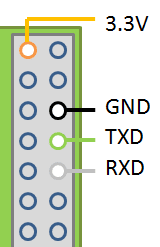
For the connections, you'll need to connect the TX (transmit) channel on the pi to the RX (receive) channel on the nikobus pc-link/logic and vice versa.For example :Pi - UART TX pin (=Transmit) -> RS232 converter TX pin -> RS232 to RJ12 converter -> RJ12 cable -> Nikobus RJ12 RX Pin (Receive)Pi - UART RX pin (=Receive) -> RS232 converter RX pin -> RS232 to RJ12 converter -> RJ12 cable -> Nikobus RJ12 TX Pin (Transmit)
These are the pins on the pi to which you'll need to attach the rs232 connector :
familie....@gmail.com
Hi,
Thanks for your feedback. I finally got it working by using the USB-to-DB9 solution. When I have more time, I will also try to find out what the problem is with the serial connection.
I still have another question. My current configuration has been done by using the PC-link module and the related software. I assume that I have to wipe the existing configuration and rebuild it in Openhab? Another question, in case the Raspberry would fail, Openhab would get corrupt …, nothing would work anymore, since all bus traffic will have to go over the Raspberry (via serial interface). How do you estimate that risk of having a total blackout? I have been thinking to allow also direct communication between the wall-switches and the Niko-modules for some crucial lights, but then Openhab would get out-of-sync with the real status?
Regards,
Tijl
Davy Vanherbergen
If you keep your main config in the nikobus, all you need to do is configure your wall switches in openhab too. This way the binding can poll the state of the nikobus when a wall switch is pressed and stay in sync.
--
You received this message because you are subscribed to a topic in the Google Groups "openhab" group.
To unsubscribe from this topic, visit https://groups.google.com/d/topic/openhab/c015YXMJgp8/unsubscribe.
To unsubscribe from this group and all its topics, send an email to openhab+u...@googlegroups.com.
To post to this group, send email to ope...@googlegroups.com.
Visit this group at http://groups.google.com/group/openhab.
For more options, visit https://groups.google.com/d/optout.
familie....@gmail.com
Hey guys,
I’ve been playing with Openhab-Nikobus the last couple of days and thanks to your support and feedback, I finally got it working.
However some things are still behaving in a strange way. I just list them, maybe you have similar experiences or workarounds:
- I have been using Openhab on a Raspberry and after a couple of hours it locks up. It can still send commands to Nikobus, but it stops polling the modules after having pushed the wall switches. I replaced the Raspberry with a Windows PC and now it worked for a period of 24hours before locking up.
- Scene: I have tried to create a very basic scene which activates 4 circuits:
rule "Sfeer1"
when
Item Scene_Living received command 1
then
sendCommand(STOPC_GF_Living_1, ON)
sendCommand(STOPC_GF_Living_2, ON)
sendCommand(STOPC_GF_Living_3, ON)
sendCommand(STOPC_GF_Living_4, ON)
end
Unfortunately almost 80% of the time Openhab “forgets” to activate 1 (random) circuit. I had similar issues when quickly switching different circuits (one after another) via wall switches or the Openhab app. It seems that the bus gets overloaded and misses commands. As a consequence, the status of the different circuits in Openhab gets out-of-sync.
- In the iPAD app, the circuits are sometimes not updated. If I go back and go into the site-maps again, it shows correctly. Sometimes the light on the Openhab app turns on, but the slider is not updated.
Would be nice if could comment on this if you have similar experiences …
Regards,
Tijl
To unsubscribe from this group and all its topics, send an email to openhab+unsubscribe@googlegroups.com.
familie....@gmail.com
Hi guys,
I’ve run into another issue recently. If I use Openhab to make the rollershutters going up and while this is happening, I push a wall-switch that makes the same rollershutters going down, then I have on the rollershutter-module both LED’s being illuminated. This means that current is put on both wires !
When you normally push the wall-switch making the shutters going up and push another button on the wall-switch that makes the shutters going down, the current will be broken, the shutter will stop and after that current will be put on the other pole.
Any experience with this?
Tnx for the feedback !
Tijl
Davy Vanherbergen
I’ve run into another issue recently. If I use Openhab to make the rollershutters going up and while this is happening, I push a wall-switch that makes the same rollershutters going down, then I have on the rollershutter-module both LED’s being illuminated. This means that current is put on both wires !
- I have been using Openhab on a Raspberry and after a couple of hours it locks up. It can still send commands to Nikobus, but it stops polling the modules after having pushed the wall switches. I replaced the Raspberry with a Windows PC and now it worked for a period of 24hours before locking up.
Unfortunately almost 80% of the time Openhab “forgets” to activate 1 (random) circuit. I had similar issues when quickly switching different circuits (one after another) via wall switches or the Openhab app. It seems that the bus gets overloaded and misses commands. As a consequence, the status of the different circuits in Openhab gets out-of-sync.
- In the iPAD app, the circuits are sometimes not updated. If I go back and go into the site-maps again, it shows correctly. Sometimes the light on the Openhab app turns on, but the slider is not updated.

rohnny....@gmail.com
I'm interested in using the openhanded nikobus as well. I have dimmers, roller shutters and lights in my nikobus config. Will all,of these work? Especially the status of dimmers and rollershutters ? When I looked into this some time ago it seems like it was only lights at that point in time.
Also can openhab be installed on a synology NAS? Would prefer a NAS over a raspberry pi.
Stefaan Bolle
--
You received this message because you are subscribed to a topic in the Google Groups "openhab" group.
To unsubscribe from this topic, visit https://groups.google.com/d/topic/openhab/c015YXMJgp8/unsubscribe.
To unsubscribe from this group and all its topics, send an email to openhab+u...@googlegroups.com.
familie....@gmail.com
I have installed quite recently Openhab on a Raspberry and I have to say, it really changed my Nikobus system into the system I always wanted to have.
However I also have to say that there is still some work to do.
For me the most important issue is that the feedback (by polling the module) isn't perfect yet. It happens regularly that the status of Openhab is not in sync with the reality (and yes I have checked my configs). I am not sure yet if this is related to Openhab or the binding. Maybe other people on this forum can comment on this.
Another issue I've met is that a Raspberry is not powerful enough. A status update of an item takes about 3 seconds before you see it on your Ipad, if a rule needs to be executed, this is painfully slow ...
Therefore I am using Openhab (temporarily) on a Windows notebook and this works great. I also tried to install Openhab on my Synology 214play, but that didn't work out well...
Currently I am considering a Cubieboard 8 (not yet available) or a Intel Nuc to give me the performance I need ....
So from my point of view a great solution, if we can solve the small issues it currently has ... and then the sky is the limit ...
By the way I have switch, dimmer and rollershutter-modules and they all work ...
Tijl
Stefaan Bolle
--
You received this message because you are subscribed to a topic in the Google Groups "openhab" group.
To unsubscribe from this topic, visit https://groups.google.com/d/topic/openhab/c015YXMJgp8/unsubscribe.
To unsubscribe from this group and all its topics, send an email to openhab+u...@googlegroups.com.
Davy Vanherbergen
For me the most important issue is that the feedback (by polling the module) isn't perfect yet. It happens regularly that the status of Openhab is not in sync with the reality (and yes I have checked my configs). I am not sure yet if this is related to Openhab or the binding. Maybe other people on this forum can comment on this.
openhab status <yourItemName>If the status shown there is correct, then the internal state of the item is correct and your issue is related to the openHAB UI you are using. If it is incorrect, it is a binding or configuration issue.
familie....@gmail.com
Hi Davy,
I think it might be related to the binding or Openhab. I've added the log-file showing that Openhab "forgets" to update one of the items.
As you will see "Schakelaar_keuken_ingang_1” will always switch 2 circuits: “ Light_GF_Keuken_aanrecht” and “Light_GF_Keuken_plafond”. Mostly it happens as it should. However for wathever reason at “2014-10-21 18:36:13” Openhab only updates “Light_GF_Keuken_plafond” and NOT “Light_GF_Keuken_plafond”. After that things get out of sync. So my bet is that this could be an issue with the binding.
Regards,
Tijl
On Sunday, October 19, 2014 10:01:19 AM UTC+2, Davy Vanherbergen wrote:
For me the most important issue is that the feedback (by polling the module) isn't perfect yet. It happens regularly that the status of Openhab is not in sync with the reality (and yes I have checked my configs). I am not sure yet if this is related to Openhab or the binding. Maybe other people on this forum can comment on this.
Davy Vanherbergen
--
You received this message because you are subscribed to a topic in the Google Groups "openhab" group.
To unsubscribe from this topic, visit https://groups.google.com/d/topic/openhab/c015YXMJgp8/unsubscribe.
To unsubscribe from this group and all its topics, send an email to openhab+u...@googlegroups.com.
familie....@gmail.com
Hi Davy,
I’m using my wall-switches (8 buttons) to switch my lights. They are configured as a push-button (M5). I checked my Nikobus-configuration and the lines marked in yellow are the lines that are relevant. For “Light_GF_Keuken_plafond__3_9” and “Light_GF_Keuken_aanrecht__1_5” there are no rules involved. I have had similar issues with other circuits as well (always when a command switches more than 1 circuit). 90% of the time, it works fine, but suddenly things get out of sync.
Switch Light_GF_Keuken_plafond__3_9 "Licht keuken" (GF_Kitchen, Lights_beneden) { nikobus="D715:9" }
Switch Light_GF_Keuken_aanrecht__1_5 "Licht aanrecht" (GF_Kitchen, Lights_beneden) { nikobus="C715:5" }
Switch Schakelaar_keuken_ingang_1 {nikobus="#NB86B82[C715-1,D715-2]"}
Switch Schakelaar_keuken_ingang_2 {nikobus="#N386B82[D715-2]"}
Switch Schakelaar_keuken_ingang_3 {nikobus="#N986B82"}
Switch Schakelaar_keuken_ingang_4 {nikobus="#N186B82"}
Switch Schakelaar_keuken_ingang_5 {nikobus="#NF86B82[D715-2]"}
Switch Schakelaar_keuken_ingang_6 {nikobus="#N786B82[D715-1]"}
Switch Schakelaar_keuken_ingang_7 {nikobus="#ND86B82"}
Switch Schakelaar_keuken_ingang_8 {nikobus="#N586B82"}
Switch Schakelaar_keuken_living_1 {nikobus="#NBE0382[C715-1,D715-2]"}
Switch Schakelaar_keuken_living_2 {nikobus="#N3E0382[8415-2]"}
Switch Schakelaar_keuken_living_3 {nikobus="#N9E0382"}
Switch Schakelaar_keuken_living_4 {nikobus="#N1E0382"}
Switch Schakelaar_keuken_living_5 {nikobus="#NFE0382[C715-1]"}
Switch Schakelaar_keuken_living_6 {nikobus="#N7E0382[8415-2]"}
Switch Schakelaar_keuken_living_7 {nikobus="#NDE0382"}
Switch Schakelaar_keuken_living_8 {nikobus="#N5E0382"}
Switch Bewegingsmelder_keuken_1A {nikobus="#N820824[8415-1]"}
Switch Bewegingsmelder_keuken_1B {nikobus="#NC20824"}
Switch Schakelaar_gang_gelijkvloers_ingang_6 {nikobus="#N668982[C715-1,D715-2]"}
Switch Schakelaar_gang_gelijkvloers_living_8 {nikobus="#N4F30BA[C715-1,8415-1,8415-2,D715-1,D715-2,0BC2-1]"}
Switch Schakelaar_living_eethoek_5 {nikobus="#NFE9782[C715-1,D715-2]"}
If needed I can always send you my complete configuration by e-mail.
cheers
Tijl
familie....@gmail.com
Yesterday I had a similar issue again. I have a motion detector in the corridor which activates the lights. At the same time I pushed a button to activate the light in the garage. The commands were executed
succesfully, but the status in Openhab was again out-of-sync. Again the polling "forgot" to read the status of one of the circuits. The same happened in the log-file I have sent you a couple of days ago. My
impression is that if the initial polling of the circuits isn't finished yet and a new polling needs to be done, the latest polling-request terminates the initial request.
This might be a coincidence, but based on the logs I currently have, this explanation might make sense. If this is the case, I am pretty sure that this could be solved in the binding.
I keep on searching ...
Tijl
...
Davy Vanherbergen
Daan Dewinne
Op donderdag 11 september 2014 17:54:14 UTC+2 schreef familie....@gmail.com:
Familie De Waele
Hi Davy,
In the meanwhile I have again some time in order to check the issues with regards to the Nikobus-binding.
In attach you will find the log of 1 day and I noticed already twice an issue. Let me explain:
“Infrarood_garage_2D received command ON” should normally deactivate the following circuits:
· STOPC_GF_Living_midden_tuin__1_2
· STOPC_GF_Living_Commode__2_1
· STOPC_GF_Living_Sfeerlichten_boxen__2_5
· STOPC_GF_Living_Relais_6_STOPC_Box__3_4
· Light_GF_Living_Dimmer_living__4_1
As you will see in the log-file, this happens mostly in a correct way, but on 2015-01-12 11:50:53, things went wrong. The circuits were deactivated in reality, but this wasn’t updated in Openhab for “STOPC_GF_Living_Commode__2_1” and “STOPC_GF_Living_Sfeerlichten_boxen__2_5”. They remain “ON” in Openhab.
Another issue I discovered is at 2015-01-12 18:22:47. Normally when the item “Chauffage_beneden” receives an OFF-command, a command will be sent (via a rule) in order to activate “twaalf_Volt_chauffage_beneden__2_12” (puts the heating into Night-modus). However out-of-the-blue at 18:22:47, twaalf_Volt_chauffage_beneden__2_12 is deactivated again without any reason and this puts the heating back into Day-modus. There was no reason why this needed to happen.
Also at 2015-01-12 18:59:01, things went wrong. “Chauffage_beneden” received an OFF-command meaning that “twaalf_Volt_chauffage_beneden__2_12” should be activated which happened, but immediately the state was updated again to “OFF”.
To be honest this happens regularly … changes of the state of an object without any reason or the polling of the Niko-modules which doesn’t happen like it should. I can send you also the complete log via Dropbox since this is a file of 50M.
cheers
Tijl
Davy Vanherbergen
On 18 Jan 2015, at 16:59, František Benko <b0d8...@gmail.com> wrote:Hello,
I wanted to bind nikobus to openhab so I have got;
raspberry pi with OpenHAB 1.6.1, ttl to rs232 converter with max3232 chip, made compatible db9 to rj11 cabel,
next I got 05-201 PC-LOGIC (well by accident, I wanted 05-200 of course..)
I installed nikobus binding bundle, set nikobus as DEBUG and run sudo ./openhab_debug.sh
I didn't set any items, nor any sitemaps yet because I couldn't get any address from nikobus;
I managed openhab to connect nikobus14:59:30.459 [INFO ] [.o.b.n.i.core.NikobusInterface:179 ] - Connected to serial port '/dev/ttyAMA0'
14:59:30.467 [DEBUG] [.o.b.n.i.core.NikobusInterface:233 ] - Sending : ++++
14:59:30.489 [DEBUG] [.o.b.n.i.core.NikobusInterface:233 ] - Sending : ATH0
14:59:30.509 [DEBUG] [.o.b.n.i.core.NikobusInterface:233 ] - Sending : ATZ
14:59:30.530 [DEBUG] [.o.b.n.i.core.NikobusInterface:233 ] - Sending : $10110000B8CF9D
14:59:30.559 [DEBUG] [.o.b.n.i.core.NikobusInterface:233 ] - Sending : #L0
14:59:30.579 [DEBUG] [b.n.i.c.NikobusCommandReceiver:161 ] - Received NikobusCommand [command=$0511, repeats=1]
14:59:30.590 [DEBUG] [.o.b.n.i.core.NikobusInterface:233 ] - Sending : #E0
14:59:30.609 [DEBUG] [.o.b.n.i.core.NikobusInterface:233 ] - Sending : #L0
14:59:30.629 [DEBUG] [.o.b.n.i.core.NikobusInterface:233 ] - Sending : #E1
14:59:30.646 [DEBUG] [b.n.i.c.NikobusCommandReceiver:161 ] - Received NikobusCommand [command=$10110000B8CF9D, repeats=1]
14:59:30.650 [INFO ] [.o.b.n.i.core.NikobusInterface:119 ] - Connected to Nikobus :-)
so this "worked". Also, when I send PC-LOGIC modules address, openhab can capture it15:01:44.525 [DEBUG] [b.n.i.c.NikobusCommandReceiver:161 ] - Received NikobusCommand [command=$18D1900040073FFF263276, repeats=1]
but that's it. I can't get any other trafic captured. When I press nikobus wall switch, nikobus react, light is lit, but PC-LOGIC don't send anything to the openhub.
I tried connecting the bus to B1 B2 also to B'1 B'2 conectors and connect them together. Nothing helped, the module do not send anything to the openhab, besides its own address, when triggered from its menu.
Do you have any idea, what can I do? What is the behavior of PC-LINK 05-200 module, does it send every command on the bus through rs232 to the openhab? If I really couldn't get it working, I will get the PC-LINK (This PC-LOGIC is just lent)
Thank you very much for your help!

František Benko
I also set virtual button Switch TrollTest1 {nikobus="#N000001:SHORT"}, this can send command to nikobus...
17:23:51.505 [INFO ] [runtime.busevents :22 ] - TrollTest1 received command ONbut I still can not get any other addresses from the bus..
17:23:51.630 [DEBUG] [.o.b.n.i.core.NikobusInterface:233 ] - Sending : #N000001
there is absolutely nothing shown, when the switch is pressed, or 12channel module is triggered to send its address.
OR.. should have I known the addresses from somewhere else, maybe nikobus software?(butI didn't find them there..)
I didn't find any "how to get the address of your switches on the first start of the openhab" post on the wiki.
Can you help me with it? Thank you very much for your time!
Dňa nedeľa, 18. januára 2015 17:16:50 UTC+1 Davy Vanherbergen napísal(-a):
Davy Vanherbergen
--
You received this message because you are subscribed to a topic in the Google Groups "openhab" group.
To unsubscribe from this topic, visit https://groups.google.com/d/topic/openhab/c015YXMJgp8/unsubscribe.
To post to this group, send email to ope...@googlegroups.com.
Visit this group at http://groups.google.com/group/openhab.
To view this discussion on the web visit https://groups.google.com/d/msgid/openhab/a77ddaf0-62e0-4409-a2b4-9465c4288a79%40googlegroups.com.
František Benko
For everyone I can confirm, you can use PC-LOGIC 05-201 for serial connection with OpenHAB.
It works well. You can connect it as in nikobus manual; B1 B2 for modules/output and B'1 B'2 for switches/input.
It can also be connected to the bus just with B1 B2 connectors (pc-logic displays an error #5 - "Bus B'1 B'2 not connected" but it's not a problem).
I was able to pick up the addresses from every connected module or switch and I can switch channels on and off with these addresses through OpenHAB, so now just set up configs.
And yes, my modules are 05-***-02 obviously. I must have had something connected badly.
I am very happy, that I found google group like this and thank you for your help.
Dňa nedeľa, 18. januára 2015 19:36:08 UTC+1 Davy Vanherbergen napísal(-a):
Davy Vanherbergen
To view this discussion on the web visit https://groups.google.com/d/msgid/openhab/f2830f43-222e-4058-b090-4c744d258fe8%40googlegroups.com.
Daan Dewinne
Op woensdag 21 januari 2015 10:06:26 UTC+1 schreef Davy Vanherbergen:
Pascal Dequecker
František Benko
Hi Stefaan,Hw do you connect the openHAB server with the nikobus switch module? What interface is needed to do this? (nikobus PC-link,...)?You will need either a pc-link (part 05-200) module (tested) or pc-logic (05-201) module (untested, but should work).You can use the same cabling as you use for connecting your computer to the pc-link when using the nikobus software.Personally, I got my pc-link on 2dehands.be, since people seem to sell it after they have finished programming their installation.My pc-link didn't come with a cable, so I made a RJ45 to RJ11 cable, combined it with a DB9 to RJ45 adapter and a USB to Serial Converter. This worked fine on my laptop.Now, my openHAB install is running on a raspberry pi, and it didn't like the USB-Serial converter, so there I'm using a UART to TTL converter combined with a DB to RJ45 Female adapter.I'm currently finalizing some refactoring on the binding, it should be ready soon...Kind regards,Davy