
Special characters in .map file
1,714 views
Skip to first unread message

Sam
Mar 20, 2012, 1:55:23 PM3/20/12
to openhab
Does anybody know by any chance if it is possible to represent the
french charceters 'é', 'è' or for that matter the German Umlauts
'ö','ä' etc. as part of words describing states (in French or German)
in the .map files? I tried it and an 'é' for example results ina 2
letter garbage.
french charceters 'é', 'è' or for that matter the German Umlauts
'ö','ä' etc. as part of words describing states (in French or German)
in the .map files? I tried it and an 'é' for example results ina 2
letter garbage.

Kai Kreuzer
Mar 20, 2012, 2:00:17 PM3/20/12
to ope...@googlegroups.com
These files must be in UTF-8 encoding. Then all special characters are
supported.
You can simply use the openHAB Designer to edit these files, it makes
sure that the encoding is UTF-8.
supported.
You can simply use the openHAB Designer to edit these files, it makes
sure that the encoding is UTF-8.
Regards,
Kai
Quoting Sam <samc...@hotmail.com>:
> --
> You received this message because you are subscribed to the Google
> Groups "openhab" group.
> To post to this group, send email to ope...@googlegroups.com.
> To unsubscribe from this group, send email to
> openhab+u...@googlegroups.com.
> For more options, visit this group at
> http://groups.google.com/group/openhab?hl=en.
>
>
Sam
Mar 20, 2012, 2:58:51 PM3/20/12
to openhab
Yes but I used openHAB Designer to edit the files. The characters show
up ok in Designer but not in the iOS client.
Thanks,
Sam
up ok in Designer but not in the iOS client.
Thanks,
Sam
Kai Kreuzer
Mar 21, 2012, 3:44:27 AM3/21/12
to ope...@googlegroups.com
Sounds like a bug in the iOS client then. Can you confirm that it is showing the characters correctly in the Classic (Web) UI?
If so, please enter a bug report in the issue tracker.
If so, please enter a bug report in the issue tracker.
Thanks,
Kai

Victor Belov
Mar 21, 2012, 5:15:17 AM3/21/12
to ope...@googlegroups.com
Hi,
I'm using TextMate on Mac to edit openHAB configs, I have russian cyrillic names of items in utf-8, no problems with showing them on iOS client!
Best regards,
Victor Belov
Sam
Mar 21, 2012, 4:35:15 PM3/21/12
to openhab
I tried the Classic (Web) UI and the characters do not show up
correctly there either unless I write them with the UTF-8 encoding
(e.g. for an 'e' I have to write an 'é' in openHAB Designer);
then those special characters show up correctly in the WebUI but still
not in the iOS app.
And yes I am also successfully using French characters (typed normally
as 'é' in Designer) in the .item file; the problem only seems to
appear for special characters in the .map file.
Sam
correctly there either unless I write them with the UTF-8 encoding
(e.g. for an 'e' I have to write an 'é' in openHAB Designer);
then those special characters show up correctly in the WebUI but still
not in the iOS app.
And yes I am also successfully using French characters (typed normally
as 'é' in Designer) in the .item file; the problem only seems to
appear for special characters in the .map file.
Sam
Kai
Mar 21, 2012, 6:11:51 PM3/21/12
to ope...@googlegroups.com
I have just tried it myself and it looks fine both on the Classic UI as well as on the iOS UI:
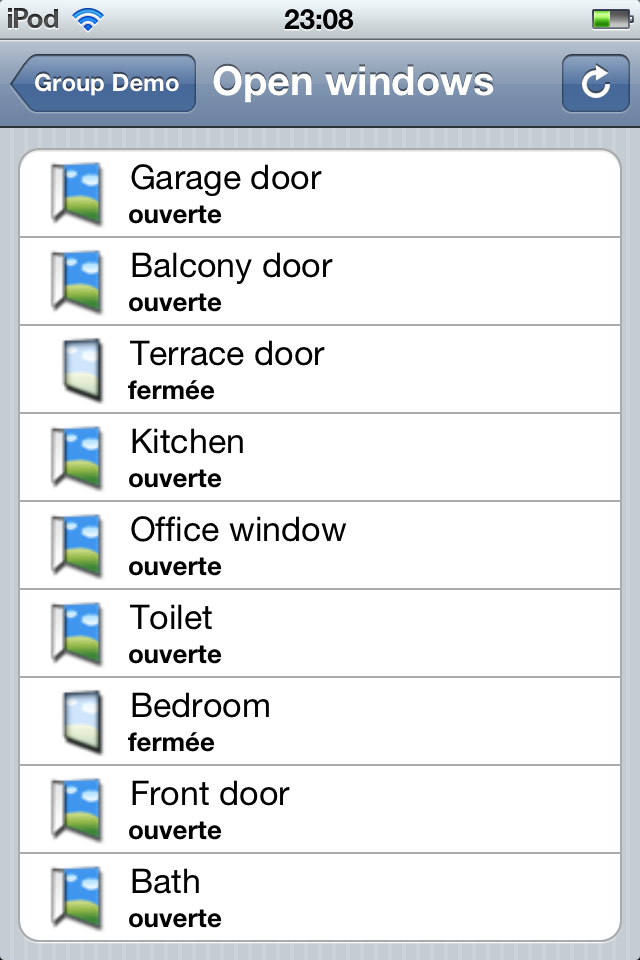
Not sure what the problem could be on your side...
Regards,
Kai
Kai
Sam
Mar 22, 2012, 2:05:53 AM3/22/12
to ope...@googlegroups.com
Thank you Kai for your help. I um anable to get this result. I double-checked that I save in UTF-8 encoding in Designer and even used a second text editor to save in UTF-8.
I always get this: (see the attached picture)
Sam
Kai Kreuzer
Mar 22, 2012, 4:48:40 AM3/22/12
to ope...@googlegroups.com
Could you send me your map file so I can have a try with it?
Kai
Quoting Sam <samc...@hotmail.com>:
> --
> You received this message because you are subscribed to the Google
> Groups "openhab" group.
> To view this discussion on the web visit
> https://groups.google.com/d/msg/openhab/-/KjE38zSrD-wJ.

Mihail Panayotov
Mar 22, 2012, 5:11:22 AM3/22/12
to ope...@googlegroups.com
On which OS you run openHAB runtime?

Pablo Romeu
Mar 23, 2012, 5:20:19 AM3/23/12
to openhab
It is the way you save your file. Maybe you are saving it as
ISO-8859??? It shows like this in Safari:
OPEN=déverrouill�e
CLOSED=verrouill�e
undefined=indefini
-=-
> lock.map
> < 1 KBVerDescargar
ISO-8859??? It shows like this in Safari:
OPEN=déverrouill�e
CLOSED=verrouill�e
undefined=indefini
-=-
> < 1 KBVerDescargar
Mihail Panayotov
Mar 23, 2012, 5:49:26 AM3/23/12
to ope...@googlegroups.com
Yes, it's the file. Open it with Notepad and save it again as UTF-8 (you have Encoding dropdown on the Save As dialog window). It should work.
Sam
Mar 24, 2012, 4:00:46 AM3/24/12
to ope...@googlegroups.com
I am unable to get it to work, no matter what I try. I saved it with Notepad and UTF-8 as you suggested. This results in either the same or sometimes no display of .map translations at all...
Mihail Panayotov
Mar 24, 2012, 5:39:09 AM3/24/12
to ope...@googlegroups.com
Well, the only thing that comes to my mind is this:
Go to Control Panel -> Region and Language and got to the "Administrative" tab (the last one). Look at "Language for non-Unicode programs" and change it to your desired language.

Maze
Nov 15, 2013, 10:51:14 AM11/15/13
to ope...@googlegroups.com
any solution? I have the same problem with Swdish öäå. I'm running OH SNAPSHOT 1.4.0 on win7 64 bit.
Kai Kreuzer
Nov 15, 2013, 12:41:48 PM11/15/13
to ope...@googlegroups.com
There should be no problem if proper UTF-8 is used. Works nicely for me and others…
Am 15 Nov 2013 um 16:51 schrieb Maze <ysta...@gmail.com>:
> any solution? I have the same problem with Swdish öäå. I'm running OH SNAPSHOT 1.4.0 on win7 64 bit.
>
> For more options, visit https://groups.google.com/groups/opt_out.
Am 15 Nov 2013 um 16:51 schrieb Maze <ysta...@gmail.com>:
> any solution? I have the same problem with Swdish öäå. I'm running OH SNAPSHOT 1.4.0 on win7 64 bit.
>
> --
> You received this message because you are subscribed to the Google Groups "openhab" group.
> To unsubscribe from this group and stop receiving emails from it, send an email to openhab+u...@googlegroups.com.
> You received this message because you are subscribed to the Google Groups "openhab" group.
> To post to this group, send email to ope...@googlegroups.com.
> Visit this group at http://groups.google.com/group/openhab.
> For more options, visit https://groups.google.com/groups/opt_out.
Maze
Nov 16, 2013, 2:49:09 AM11/16/13
to ope...@googlegroups.com
ok and thanks for the test. Then the the problem must be with the OS.

jana...@gmail.com
Nov 25, 2013, 1:26:45 PM11/25/13
to ope...@googlegroups.com
I also get same error
using Windows 7 32 bit Swedish
I see there is an de.map and an en.map - if Icreate a se.map file - how will OpenHab now to use that file? (or the DE) file?
jana...@gmail.com
Nov 25, 2013, 2:23:09 PM11/25/13
to ope...@googlegroups.com, jana...@gmail.com
I tested alittle more:
I have by-the-way problem in IE version 11 which hangs almost directly Firefox and Chrome works though
using English version of Windows 7.
change language and system local to German Germany.
date is presented in German as Montag so that is ok.
en.map :
CLOSED=stängd_enmap
OPEN=öpen_enmap
undefined=okänd
in Android and Chrome, IE, Firefoxopen is shown as below
- öpen_enmap
/Janne
Kai Kreuzer
Nov 25, 2013, 5:10:02 PM11/25/13
to ope...@googlegroups.com, jana...@gmail.com
Did you make sure you edited it with the openHAB Designer to have proper UTF-8 format?
> I have by-the-way problem in IE version 11 which hangs almost directly Firefox and Chrome works though
IE is not supported, only webkit-based browsers will work as expected.
Regards,
Kai
> I have by-the-way problem in IE version 11 which hangs almost directly Firefox and Chrome works though
Regards,
Kai
Kai Kreuzer
Nov 25, 2013, 5:15:07 PM11/25/13
to ope...@googlegroups.com
I see there is an de.map and an en.map - if Icreate a se.map file - how will OpenHab now to use that file? (or the DE) file?
Simply reference the se.map in your item or sitemap files - at the moment you will find en.map used in the label definitions there.
Regards,
Kai
jana...@gmail.com
Nov 25, 2013, 5:28:42 PM11/25/13
to ope...@googlegroups.com, jana...@gmail.com
yes I used openhab designer.
could you upload an en.map file with åäö so I can download and replace mine just to make sure it is not my saving which is the error?
/Janne
jana...@gmail.com
Nov 25, 2013, 5:59:25 PM11/25/13
to ope...@googlegroups.com, jana...@gmail.com
thanks
I get
Ã¥ for open where you had ä i en.map
another thing I get this error
23:53:58.255 WARN o.o.c.t.i.s.MapTransformationService[:90]- Could not find a mapping for '-' in the file 'en.map'.
if I had a mapping row
-=code-demap
I get response
code-enmap
so mapping file seems to work but value is sometimes -
/Janne

Mampfes
Nov 26, 2013, 4:43:57 AM11/26/13
to ope...@googlegroups.com, jana...@gmail.com
Hi, I see the same problem here with OpenHAB 1.3.1 and a Windows 7, 64Bit, english PC.
I tested e.g. the german Umlaut ä (Unicode U+00E4). In the .map file it is correctly stored as "C4 A4" (UTF-8 conversation of U+00E4).
However, in the HTML document I get a "C3 83 C2 A4"! This is exactly the UTF-8 conversion of "C4 A4". Therefore I assume there is - under certain circumstances - a double UTF-8 conversion of strings from .map files within OpenHAB.

Artyom
Mar 15, 2015, 4:34:49 PM3/15/15
to ope...@googlegroups.com
Try convert .map file to "UTF-8 (wo BOM)" by "notepad+ +" free editor, not "UTF-8".

cal
Mar 16, 2015, 2:30:00 AM3/16/15
to ope...@googlegroups.com
Hi,
I am curious...
Which windows program generates files with BOM?
Carsten
I am curious...
Which windows program generates files with BOM?
Carsten

Mark
Mar 16, 2015, 2:55:00 AM3/16/15
to ope...@googlegroups.com
Notepad++ is one that sticks in the BOM prefix chars (per above comment also). If you use it to open an existing file, or to edit a new one, and you're not careful then it'll cause issues for some software (including my previous HA Controller)

Andreas
Jul 4, 2015, 3:46:38 AM7/4/15
to ope...@googlegroups.com
I'm also trying to get the Swedish characters åäö to show correctly in the Android UI. The map file has been saved in openHAB designe. I'm running the runtime on a Windows 7, 64bit PC with Swedish language used. It would be great if someone could look into fixing this bug (#1711 ?)
Thanks! :)


Siegfried H.
Jul 4, 2015, 7:18:29 AM7/4/15
to ope...@googlegroups.com
I'm also trying to get the Swedish characters åäö to show correctly in the Android UI.
In my case (german umlauts) it helped to write the characters like
\u00F6
for the hex code
U+00F6.
This would give an "ö" in the GUI and the Android App. Didn't test iOS.
Siegfried
Andreas Nordvall
Jul 4, 2015, 7:42:26 AM7/4/15
to ope...@googlegroups.com
Perfect! Many thanks Siegfried!
I can confirm it works both with the Android UI and iOS UI :)
Best regards,
Andreas
> This would give an "ö" in the GUI and the Android App. Didn' test iOS.
>
> Siegfried
>
> --
> You received this message because you are subscribed to a topic in the
> Google Groups "openhab" group.
> To unsubscribe from this topic, visit
> https://groups.google.com/d/topic/openhab/_eeT4JMWywQ/unsubscribe.
> To unsubscribe from this group and all its topics, send an email to
>
> For more options, visit https://groups.google.com/d/optout.
I can confirm it works both with the Android UI and iOS UI :)
Best regards,
Andreas
>
> Siegfried
>
> --
> You received this message because you are subscribed to a topic in the
> Google Groups "openhab" group.
> To unsubscribe from this topic, visit
> https://groups.google.com/d/topic/openhab/_eeT4JMWywQ/unsubscribe.
> To unsubscribe from this group and all its topics, send an email to
> openhab+u...@googlegroups.com.
> To post to this group, send email to ope...@googlegroups.com.
> Visit this group at http://groups.google.com/group/openhab.
> To post to this group, send email to ope...@googlegroups.com.
> Visit this group at http://groups.google.com/group/openhab.
> To view this discussion on the web visit
> https://groups.google.com/d/msgid/openhab/887ac10f-4a14-43f0-ac61-61de73c9a74f%40googlegroups.com.
>
> For more options, visit https://groups.google.com/d/optout.
Reply all
Reply to author
Forward
0 new messages