
Z-Wave - PST02 - Philio 4 in 1 sensor - how do I set parameters?
2,750 views
Skip to first unread message

Daniel Byers
Mar 30, 2015, 5:49:15 PM3/30/15
to ope...@googlegroups.com
Hi all,
Today I received my 2nd Z-Wave device, a Philio 4 in 1 Multisensor (PIR, Door, Temp, Light), PST02 ('A'):
http://www.vesternet.com/z-wave-philio-multisensor-door-pir-light-temp-gen5
http://www.pepper1.net/zwavedb/device/435
(as a minor review note, the PIR and door sensor are exclusive, so I would in future save myself the £9 and go for the 3in1, sans PIR)
I have it set up in openhab, but I have a couple of issues:
-The door sensor always registers as CLOSED; and
-The temperature is reported in Fahrenheit, nor Celsius.
Having read the manual, both problems can be easily resolved with parameters, but I'm having trouble figuring out how to set them. I know what I want them set to, but not how to do it. My items are defined thus:
As an example, I want parameter 5 set to 8, which triggers the change from Farenheit to Celsius. On my Fibaro Dimmer I would just put "5=8" into the parameter string:
My issue is that I don't have a parent device defined, nor do I know how to create one - my basic attempts have failed.
Can anybody advise on how to get this sensor to register parameters, either with or without a parent device? In case it helps, here is a report event from the sensor:
Is the following line relevant at all?
Today I received my 2nd Z-Wave device, a Philio 4 in 1 Multisensor (PIR, Door, Temp, Light), PST02 ('A'):
http://www.vesternet.com/z-wave-philio-multisensor-door-pir-light-temp-gen5
http://www.pepper1.net/zwavedb/device/435
(as a minor review note, the PIR and door sensor are exclusive, so I would in future save myself the £9 and go for the 3in1, sans PIR)
I have it set up in openhab, but I have a couple of issues:
-The door sensor always registers as CLOSED; and
-The temperature is reported in Fahrenheit, nor Celsius.
Having read the manual, both problems can be easily resolved with parameters, but I'm having trouble figuring out how to set them. I know what I want them set to, but not how to do it. My items are defined thus:
Number  Door_Temperature "Door Temperature [%.1f F]" <temperature> (Upstairs) { zwave="5:1:command=SENSOR_MULTILEVEL,sensor_type=1" }
Number  Door_Luminance "Door Luminance [%.0f Lux]" <sun> (Upstairs) { zwave="5:1:command=SENSOR_MULTILEVEL,sensor_type=3" }
Contact    Door_Motion "Sensor [:%s]" <frontdoor> (Upstairs) { zwave="5:1:command=ALARM,respond_to_basic=true" }
Number  Door_Battery "Battery [%s %%]" <socket> (Upstairs) { zwave="5:1:command=BATTERY" }
As an example, I want parameter 5 set to 8, which triggers the change from Farenheit to Celsius. On my Fibaro Dimmer I would just put "5=8" into the parameter string:
Contact    Door_Motion "Sensor [:%s]" <frontdoor> (Upstairs) { zwave="5:1:command=ALARM,respond_to_basic=true, 5=8" }
However this has no effect. I've tried in all 4 of my items, with parameter 5 and others, and I can see no effect - it's simply not working (other changes are reflected, so it is not that the device hasn't woken up). In searching for an answer I have come across a Vesternet article on how to set this sensor up with a Vera (http://www.vesternet.com/resources/application-notes/apnt-55#.VRnDfOGuFCg), and there's one piece of advice that I think is key here:
Only make configuration changes on the main Sensor deviceThe main sensor ("Philio 4-in-1" in the Figure 2) acts as the parent device - all configuration changes are made in the parent device and not in the temperature or light sensors.
My issue is that I don't have a parent device defined, nor do I know how to create one - my basic attempts have failed.
Can anybody advise on how to get this sensor to register parameters, either with or without a parent device? In case it helps, here is a report event from the sensor:
22:47:00.867 [DEBUG] [eController$ZWaveReceiveThread:1499 ] - Receive Message = 01 24 00 04 00 05 1E 8F 01 04 03 80 03 64 09 71 05 00 00 00 FF 06 17 00 05 31 05 03 01 05 06 31 05 01 0A 00 4E 78
22:47:00.869 [DEBUG] [eController$ZWaveReceiveThread:1423 ] - Receive queue ADD: Length=1
22:47:00.869 [DEBUG] [b.z.i.protocol.ZWaveController:1181 ] - Receive queue TAKE: Length=0
22:47:00.869 [DEBUG] [o.b.z.i.protocol.SerialMessage:233  ] - Assembled message buffer = 01 24 00 04 00 05 1E 8F 01 04 03 80 03 64 09 71 05 00 00 00 FF 06 17 00 05 31 05 03 01 05 06 31 05 01 0A 00 4E 78
22:47:00.870 [DEBUG] [b.z.i.protocol.ZWaveController:1182 ] - Process Message = 01 24 00 04 00 05 1E 8F 01 04 03 80 03 64 09 71 05 00 00 00 FF 06 17 00 05 31 05 03 01 05 06 31 05 01 0A 00 4E 78
22:47:00.870 [DEBUG] [b.z.i.protocol.ZWaveController:191  ] - Message: class = ApplicationCommandHandler (0x04), type = Request (0x00), payload = 00 05 1E 8F 01 04 03 80 03 64 09 71 05 00 00 00 FF 06 17 00 05 31 05 03 01 05 06 31 05 01 0A 00 4E
22:47:00.870 [DEBUG] [ApplicationCommandMessageClass:38   ] - NODE 5: Application Command Request (ALIVE:DONE)
22:47:00.870 [DEBUG] [ApplicationCommandMessageClass:56   ] - NODE 5: Incoming command class MULTI_CMD
22:47:00.870 [DEBUG] [.ZWaveMultiCommandCommandClass:60   ] - NODE 5: Received Multi-Command Request
22:47:00.871 [DEBUG] [.ZWaveMultiCommandCommandClass:92   ] - NODE 5: Incoming command class BATTERY
22:47:00.871 [DEBUG] [.ZWaveMultiCommandCommandClass:113  ] - NODE 5: Calling handleApplicationCommandRequest.
22:47:00.871 [DEBUG] [i.p.c.ZWaveBatteryCommandClass:81   ] - NODE 5: Received Battery Request
22:47:00.871 [DEBUG] [i.p.c.ZWaveBatteryCommandClass:96   ] - NODE 5: Battery report value = 100
22:47:00.871 [DEBUG] [b.z.i.protocol.ZWaveController:674  ] - Notifying event listeners: ZWaveCommandClassValueEvent
22:47:00.871 [DEBUG] [.z.internal.ZWaveActiveBinding:433  ] - ZwaveIncomingEvent
22:47:00.871 [DEBUG] [.z.internal.ZWaveActiveBinding:450  ] - NODE 5: Got a value event from Z-Wave network, endpoint = 1, command class = BATTERY, value = 100
22:47:00.872 [INFO ] [runtime.busevents             :26   ] - Door_Battery state updated to 100
22:47:00.873 [DEBUG] [.ZWaveMultiCommandCommandClass:92   ] - NODE 5: Incoming command class ALARM
22:47:00.873 [DEBUG] [o.i.t.m.i.MqttBrokerConnection:437  ] - Publishing message 1277 to topic '/openHAB/out/Door_Battery/state'
22:47:00.873 [DEBUG] [.ZWaveMultiCommandCommandClass:113  ] - NODE 5: Calling handleApplicationCommandRequest.
22:47:00.873 [DEBUG] [z.i.p.c.ZWaveAlarmCommandClass:82   ] - NODE 5: Received Alarm Request
22:47:00.873 [DEBUG] [z.i.p.c.ZWaveAlarmCommandClass:94   ] - NODE 5: Alarm report - Value = 0
22:47:00.874 [DEBUG] [z.i.p.c.ZWaveAlarmCommandClass:112  ] - NODE 5: Alarm Type = General (0)
22:47:00.874 [DEBUG] [b.z.i.protocol.ZWaveController:674  ] - Notifying event listeners: ZWaveAlarmValueEvent
22:47:00.874 [DEBUG] [.z.internal.ZWaveActiveBinding:433  ] - ZwaveIncomingEvent
22:47:00.874 [DEBUG] [.z.internal.ZWaveActiveBinding:450  ] - NODE 5: Got a value event from Z-Wave network, endpoint = 1, command class = ALARM, value = 0
22:47:00.874 [INFO ] [runtime.busevents             :26   ] - Door_Motion state updated to CLOSED
22:47:00.876 [DEBUG] [o.i.t.m.i.MqttBrokerConnection:437  ] - Publishing message 1278 to topic '/openHAB/out/Door_Motion/state'
22:47:00.876 [DEBUG] [.ZWaveMultiCommandCommandClass:92   ] - NODE 5: Incoming command class SENSOR_MULTILEVEL
22:47:00.876 [DEBUG] [.ZWaveMultiCommandCommandClass:113  ] - NODE 5: Calling handleApplicationCommandRequest.
22:47:00.876 [DEBUG] [veMultiLevelSensorCommandClass:97   ] - NODE 5: Received Sensor Multi Level Request
22:47:00.877 [DEBUG] [veMultiLevelSensorCommandClass:131  ] - NODE 5: Sensor Multi Level REPORT received
22:47:00.877 [DEBUG] [veMultiLevelSensorCommandClass:141  ] - NODE 5: Sensor Type = Luminance(3), Scale = 0
22:47:00.877 [DEBUG] [veMultiLevelSensorCommandClass:150  ] - NODE 5: Sensor Value = 5
22:47:00.878 [DEBUG] [b.z.i.protocol.ZWaveController:674  ] - Notifying event listeners: ZWaveMultiLevelSensorValueEvent
22:47:00.878 [DEBUG] [.z.internal.ZWaveActiveBinding:433  ] - ZwaveIncomingEvent
22:47:00.878 [DEBUG] [.z.internal.ZWaveActiveBinding:450  ] - NODE 5: Got a value event from Z-Wave network, endpoint = 1, command class = SENSOR_MULTILEVEL, value = 5
22:47:00.879 [INFO ] [runtime.busevents             :26   ] - Door_Luminance state updated to 5
22:47:00.881 [DEBUG] [.ZWaveMultiCommandCommandClass:92   ] - NODE 5: Incoming command class SENSOR_MULTILEVEL
22:47:00.881 [DEBUG] [.ZWaveMultiCommandCommandClass:113  ] - NODE 5: Calling handleApplicationCommandRequest.
22:47:00.881 [DEBUG] [veMultiLevelSensorCommandClass:97   ] - NODE 5: Received Sensor Multi Level Request
22:47:00.881 [DEBUG] [veMultiLevelSensorCommandClass:131  ] - NODE 5: Sensor Multi Level REPORT received
22:47:00.881 [DEBUG] [veMultiLevelSensorCommandClass:141  ] - NODE 5: Sensor Type = Temperature(1), Scale = 1
22:47:00.882 [DEBUG] [veMultiLevelSensorCommandClass:150  ] - NODE 5: Sensor Value = 78
22:47:00.882 [DEBUG] [b.z.i.protocol.ZWaveController:674  ] - Notifying event listeners: ZWaveMultiLevelSensorValueEvent
22:47:00.882 [DEBUG] [.z.internal.ZWaveActiveBinding:433  ] - ZwaveIncomingEvent
22:47:00.882 [DEBUG] [.z.internal.ZWaveActiveBinding:450  ] - NODE 5: Got a value event from Z-Wave network, endpoint = 1, command class = SENSOR_MULTILEVEL, value = 78
22:47:00.883 [DEBUG] [.p.m.i.MysqlPersistenceService:319  ] - mySQL: Stored item 'Door_Luminance' as '5'[5] in SQL database at Mon Mar 30 22:47:00 BST 2015.
22:47:00.883 [DEBUG] [.p.m.i.MysqlPersistenceService:321  ] - mySQL: INSERT INTO Item16 (TIME, VALUE) VALUES(NOW(),'5') ON DUPLICATE KEY UPDATE VALUE='5';
22:47:00.884 [DEBUG] [o.i.t.m.i.MqttBrokerConnection:437  ] - Publishing message 1279 to topic '/openHAB/out/Door_Luminance/state'
22:47:00.884 [INFO ] [runtime.busevents             :26   ] - Door_Temperature state updated to 78
22:47:00.886 [DEBUG] [ApplicationCommandMessageClass:85   ] - Transaction not completed: node address inconsistent.
22:47:00.887 [DEBUG] [.p.m.i.MysqlPersistenceService:319  ] - mySQL: Stored item 'Door_Temperature' as '78'[78] in SQL database at Mon Mar 30 22:47:00 BST 2015.
22:47:00.887 [DEBUG] [.p.m.i.MysqlPersistenceService:321  ] - mySQL: INSERT INTO Item15 (TIME, VALUE) VALUES(NOW(),'78') ON DUPLICATE KEY UPDATE VALUE='78';
22:47:00.888 [DEBUG] [o.i.t.m.i.MqttBrokerConnection:437  ] - Publishing message 1280 to topic '/openHAB/out/Door_Temperature/state'
Is the following line relevant at all?
22:47:00.886 [DEBUG] [ApplicationCommandMessageClass:85   ] - Transaction not completed: node address inconsistent.


Cheers,
Dan
Chris Jackson
Mar 30, 2015, 5:57:00 PM3/30/15
to ope...@googlegroups.com
As an example, I want parameter 5 set to 8, which triggers the change from Farenheit to Celsius. On my Fibaro Dimmer I would just put "5=8" into the parameter string:
Ummm - no - this won’t work. It’s not possible to set parameter values in the item definition.
There are two ways to set parameters - one is through an item definition if you want to control the parameter via a sitemap (not what you want to do). The propper way to set a parameter is manually through HABmin.
However this has no effect.
No - exactly, this doesn’t do anything to configure a parameter.
My issue is that I don't have a parent device defined, nor do I know how to create one - my basic attempts have failed.
Parent devices are a Vera ‘thing’ so it’s not directly relevant here. I’m not familiar with this device though so I can’t comment too much on how to configure the items - sorry.
Is the following line relevant at all?
Nope - that’s a perfectly normal message - it’s a debug message, not any sort of error.
Chris
Daniel Byers
Mar 30, 2015, 6:17:20 PM3/30/15
to ope...@googlegroups.com
Chris, thanks very much for the lightning reply - you do a great job here, from what I've seen over the past few days.
I'd read the page that you've linked a few times, but it never quite twigged with me, until I realised that the values on the device page are editable! I don't think that that fact is particularly obvious - I had thought that this page was a read-only display of the state of the device. You have now led me to understand why I have had so much trouble with my Fibaro dimmer - I'd not actually changed any settings!
So, I think that the fact that that page in HABmin is editable is non-obvious, though I understand that I am but one man and everyone else may have understood it from the start. Perhaps a slight rewording of the giudance could make this more clear? Just a suggestion, but it may help others in the same boat as me.
Cheers again for your help - I feel like I'm starting anew now :O)
Dan
I'd read the page that you've linked a few times, but it never quite twigged with me, until I realised that the values on the device page are editable! I don't think that that fact is particularly obvious - I had thought that this page was a read-only display of the state of the device. You have now led me to understand why I have had so much trouble with my Fibaro dimmer - I'd not actually changed any settings!
So, I think that the fact that that page in HABmin is editable is non-obvious, though I understand that I am but one man and everyone else may have understood it from the start. Perhaps a slight rewording of the giudance could make this more clear? Just a suggestion, but it may help others in the same boat as me.
Cheers again for your help - I feel like I'm starting anew now :O)
Dan
Daniel Byers
Mar 31, 2015, 1:39:29 PM3/31/15
to ope...@googlegroups.com
Okay, I thought that I'd come back to this with an answer, in case anybody lands here via google.
I wish to use this device for its DOOR feature, and I am not interested in MOTION. By default it will report 4 command classes back to your controller - BATTERY, ALARM (motion), SENSOR_MULTILEVEL (lux), SENSOR_MULTILEVEL (temp). That second report, the ALARM, was what had me stumped, until I re-read the manual for the umpteenth time and noticed a short sentence on page 4:
I didn't realise that that was relevant, but once you set it the ALARM response turns into a SENSOR_BINARY response, with values either 0 or 255. My item line now correctly records OPEN / CLOSED:
As the manual states, conf item 7 needs bit4 to be a 1 (bit4 is a 16; the default value here is 4). Conf in habmin looks like this:
![]()
My thanks to anyone and everyone who helped me troubleshoot this.
Cheers,
Dan
I wish to use this device for its DOOR feature, and I am not interested in MOTION. By default it will report 4 command classes back to your controller - BATTERY, ALARM (motion), SENSOR_MULTILEVEL (lux), SENSOR_MULTILEVEL (temp). That second report, the ALARM, was what had me stumped, until I re-read the manual for the umpteenth time and noticed a short sentence on page 4:
In default the device will be using Notification Report to represent the trigger event, it can be changed to Sensor Binary Report by setting the configuration NO. 7 Bit4 to 1.
I didn't realise that that was relevant, but once you set it the ALARM response turns into a SENSOR_BINARY response, with values either 0 or 255. My item line now correctly records OPEN / CLOSED:
Contact Door_Motion "Door [%s]" <frontdoor> (Upstairs) { zwave="5:1:command=SENSOR_BINARY,respond_to_basic=true" }As the manual states, conf item 7 needs bit4 to be a 1 (bit4 is a 16; the default value here is 4). Conf in habmin looks like this:
My thanks to anyone and everyone who helped me troubleshoot this.
Cheers,
Dan

Marcel Erkel
Mar 31, 2015, 6:03:32 PM3/31/15
to ope...@googlegroups.com
Hi Daniel,
Just a quick note. The PIR and door sensor are only exclusive when it uses the Notification Report (default setting). When the device uses the Sensor Binary Report, both PIR and door sensor will send separate reports. The motion will by default not automatically send a report when no motion is noticed for x number of seconds. If you want this you need to set Bit1 to 1 of config NO. 7. I use a timer in OpenHAB to reset the state to No Motion in the hope that it will save the battery a bit.
Here's my item definition:
Regarding the 'parent device', I think you miss understood. With parent device they mean the Philio 4-in-1 sensor, or at least, that's how I understand it ;)
Cheers,
Marcel
Just a quick note. The PIR and door sensor are only exclusive when it uses the Notification Report (default setting). When the device uses the Sensor Binary Report, both PIR and door sensor will send separate reports. The motion will by default not automatically send a report when no motion is noticed for x number of seconds. If you want this you need to set Bit1 to 1 of config NO. 7. I use a timer in OpenHAB to reset the state to No Motion in the hope that it will save the battery a bit.
Here's my item definition:
/* A Philio Slim Multisensor PST02-A */
Number  Door_GF_Hallway_Temperature "Temperature [%.1f C]"        <temperature> (GF) {zwave="4:1:command=SENSOR_MULTILEVEL,sensor_type=1"}
Number  Door_GF_Hallway_Illuminance "Illuminance [%.0f Lux]"      <sun>         (GF) {zwave="4:1:command=SENSOR_MULTILEVEL,sensor_type=3"}
Contact Door_GF_Hallway_Motion      "Motion [MAP(motion.map):%s]" <frontdoor>   (GF) {zwave="4:1:command=SENSOR_BINARY,sensor_type=12,respond_to_basic=true"}
Contact Door_GF_Hallway_Contact     "Status [MAP(en.map):%s]"     <contact>     (GF) {zwave="4:1:command=SENSOR_BINARY,sensor_type=10,respond_to_basic=true"}
Number  Door_GF_Hallway_Battery     "Battery [%s %%]"             <socket>      (GF) {zwave="4:1:command=BATTERY"}
Regarding the 'parent device', I think you miss understood. With parent device they mean the Philio 4-in-1 sensor, or at least, that's how I understand it ;)
Cheers,
Marcel

hl_at
Apr 1, 2015, 3:29:44 AM4/1/15
to ope...@googlegroups.com
Hi Marcel!
Thx for your explanations - will try it tonight. One question left for me: I do not understand the Parameter Setting. How does the bitset stuff work (which value to enter if I want to set Bit 1 to 1 of Config no 7)?
Regards,
Herbert
Daniel Byers
Apr 1, 2015, 4:28:25 AM4/1/15
to ope...@googlegroups.com
Marcel, thank you for explaining this, I also will try this out when I get home from work.
Herbert, for the binary stuff, take a look at this page here: http://www.calculator.net/binary-calculator.html. You want the second calculator, binary -> decimal. You must work out what the value of your setting is in binary, and then convert this to decimal and send it to the device.
For example, to flip this device from Fahrenheit toCelsius requires setting Bit4 to '1' on param 5. Assuming Bit3 is 1 and all others are zeroes, this gives us the binary '1000' (from the RHS we have Bit0, Bit1, Bit2, Bit3, with these values corresponding to 1, 2, 4, 8, 16, 32, 64...). Setting Bit3 to '1' (or true) has a value of 8. For parameter 5, if I wanted all bits to be zero except for Bit3, this would give me a value of 8, which is what we then enter into habmin for the parameter.
Just enter your bits into the calculator I linked, setting each to 0 or 1 (and realising that the most significant bit must be on the left) and see what decimal number you get. That decimal is your ultimate parameter value, as it can be mapped back exactly to see what parameters you wanted to set.
Cheers,
Dan
Herbert, for the binary stuff, take a look at this page here: http://www.calculator.net/binary-calculator.html. You want the second calculator, binary -> decimal. You must work out what the value of your setting is in binary, and then convert this to decimal and send it to the device.
For example, to flip this device from Fahrenheit toCelsius requires setting Bit4 to '1' on param 5. Assuming Bit3 is 1 and all others are zeroes, this gives us the binary '1000' (from the RHS we have Bit0, Bit1, Bit2, Bit3, with these values corresponding to 1, 2, 4, 8, 16, 32, 64...). Setting Bit3 to '1' (or true) has a value of 8. For parameter 5, if I wanted all bits to be zero except for Bit3, this would give me a value of 8, which is what we then enter into habmin for the parameter.
Just enter your bits into the calculator I linked, setting each to 0 or 1 (and realising that the most significant bit must be on the left) and see what decimal number you get. That decimal is your ultimate parameter value, as it can be mapped back exactly to see what parameters you wanted to set.
Cheers,
Dan
Daniel Byers
Apr 1, 2015, 4:34:38 AM4/1/15
to ope...@googlegroups.com
Sorry, one edit. Where I said:
I actually meant:For example, to flip this device from Fahrenheit to Celsius requires setting Bit4 to '1' on param 5
For example, to flip this device from Fahrenheit to Celsius requires setting Bit3 to '1' on param 5
--
You received this message because you are subscribed to a topic in the Google Groups "openhab" group.
To unsubscribe from this topic, visit https://groups.google.com/d/topic/openhab/JfRXSHZJdLo/unsubscribe.
To unsubscribe from this group and all its topics, send an email to openhab+u...@googlegroups.com.
To post to this group, send email to ope...@googlegroups.com.
Visit this group at http://groups.google.com/group/openhab.
To view this discussion on the web visit https://groups.google.com/d/msgid/openhab/4a85de66-600a-4ab6-965f-92a010a74d8d%40googlegroups.com.
Marcel Erkel
Apr 1, 2015, 1:30:24 PM4/1/15
to ope...@googlegroups.com
Hi Herbert,
If you didn't change the Config No. 7 before, then in Habmin it is showing the value 4 because only bit 2 is set to 1.
Bit: 7 6 5 4 3 2 1 0
0 0 0 0 0 1 0 0
Value 128 64 32 16 8 4 2 1
-------------------------------------
0 + 0 + 0 + 0 + 0 + 4 + 0 + 0 = 4
So in your case where you also want to set bit 1 you would get:
Bit: 7 6 5 4 3 2 1 0
0 0 0 0 0 1 1 0
Value 128 64 32 16 8 4 2 1
-------------------------------------
0 + 0 + 0 + 0 + 0 + 4 + 2 + 0 = 6
I have this config parameter set to 20 because I want the door contact sensor and the motion sensor to each send their own message so that I can differentiate between whether motion was detected or the door was opened/closed. To be able to do that I needed to set bit 4:
Bit: 7 6 5 4 3 2 1 0
0 0 0 1 0 1 0 0
Value 128 64 32 16 8 4 2 1
-------------------------------------
0 + 0 + 0 +16 + 0 + 4 + 0 + 0 = 20
The temperature I want reported in Celsius and not in Fahrenheit, so I have config parameter 5 set to 8:
Bit: 7 6 5 4 3 2 1 0
0 0 0 0 1 0 0 0
Value 128 64 32 16 8 4 2 1
-------------------------------------
0 + 0 + 0 + 0 + 8 + 0 + 0 + 0 = 8
Or you can just use the calculator mentioned by Daniel. I think the Windows calculator also has a mode to do binary to decimal (and visa versa) conversion. I'm currently under Ubuntu and there it calculator mode is called Programming.
Hope this helps.
Cheers,
Marcel
If you didn't change the Config No. 7 before, then in Habmin it is showing the value 4 because only bit 2 is set to 1.
Bit: 7 6 5 4 3 2 1 0
0 0 0 0 0 1 0 0
Value 128 64 32 16 8 4 2 1
-------------------------------------
0 + 0 + 0 + 0 + 0 + 4 + 0 + 0 = 4
So in your case where you also want to set bit 1 you would get:
Bit: 7 6 5 4 3 2 1 0
0 0 0 0 0 1 1 0
Value 128 64 32 16 8 4 2 1
-------------------------------------
0 + 0 + 0 + 0 + 0 + 4 + 2 + 0 = 6
I have this config parameter set to 20 because I want the door contact sensor and the motion sensor to each send their own message so that I can differentiate between whether motion was detected or the door was opened/closed. To be able to do that I needed to set bit 4:
Bit: 7 6 5 4 3 2 1 0
0 0 0 1 0 1 0 0
Value 128 64 32 16 8 4 2 1
-------------------------------------
0 + 0 + 0 +16 + 0 + 4 + 0 + 0 = 20
The temperature I want reported in Celsius and not in Fahrenheit, so I have config parameter 5 set to 8:
Bit: 7 6 5 4 3 2 1 0
0 0 0 0 1 0 0 0
Value 128 64 32 16 8 4 2 1
-------------------------------------
0 + 0 + 0 + 0 + 8 + 0 + 0 + 0 = 8
Or you can just use the calculator mentioned by Daniel. I think the Windows calculator also has a mode to do binary to decimal (and visa versa) conversion. I'm currently under Ubuntu and there it calculator mode is called Programming.
Hope this helps.
Cheers,
Marcel
hl_at
Apr 3, 2015, 11:07:48 AM4/3/15
to ope...@googlegroups.com
Hi guys!
Thanks for your explanations - but two questions:
Habmin Shows no Config Parameter 7 and 20?
Am I talking about a different device?

Marcel Erkel
Apr 3, 2015, 12:11:42 PM4/3/15
to ope...@googlegroups.com
Hi Herbert,
There's basically two possibilities:
There's basically two possibilities:
- You really have PSM-02 and not a PST-02. The PSM-02 configuration parameters are incompatible with the PST-02.
- You are using an older version of the binding. At first it was thought that the PST-02 was more or less a rebranded PSM-02 but this is not the case. The required changes to make the PST-02 work properly were merged on the 17th of March. So your Z-Wave binding needs to be from the 18th of March or later.
Cheers,
Marcel
Marcel Erkel
Apr 3, 2015, 12:24:42 PM4/3/15
to ope...@googlegroups.com
For the latest org.openhab.binding.zwave-1.7.0-SNAPSHOT.jar, download https://openhab.ci.cloudbees.com/job/openHAB/lastSuccessfulBuild/artifact/distribution/target/distribution-1.7.0-SNAPSHOT-addons.zip and unzip the archive. Replace your org.openhab.binding.zwave-*.jar by the org.openhab.binding.zwave-1.7.0-SNAPSHOT.jar from the archive.
Cheers,
Marcel

Mauro Locci
Apr 15, 2015, 9:59:44 AM4/15/15
to ope...@googlegroups.com
Hi all,


Any help?
I'm trying to configure my PST-02 and I've followed all your suggestions but no one of sensors give me any data. Below my configuration:
Habmin detects fine the sensor (bit changed following your suggestions):

Opnehab Frontend (No data):
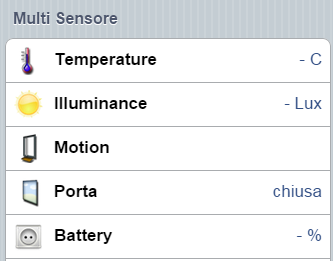
items (like Marcel's conf):
Number Door_Temperature "Temperature [%.1f C]" <temperature> (Door) {zwave="15:1:command=SENSOR_MULTILEVEL,sensor_type=1"}Number Door_Illuminance "Illuminance [%.0f Lux]" <sun> (Door) {zwave="15:1:command=SENSOR_MULTILEVEL,sensor_type=3"}Contact Door_Motion "Motion [MAP(motion.map):%s]" <frontdoor> (Door) {zwave="15:1:command=SENSOR_BINARY,sensor_type=12,respond_to_basic=true"}Contact Door_Contact "Porta [MAP(it.map):%s]" <contact> (Door) {zwave="15:1:command=SENSOR_BINARY,sensor_type=10,respond_to_basic=true"}Number Door_Battery "Battery [%s %%]" <socket> (Door) {zwave="15:1:command=BATTERY"}Logs:
2015-04-15 15:17:58.774 [DEBUG] [ZWaveConfigurationCommandClass:182 ]- NODE 15: Creating new message for application command CONFIGURATIONCMD_SET2015-04-15 15:17:58.776 [DEBUG] [o.b.z.i.protocol.SerialMessage:109 ]- NODE 15: Creating empty message of class = SendData (0x13), type = Request (0x00)2015-04-15 15:17:58.778 [DEBUG] [.i.p.c.ZWaveWakeUpCommandClass:241 ]- NODE 15: Putting message SendData in wakeup queue.2015-04-15 15:17:58.780 [DEBUG] [ZWaveConfigurationCommandClass:154 ]- NODE 15: Creating new message for application command CONFIGURATIONCMD_GET2015-04-15 15:17:58.781 [DEBUG] [o.b.z.i.protocol.SerialMessage:109 ]- NODE 15: Creating empty message of class = SendData (0x13), type = Request (0x00)2015-04-15 15:17:58.784 [DEBUG] [.i.p.c.ZWaveWakeUpCommandClass:237 ]- NODE 15: Message already on the wake-up queue. Removing original.2015-04-15 15:17:58.785 [DEBUG] [.i.p.c.ZWaveWakeUpCommandClass:241 ]- NODE 15: Putting message SendData in wakeup queue.Any help?
Cheers,
Mauro
Chris Jackson
Apr 15, 2015, 10:02:48 AM4/15/15
to ope...@googlegroups.com
The yellow background in the parameters in HABmin mean that these changes have not yet been transmitted to the device. As this is a battery device, it needs to wake up before the binding can send data to it. Normally there's a button you can press to wake it up, or, i the wakeup class has been set it will wake up automatically every hour or so (or every day if wakeup period is set that long).
Chris
Mauro Locci
Apr 15, 2015, 11:04:44 AM4/15/15
to ope...@googlegroups.com
Ok Chris,
Mauro
Device woke up with single press tamper button and yellow background was disappeared but Data still can't displayed in the frontend. Below new logs:
2015-04-15 16:49:33.577 [DEBUG] [ApplicationCommandMessageClass:38 ]- NODE 15: Application Command Request (ALIVE:DONE)2015-04-15 16:49:33.578 [DEBUG] [ApplicationCommandMessageClass:56 ]- NODE 15: Incoming command class WAKE_UP2015-04-15 16:49:33.579 [DEBUG] [.i.p.c.ZWaveWakeUpCommandClass:136 ]- NODE 15: Received Wake Up Request2015-04-15 16:49:33.580 [DEBUG] [.i.p.c.ZWaveWakeUpCommandClass:182 ]- NODE 15: Received WAKE_UP_NOTIFICATION2015-04-15 16:49:33.581 [DEBUG] [.i.p.c.ZWaveWakeUpCommandClass:411 ]- NODE 15: Is awake with 12 messages in the wake-up queue.2015-04-15 16:49:33.583 [DEBUG] [z.internal.ZWaveNetworkMonitor:701 ]- NODE 15: Heal WakeUp EVENT WAITING2015-04-15 16:49:33.584 [DEBUG] [z.internal.ZWaveNetworkMonitor:469 ]- NODE 15: NETWORK HEAL - STARTING2015-04-15 16:49:33.585 [DEBUG] [z.internal.ZWaveNetworkMonitor:478 ]- NODE 15: NETWORK HEAL - PING2015-04-15 16:49:33.586 [DEBUG] [c.ZWaveNoOperationCommandClass:72 ]- NODE 15: Creating new message for command No Operation2015-04-15 16:49:33.587 [DEBUG] [o.b.z.i.protocol.SerialMessage:109 ]- NODE 15: Creating empty message of class = SendData (0x13), type = Request (0x00)2015-04-15 16:49:33.591 [DEBUG] [WaveController$ZWaveSendThread:1306]- NODE 15: Sending REQUEST Message = 01 08 00 13 0F 01 00 25 BA 752015-04-15 16:49:33.604 [DEBUG] [b.z.i.p.s.SendDataMessageClass:38 ]- NODE 15: Sent Data successfully placed on stack.2015-04-15 16:49:33.619 [DEBUG] [b.z.i.p.s.SendDataMessageClass:74 ]- NODE 15: SendData Request. CallBack ID = 186, Status = Transmission complete and ACK received(0)2015-04-15 16:49:33.624 [DEBUG] [z.internal.ZWaveNetworkMonitor:494 ]- NODE 15: NETWORK HEAL - SETSUCROUTE2015-04-15 16:49:33.624 [DEBUG] [z.internal.ZWaveNetworkMonitor:499 ]- NODE 15: Heal is setting SUC route.2015-04-15 16:49:33.626 [DEBUG] [signSucReturnRouteMessageClass:29 ]- NODE 15: Assigning SUC return route2015-04-15 16:49:33.630 [DEBUG] [WaveController$ZWaveSendThread:1365]- NODE 15: Response processed after 37ms/1201ms.2015-04-15 16:49:33.633 [DEBUG] [WaveController$ZWaveSendThread:1306]- NODE 15: Sending REQUEST Message = 01 0A 00 13 0F 03 31 04 01 25 BB 402015-04-15 16:49:33.645 [DEBUG] [b.z.i.p.s.SendDataMessageClass:38 ]- NODE 15: Sent Data successfully placed on stack.2015-04-15 16:49:33.660 [DEBUG] [b.z.i.p.s.SendDataMessageClass:74 ]- NODE 15: SendData Request. CallBack ID = 187, Status = Transmission complete and ACK received(0)2015-04-15 16:49:33.680 [DEBUG] [ApplicationCommandMessageClass:38 ]- NODE 15: Application Command Request (ALIVE:DONE)2015-04-15 16:49:33.681 [DEBUG] [ApplicationCommandMessageClass:56 ]- NODE 15: Incoming command class SENSOR_MULTILEVEL2015-04-15 16:49:33.681 [DEBUG] [veMultiLevelSensorCommandClass:97 ]- NODE 15: Received Sensor Multi Level Request2015-04-15 16:49:33.682 [DEBUG] [veMultiLevelSensorCommandClass:131 ]- NODE 15: Sensor Multi Level REPORT received2015-04-15 16:49:33.683 [DEBUG] [veMultiLevelSensorCommandClass:141 ]- NODE 15: Sensor Type = Temperature(1), Scale = 12015-04-15 16:49:33.685 [DEBUG] [veMultiLevelSensorCommandClass:150 ]- NODE 15: Sensor Value = 722015-04-15 16:49:33.687 [DEBUG] [.z.internal.ZWaveActiveBinding:450 ]- NODE 15: Got a value event from Z-Wave network, endpoint = 0, command class = SENSOR_MULTILEVEL, value = 722015-04-15 16:49:33.688 [WARN ] [.z.internal.ZWaveActiveBinding:467 ]- NODE 15: No item bound for event, endpoint = 0, command class = SENSOR_MULTILEVEL, value = 72, ignoring.2015-04-15 16:49:33.694 [DEBUG] [WaveController$ZWaveSendThread:1365]- NODE 15: Response processed after 61ms/1201ms.2015-04-15 16:49:33.697 [DEBUG] [WaveController$ZWaveSendThread:1306]- NODE 15: Sending REQUEST Message = 01 0A 00 13 0F 03 31 04 03 25 BD 442015-04-15 16:49:33.709 [DEBUG] [b.z.i.p.s.SendDataMessageClass:38 ]- NODE 15: Sent Data successfully placed on stack.2015-04-15 16:49:33.724 [DEBUG] [b.z.i.p.s.SendDataMessageClass:74 ]- NODE 15: SendData Request. CallBack ID = 189, Status = Transmission complete and ACK received(0)2015-04-15 16:49:33.743 [DEBUG] [ApplicationCommandMessageClass:38 ]- NODE 15: Application Command Request (ALIVE:DONE)2015-04-15 16:49:33.744 [DEBUG] [ApplicationCommandMessageClass:56 ]- NODE 15: Incoming command class SENSOR_MULTILEVEL2015-04-15 16:49:33.745 [DEBUG] [veMultiLevelSensorCommandClass:97 ]- NODE 15: Received Sensor Multi Level Request2015-04-15 16:49:33.746 [DEBUG] [veMultiLevelSensorCommandClass:131 ]- NODE 15: Sensor Multi Level REPORT received2015-04-15 16:49:33.747 [DEBUG] [veMultiLevelSensorCommandClass:141 ]- NODE 15: Sensor Type = Luminance(3), Scale = 02015-04-15 16:49:33.748 [DEBUG] [veMultiLevelSensorCommandClass:150 ]- NODE 15: Sensor Value = 42015-04-15 16:49:33.750 [DEBUG] [.z.internal.ZWaveActiveBinding:450 ]- NODE 15: Got a value event from Z-Wave network, endpoint = 0, command class = SENSOR_MULTILEVEL, value = 42015-04-15 16:49:33.750 [WARN ] [.z.internal.ZWaveActiveBinding:467 ]- NODE 15: No item bound for event, endpoint = 0, command class = SENSOR_MULTILEVEL, value = 4, ignoring.2015-04-15 16:49:33.757 [DEBUG] [WaveController$ZWaveSendThread:1365]- NODE 15: Response processed after 60ms/1201ms.2015-04-15 16:49:33.759 [DEBUG] [WaveController$ZWaveSendThread:1306]- NODE 15: Sending REQUEST Message = 01 09 00 13 0F 02 30 02 25 BE 412015-04-15 16:49:33.771 [DEBUG] [b.z.i.p.s.SendDataMessageClass:38 ]- NODE 15: Sent Data successfully placed on stack.2015-04-15 16:49:33.786 [DEBUG] [b.z.i.p.s.SendDataMessageClass:74 ]- NODE 15: SendData Request. CallBack ID = 190, Status = Transmission complete and ACK received(0)2015-04-15 16:49:33.803 [DEBUG] [ApplicationCommandMessageClass:38 ]- NODE 15: Application Command Request (ALIVE:DONE)2015-04-15 16:49:33.804 [DEBUG] [ApplicationCommandMessageClass:56 ]- NODE 15: Incoming command class SENSOR_BINARY2015-04-15 16:49:33.805 [DEBUG] [.ZWaveBinarySensorCommandClass:82 ]- NODE 15: Received Sensor Binary Request (v2)2015-04-15 16:49:33.806 [DEBUG] [.ZWaveBinarySensorCommandClass:102 ]- NODE 15: Sensor Binary report, type=Unknown, value=2552015-04-15 16:49:33.808 [DEBUG] [.z.internal.ZWaveActiveBinding:450 ]- NODE 15: Got a value event from Z-Wave network, endpoint = 0, command class = SENSOR_BINARY, value = 2552015-04-15 16:49:33.809 [WARN ] [.z.internal.ZWaveActiveBinding:467 ]- NODE 15: No item bound for event, endpoint = 0, command class = SENSOR_BINARY, value = 255, ignoring.2015-04-15 16:49:33.815 [DEBUG] [WaveController$ZWaveSendThread:1365]- NODE 15: Response processed after 55ms/1201ms.2015-04-15 16:49:33.818 [DEBUG] [WaveController$ZWaveSendThread:1306]- NODE 15: Sending REQUEST Message = 01 0C 00 13 0F 05 70 04 07 01 01 25 BF 032015-04-15 16:49:33.830 [DEBUG] [b.z.i.p.s.SendDataMessageClass:38 ]- NODE 15: Sent Data successfully placed on stack.2015-04-15 16:49:33.846 [DEBUG] [b.z.i.p.s.SendDataMessageClass:74 ]- NODE 15: SendData Request. CallBack ID = 191, Status = Transmission complete and ACK received(0)2015-04-15 16:49:33.852 [DEBUG] [WaveController$ZWaveSendThread:1365]- NODE 15: Response processed after 34ms/1201ms.2015-04-15 16:49:33.855 [DEBUG] [WaveController$ZWaveSendThread:1306]- NODE 15: Sending REQUEST Message = 01 0C 00 13 0F 05 70 04 05 01 00 25 C0 7F2015-04-15 16:49:33.867 [DEBUG] [b.z.i.p.s.SendDataMessageClass:38 ]- NODE 15: Sent Data successfully placed on stack.2015-04-15 16:49:33.883 [DEBUG] [b.z.i.p.s.SendDataMessageClass:74 ]- NODE 15: SendData Request. CallBack ID = 192, Status = Transmission complete and ACK received(0)2015-04-15 16:49:33.890 [DEBUG] [WaveController$ZWaveSendThread:1365]- NODE 15: Response processed after 35ms/1201ms.2015-04-15 16:49:33.892 [DEBUG] [WaveController$ZWaveSendThread:1306]- NODE 15: Sending REQUEST Message = 01 0C 00 13 0F 05 70 04 05 01 08 25 C1 762015-04-15 16:49:33.904 [DEBUG] [b.z.i.p.s.SendDataMessageClass:38 ]- NODE 15: Sent Data successfully placed on stack.2015-04-15 16:49:33.921 [DEBUG] [b.z.i.p.s.SendDataMessageClass:74 ]- NODE 15: SendData Request. CallBack ID = 193, Status = Transmission complete and ACK received(0)2015-04-15 16:49:33.927 [DEBUG] [WaveController$ZWaveSendThread:1365]- NODE 15: Response processed after 34ms/1201ms.2015-04-15 16:49:33.930 [DEBUG] [WaveController$ZWaveSendThread:1306]- NODE 15: Sending REQUEST Message = 01 0A 00 13 0F 03 70 05 05 25 C2 7D2015-04-15 16:49:33.942 [DEBUG] [b.z.i.p.s.SendDataMessageClass:38 ]- NODE 15: Sent Data successfully placed on stack.2015-04-15 16:49:33.957 [DEBUG] [b.z.i.p.s.SendDataMessageClass:74 ]- NODE 15: SendData Request. CallBack ID = 194, Status = Transmission complete and ACK received(0)2015-04-15 16:49:33.977 [DEBUG] [ApplicationCommandMessageClass:38 ]- NODE 15: Application Command Request (ALIVE:DONE)2015-04-15 16:49:33.978 [DEBUG] [ApplicationCommandMessageClass:56 ]- NODE 15: Incoming command class CONFIGURATION2015-04-15 16:49:33.978 [DEBUG] [ZWaveConfigurationCommandClass:76 ]- NODE 15: Received Configuration Request2015-04-15 16:49:33.980 [DEBUG] [ZWaveConfigurationCommandClass:115 ]- NODE 15: Node configuration report, parameter = 5, value = 82015-04-15 16:49:33.982 [DEBUG] [.z.internal.ZWaveActiveBinding:450 ]- NODE 15: Got a value event from Z-Wave network, endpoint = 0, command class = CONFIGURATION, value = org.openhab.binding.zwave.internal.protocol.ConfigurationParameter@41e2ac402015-04-15 16:49:33.983 [WARN ] [.z.internal.ZWaveActiveBinding:467 ]- NODE 15: No item bound for event, endpoint = 0, command class = CONFIGURATION, value = org.openhab.binding.zwave.internal.protocol.ConfigurationParameter@41e2ac40, ignoring.2015-04-15 16:49:34.025 [DEBUG] [.b.z.i.p.i.ZWaveNodeSerializer:107 ]- NODE 15: Serializing to file etc/zwave/node15.xml2015-04-15 16:49:34.074 [DEBUG] [WaveController$ZWaveSendThread:1365]- NODE 15: Response processed after 144ms/1201ms.2015-04-15 16:49:34.076 [DEBUG] [WaveController$ZWaveSendThread:1306]- NODE 15: Sending REQUEST Message = 01 0C 00 13 0F 05 70 04 07 01 04 25 C3 7A2015-04-15 16:49:34.088 [DEBUG] [b.z.i.p.s.SendDataMessageClass:38 ]- NODE 15: Sent Data successfully placed on stack.2015-04-15 16:49:34.104 [DEBUG] [b.z.i.p.s.SendDataMessageClass:74 ]- NODE 15: SendData Request. CallBack ID = 195, Status = Transmission complete and ACK received(0)2015-04-15 16:49:34.111 [DEBUG] [WaveController$ZWaveSendThread:1365]- NODE 15: Response processed after 34ms/1201ms.2015-04-15 16:49:34.114 [DEBUG] [WaveController$ZWaveSendThread:1306]- NODE 15: Sending REQUEST Message = 01 0C 00 13 0F 05 70 04 07 01 18 25 C4 612015-04-15 16:49:34.125 [DEBUG] [b.z.i.p.s.SendDataMessageClass:38 ]- NODE 15: Sent Data successfully placed on stack.2015-04-15 16:49:34.142 [DEBUG] [b.z.i.p.s.SendDataMessageClass:74 ]- NODE 15: SendData Request. CallBack ID = 196, Status = Transmission complete and ACK received(0)2015-04-15 16:49:34.148 [DEBUG] [WaveController$ZWaveSendThread:1365]- NODE 15: Response processed after 34ms/1201ms.2015-04-15 16:49:34.151 [DEBUG] [WaveController$ZWaveSendThread:1306]- NODE 15: Sending REQUEST Message = 01 0C 00 13 0F 05 70 04 07 01 10 25 C5 682015-04-15 16:49:34.163 [DEBUG] [b.z.i.p.s.SendDataMessageClass:38 ]- NODE 15: Sent Data successfully placed on stack.2015-04-15 16:49:34.179 [DEBUG] [b.z.i.p.s.SendDataMessageClass:74 ]- NODE 15: SendData Request. CallBack ID = 197, Status = Transmission complete and ACK received(0)2015-04-15 16:49:34.186 [DEBUG] [WaveController$ZWaveSendThread:1365]- NODE 15: Response processed after 34ms/1201ms.2015-04-15 16:49:34.188 [DEBUG] [WaveController$ZWaveSendThread:1306]- NODE 15: Sending REQUEST Message = 01 0A 00 13 0F 03 70 05 07 25 C6 7B2015-04-15 16:49:34.200 [DEBUG] [b.z.i.p.s.SendDataMessageClass:38 ]- NODE 15: Sent Data successfully placed on stack.2015-04-15 16:49:34.216 [DEBUG] [b.z.i.p.s.SendDataMessageClass:74 ]- NODE 15: SendData Request. CallBack ID = 198, Status = Transmission complete and ACK received(0)2015-04-15 16:49:34.234 [DEBUG] [ApplicationCommandMessageClass:38 ]- NODE 15: Application Command Request (ALIVE:DONE)2015-04-15 16:49:34.235 [DEBUG] [ApplicationCommandMessageClass:56 ]- NODE 15: Incoming command class CONFIGURATION2015-04-15 16:49:34.236 [DEBUG] [ZWaveConfigurationCommandClass:76 ]- NODE 15: Received Configuration Request2015-04-15 16:49:34.237 [DEBUG] [ZWaveConfigurationCommandClass:115 ]- NODE 15: Node configuration report, parameter = 7, value = 162015-04-15 16:49:34.239 [DEBUG] [.z.internal.ZWaveActiveBinding:450 ]- NODE 15: Got a value event from Z-Wave network, endpoint = 0, command class = CONFIGURATION, value = org.openhab.binding.zwave.internal.protocol.ConfigurationParameter@7c27e6f22015-04-15 16:49:34.240 [WARN ] [.z.internal.ZWaveActiveBinding:467 ]- NODE 15: No item bound for event, endpoint = 0, command class = CONFIGURATION, value = org.openhab.binding.zwave.internal.protocol.ConfigurationParameter@7c27e6f2, ignoring.2015-04-15 16:49:34.263 [DEBUG] [.b.z.i.p.i.ZWaveNodeSerializer:107 ]- NODE 15: Serializing to file etc/zwave/node15.xml2015-04-15 16:49:34.304 [DEBUG] [WaveController$ZWaveSendThread:1365]- NODE 15: Response processed after 115ms/1201ms.2015-04-15 16:49:34.308 [DEBUG] [WaveController$ZWaveSendThread:1306]- NODE 15: Sending REQUEST Message = 01 09 00 13 0F 02 86 11 25 C7 9D2015-04-15 16:49:34.320 [DEBUG] [b.z.i.p.s.SendDataMessageClass:38 ]- NODE 15: Sent Data successfully placed on stack.2015-04-15 16:49:34.335 [DEBUG] [b.z.i.p.s.SendDataMessageClass:74 ]- NODE 15: SendData Request. CallBack ID = 199, Status = Transmission complete and ACK received(0)2015-04-15 16:49:34.360 [DEBUG] [ApplicationCommandMessageClass:38 ]- NODE 15: Application Command Request (ALIVE:DONE)2015-04-15 16:49:34.361 [DEBUG] [ApplicationCommandMessageClass:56 ]- NODE 15: Incoming command class VERSION2015-04-15 16:49:34.362 [DEBUG] [i.p.c.ZWaveVersionCommandClass:78 ]- NODE 15: Received Version Request2015-04-15 16:49:34.363 [DEBUG] [i.p.c.ZWaveVersionCommandClass:86 ]- NODE 15: Process Version Report2015-04-15 16:49:34.365 [DEBUG] [i.p.c.ZWaveVersionCommandClass:93 ]- NODE 15: Library Type = 3 (Slave Enhanced)2015-04-15 16:49:34.365 [DEBUG] [i.p.c.ZWaveVersionCommandClass:94 ]- NODE 15: Protocol Version = 3.952015-04-15 16:49:34.366 [DEBUG] [i.p.c.ZWaveVersionCommandClass:95 ]- NODE 15: Application Version = 1.172015-04-15 16:49:34.371 [DEBUG] [WaveController$ZWaveSendThread:1365]- NODE 15: Response processed after 63ms/1201ms.2015-04-15 16:49:34.386 [DEBUG] [signSucReturnRouteMessageClass:46 ]- NODE 15: Got AssignSucReturnRoute response.2015-04-15 16:49:34.387 [DEBUG] [signSucReturnRouteMessageClass:49 ]- NODE 15: AssignSucReturnRoute operation started.2015-04-15 16:49:34.484 [DEBUG] [signSucReturnRouteMessageClass:64 ]- NODE 15: Got AssignSucReturnRoute request.2015-04-15 16:49:34.486 [DEBUG] [z.internal.ZWaveNetworkMonitor:509 ]- NODE 15: NETWORK HEAL - UPDATENEIGHBORS2015-04-15 16:49:34.487 [DEBUG] [NodeNeighborUpdateMessageClass:33 ]- NODE 15: Request neighbor update2015-04-15 16:49:34.507 [DEBUG] [NodeNeighborUpdateMessageClass:47 ]- NODE 15: Got NodeNeighborUpdate request.2015-04-15 16:49:34.508 [DEBUG] [NodeNeighborUpdateMessageClass:50 ]- NODE 15: NodeNeighborUpdate STARTED2015-04-15 16:49:35.511 [DEBUG] [.i.p.c.ZWaveWakeUpCommandClass:506 ]- NODE 15: No more messages, go back to sleep2015-04-15 16:49:35.511 [DEBUG] [.i.p.c.ZWaveWakeUpCommandClass:202 ]- NODE 15: Creating new message for application command WAKE_UP_NO_MORE_INFORMATION2015-04-15 16:49:35.512 [DEBUG] [o.b.z.i.protocol.SerialMessage:109 ]- NODE 15: Creating empty message of class = SendData (0x13), type = Request (0x00)2015-04-15 16:49:35.516 [DEBUG] [WaveController$ZWaveSendThread:1306]- NODE 15: Sending REQUEST Message = 01 09 00 13 0F 02 84 08 25 C8 892015-04-15 16:49:35.528 [DEBUG] [b.z.i.p.s.SendDataMessageClass:38 ]- NODE 15: Sent Data successfully placed on stack.2015-04-15 16:49:35.543 [DEBUG] [b.z.i.p.s.SendDataMessageClass:74 ]- NODE 15: SendData Request. CallBack ID = 200, Status = Transmission complete and ACK received(0)2015-04-15 16:49:35.548 [DEBUG] [.i.p.c.ZWaveWakeUpCommandClass:372 ]- NODE 15: Went to sleep2015-04-15 16:49:35.549 [DEBUG] [.i.p.c.ZWaveWakeUpCommandClass:435 ]- NODE 15: Is sleeping2015-04-15 16:49:35.550 [DEBUG] [WaveController$ZWaveSendThread:1365]- NODE 15: Response processed after 33ms/1201ms.2015-04-15 16:49:36.490 [DEBUG] [NodeNeighborUpdateMessageClass:47 ]- NODE 15: Got NodeNeighborUpdate request.2015-04-15 16:49:36.491 [DEBUG] [NodeNeighborUpdateMessageClass:55 ]- NODE 15: NodeNeighborUpdate DONE2015-04-15 16:49:36.493 [DEBUG] [z.internal.ZWaveNetworkMonitor:432 ]- NODE 15: Node is asleep. Defer heal until it's awake2015-04-15 16:49:36.494 [DEBUG] [.i.p.c.ZWaveWakeUpCommandClass:372 ]- NODE 15: Went to sleep2015-04-15 16:49:36.495 [DEBUG] [.i.p.c.ZWaveWakeUpCommandClass:435 ]- NODE 15: Is sleepingMauro
Marcel Erkel
Apr 15, 2015, 4:15:19 PM4/15/15
to ope...@googlegroups.com
Hi Mauro,
It seems that your device is using endpoint 0 whereas my device uses endpoint 1. Can you try to change your item definitions to the following:
Number Door_Temperature "Temperature [%.1f C]" <temperature> (Door) {zwave="15:command=SENSOR_MULTILEVEL,sensor_type=1"}Number Door_Illuminance "Illuminance [%.0f Lux]" <sun> (Door) {zwave="15:command=SENSOR_MULTILEVEL,sensor_type=3"}Contact Door_Motion "Motion [MAP(motion.map):%s]" <frontdoor> (Door) {zwave="15:command=SENSOR_BINARY,sensor_type=12,respond_to_basic=true"}Contact Door_Contact "Porta [MAP(it.map):%s]" <contact> (Door) {zwave="15:command=SENSOR_BINARY,sensor_type=10,respond_to_basic=true"}Number Door_Battery "Battery [%s %%]" <socket> (Door) {zwave="15:command=BATTERY"}If I understand correctly, then endpoint 0 should not be listed as 15:0:command=... but as 15:command=... instead.
Cheers,
Marcel
Mauro Locci
Apr 16, 2015, 9:23:13 AM4/16/15
to ope...@googlegroups.com
Hi Marcel,
I'm going to try this evening and I let you know. Meanwhile how can I know the endpoint number used by devices? Is there any procedure?
thanks
Mauro
Marcel Erkel
Apr 16, 2015, 10:56:28 AM4/16/15
to ope...@googlegroups.com
Hi Mauro,
The z-wave binding logs the enpoint in the the openhab.log file:
The z-wave binding logs the enpoint in the the openhab.log file:
2015-04-15 16:49:33.687 [DEBUG] [.z.internal.ZWaveActiveBinding:450 ]- NODE 15: Got a value event from Z-Wave network, endpoint = 0, command class = SENSOR_MULTILEVEL, value = 722015-04-15 16:49:33.688 [WARN ] [.z.internal.ZWaveActiveBinding:467 ]- NODE 15: No item bound for event, endpoint = 0, command class = SENSOR_MULTILEVEL, value = 72, ignoring.Good luck!
Cheers,
Marcel
Chris Jackson
Apr 16, 2015, 11:53:48 AM4/16/15
to ope...@googlegroups.com
> I'm going to try this evening and I let you know. Meanwhile how can I know the endpoint number used by devices? Is there any procedure?
> thanks
Mauro Locci
Apr 24, 2015, 11:12:26 AM4/24/15
to ope...@googlegroups.com
Thanks Chris and Marcel. It works!
There are still some minor adjustments in particulary in "motion" sensor that I have to tune.
Mauro
Reply all
Reply to author
Forward
0 new messages