
New graphical rule designer
1,260 views
Skip to first unread message

Chris Jackson
Apr 28, 2014, 3:57:03 PM4/28/14
to ope...@googlegroups.com
I've started to implement a graphical rule designer within HABmin. The hope is that this will provide a drag and drop interface for writing (most) rules. It uses a block system where you can drag blocks into the workspace and link them together to build up your rule. The blocks support things like item access, loops, if-then-else, timers etc. When you save the diagram, HABmin will create a .rules file for you, and starts it running in openHAB thus hiding some of the openhab 'picky rule syntax' from the user.
I'm sure that not all rules will be able to be written this way - sometimes, you just need to get in there and write at the lowest level to get the most power. However, some commercial HA systems use a similar system and I hope that for many 'standard' things that this might be a useful feature for people to write rules in a simpler way. The interface also makes it easy to change item names, constants etc, so you can apply the same rule to different items (although I still need to provide cut and paste, or library functions).
Currently, this is still reasonably early days, but I'm interested to see if there's a few people who would like to help testing this. I've written a few rules so far, but I'm sure once others try and use it we'll find issues and I'd like to make sure the concept doesn't fall down before I go too far.
I also still have some work to do to add more blocks, and some of the interface is still a little rough around the edges, so please don't think this is a complete 'product'.
Below is an image of what the interface looks like.
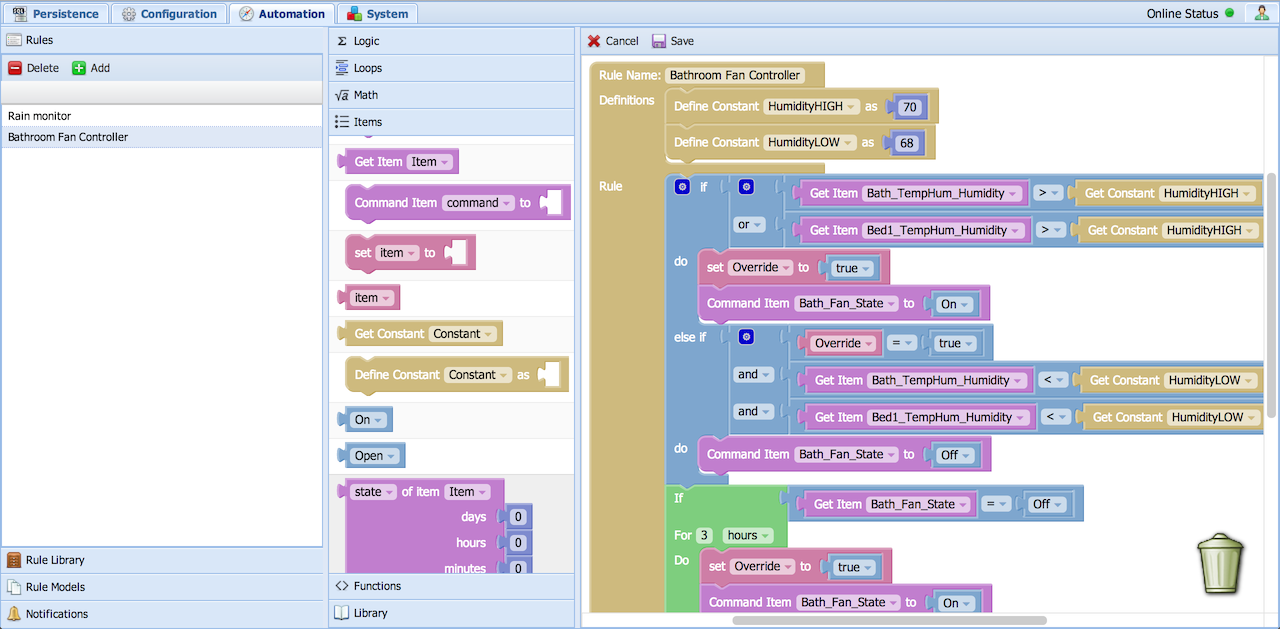
There's a more detailed overview here, and some example rules here and here to give you a better idea of the system. As I said, this is early work still, so I'm open to suggestions on the direction or ideas for improvement. Feel free to have a play and let me know what you think (either reply here, or create an issue on the HABmin site). To install, just grab the latest development off the HABmin github site rules branch - note that both the JAR file and the javascript are required.
Cheers
Chris

Ben Jones
Apr 28, 2014, 4:12:55 PM4/28/14
to ope...@googlegroups.com
Wow. Just wow. Great stuff Chris. I am busy with a few other projects currently but I will do my best to have a play with this.

Kai Kreuzer
Apr 28, 2014, 5:09:54 PM4/28/14
to ope...@googlegroups.com
Hey Chris, this is really awesome stuff!
--
You received this message because you are subscribed to the Google Groups "openhab" group.
To unsubscribe from this group and stop receiving emails from it, send an email to openhab+u...@googlegroups.com.
To post to this group, send email to ope...@googlegroups.com.
Visit this group at http://groups.google.com/group/openhab.
For more options, visit https://groups.google.com/d/optout.

Greg
Apr 28, 2014, 5:23:45 PM4/28/14
to ope...@googlegroups.com
Wow, Very impressive!
Can't wait to try this out.
Can't wait to try this out.

Daniele Casti
Apr 30, 2014, 5:16:55 AM4/30/14
to ope...@googlegroups.com
Hi Chris!
I have grabbed the https://github.com/cdjackson/HABmin/tree/rules and copied both the .jar files but don't work, if i add a rule into automation flag the right don't appear....
Thanks Daniele
I have grabbed the https://github.com/cdjackson/HABmin/tree/rules and copied both the .jar files but don't work, if i add a rule into automation flag the right don't appear....
Thanks Daniele

Lars Bretschneider
Apr 30, 2014, 5:25:50 AM4/30/14
to ope...@googlegroups.com
Great!!, i will try too!
Chris Jackson
Apr 30, 2014, 6:21:28 AM4/30/14
to ope...@googlegroups.com
Hi Chris!
I have grabbed the https://github.com/cdjackson/HABmin/tree/rules and copied both the .jar files but don't work, if i add a rule into automation flag the right don't appear....
Hi Daniele,
Did you also download and install all the js files (including images etc) from the repository and install them into the webapps directory, or have you just installed the JAR files?
You should be able to follow the link below to grab the full application.
Cheers
Chris
- Download the project zip file from GitHub and unzip files in the directory webapps/habmin (you will need to create this directory - note that the directory name must be lower case).
Daniele Casti
Apr 30, 2014, 6:43:18 AM4/30/14
to ope...@googlegroups.com
Chris:
i have this:
openhab@ZanzAlix:~/openhab1/webapps/habmin$ ls -l
totale 68
drwxr-xr-x 2 openhab openhab 4096 2014-04-30 10:12 addons
drwxr-xr-x 7 openhab openhab 4096 2014-04-28 21:38 app
-rw-r--r-- 1 openhab openhab 16072 2014-04-28 21:38 chart.html
-rw-r--r-- 1 openhab openhab 2902 2014-04-28 21:38 debug.html
-rw-r--r-- 1 openhab openhab 6701 2014-04-28 21:38 Gruntfile.js
drwxr-xr-x 2 openhab openhab 4096 2014-04-28 21:38 images
-rw-r--r-- 1 openhab openhab 2973 2014-04-28 21:38 index.html
drwxr-xr-x 3 openhab openhab 4096 2014-04-28 21:38 js
drwxr-xr-x 2 openhab openhab 4096 2014-04-28 21:38 openhab
-rw-r--r-- 1 openhab openhab 904 2014-04-28 21:38 package.json
-rw-r--r-- 1 openhab openhab 5490 2014-04-28 21:38 README.md
drwxr-xr-x 5 openhab openhab 4096 2014-04-28 21:38 resources
It's right?
Chris Jackson
Apr 30, 2014, 7:45:50 AM4/30/14
to ope...@googlegroups.com
It's right?
It looks ok - at least the relevant files are in the root folder. I assume that the subfolders are also populated...
If you have Chrome, can you enable Developer Tools in the menu and see if there's an error reported in the console? I guess there will be (?).
Also, please can you confirm what happens when you press the '+ Add' button in the Rules tab (as in the image at the top of this thread). If you can open Developers Tools, then again this would be useful as this might be when the error occurs.
One last question - what web browser are you using? I've only tested this fully on Chrome, but have done some tests with Firefox, but not Safari or IE.
Cheers
Chris
Daniele Casti
Apr 30, 2014, 8:26:53 AM4/30/14
to ope...@googlegroups.com
Chris:
I have these errors
I have these errors
Request Status app.js:493
this.onResizeWrapper_ = Blockly.bindEvent_(window, goog.events.EventType.RESIZE, this, this.position_); core.js:8194
- Uncaught TypeError: Cannot read property 'length' of undefined core.js:11806
- Uncaught TypeError: Cannot read property 'height' of null core.js:1175
10Request Status
when press a "+Add" button, the subfolders are populated, i use Firefox, but i have same prob into Chrome
when press a "+Add" button, the subfolders are populated, i use Firefox, but i have same prob into Chrome
Chris Jackson
Apr 30, 2014, 8:34:26 AM4/30/14
to ope...@googlegroups.com
Thanks - I'll take a look at this tonight. Maybe there's some descrepancy between my version and the version on Github and files are somehow different. I'll try a fresh install of the Github version to be sure...
Cheers
Chris
Daniele Casti
Apr 30, 2014, 8:39:45 AM4/30/14
to ope...@googlegroups.com
OK!
--
You received this message because you are subscribed to a topic in the Google Groups "openhab" group.
To unsubscribe from this topic, visit https://groups.google.com/d/topic/openhab/F5EysbZ-dQc/unsubscribe.
To unsubscribe from this group and all its topics, send an email to openhab+u...@googlegroups.com.
Chris Jackson
Apr 30, 2014, 3:18:48 PM4/30/14
to ope...@googlegroups.com
I had missed a file - it was in my local copy, but I hadn’t actually committed it to Github…
Hopefully it will work now.
Chris
Hopefully it will work now.
Chris

rak
May 1, 2014, 2:34:01 AM5/1/14
to ope...@googlegroups.com
I am impressed. This running on a smartphone is my final dream comming true. Will give it a try. Can you modify existing rules with this tool? Create new items? I am dreaming ,-)
Chris Jackson
May 1, 2014, 3:33:04 AM5/1/14
to ope...@googlegroups.com
I am impressed. This running on a smartphone is my final dream comming true. Will give it a try.
I've not tried it on a smart phone - that might be a little optimistic. We'll see...
Can you modify existing rules with this tool? Create new items? I am dreaming ,-)
You can't modify existing rules with the graphical designer, but there is an editor built in that allows editing of rules within a browser. The editor is reasonably nice and provides things like syntax highlighting and this can be used to edit a standard rule file.
Rules generated with the graphical designer are stored in an abstract form, with a one way conversion to generate an openHAB rule file.
There are also GUIs within HABmin that allow you to create/edit items and sitemaps, along with graphing from persistence stores.
Cheers
Chris

Ivar V
May 5, 2014, 3:10:44 PM5/5/14
to ope...@googlegroups.com
Hi
Wow! Nice work Chris! This is a big step up to Habmin :)
One question.. the rules file does not save with *.rules ending, but rather a txt file like this: (1)_htpc_status.txt
Is the .rules file-ending not added yet?
Best regards
Ivar
Chris Jackson
May 5, 2014, 6:02:32 PM5/5/14
to ope...@googlegroups.com
One question.. the rules file does not save with *.rules ending, but rather a txt file like this: (1)_htpc_status.txt
Is the .rules file-ending not added yet?
Yes, since this is still in test, I decided for now to save with a .txt extension and then to force the user to rename it - it just adds an extra check while it’s being tested. You should be able to rename the file from .txt to .rules.
I welcome any feedback - both positive and negative to know how it is working…
Cheers
Chris
Ivar V
May 5, 2014, 6:33:31 PM5/5/14
to ope...@googlegroups.com
Hello again
Makes sense. Just wondering if there was something wrong with my setup as it says it's gonna save as a .rules file, on the wiki :)
I've just started using it.. sure will report back any findings/bugs.
Wishlist:
- On the Item Access Blocks, ability to select among all the existing items.
I'm not sure about this tho.. could be an issue on large setups I imagine.. anyway.. just a thought.
- Ability to load/import existing rules.
Thank you again.
Ivar
Makes sense. Just wondering if there was something wrong with my setup as it says it's gonna save as a .rules file, on the wiki :)
I've just started using it.. sure will report back any findings/bugs.
Wishlist:
- On the Item Access Blocks, ability to select among all the existing items.
I'm not sure about this tho.. could be an issue on large setups I imagine.. anyway.. just a thought.
- Ability to load/import existing rules.
Thank you again.
Ivar
Chris Jackson
May 6, 2014, 1:46:10 PM5/6/14
to ope...@googlegroups.com
> Makes sense. Just wondering if there was something wrong with my setup as it says it's gonna save as a .rules file, on the wiki :)
> I've just started using it.. sure will report back any findings/bugs.
> Wishlist:
> - On the Item Access Blocks, ability to select among all the existing items.
> I'm not sure about this tho.. could be an issue on large setups I imagine.. anyway.. just a thought.
> - Ability to load/import existing rules.
Cheers
Chris
Ivar V
May 6, 2014, 3:17:13 PM5/6/14
to ope...@googlegroups.com
>
Toward the bottom of the page, it does say this - maybe I should put it at the top :)
I totally missed that.. my bad :)
Made one more rule today.. works like a charm.
One question if you don't mind:)
- The rule I created contains this:
.....
when
Item House_Lux_Outdoor changed
then
....
Any way to change the trigger, lets say use cron or "received update" instead?
Again... awesome work!
This makes making rules for a novice coder like me much easier!
Regards
Ivar
Made one more rule today.. works like a charm.
One question if you don't mind:)
- The rule I created contains this:
.....
when
Item House_Lux_Outdoor changed
then
....
Any way to change the trigger, lets say use cron or "received update" instead?
Again... awesome work!
This makes making rules for a novice coder like me much easier!
Regards
Ivar
Chris Jackson
May 6, 2014, 3:32:33 PM5/6/14
to ope...@googlegroups.com
> > Toward the bottom of the page, it does say this - maybe I should put it at the top :)
> I totally missed that.. my bad :)
> Made one more rule today.. works like a charm.
>
> One question if you don't mind:)
> - The rule I created contains this:
> .....
> when
> Item House_Lux_Outdoor changed
> then
> ....
> Any way to change the trigger, lets say use cron or "received update" instead?
Currently, the system will automatically add a cron trigger if you use a persistence block in which case it adds a periodic cron of roughly 1/500th of the persistence period.
Are you just asking out of interest, or do you have a rule that needs this? Why for example do you want ‘received update’ instead of ‘changed’?
Thanks
Chris
Ivar V
May 6, 2014, 4:23:26 PM5/6/14
to ope...@googlegroups.com
Hello again
> Currently, there’s no way to change the triggers
Okay.. no big deal at the moment, i just edit directly in the .rules file. This might be more of an issue when the files no longer are saved as .txt and overwritten on update.
> Are you just asking out of interest, or do you have a rule that needs this? Why for example do you want ‘received update’ instead of ‘changed’?
Well.. i got some scene selection rules that uses "received command" like this:
Another to trim Arduino input, like this
And many more rules ;)
As far as I understand the "changed" trigger is kinda limited to IF the value actually is different than the previous value?
Cheers
Ivar
rule "Main Room Lights"
when
Item Scene_Main_Rooms received command
then
//0="Av", 1="På 2="Kveld"
switch (receivedCommand) {
case 0 : {
sendCommand(House_Light_Livingroom_Kids_CeilingSpot_Dim, 0)
......
Another to trim Arduino input, like this
rule "Trim raw serial input"
when
Item pwrRAW received update
then
/* Trim the serial input for whitespace and line break */
var String trimmed = pwrRAW.state.toString.trim
postUpdate(pwr, trimmed)
.........
And many more rules ;)
As far as I understand the "changed" trigger is kinda limited to IF the value actually is different than the previous value?
Cheers
Ivar
Chris Jackson
May 8, 2014, 5:50:07 PM5/8/14
to ope...@googlegroups.com
> Are you just asking out of interest, or do you have a rule that needs this? Why for example do you want ‘received update’ instead of ‘changed’?
Well.. i got some scene selection rules that uses "received command" like this:
I also have this, and it works just the same (as far as I can tell - at least I should say it works fine!) with ‘received update’ so I’m not really sure what the difference it. Have you tried this just as HABmin generates the rule?
Another to trim Arduino input, like this
rule "Trim raw serial input"
when
Item pwrRAW received update
then
/* Trim the serial input for whitespace and line break */
var String trimmed = pwrRAW.state.toString.trim
postUpdate(pwr, trimmed)
………
Just as a matter of interest - is a rule the best way to handle this? Can’t you use a translation? Or maybe the serial binding doesn’t provide translations?
If needed, I can add another block type that supports this - it’s not a major problem. I’m just wanting to try and ensure that blocks are needed before we add them, as I’d like to keep the number to a minimum to keep things simple...
As far as I understand the "changed" trigger is kinda limited to IF the value actually is different than the previous value?
Yes, but I would think (maybe incorrectly) that this should cover most cases? In my mind you only want to do something (most of the time) when something changes (??). Clearly, it doesn’t cover the situation above where you’re using the rule to do a translation so there may be a need for this.
Anyway, this is exactly the discussion I was wanting to have, so thanks :)
Cheers
Chris
Ben Jones
May 8, 2014, 5:53:33 PM5/8/14
to ope...@googlegroups.com
I have rules which definitely require both 'updated' and 'changed'. For example I have rules which check a sensor is reporting values and hasn't died. These rules trigger on the updated event, since the sensor value might not have changed but I still want to know when it is reporting something. Then obviously other rules which only trigger when something actually changes.
So there is definitely a requirement for both trigger types IMHO.
Chris Jackson
May 8, 2014, 6:09:46 PM5/8/14
to ope...@googlegroups.com
Thanks Ben,
I’m sure you’re right - or maybe I should make it so that it always uses the ‘update’ trigger. I’d need to think about this as well - or maybe I just need both as you suggest. My goal is to try and make things simpler - preferably without compromising (too much at least) on power/functionality, and without producing rules that are too inefficient… There’s a compromise to be had probably (as always)…
I’ve got your rules that you sent out late last year so I might take a peak at them again to see how they map to the graphical designer so give me another idea of required ‘widgets'…
Anyway, I’ve had my fill of fine German beer this evening, and I’d better think about some sleep :)
Cheers
Chris
I’m sure you’re right - or maybe I should make it so that it always uses the ‘update’ trigger. I’d need to think about this as well - or maybe I just need both as you suggest. My goal is to try and make things simpler - preferably without compromising (too much at least) on power/functionality, and without producing rules that are too inefficient… There’s a compromise to be had probably (as always)…
I’ve got your rules that you sent out late last year so I might take a peak at them again to see how they map to the graphical designer so give me another idea of required ‘widgets'…
Anyway, I’ve had my fill of fine German beer this evening, and I’d better think about some sleep :)
Cheers
Chris
Ben Jones
May 8, 2014, 6:15:31 PM5/8/14
to ope...@googlegroups.com
Yep - I can see your point. Simple is good and that is the whole idea of this UI - to make it easier for beginners etc. However I think you do need to support both, but perhaps you can build this into the rule UI somehow so it is still a simple check box or something?
Enjoy your hangover tomorrow morning ;).

Petr Klus
May 9, 2014, 7:17:21 AM5/9/14
to ope...@googlegroups.com
I think that the approach Fibaro uses is a nice compromise. One can use the graphical rule editor or write rules manually. Alternatively, one can also convert graphical rules into a rule script and edit from there - however, this is only one-way conversion. Maybe making this accessible will be the solution?
Ivar V
May 9, 2014, 12:16:50 PM5/9/14
to ope...@googlegroups.com
Chris
> I also have this, and it works just the same (as far as I can tell - at least I should say it works fine!) with ‘received update’ so I’m not really sure what the difference it. Have you tried this just as HABmin generates the rule?
I haven't tried re-writing all the rules with the editor, so couldn't tell. Just done some basic testing yet :)
> Just as a matter of interest - is a rule the best way to handle this? Can’t you use a translation? Or maybe the serial binding doesn’t provide translations?
To be honest.. I have no clue how to do this with a translation. Haven't gotten that far yet :)
Maybe that's the way to go in this case.. Is translations better performance wise?
If anyone could provide an example, I'd be happy.
As another example, I have a rule that uses "Item NX_motion_1 changed from OFF to ON"
I want the rule to run only when the state is changing to ON. It sure could run in either case, but my idea is that it's better performance wise doing it like this?
(The rPi isn't the fastest thing on earth.. will swap shortly)
I guess my point is that there are so many different ways to solve a problem with rules in OpenHab.
Users have different ideas on how to do this, and there are even more different problems to be solved.
Maybe your keep-it-simple approach is the way to go for simplicity, but my hope is that there will be support to all the triggers in the future.
Heck.. maybe even a cron maker like this one? ;) http://www.cronmaker.com/
I appreciate your work man!
Tonight is my time drinking beer.. although it's Danish :)
Cheers
Ivar
Chris Jackson
May 9, 2014, 3:10:01 PM5/9/14
to ope...@googlegroups.com
I’m not sure I agree completely, here’s an example of why you don’t need (necessarily) the different rule triggers (in my opinion - again, I’m just sounding stuff out at the moment so feel free to shoot me down :) ).
If I write a graphical rule that says -:
If lights == ON then do something….
I can translate this into different rules -:
when
Item lights received update
then
if(lights.state == ON) {
do something
}
end
OR
when
Item lights received update ON
then
do something
end
OR
when
Item lights changed to ON
then
do something
end
or probably a bunch of others. I think they should all do the same thing, although some might be slightly better performance, but I’m not really sure. While the rule looks simpler for the latter versions because the rule will only run if the state is changed, however, this state change is still evaluated by the rule engine (I think) so it’s still effectively doing the same as the first version (again - I think this is true - I haven't checked it line by line). Maybe there’s some performance gain by not running the rule - i’m not sure when the rule gets compiled - i.e. if it’s compiled each time, or only once. If it’s only compiled once (when the rule file is loaded) then I suspect there’s not a lot of difference in overall performance (someone can feel free to tell me I’m talking rubbish).
At the end of the day, the rule needs to run when the state updates, so as long as the condition gets evaluated (somewhere) then it shouldn’t matter where (too much!). So long as there’s no major performance hit by doing it a certain way then it shouldn’t matter - and most rules aren’t running that often (I guess?).
It may also be possible for the system to decide which trigger to use - in the above case, we’re only testing one condition, so the rule generator could look at this and decide to use a trigger with a state in the trigger. If multiple conditions are specified, then it would need to be a more generic trigger… I’ll have a think about this…
Clearly the system needs to be versatile enough to meet ‘all' needs - that’s a given, but we shouldn’t (necessarily) think about what the rule looks like, but more the result that it achieves…..
???
Cheers
Chris
If I write a graphical rule that says -:
If lights == ON then do something….
I can translate this into different rules -:
when
Item lights received update
then
if(lights.state == ON) {
do something
}
end
OR
when
Item lights received update ON
then
do something
end
OR
when
Item lights changed to ON
then
do something
end
or probably a bunch of others. I think they should all do the same thing, although some might be slightly better performance, but I’m not really sure. While the rule looks simpler for the latter versions because the rule will only run if the state is changed, however, this state change is still evaluated by the rule engine (I think) so it’s still effectively doing the same as the first version (again - I think this is true - I haven't checked it line by line). Maybe there’s some performance gain by not running the rule - i’m not sure when the rule gets compiled - i.e. if it’s compiled each time, or only once. If it’s only compiled once (when the rule file is loaded) then I suspect there’s not a lot of difference in overall performance (someone can feel free to tell me I’m talking rubbish).
At the end of the day, the rule needs to run when the state updates, so as long as the condition gets evaluated (somewhere) then it shouldn’t matter where (too much!). So long as there’s no major performance hit by doing it a certain way then it shouldn’t matter - and most rules aren’t running that often (I guess?).
It may also be possible for the system to decide which trigger to use - in the above case, we’re only testing one condition, so the rule generator could look at this and decide to use a trigger with a state in the trigger. If multiple conditions are specified, then it would need to be a more generic trigger… I’ll have a think about this…
Clearly the system needs to be versatile enough to meet ‘all' needs - that’s a given, but we shouldn’t (necessarily) think about what the rule looks like, but more the result that it achieves…..
???
Cheers
Chris
Chris Jackson
May 9, 2014, 3:11:27 PM5/9/14
to ope...@googlegroups.com
> I think that the approach Fibaro uses is a nice compromise. One can use the graphical rule editor or write rules manually. Alternatively, one can also convert graphical rules into a rule script and edit from there - however, this is only one-way conversion. Maybe making this accessible will be the solution?
Cheers
Chris
Greg
Jun 12, 2014, 11:17:17 AM6/12/14
to ope...@googlegroups.com
Chris, I think this is a great addition to OpenHAB. I've been playing with this now that the rules branch has been merged into the master, but for some reason, I can't seem to select any items. Are the available items supposed to be in a dropdown, or do I rename the variable to be the item I want to use?
Chris Jackson
Jun 12, 2014, 12:01:03 PM6/12/14
to ope...@googlegroups.com
On 12 Jun 2014, at 16:17, Greg <g.g....@gmail.com> wrote:
> Chris, I think this is a great addition to OpenHAB. I've been playing with this now that the rules branch has been merged into the master, but for some reason, I can't seem to select any items. Are the available items supposed to be in a dropdown, or do I rename the variable to be the item I want to use?
At the moment, you need to type in the name of the variable. Once you’ve typed it in once, you can then select it from the list - also if you rename it, all instances will be renamed.
I do agree though that this is needed and I will certainly add this in future.
Cheers
Chris

gilles.l...@gmail.com
Jun 12, 2014, 3:43:00 PM6/12/14
to ope...@googlegroups.com
It's clear rule web designer is a wonderfull tool, I think we can do many complicated rules with it.
I agree that an automatic item list will be great.
I continue playing with it.
Cheers
Gilles.
I agree that an automatic item list will be great.
I continue playing with it.
Cheers
Gilles.

wayan...@gmail.com
Aug 24, 2014, 5:04:49 AM8/24/14
to ope...@googlegroups.com
What a great tool to design rules - but how does one get an if-else construct?
If I click the blue gear on the if block i may be able to chose else abd if-else, but..... how?
If i click them, nothing happens, drag them, nothing happens... i am unable to get the blocks out of the dialog.
Is this a bug?
Greetz!
If I click the blue gear on the if block i may be able to chose else abd if-else, but..... how?
If i click them, nothing happens, drag them, nothing happens... i am unable to get the blocks out of the dialog.
Is this a bug?
Greetz!

Alex Jongman
Aug 24, 2014, 5:37:20 PM8/24/14
to ope...@googlegroups.com, wayan...@gmail.com
You have to drag the else to the connector part of the if statement within the block you get when you click on the gear.
wayan...@gmail.com
Aug 29, 2014, 3:53:03 PM8/29/14
to ope...@googlegroups.com
OMG, now i think i am dumb. Thanks for your help.
Greetz!
Greetz!
Reply all
Reply to author
Forward
0 new messages