
Fibaro Motion Sensor FGMS-001 Working !

wolffromthenorth
Group Motion_Sensors "Fibaro_Motion"
Number Fibaro_Motion_1_Temp "Bureau_temp [%.2f °C]" <temperature> (SensorTemperature) { zwave="4:1:command=sensor_multilevel,sensor_type=1" }
Number Fibaro_Motion_1_Lux "bureau_lux [%.0f Lux]" <sun> (SensorLuminance) { zwave="4:1:command=Sensor_multilevel,sensor_type=3" }
Number Fibaro_Motion_1_Bat "bureau_motion_bat [%s %%]" <energy> (Batterylevel_Sensors_Zwave) { zwave="4:1:command=BATTERY" }
{
Frame label="RGB" {
Group item=gRGBW {
Slider item=RGBWControllerAll switchSupport
Colorpicker item=RGBW
}
}
Frame label="Motion Sensors" {
Group item=Motion_Sensors {
Text item=Fibaro_Motion_1_Bat label="Bureau_temp [%.2f °C]"
Text item=Fibaro_Motion_1_Temp
Text item=Fibaro_Motion_1_Lux
}
}
}

Ivar V
Thank you!
Just got my FGMS-001 a few days ago.. your post helped me set it up easily :)
I have one problem tho.. I'm trying to change Association Groups, but can't get it to work.
I just stays yellow all the time, awaiting wakeup i guess?
I tried leaving it one day and even tried manual wakeup by pressing button 3 times. Still no update.
It's the same with the other Configuration parameters.
Did this work for you?
Cheers
Ivar
openhab 1.4.0 / zwave binding 1.5.0.20140510

Chris Jackson
> I have one problem tho.. I'm trying to change Association Groups, but can't get it to work.
> I just stays yellow all the time, awaiting wakeup i guess?
> I tried leaving it one day and even tried manual wakeup by pressing button 3 times. Still no update.
> It's the same with the other Configuration parameters.
>
> Did this work for you?
Chris
Ivar V
One of them (bought 2) should be in direct contact with the controller.. the second one I think is via the mesh.
Same behavior on both.. At least I know it's not supposed to be that way, so I'll investigate some more.
Btw.. do I need to add the main controller (Node1) to the sensors Association group, for it to report the values to Openhab correctly?
How's that working exactly?
Ivar
>It works ok here for me. This probably indicates that the sensor is not communicating with the controller in it’s current position? If you wake it up (by pressing the button 3 times) and things don’t change then. I would suspect its not able to communicate and might need to move closer to the controller. Alternatively, you might need to do a heal quite a few times over a longish period to make sure that the mesh >routing has sorted itself out. I’ve seen this sometimes - you include the device next to the controller, then move it to where the controller can’t hear it, and it takes a while for the network to sort out the >routes… Just a thought….
>Chris
Chris Jackson
One of them (bought 2) should be in direct contact with the controller.. the second one I think is via the mesh.
Same behavior on both.. At least I know it's not supposed to be that way, so I'll investigate some more.
Btw.. do I need to add the main controller (Node1) to the sensors Association group, for it to report the values to Openhab correctly?
How's that working exactly?
Ivar V
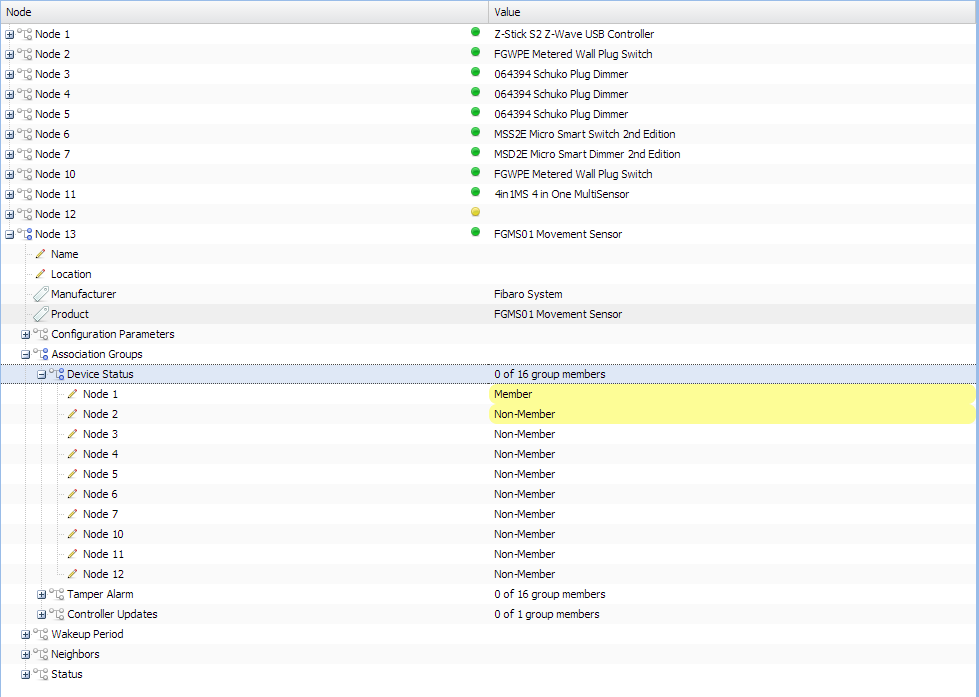
It seemed the Group Assignment did update, because I started receiving allot more sensor data now.
It's still yellow in Habmin tho..
> Yes- you need the association with node 1 in order for the sensor to report automatically. Associations are z-waves way of allowing you to say what nodes get to be told what’s happening. At some stage,
>I’d like to set this up automatically when a new device is found, but at the moment you need to do it manually.
Now I lost all the info on Node12. Guess that will fix itself over time?
//Ivar
Ivar V
Finally got the parameter settings to stick!
Howto:
- Make sure to be in direct contact with the main controller.
I got a wide stretched house, so one of the FGMS sensors wasn't in direct contact.
It seems strange since the motion/alarm messages went through from the final position.
It might apply one change each wakeup. Just needed to repeat until all settings went through.
Now.. just the lost info on Node12 to solve :)
Cheers
Ivar
christophe xxx
Great you have thema working man.
They neef all their 3 groups tot report to the controller. Searched also for quite a bit to find out. YelloW is normal, it means its syncing. Try also to reload the habmin site while configuring Evert setting this helps. Also make dure you configurere the tamper setting, i had the issue here that without that in the item file it was not included in the network.
Kind regards
--
You received this message because you are subscribed to a topic in the Google Groups "openhab" group.
To unsubscribe from this topic, visit https://groups.google.com/d/topic/openhab/8uMM-xT_WoE/unsubscribe.
To unsubscribe from this group and all its topics, send an email to openhab+u...@googlegroups.com.
To post to this group, send email to ope...@googlegroups.com.
Visit this group at http://groups.google.com/group/openhab.
For more options, visit https://groups.google.com/d/optout.
Chris Jackson
It's still yellow in Habmin tho..
They neef all their 3 groups tot report to the controller. Searched also for quite a bit to find out.
YelloW is normal, it means its syncing. Try also to reload the habmin site while configuring Evert setting this helps

Sebastian Waitz

Davor Fikais
Sebastian Waitz
Hello!I'm not 100% percent sure (pretty sure Chris would know if this is true), but as I can recall, I've read in some topic here that Fibaro doesn't use endpoint 0, so you should replace zwave=2:0:command=basic with zwave=2:command=basic. I have the same motion sensor, but I don't use basic for motion report. Here is my binding line for the motion sensor item:
7:command=sensor_binaryYou can try to use your way of binding item to device (just remove endpoint 0 part), but in case it doesn't work, try it with sensor_binary, because in my case, it works that way.Best regards,
Davor
On Thursday, February 19, 2015 at 2:37:15 PM UTC+1, Sebastian Waitz wrote:
--
You received this message because you are subscribed to a topic in the Google Groups "openhab" group.
To unsubscribe from this topic, visit https://groups.google.com/d/topic/openhab/8uMM-xT_WoE/unsubscribe.
To unsubscribe from this group and all its topics, send an email to openhab+u...@googlegroups.com.
To post to this group, send email to ope...@googlegroups.com.
Visit this group at http://groups.google.com/group/openhab.
To view this discussion on the web visit https://groups.google.com/d/msgid/openhab/83a51481-8cb3-4b04-a8c1-8f5afd91a305%40googlegroups.com.
Davor Fikais
Tamper alarm:
christophe xxx
Idd should work mine are also set like this. Wake the unit up a few times by tripple clicking and also assing group 3 to controller
Kind regards
To view this discussion on the web visit https://groups.google.com/d/msgid/openhab/75c0516e-2c9e-424e-a3ab-eb7c33ec9b0b%40googlegroups.com.
Sebastian Waitz
To view this discussion on the web visit https://groups.google.com/d/msgid/openhab/CAFyOZuiihN01m-G2GDX%3D4UpVcvZYjcv3dsvwKT%3D5oaSi7zrCcg%40mail.gmail.com.
christophe xxx
Habmin and configure there, read manual for all indtructions on the parameters
To view this discussion on the web visit https://groups.google.com/d/msgid/openhab/CAMu7JKuSbNNrBv0eOqVDjYsVxUKd-2U2v8zARpGk300zipnYfw%40mail.gmail.com.
Chris Jackson
Habmin and configure there, read manual for all indtructions on the parameters
Sebastian Waitz

Martin Naughton
I did a test of deleting all node configuration in openhab and restarting the board.
Since the Fibaro motion sensor was already configured to report information to my controller before i restarted i started getting information like this after restart which is correct.
NODE 23: Got a value event from Z-Wave network, endpoint = 0, command class = SENSOR_MULTILEVEL, value = 12.4
Only problem is I restarted 12 hours ago. I am getting sensor information from the motion sensor but in that 12 hours i did not get a WAKE_UP notification. WAKE_UP will send the node information to openhab so at the moment i am missing all node information. The WAKE_UP interval is defaulted to 7200 seconds which is 2 hours. I did not change this.
Anyone else see this problem? I prefer to let the device sync up it self with out me clicking the button.
Martin Naughton
Here is some logs from when it started up. I just did a grep for "NODE 23". At the end you can see that it stops waiting.
2015-02-23 19:53:01.122 DEBUG o.o.b.z.i.p.i.ZWaveNodeSerializer[:129]- NODE 23: Serializing from file etc/zwave/node23.xml
2015-02-23 19:53:01.160 DEBUG o.o.b.z.i.p.i.ZWaveNodeSerializer[:132]- NODE 23: Error serializing from file: file does not exist.
2015-02-23 19:53:01.192 DEBUG o.o.b.z.i.p.i.ZWaveNodeStageAdvancer[:267]- NODE 23: Node advancer - EMPTYNODE: queue length(0), free to send(true)
2015-02-23 19:53:01.210 DEBUG o.o.b.z.i.p.i.ZWaveNodeStageAdvancer[:333]- NODE 23: Node advancer: loop - EMPTYNODE try 1: stageAdvanced(false)
2015-02-23 19:53:01.226 DEBUG o.o.b.z.i.p.i.ZWaveNodeStageAdvancer[:338]- NODE 23: Node advancer: Initialisation starting
2015-02-23 19:53:01.249 DEBUG o.o.b.z.i.p.i.ZWaveNodeStageAdvancer[:835]- NODE 23: Node advancer - advancing to PROTOINFO
2015-02-23 19:53:01.266 DEBUG o.o.b.z.i.p.i.ZWaveNodeStageAdvancer[:333]- NODE 23: Node advancer: loop - PROTOINFO try 0: stageAdvanced(true)
2015-02-23 19:53:01.285 DEBUG o.o.b.z.i.p.i.ZWaveNodeStageAdvancer[:347]- NODE 23: Node advancer: PROTOINFO - send IdentifyNode
2015-02-23 19:53:01.350 DEBUG o.o.b.z.i.p.i.ZWaveNodeStageAdvancer[:240]- NODE 23: Node advancer - queued packet. Queue length is 1
2015-02-23 19:53:20.217 DEBUG o.o.b.z.i.p.s.IdentifyNodeMessageClass[:52]- NODE 23: ProtocolInfo
2015-02-23 19:53:20.225 DEBUG o.o.b.z.i.p.s.IdentifyNodeMessageClass[:61]- NODE 23: Listening = false
2015-02-23 19:53:20.236 DEBUG o.o.b.z.i.p.s.IdentifyNodeMessageClass[:62]- NODE 23: Routing = true
2015-02-23 19:53:20.248 DEBUG o.o.b.z.i.p.s.IdentifyNodeMessageClass[:63]- NODE 23: Version = 4
2015-02-23 19:53:20.256 DEBUG o.o.b.z.i.p.s.IdentifyNodeMessageClass[:64]- NODE 23: FLIRS = false
2015-02-23 19:53:20.265 DEBUG o.o.b.z.i.p.s.IdentifyNodeMessageClass[:76]- NODE 23: Basic = Routing Slave
2015-02-23 19:53:20.276 DEBUG o.o.b.z.i.p.s.IdentifyNodeMessageClass[:83]- NODE 23: Generic = Binary Sensor
2015-02-23 19:53:20.288 DEBUG o.o.b.z.i.p.s.IdentifyNodeMessageClass[:90]- NODE 23: Specific = Routing Binary Sensor
2015-02-23 19:53:20.299 DEBUG o.o.b.z.i.p.c.ZWaveCommandClass[:220]- NODE 23: Creating new instance of command class NO_OPERATION
2015-02-23 19:53:20.318 DEBUG o.o.b.z.i.protocol.ZWaveNode[:497]- NODE 23: Adding command class NO_OPERATION to the list of supported command classes.
2015-02-23 19:53:20.329 DEBUG o.o.b.z.i.p.c.ZWaveCommandClass[:220]- NODE 23: Creating new instance of command class BASIC
2015-02-23 19:53:20.349 DEBUG o.o.b.z.i.protocol.ZWaveNode[:497]- NODE 23: Adding command class BASIC to the list of supported command classes.
2015-02-23 19:53:20.364 DEBUG o.o.b.z.i.p.c.ZWaveCommandClass[:220]- NODE 23: Creating new instance of command class SENSOR_BINARY
2015-02-23 19:53:20.396 DEBUG o.o.b.z.i.protocol.ZWaveNode[:497]- NODE 23: Adding command class SENSOR_BINARY to the list of supported command classes.
2015-02-23 19:53:20.708 DEBUG o.o.b.z.i.p.i.ZWaveNodeStageAdvancer[:980]- NODE 23: Node advancer - PROTOINFO: Transaction complete (IdentifyNode:Request) success(true)
2015-02-23 19:53:20.717 DEBUG o.o.b.z.i.p.i.ZWaveNodeStageAdvancer[:201]- NODE 23: Node advancer - checking initialisation queue. Queue size 1.
2015-02-23 19:53:20.725 DEBUG o.o.b.z.i.p.i.ZWaveNodeStageAdvancer[:207]- NODE 23: Node advancer - message removed from queue. Queue size 0.
2015-02-23 19:53:20.736 DEBUG o.o.b.z.i.p.i.ZWaveNodeStageAdvancer[:267]- NODE 23: Node advancer - PROTOINFO: queue length(0), free to send(true)
2015-02-23 19:53:20.745 DEBUG o.o.b.z.i.p.i.ZWaveNodeStageAdvancer[:333]- NODE 23: Node advancer: loop - PROTOINFO try 1: stageAdvanced(false)
2015-02-23 19:53:20.756 DEBUG o.o.b.z.i.p.i.ZWaveNodeStageAdvancer[:835]- NODE 23: Node advancer - advancing to NEIGHBORS
2015-02-23 19:53:20.765 DEBUG o.o.b.z.i.p.i.ZWaveNodeStageAdvancer[:333]- NODE 23: Node advancer: loop - NEIGHBORS try 0: stageAdvanced(true)
2015-02-23 19:53:20.778 DEBUG o.o.b.z.i.p.i.ZWaveNodeStageAdvancer[:357]- NODE 23: Node advancer: NEIGHBORS - send RoutingInfo
2015-02-23 19:53:20.788 DEBUG o.o.b.z.i.p.s.GetRoutingInfoMessageClass[:29]- NODE 23: Request routing info
2015-02-23 19:53:20.821 DEBUG o.o.b.z.i.p.i.ZWaveNodeStageAdvancer[:240]- NODE 23: Node advancer - queued packet. Queue length is 1
2015-02-23 19:53:31.194 DEBUG o.o.b.z.i.p.s.GetRoutingInfoMessageClass[:47]- NODE 23: Got NodeRoutingInfo request.
2015-02-23 19:53:31.198 DEBUG o.o.b.z.i.p.s.GetRoutingInfoMessageClass[:78]- NODE 23: Neighbor nodes: 1
2015-02-23 19:53:31.381 DEBUG o.o.b.z.i.p.i.ZWaveNodeStageAdvancer[:980]- NODE 23: Node advancer - NEIGHBORS: Transaction complete (GetRoutingInfo:Request) success(true)
2015-02-23 19:53:31.385 DEBUG o.o.b.z.i.p.i.ZWaveNodeStageAdvancer[:201]- NODE 23: Node advancer - checking initialisation queue. Queue size 1.
2015-02-23 19:53:31.391 DEBUG o.o.b.z.i.p.i.ZWaveNodeStageAdvancer[:207]- NODE 23: Node advancer - message removed from queue. Queue size 0.
2015-02-23 19:53:31.395 DEBUG o.o.b.z.i.p.i.ZWaveNodeStageAdvancer[:267]- NODE 23: Node advancer - NEIGHBORS: queue length(0), free to send(true)
2015-02-23 19:53:31.399 DEBUG o.o.b.z.i.p.i.ZWaveNodeStageAdvancer[:333]- NODE 23: Node advancer: loop - NEIGHBORS try 1: stageAdvanced(false)
2015-02-23 19:53:31.405 DEBUG o.o.b.z.i.p.i.ZWaveNodeStageAdvancer[:835]- NODE 23: Node advancer - advancing to FAILED_CHECK
2015-02-23 19:53:31.409 DEBUG o.o.b.z.i.p.i.ZWaveNodeStageAdvancer[:333]- NODE 23: Node advancer: loop - FAILED_CHECK try 0: stageAdvanced(true)
2015-02-23 19:53:31.412 DEBUG o.o.b.z.i.p.s.IsFailedNodeMessageClass[:31]- NODE 23: Requesting IsFailedNode status from controller.
2015-02-23 19:53:31.425 DEBUG o.o.b.z.i.p.i.ZWaveNodeStageAdvancer[:240]- NODE 23: Node advancer - queued packet. Queue length is 1
2015-02-23 19:53:36.958 DEBUG o.o.b.z.i.p.s.IsFailedNodeMessageClass[:54]- NODE 23: Is currently marked as healthy by the controller
2015-02-23 19:53:37.041 DEBUG o.o.b.z.i.p.i.ZWaveNodeStageAdvancer[:980]- NODE 23: Node advancer - FAILED_CHECK: Transaction complete (IsFailedNodeID:Request) success(true)
2015-02-23 19:53:37.045 DEBUG o.o.b.z.i.p.i.ZWaveNodeStageAdvancer[:201]- NODE 23: Node advancer - checking initialisation queue. Queue size 1.
2015-02-23 19:53:37.050 DEBUG o.o.b.z.i.p.i.ZWaveNodeStageAdvancer[:207]- NODE 23: Node advancer - message removed from queue. Queue size 0.
2015-02-23 19:53:37.054 DEBUG o.o.b.z.i.p.i.ZWaveNodeStageAdvancer[:267]- NODE 23: Node advancer - FAILED_CHECK: queue length(0), free to send(true)
2015-02-23 19:53:37.058 DEBUG o.o.b.z.i.p.i.ZWaveNodeStageAdvancer[:333]- NODE 23: Node advancer: loop - FAILED_CHECK try 1: stageAdvanced(false)
2015-02-23 19:53:37.064 DEBUG o.o.b.z.i.p.i.ZWaveNodeStageAdvancer[:835]- NODE 23: Node advancer - advancing to WAIT
2015-02-23 19:53:37.068 DEBUG o.o.b.z.i.p.i.ZWaveNodeStageAdvancer[:333]- NODE 23: Node advancer: loop - WAIT try 0: stageAdvanced(true)
2015-02-23 19:53:37.072 DEBUG o.o.b.z.i.p.i.ZWaveNodeStageAdvancer[:380]- NODE 23: Node advancer: WAIT - Listening=false, FrequentlyListening=false
2015-02-23 19:53:37.077 DEBUG o.o.b.z.i.p.i.ZWaveNodeStageAdvancer[:398]- NODE 23: Node advancer: WAIT - Still waiting!
2015-02-23 19:53:39.123 DEBUG o.o.b.z.i.p.i.ZWaveNodeStageAdvancer[:966]- NODE 23: Node advancer - WAIT: The WAIT is over!
2015-02-23 19:53:39.127 DEBUG o.o.b.z.i.p.i.ZWaveNodeStageAdvancer[:201]- NODE 23: Node advancer - checking initialisation queue. Queue size 0.
Chris Jackson
Chris Jackson

Klaus Hildner
Chris Jackson
String Fibaro_Motion_1_Basic "Fibaro Tamper [%s]" { zwave="3:0:command=BASIC" }
I see log output like: "Got a value event from Z-Wave network for nodeId = 3, endpoint = 0, command class = BASIC, value = 0",
and "No converter found for item = Fibaro_Motion_1_Basic, node = 3 endpoint 0, ignoring event”
Christophe Van Vossel
Chris is correct.
If needed search the forum for correct item defs. If you like we can also post them.
Kind regards
--
You received this message because you are subscribed to a topic in the Google Groups "openhab" group.
To unsubscribe from this topic, visit https://groups.google.com/d/topic/openhab/8uMM-xT_WoE/unsubscribe.
To unsubscribe from this group and all its topics, send an email to openhab+u...@googlegroups.com.
To post to this group, send email to ope...@googlegroups.com.
Visit this group at http://groups.google.com/group/openhab.
To view this discussion on the web visit https://groups.google.com/d/msgid/openhab/F75BAA30-8F92-4BA0-A26B-BAD1C0ECD046%40cd-jackson.com.
Klaus Hildner
Contact Fibaro_Motion_1 "Fibaro_Motion_1" { zwave="4:1:command=basic" }Group Motion_Sensors "Fibaro_Motion"
Number Fibaro_Motion_1_Tamper "Fibaro Tamper [%s]" { zwave="3:command=SENSOR_ALARM" }Switch Fibaro_Motion_1_Basic "Fibaro Tamper [%s]" { zwave="3:command=BASIC" }Number Fibaro_Motion_1_1_Temperature "Fibaro 1 Temp [%.2f °C]" <temperature> (SensorTemperature) { zwave="3:command=SENSOR_MULTILEVEL,sensor_type=1,refresh_interval=15" }Number Fibaro_Motion_1_2_General "Unknown 2 [%.2f °C]" <temperature> (SensorTemperature) { zwave="3:command=SENSOR_MULTILEVEL,sensor_type=2,refresh_interval=15" }Number Fibaro_Motion_1_3_Luminance "Fibaro 1 Lux [%.0f Lux]" <sun> (SensorLuminance) { zwave="3:command=SENSOR_MULTILEVEL,sensor_type=3,refresh_interval=15" }Number Fibaro_Motion_1_4_Power "Unknown 4 [%.2f °C]" <temperature> (SensorTemperature) { zwave="3:command=SENSOR_MULTILEVEL,sensor_type=4,refresh_interval=15" }Number Fibaro_Motion_1_5_RelativeHumidity "Unknown 5 [%.2f °C]" <temperature> (SensorTemperature) { zwave="3:command=SENSOR_MULTILEVEL,sensor_type=5,refresh_interval=15" }
Number Fibaro_Motion_1_6_Velocity "Unknown 6 [%.2f °C]" <temperature> (SensorTemperature) { zwave="3:command=SENSOR_MULTILEVEL,sensor_type=6,refresh_interval=15" }Number Fibaro_Motion_1_7_Direction "Unknown 7 [%s]" <temperature> (SensorTemperature) { zwave="3:command=SENSOR_MULTILEVEL,sensor_type=7,refresh_interval=15" }Number Fibaro_Motion_1_Battery "Fibaro 1 Batterie [%s %%]" <energy> (Batterylevel_Sensors_Zwave) { zwave="3:command=BATTERY" }
Switch Fibaro_Switch_1 { zwave="2:command=SWITCH_BINARY" }
String ZwaveNode02HomeID "Home ID [%s]" (gZwaveNode02) {zwave="2:homeid"}String ZwaveNode02NetworkID "Network ID [%s]" (gZwaveNode02) {zwave="2:nodeid"}String ZwaveNode02LastUpdated "Last Updated [%s]" (gZwaveNode02) {zwave="2:lastupdate"}String ZwaveNode02Listening "Listening [%s]" (gZwaveNode02) {zwave="2:listening"}String ZwaveNode02Routing "Routing [%s]" (gZwaveNode02) {zwave="2:routing"}String ZwaveNode02Version "Version [%s]" (gZwaveNode02) {zwave="2:version"}String ZwaveNode03HomeID "Home ID [%s]" (gZwaveNode03) {zwave="3:homeid"}String ZwaveNode03NetworkID "Network ID [%s]" (gZwaveNode03) {zwave="3:nodeid"}String ZwaveNode03LastUpdated "Last Updated [%s]" (gZwaveNode03) {zwave="3:lastupdate"}String ZwaveNode03Listening "Listening [%s]" (gZwaveNode03) {zwave="3:listening"}String ZwaveNode03Routing "Routing [%s]" (gZwaveNode03) {zwave="3:routing"}String ZwaveNode03Version "Version [%s]" (gZwaveNode03) {zwave="3:version"}
2015-07-02 14:41:32.596 [DEBUG] [ZWaveMultiLevelSensorConverter:68 ]- Generating poll message for SENSOR_MULTILEVEL for node 3 endpoint 02015-07-02 14:41:32.598 [DEBUG] [veMultiLevelSensorCommandClass:220 ]- NODE 3: Creating new message for application command SENSOR_MULTI_LEVEL_GET2015-07-02 14:41:32.601 [DEBUG] [o.b.z.i.protocol.SerialMessage:108 ]- NODE 3: Creating empty message of class = SendData (0x13), type = Request (0x00)2015-07-02 14:41:32.603 [DEBUG] [.i.p.c.ZWaveWakeUpCommandClass:243 ]- NODE 3: Message already on the wake-up queue. Removing original.2015-07-02 14:41:32.604 [DEBUG] [.i.p.c.ZWaveWakeUpCommandClass:247 ]- NODE 3: Putting message in wakeup queue.2015-07-02 14:41:32.607 [DEBUG] [ZWaveMultiLevelSensorConverter:68 ]- Generating poll message for SENSOR_MULTILEVEL for node 3 endpoint 02015-07-02 14:41:32.609 [DEBUG] [veMultiLevelSensorCommandClass:220 ]- NODE 3: Creating new message for application command SENSOR_MULTI_LEVEL_GET2015-07-02 14:41:32.611 [DEBUG] [o.b.z.i.protocol.SerialMessage:108 ]- NODE 3: Creating empty message of class = SendData (0x13), type = Request (0x00)2015-07-02 14:41:32.613 [DEBUG] [.i.p.c.ZWaveWakeUpCommandClass:243 ]- NODE 3: Message already on the wake-up queue. Removing original.2015-07-02 14:41:32.615 [DEBUG] [.i.p.c.ZWaveWakeUpCommandClass:247 ]- NODE 3: Putting message in wakeup queue.2015-07-02 14:41:32.617 [DEBUG] [ZWaveMultiLevelSensorConverter:68 ]- Generating poll message for SENSOR_MULTILEVEL for node 3 endpoint 02015-07-02 14:41:32.619 [DEBUG] [veMultiLevelSensorCommandClass:220 ]- NODE 3: Creating new message for application command SENSOR_MULTI_LEVEL_GET2015-07-02 14:41:32.621 [DEBUG] [o.b.z.i.protocol.SerialMessage:108 ]- NODE 3: Creating empty message of class = SendData (0x13), type = Request (0x00)2015-07-02 14:41:32.624 [DEBUG] [.i.p.c.ZWaveWakeUpCommandClass:243 ]- NODE 3: Message already on the wake-up queue. Removing original.2015-07-02 14:41:32.625 [DEBUG] [.i.p.c.ZWaveWakeUpCommandClass:247 ]- NODE 3: Putting message in wakeup queue.
pi@haus /opt/openhab-1.6.2-runtime/etc/zwave $ cat node3.xml<node><deviceClass><basicDeviceClass>ROUTING_SLAVE</basicDeviceClass><genericDeviceClass>BINARY_SENSOR</genericDeviceClass><specificDeviceClass>ROUTING_SENSOR_BINARY</specificDeviceClass></deviceClass><homeId>-861435197</homeId><nodeId>3</nodeId><version>4</version><manufacturer>0x10f</manufacturer><deviceId>0x1001</deviceId><deviceType>0x800</deviceType><listening>false</listening><frequentlyListening>false</frequentlyListening><routing>true</routing><supportedCommandClasses><entry><commandClass>VERSION</commandClass><versionCommandClass><version>1</version><instances>0</instances><libraryType>LIB_UNKNOWN</libraryType></versionCommandClass></entry><entry><commandClass>WAKE_UP</commandClass><WakeUpCommandClass><version>1</version><instances>0</instances><targetNodeId>1</targetNodeId><interval>7200</interval><minInterval>0</minInterval><maxInterval>0</maxInterval><defaultInterval>0</defaultInterval><intervalStep>0</intervalStep></WakeUpCommandClass></entry><entry><commandClass>ASSOCIATION</commandClass><associationCommandClass><version>1</version><instances>0</instances><configAssociations/><maxGroups>0</maxGroups></associationCommandClass></entry><entry><commandClass>MANUFACTURER_SPECIFIC</commandClass><manufacturerSpecificCommandClass><version>1</version><instances>0</instances></manufacturerSpecificCommandClass></entry><entry><commandClass>CONFIGURATION</commandClass><configurationCommandClass><version>1</version><instances>0</instances><configParameters/></configurationCommandClass></entry><entry><commandClass>SENSOR_MULTILEVEL</commandClass><multiLevelSensorCommandClass><version>5</version><instances>0</instances><sensors><sensorType>LUMINANCE</sensorType><sensorType>TEMPERATURE</sensorType></sensors></multiLevelSensorCommandClass></entry><entry><commandClass>MULTI_CMD</commandClass><multiCommandCommandClass><version>1</version><instances>0</instances></multiCommandCommandClass></entry><entry><commandClass>SENSOR_BINARY</commandClass><binarySensorCommandClass><version>1</version><instances>0</instances></binarySensorCommandClass></entry><entry><commandClass>NO_OPERATION</commandClass><noOperationCommandClass><version>1</version><instances>0</instances></noOperationCommandClass></entry><entry><commandClass>SENSOR_ALARM</commandClass><alarmSensorCommandClass><version>1</version><instances>0</instances><alarms><alarmType>GENERAL</alarmType></alarms></alarmSensorCommandClass></entry><entry><commandClass>BASIC</commandClass><basicCommandClass><version>1</version><instances>0</instances></basicCommandClass></entry><entry><commandClass>BATTERY</commandClass><batteryCommandClass><version>1</version><instances>0</instances><batteryLevel>88</batteryLevel></batteryCommandClass></entry></supportedCommandClasses><nodeNeighbors/><lastSent>2015-07-02 08:32:20.585 UTC</lastSent><lastReceived>2015-07-02 10:32:47.15 UTC</lastReceived>pi@haus /opt/openhab-1.6.2-runtime/etc/zwave $
Christophe Van Vossel
I will post my item file tonight so ypu can see how it works. Battery devices operate differently. For values to be read directly tripple click the button a few times and modify the dzvice optionq of reporting. The initiam values are very slow in reporting to sustain battery life
--
You received this message because you are subscribed to a topic in the Google Groups "openhab" group.
To unsubscribe from this topic, visit https://groups.google.com/d/topic/openhab/8uMM-xT_WoE/unsubscribe.
To unsubscribe from this group and all its topics, send an email to openhab+u...@googlegroups.com.
To post to this group, send email to ope...@googlegroups.com.
Visit this group at http://groups.google.com/group/openhab.
To view this discussion on the web visit https://groups.google.com/d/msgid/openhab/5c64bb31-4080-4b9d-ac12-dcf6558b8c31%40googlegroups.com.
Klaus Hildner
Chris Jackson
How are these parameters set?In .items, I tried:
String Fibaro_Init { zwave="2:command=basic,24=3” }
Does this sort of "startup configuration" really belong into .items, and what is the syntax for these (assumedly) key/value pairs?