
Accu-Chek Combo Pump: Accessing and documenting Bluetooth communication

Tim Omer
I wanted to start a dedicated thread on hacking the Accu-Chek Combo Pump. One location to help share current knowledge and disscuss possible next steps.
Final aim: control the pump over Bluetooth from mobile app.
Mikael Rinnetmäki, Oliver Schumacher - I read on an older thread you discussing this pump, do you have any information you can share or any tests you are currently performing / about to perform?
Mikael - you say you are aware of someone who has been able to reverse engineer and use the bluetooth interface, if you are willing to share their contact details I will be happy to get in contact with them to get more information. If so please DM me.
Stephen Black - we have spoken briefly about xDrip and that you are working on android Bluetooth libraries for the medtronic pumps and that you have been teaching yourself along the way! I have a few questions...
- How did you discover if the device is Ble or normal Bluetooth?
- What HW and SW have you setup \ recommend for hacking the Bluetooth comms?
- Any tips to help get me started?
What I know so far:
- Putting the meter into pairing mode by holding down the backlight and power button - you can see meter from an Android phone, but PIN in unknown
- you cannot discover the pump when it is in pairing mode
- To pair the pump and meter...
1. Put the meter into pairing mode
2. Go to bluetooth menu on pump and Add Device
3. Pump will search for meter, it will connect and then prompt to enter code on meter (note this code changes each time)
4. Meter allows code to be entered to complete pairing
It appears that the pump and meter know how to identify each other and the code allows the user to confirm the match.
Sorry to be directing questions at people, I hope you don't mind. I will also be hunting the internet for anyone else who can assist and directing them to this thread.
Thanks,
tim

Oliver Schumacher

Benjamin West
To view this discussion on the web visit https://groups.google.com/d/msgid/openaps-dev/1154774d-c985-4b58-a833-24adc8441bd9%40googlegroups.com.--
You received this message because you are subscribed to the Google Groups "OpenAPS Dev" group.
To unsubscribe from this group and stop receiving emails from it, send an email to openaps-dev...@googlegroups.com.
To post to this group, send email to opena...@googlegroups.com.
Visit this group at http://groups.google.com/group/openaps-dev.
Oliver Schumacher
Oliver Schumacher
Benjamin West
--
You received this message because you are subscribed to the Google Groups "OpenAPS Dev" group.
To unsubscribe from this group and stop receiving emails from it, send an email to openaps-dev...@googlegroups.com.
To post to this group, send email to opena...@googlegroups.com.
Visit this group at http://groups.google.com/group/openaps-dev.
To view this discussion on the web visit https://groups.google.com/d/msgid/openaps-dev/a9043288-79dd-42a5-9ffd-349869ea2b3f%40googlegroups.com.
Benjamin West
--
You received this message because you are subscribed to the Google Groups "OpenAPS Dev" group.
To unsubscribe from this group and stop receiving emails from it, send an email to openaps-dev...@googlegroups.com.
To post to this group, send email to opena...@googlegroups.com.
Visit this group at http://groups.google.com/group/openaps-dev.
To view this discussion on the web visit https://groups.google.com/d/msgid/openaps-dev/b9adc5b1-8aba-4bac-9561-89b72d7fa025%40googlegroups.com.

Gustavo Munoz
Tim Omer
All - without sounding like a complete arse would you mind keeping this thread on topic with the Accu-Chek pump hacking. I wish to keep a central hub of progress that anyone can quickly read and contribute too. If you have a suggestion on a better way to do this please let me know!
Oliver Schumacher
root@NS2GO:~/bin/Python/decoding-carelink# uname -a
Linux NS2GO 3.10.17-poky-edison+ #1 SMP PREEMPT Fri Jan 30 14:16:35 CET 2015 i686 GNU/Linux
Oliver Schumacher
Tim Omer
I was thinking about making the phone appear as a pump and meter - but it never crossed my mind to emulate the pump to capture the commands from the meter.
I guess the start would be to sniff the pump Bluetooth profile when it is in pairing mode - ill look into that process.
Do let me know if you have any other ideas, I now have somewhere to start!
(good luck with your current issue, sorry all again on being thread protective ;) )
Oliver Schumacher
Benjamin West
--
You received this message because you are subscribed to the Google Groups "OpenAPS Dev" group.
To unsubscribe from this group and stop receiving emails from it, send an email to openaps-dev...@googlegroups.com.
To post to this group, send email to opena...@googlegroups.com.
Visit this group at http://groups.google.com/group/openaps-dev.
To view this discussion on the web visit https://groups.google.com/d/msgid/openaps-dev/11eb0404-2c27-4b08-861b-15755b1532ad%40googlegroups.com.
Tim Omer
You are correct there is a ir port, from a consumer perspective you can only download data and upload pump profiles. That would be useful but you have to stop the pump and put it in communication mode to use ir.
Tim Omer
Tim Omer
On Sunday, 22 March 2015 22:58:47 UTC, Tim Omer wrote:

Stephen Black
To view this discussion on the web visit https://groups.google.com/d/msgid/openaps-dev/5bddc124-c105-4326-aa71-ab4c6d81d3d2%40googlegroups.com.


Matthias Granberry
I have an ubertooth that could be loaned out for a few weeks if necessary or I could attempt a data capture from a loaner pump. Bluetooth security is kind of a hit or miss deal, but medical devices generally do a poor job of it because good security is hard and the number of potential attackers is small.
To view this discussion on the web visit https://groups.google.com/d/msgid/openaps-dev/0815915a-9286-4445-a169-8c59280bdb50%40googlegroups.com.
Tim Omer
Matthias, Stephen - any suggestions on programs to use or technique? I do not have a tech HW hacking experience so starting from zero.
Tim Omer
Update on my progress and looking for some advice from Ubertooth users:
I have successfully set-up Ubertooth, Kismet and Wireshark and able to sniff communication between my pump and meter (virtual hi five)
Observations so far:
- I have sniffed comms when pump and meter are pairing::
- Power Meter on in pair mode (press back light and power buttons)
- Meter displays its UID and asks that the pump is in pairing mode
- Meter does not broadcast any data
- Pump put into pair mode
- starts broadcasting
- Mac: 00:00:00:9E:8B:33 (only used when pairing)
- Pump Discovers meter
- Pump changes its to Mac: 00:00:00:00:BD:7B
- Pump shows meters UID, asks you to accept
- Accept found meter
- Meter starts broadcasting
- MAC: 00:00:00:E3:A2:FA
- Pump prompts with 10 digit Pin to enter into meter
- Enter PIN into meter - units paired
- Devices Macs under normal operations:
- Meter: 00:00:00:E3:A2:FA
- Pump: 00:00:00:00:BD:7B
Attached are the Kismet logs for this processes.
Next steps (I guess)...
- Produce an app that reproduces the pairing processes
-- advertises its Mac as 00:00:00:9E:8B:33
-- produces a 10 digit pin
- once paired the app can log requests coming in from the meter
If anyone could provide any direction where to go from here would be very helpful. Is there a shell an android app I can use to produce this app? Am im barking up the right tree with my next steps?
Thanks all,
tim
Tim Omer
I have created a job on freelancer to build an Android app that will emulate the pump, connect and log data sent from the meter.
https://www.freelancer.co.uk/jobs/Mobile-Phone/Simple-Android-app-emulate-bluetooth/?updated=true
Tim Omer
After a decent night sleep and more research I have been able to build a very basic Bluetooth Android App, but, I need more info on what is happening with the paring process between pump and meter.
Have have documented in detail the process here, with logs and video: https://docs.google.com/spreadsheets/d/1p3_3Y4DmQOwzuUkP04QcVYPbzykp-NB6NcHm0MJm0bE/edit?usp=sharing
Really not sure what to do with this Bluetooth data I am collecting, so have dropped a note on the Ubertooth Mailing List to see if I can get some expert feedback.
If anyone here is at all knowledgeable of the Bluetooth protocol please feel free to take a look at my spreadsheet.
Oliver Schumacher
nice work.
I took a look how the Edison work and found an document from Intel which explains the Bluez Stack.
Bluez is a Linux standart stack fur Bluetooth. Take a look in it it explains i little bit about connecting and BT Profiles.
http://download.intel.com/support/edison/sb/edisonbluetooth_331704002.pdf
Maybe that will help for basic understanding BT connections.
CU Oliver
Oliver Schumacher
try this from google playstore "Bluetooth spp pro" .
It shows you a bit about profiles on Devices.
CU Oliver
Stephen Black
Stephen Black

Craig sharpe
I have a similar aim, would like to be able to create my own iPhone app to control the pump.
Unfortunately I don't have access to any Bluetooth sniffing devices at the moment though but was planning the same thing myself
Oliver Schumacher
As far as i know bt ir bte is crypted.
So how do you encrypt these telegrams?
Or are these cap files plsin text?
Cu
Oliver
Tim Omer
Oliver - thanks for that checking out both items now
Craig - I plan to make and publish libraries for controlling the pump. The android app itself may not be helpful but the code will be there for you to use. If you are happy to hack your pump open would be great help. Unfortunately I only have my pump but hunting for a spare to work on.
Stephen, Craig - on the ubertooth email list it has been suggested that I run ubertooth-follow to capture some useful data, I will do this over Easter. I have captured the paring process already with Kismet, see the following spreadsheet that details what I believe I am seeing and has the log files captured - I believe this has the pcap logs?
https://docs.google.com/spreadsheets/d/1p3_3Y4DmQOwzuUkP04QcVYPbzykp-NB6NcHm0MJm0bE/edit?usp=sharing
Benjamin West
bewest@hither:~/Downloads/accu-check/take2$ tshark  -x -r ../pumpmeterpairing-20150401-11-06-02-1.pcapbtbb  | sort -n | uniq -c
    284
     70 0000  00 00 00 00 00 00 00 00 00 00 bd 7b ff f0         ...........{..
    194 0000  00 00 00 00 00 00 00 00 00 9e 8b 33 ff f0         ...........3..
     20 0000  00 00 00 00 00 00 00 00 00 e3 a2 fa ff f0         ..............
bewest@hither:~/Downloads/accu-check/take2$ ^C
bewest@hither:~/Downloads/accu-check/take2$ ^C
bewest@hither:~/Downloads/accu-check/take2$ tshark  -x -r Pump-Meter-Pair-Process/METERPUMPPAIR-20150326-15-23-25-1.pcapbtbb  | sort -n | uniq -c
    239
     20 0000  00 00 00 00 00 00 00 00 00 00 bd 7b ff f0         ...........{..
    198 0000  00 00 00 00 00 00 00 00 00 9e 8b 33 ff f0         ...........3..
     21 0000  00 00 00 00 00 00 00 00 00 e3 a2 fa ff f0         ..............
bewest@hither:~/Downloads/accu-check/take2$
--
You received this message because you are subscribed to the Google Groups "OpenAPS Dev" group.
To unsubscribe from this group and stop receiving emails from it, send an email to openaps-dev...@googlegroups.com.
To post to this group, send email to opena...@googlegroups.com.
Visit this group at http://groups.google.com/group/openaps-dev.
To view this discussion on the web visit https://groups.google.com/d/msgid/openaps-dev/718ce0db-c5a8-49ad-b197-b7609b4041a7%40googlegroups.com.
Tim Omer
Over the long weekend I have been able to run ubertooth-follow on the Meter while in pairing mode and captured the following logs.
Also, followed this article and gotten the following info from "sdptool records" on the Meter again in pairing mode:
- Service Name: SerialLink
- Service RecHandle: 0x10000
- Service Class ID List:
- "Serial Port" (0x1101)
- Protocol Descriptor List:
- "L2CAP" (0x0100)
- "RFCOMM" (0x0003)
- Channel: 1
- Language Base Attr List:
- code_ISO639: 0x656e
- encoding: 0x6a
- base_offset: 0x100
All of this data I am logging on the following site: http://www.hypodiabetic.co.uk/hackabetes
Other than capturing logs I am not sure what else I can do from here, I am looking to see if I can partner with someone who can help me decode this data and work on getting an Android app to connect to the phone.
Please let me know if anyone on this group can assist, in anyway. Happy to create more logs to analyse.
Oliver Schumacher
if Accu Check uses serial protokoll over Bluetooth will make it easy.
Cause of in all the System we use like Linux/rasp or Android should an BT Serial Stack be availaible.
I cannot open yout capture Files with which software is it made ?
CU Oliver
Timothy Omer
ubertooth-follow-METER-PAIRING was created with ubertooth-follow, im trying to find out what the log format is. Not much documentation out there will ask on the mail list.
Serial Stack - sounds promising, I have been told to read up on this: http://unix.stackexchange.com/questions/92255/how-do-i-connect-and-send-data-to-a-bluetooth-serial-port-on-linux
--
You received this message because you are subscribed to a topic in the Google Groups "OpenAPS Dev" group.
To unsubscribe from this topic, visit https://groups.google.com/d/topic/openaps-dev/hXDMbpMD3XI/unsubscribe.
To unsubscribe from this group and all its topics, send an email to openaps-dev+unsubscribe@googlegroups.com.
To post to this group, send email to opena...@googlegroups.com.
Visit this group at http://groups.google.com/group/openaps-dev.
To view this discussion on the web visit https://groups.google.com/d/msgid/openaps-dev/6a85151d-e571-4fa8-8f91-51d41612446e%40googlegroups.com.

lorel...@gmail.com
Tim Omer
What tells you the device is the Slave?
Pump Management software:
Yes I have this, there is a version for Pump and Meter. This allows you to read and write some values to the pump, you can have mutiple Basal profiles (5) and set some default values. You cannot control the pump at all and the pump must be stopped and in data transfer mode to use IR.
AccuChek Insight:
Yep, looks cool, I have a friend just move on to it, looking forward to checking it out
AccuChek Connect with Android
This is a digital diary, it can sync with AccuChek Connect meters only, not any of the pump products :(
disassemble meter
Completely agree, I am trying to find a an old unit I can nab, there is one on ebay now for £200 - what is not too bad but a little beyond my current budget. Craig on this list has a spare pump he is considering opening up.
I have been trying to find any FCC documents on the Accu-Chek Combo system, but with no luck.
lorel...@gmail.com
Timothy Omer
You received this message because you are subscribed to a topic in the Google Groups "OpenAPS Dev" group.
To unsubscribe from this topic, visit https://groups.google.com/d/topic/openaps-dev/hXDMbpMD3XI/unsubscribe.
To unsubscribe from this group and all its topics, send an email to openaps-dev...@googlegroups.com.
To post to this group, send email to opena...@googlegroups.com.
Visit this group at http://groups.google.com/group/openaps-dev.
To view this discussion on the web visit https://groups.google.com/d/msgid/openaps-dev/a95d458e-d683-4c85-a988-6438238c119a%40googlegroups.com.
Tim Omer
- Have put BT hacking to one side as it far beyond my abilities
- xDrip setup fully working with smart watch - just great
- 90% there with hacking the G4 Transmitter to replace batteries (lowering the cost for the self funded)
- Will be learning Android App development next week (I hope!) to start work on code
I had a very interesting lunch with the chap who is managing the Bio-inspired Artificial Pancreas project at Imperial College London, the reaction was interesting, half concern half excited. His main concern is that if anything negative happens by hacking a medical device, the medical device manufacture will take the blame, this will result in the industry focusing time in locking down their products and not innovation - interesting comment. http://www3.imperial.ac.uk/bioinspiredtechnology/research/bionicpancreas
They are using the same Roche pump as me, Roche have provided full documentation on the BT so they can control the pump themselves, clearly they are not able to share these documents - boo.
He has a simulation system and will be looking at running the pseudocode through it, also he is interested in the logic of the xDrip algorithm - Stephen I have looked around do you have this documented in more detail anywhere?
Progress - if painfully slow!
To unsubscribe from this group and all its topics, send an email to openaps-dev+unsubscribe@googlegroups.com.
Oliver Schumacher
yes BT is pain to capture i did not have luck ether. But i will go on and try.
Maybe there is another way with Accu Check.
When Roche gave Interface Documents away to the Bionic Pancreas people.
The question would be how big has a organisation to be, to be a partner of roche?
And get the Information we wanted.
Question: do you have pictures of the opened G4 Transmitters ?
Xdrip is running fantastic in our rig as well. We skipped using the original Dex.
Cause of is was pain having the USB always connected. We have had about 15 otg cables broken.
Some didn't last longer than a day. But with xDrip is running well.
In Europe is the new Dexcom with BT not available.
Cu Oliver
To unsubscribe from this group and all its topics, send an email to openaps-dev...@googlegroups.com.
To post to this group, send email to opena...@googlegroups.com.
Visit this group at http://groups.google.com/group/openaps-dev.
Timothy Omer
Dexcom with BT in EU - not sure to be honest.
To view this discussion on the web visit https://groups.google.com/d/msgid/openaps-dev/1d7ef1d2-ecf7-4e0f-9dc5-cc05dc9beec4%40googlegroups.com.
Oliver Schumacher
i have had both System running. And compared.
It looks like that the xDrip is not filtering noise from the sensor/transmitter.
If we use this for close loop. We have to filter the data ourself.
The calculation from the dexdrip is good and differs not much between dexcom and xdrip.
Very important is the callibration. The best callibration is two time's a day bevore breakfast and bevore evening lunch.
You can add mor calibrations but be aware don't callibrate to often or when you have a high cob or iob level. Than it can be very bad.
Don't use paracetamol it iritates the sonsor.
You should read the calibration how to from the Dexcom site.
The cool thing with xdrip is that you can wear the sensor longer than 7 days.
The dexcom turns off after 7 days. You have to restart the sensor. There is no period of rest.
That realy sucks cause of the timing. I nice feature would be a smal period of rest on the dexcom site.
CU Oliver
Stephen Black
Timothy Omer
("Im sorry to hear you are finding it inaccurate." - you should not be sorry at all! ;) )
To view this discussion on the web visit https://groups.google.com/d/msgid/openaps-dev/53522e36-3fc4-4896-87d4-0a357c2ccda1%40googlegroups.com.

spiph23
Tim Omer
Toby - ta for that
Oliver - photos as requested, I hope to do a blog post this week on the hacked transmitter I am using. Also, check these great pics
Oliver, Stephen - second G4 sensor is working well, thank you for the tips!
Tim Omer
Quick update on my project.
I have now built a Open Loop Artificial Pancreas Android app, the app completely replaces the Roche meter in that in captures my treatments and has a bolus wizard. The app is Open Loop so gives a suggestion based on a interval set by the user.
Right now I have this setup to give me notifications (if a temp basal is suggested) every 15 mins via Android Wear and manually set the pump - its a surprisingly usable system.
More details: http://www.hypodiabetic.co.uk/home/blog/diabetes-life/diy-open-loop-artificial-pancreas
Now I am looking at getting help hacking the BT interface of the Roche pump, if anyone can assist please do let me know.

Ilham BEN ABBES

Brandon B.
I went ahead to grab the app and so far I'm very please even not using my pump yet. I'll begin on 10.20.2015 have tandem tslim g4.
The ui has taken be a bit of getting used to but having read your blog that this is a first venture into android programming I'm VERY pleased with the end results and had I been in your shoes would be quite proud of myself.
Tim Omer
Tim Omer
I now have a spare pump to work on, but reluctant to open it in case I damage it.

Grégory Beloncle
Hi,
I have same aim too! I am a software engineer with old experience with Bluetooth so I may help you on Bluetooth but not on app development!
I tried an air sniffing but did not manage to sniff the encrypted info, what after pairing happens. Don't know exactly why, maybe they change the mac address or use a higher level for pairing (as far as I remember there are 3 levels).
So other way to sniff is to sniff the uart interface between the bt chip and the controller (the host).
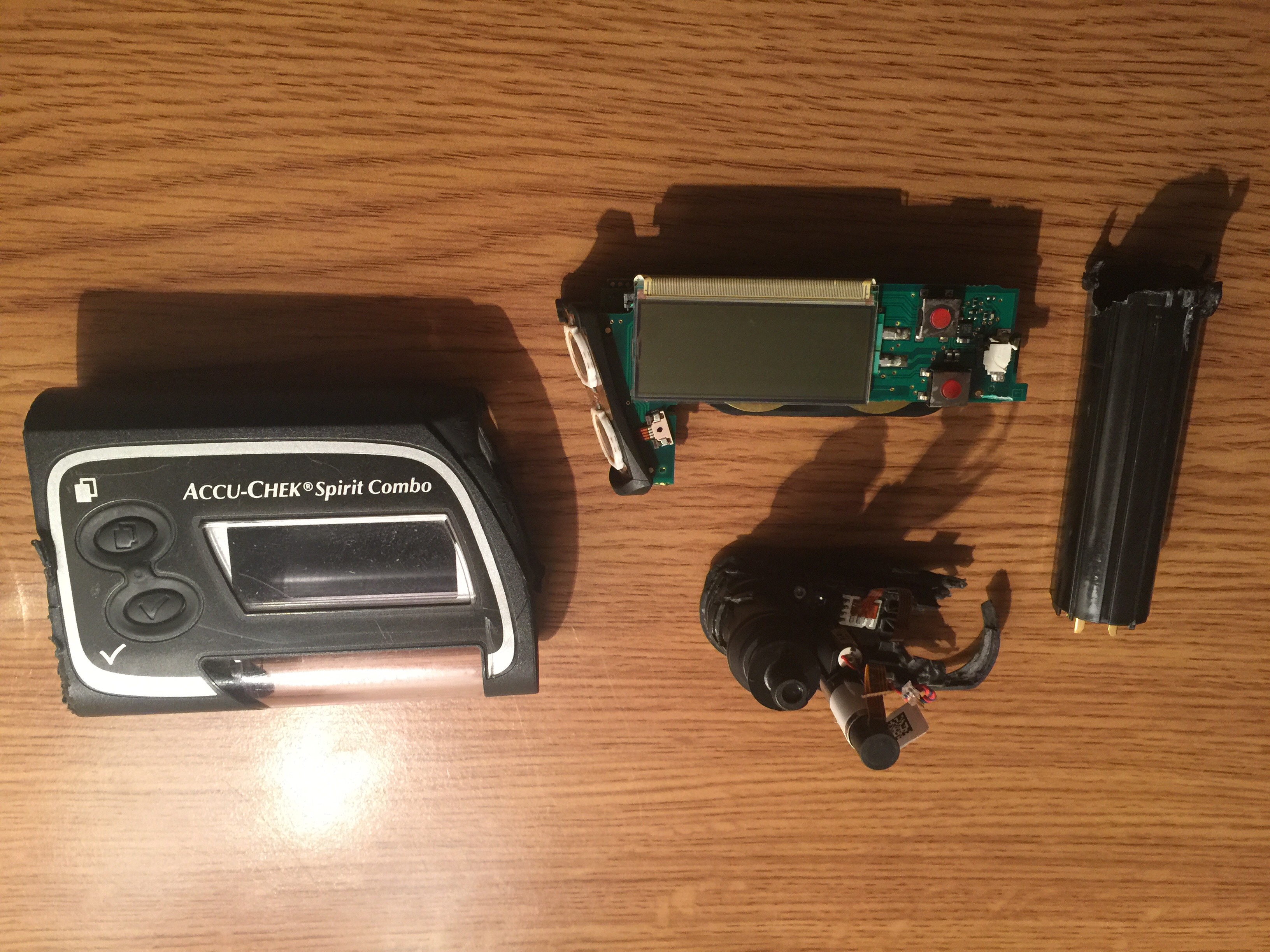
I open my meter and they simply use an old BC4 from company CSR, I assume they use same chip in pump.
Now the big deal is to find the 2 test points for the Uart.
I have no time at the moment but if one of you has a good idea or find it let me know! Then we could sniff the hci traffic and read the spp Protocol in clear, hci is not encrypted. We could even get the link key which would help for air sniffing but I assume the link key is modified at each connection, what would explain why air sniffing is not working.
But even with clear spp
protocol reading then a big work is necessary on reverse engineering a
protocol!
Cheers
Gregory from Germany
--
You received this message because you are subscribed to the Google Groups "OpenAPS Dev" group.
To unsubscribe from this group and stop receiving emails from it, send an email to openaps-dev...@googlegroups.com.
To post to this group, send email to opena...@googlegroups.com.
Visit this group at http://groups.google.com/group/openaps-dev.
To view this discussion on the web visit https://groups.google.com/d/msgid/openaps-dev/c481675e-8f62-4913-942e-38d8e14ceceb%40googlegroups.com.
Tim Omer
Any BT hacking is completely over my head! I have made contact with someone in London who should be able to assist me with this.
Do you have details of the chipset used or anything else you have seen?
Also, check this out: https://apps.fcc.gov/oetcf/eas/reports/ViewExhibitReport.cfm?mode=Exhibits&RequestTimeout=500&calledFromFrame=Y&application_id=LLyEXj8zwVovjLfH%2BagTrQ%3D%3D&fcc_id=RAH3
And this, you are correct the mac does change: https://sites.google.com/a/n-omer.co.uk/hackabetes/home/pump-control
Grégory Beloncle
Hi Tim
Up to now what I saw is nothing
special, they use a so called hci chip and protocol use the so called SPP
for serial port protocol as interface. Bluetooth is 2.0
As air sniffing is difficult, I suggest using uart sniffing. So now we need to find where uart is, this can be done by anyone with some electronics know hiw. I would suggest finding datasheet from both bc4 and micro controller and try to find where the tests points could be depending on chips pinning (I suggest looking on meter side, it is quiet easy to open).
Then let me know and we can sniff hci traffic.
Thanks for fcc link but there is nothing special in it, standard fcc tests.
Cheers
Gregory
To view this discussion on the web visit https://groups.google.com/d/msgid/openaps-dev/7a6f0c2d-51a5-40d8-916f-7db5c23e7164%40googlegroups.com.
Tim Omer
-tim
Ilham BEN ABBES
I don't know anything about hacking but I found that, I do not know if it could be helpful for you but in case :
http://null-byte.wonderhowto.com/how-to/hacks-mr-robot-hack-bluetooth-0163586/
http://null-byte.wonderhowto.com/how-to/hack-bluetooth-part-1-terms-technologies-security-0163977/
Ilham
Timothy Omer
Craig Sharpe

--
You received this message because you are subscribed to the Google Groups "OpenAPS Dev" group.
To unsubscribe from this group and stop receiving emails from it, send an email to openaps-dev...@googlegroups.com.
To post to this group, send email to opena...@googlegroups.com.
Visit this group at http://groups.google.com/group/openaps-dev.
To view this discussion on the web visit https://groups.google.com/d/msgid/openaps-dev/CAJWvVK5R7bSB%3D%2BM0ea0_dpBq_y5B13ZFOZ%2BsP2fqgRHGuhbWhA%40mail.gmail.com.
Timothy Omer
You received this message because you are subscribed to a topic in the Google Groups "OpenAPS Dev" group.
To unsubscribe from this topic, visit https://groups.google.com/d/topic/openaps-dev/hXDMbpMD3XI/unsubscribe.
To unsubscribe from this group and all its topics, send an email to openaps-dev...@googlegroups.com.
To post to this group, send email to opena...@googlegroups.com.
Visit this group at http://groups.google.com/group/openaps-dev.
To view this discussion on the web visit https://groups.google.com/d/msgid/openaps-dev/CABx87%3DhXNLsu%2BFRoEk6DVW0Vwzc71BLAuzy9m7k2uRscH6WKSg%40mail.gmail.com.
Craig Sharpe
http://pdf.datasheetarchive.com/indexerfiles/Datasheets-SL4/DSASL0073625.pdf
Hope this helps, give me a shout if there's anything I can do to help
To view this discussion on the web visit https://groups.google.com/d/msgid/openaps-dev/CAJWvVK6L4ed9kNtE_9zg%3DUExBE61XQTvSbMKxSv7g2H7BUXs7g%40mail.gmail.com.
Grégory Beloncle
Hi
Strange that you found the datasheet, this should be confidential information!
Then you can see where uart tx and rx are on chip (j10 and j11) and then can better found it on pcb. These signals need to go on connector as well, to connect to microcontroller host.
When you find it then you need a level shifter and a hci sniffer on your pc.
Regards
Gregory
To view this discussion on the web visit https://groups.google.com/d/msgid/openaps-dev/CABx87%3DhtRQ78T2eX82TeoTEDQJdT-n%2BGg1mcrB2kTKoXCZWcgw%40mail.gmail.com.
Tim Omer
Tim Omer
Craig Sharpe


To view this discussion on the web visit https://groups.google.com/d/msgid/openaps-dev/6a13fd09-c9f4-40b7-8f0b-12e85bf448b8%40googlegroups.com.
Timothy Omer
To view this discussion on the web visit https://groups.google.com/d/msgid/openaps-dev/CABx87%3DiqJSgVvUdCA4uSmFH6paOfdZZ84O77LPvT3cUNNX4JQw%40mail.gmail.com.

johanne...@posteo.de
I just found this great project and as a user of the Spirit Combo I found this thread.
Is there any progress?
I would like to contribute, did someone open up the metre yet?
Cheers,
Johannes
On Saturday, 21 March 2015 00:49:13 UTC+1, Tim Omer wrote:
Hello everyone,
I wanted to start a dedicated thread on hacking the Accu-Chek Combo Pump. One location to help share current knowledge and disscuss possible next steps.
Final aim: control the pump over Bluetooth from mobile app.
Mikael Rinnetmäki, Oliver Schumacher - I read on an older thread you discussing this pump, do you have any information you can share or any tests you are currently performing / about to perform?
Mikael - you say you are aware of someone who has been able to reverse engineer and use the bluetooth interface, if you are willing to share their contact details I will be happy to get in contact with them to get more information. If so please DM me.
Stephen Black - we have spoken briefly about xDrip and that you are working on android Bluetooth libraries for the medtronic pumps and that you have been teaching yourself along the way! I have a few questions...
- How did you discover if the device is Ble or normal Bluetooth?
- What HW and SW have you setup \ recommend for hacking the Bluetooth comms?
- Any tips to help get me started?
What I know so far:
- Putting the meter into pairing mode by holding down the backlight and power button - you can see meter from an Android phone, but PIN in unknown
- you cannot discover the pump when it is in pairing mode
- To pair the pump and meter...
1. Put the meter into pairing mode
2. Go to bluetooth menu on pump and Add Device
3. Pump will search for meter, it will connect and then prompt to enter code on meter (note this code changes each time)
4. Meter allows code to be entered to complete pairing
It appears that the pump and meter know how to identify each other and the code allows the user to confirm the match.
Sorry to be directing questions at people, I hope you don't mind. I will also be hunting the internet for anyone else who can assist and directing them to this thread.
Thanks,
tim
Craig Sharpe
Let me know if you cannot find them and I will send them
Cheers
--
You received this message because you are subscribed to the Google Groups "OpenAPS Dev" group.
To unsubscribe from this group and stop receiving emails from it, send an email to openaps-dev...@googlegroups.com.
To post to this group, send email to opena...@googlegroups.com.
Visit this group at https://groups.google.com/group/openaps-dev.
To view this discussion on the web visit https://groups.google.com/d/msgid/openaps-dev/68c89b49-76f3-4331-a533-13181e5dab2e%40googlegroups.com.
Timothy Omer
You received this message because you are subscribed to a topic in the Google Groups "OpenAPS Dev" group.
To unsubscribe from this topic, visit https://groups.google.com/d/topic/openaps-dev/hXDMbpMD3XI/unsubscribe.
To unsubscribe from this group and all its topics, send an email to openaps-dev...@googlegroups.com.
To post to this group, send email to opena...@googlegroups.com.
Visit this group at https://groups.google.com/group/openaps-dev.
To view this discussion on the web visit https://groups.google.com/d/msgid/openaps-dev/CABx87%3DgMuc9QXxF4mg778o-%2BkB-6Zb27RS8SD7Lt3Cd-RP2iXw%40mail.gmail.com.
Timothy Omer
Hi all
I hopefully managed to Bluetooth sniff over the air communication between pump and remote! It was not that easy but I found a way doing it.
Now, I would like to know who would be interested helping reverse engineer the used protocol?
And as somebody a good idea to exchange on this topic without disturbing everybody with details?
Experience with reverse engineering would be really helpful.
Thanks
Gregory
To view this discussion on the web visit https://groups.google.com/d/msgid/openaps-dev/CAJWvVK5z_VnvAB-buKr3nm6Y1C6Wbkf9Q4-%3DKgn93PZnjw%2BFSg%40mail.gmail.com.
Craig Sharpe
To view this discussion on the web visit https://groups.google.com/d/msgid/openaps-dev/CAJWvVK6Gyap7c2ogaa%3D74n6ir--2a8RD18cRS7aWHt-ngDfzLQ%40mail.gmail.com.
Grégory Beloncle
Hi all
I hopefully managed to Bluetooth sniff over the air communication between pump and remote! It was not that easy but I found a way doing it.
Now, I would like to know who would be interested helping reverse engineer the used protocol?
And as somebody a good idea to exchange on this topic without disturbing everybody with details?
Experience with reverse engineering would be really helpful.
Thanks
Gregory
Le 3 juin 2016 11:12:28 PM Timothy Omer <T...@twoit.co.uk> a écrit :
To view this discussion on the web visit https://groups.google.com/d/msgid/openaps-dev/CAJWvVK5z_VnvAB-buKr3nm6Y1C6Wbkf9Q4-%3DKgn93PZnjw%2BFSg%40mail.gmail.com.
lorel...@gmail.com
And wish you all good luck :)
Craig Sharpe
To view this discussion on the web visit https://groups.google.com/d/msgid/openaps-dev/507e6b29-3585-45b2-b00b-efe098fe7415%40googlegroups.com.
lorel...@gmail.com
Craig Sharpe
To view this discussion on the web visit https://groups.google.com/d/msgid/openaps-dev/746ce6f6-cd22-4059-b3ca-7bdc7e172cf0%40googlegroups.com.
Grégory Beloncle
Looks interesting, thanks a lot sharing it!
How did you find it?
To view this discussion on the web visit https://groups.google.com/d/msgid/openaps-dev/507e6b29-3585-45b2-b00b-efe098fe7415%40googlegroups.com.
lorel...@gmail.com
Timothy Omer
To view this discussion on the web visit https://groups.google.com/d/msgid/openaps-dev/9ca10fb4-d58b-4f00-a612-9982ae1b2d33%40googlegroups.com.
For more options, visit https://groups.google.com/d/optout.

Robert Buessow
Timothy Omer
Not as far as I'm aware Robert, I'll ask the group for a better answer
To view this discussion on the web visit https://groups.google.com/d/msgid/openaps-dev/55bd0cfc-c79a-4d0d-8785-235d3b9f3a31%40googlegroups.com.
For more options, visit https://groups.google.com/d/optout.
Timothy Omer
As promised, a better answer....
"I got it running. At least until it is connected with the pump. No remote screen yet
But it needs some modifications and lots of try and error to build and deploy
And of course it works only with old androids"
In a nutshell time is the limiting factor to review and rewrite code. If there is any android dev out there who is reasonably skilled and has the time please get in contact with me, we also maybe able to donate a combo if needed

Azar Ali Zain
Robert Buessow
Timothy Omer
To view this discussion on the web visit https://groups.google.com/d/msgid/openaps-dev/c3e4291e-9964-4aa3-9782-8284f582a2e5%40googlegroups.com.
For more options, visit https://groups.google.com/d/optout.

Sandra Keßler
Timothy Omer
This is just amazing! Two years ago when I started this thread it seemed almost impossible, where to start!?
This pump will be great for the community, I'm humbled and overwhelmed by the effort and personal time everyone has spent on this.
To view this discussion on the web visit https://groups.google.com/d/msgid/openaps-dev/4af10f2e-03b4-478b-9fcb-cc5296b3f33c%40googlegroups.com.
For more options, visit https://groups.google.com/d/optout.

Bog Dan
The Accu-Check Combo is very popular in Europe...
To unsubscribe from this group and stop receiving emails from it, send an email to openaps-dev+unsubscribe@googlegroups.com.
To post to this group, send email to opena...@googlegroups.com.
Visit this group at https://groups.google.com/group/openaps-dev.
To view this discussion on the web visit https://groups.google.com/d/msgid/openaps-dev/4af10f2e-03b4-478b-9fcb-cc5296b3f33c%40googlegroups.com.
Sandra Keßler
To view this discussion on the web visit https://groups.google.com/d/msgid/openaps-dev/CAOWJ__EKzPVpJv-Oji%2B8eCR8nUx2YzNSZFCfTSwq7e%3DnvHFDyQ%40mail.gmail.com.

