Problem with PHD2/Nexstar "PulseGuide Command to Mount Failed"

749 views
Skip to first unread message

Brad Nolan

unread,
Mar 10, 2021, 10:25:49 AM3/10/21
to Open PHD Guiding
Hello All,

I am having a lot of trouble with my set up and getting it to guide. I can connect all my equipment in PHD2 however I continually get "Pulse Guide Command to Mount has Failed" and get no movement in my mount.

I can manually slew within PHD2/ASCOM/CPWI but I cannot get guide pulses to translate down to the mount. All drivers and firmware versions are current.

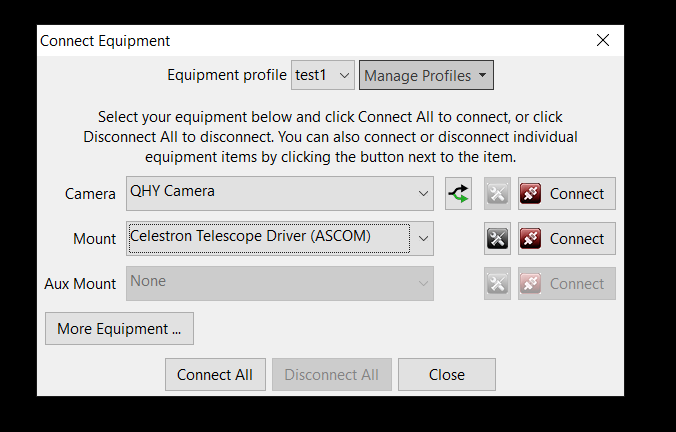
I have the ZWO ASI Camera selected for the Camera and for the Mount I have Celestron Telescope Driver (ASCOM). I tried to change up the configuration and switch to OnCamera for the mount reinstalling the st-4 wire and changing the AuxMount from None to Celestron Telescope Driver (ASCOM) but that was not working either.

Any advise would be appreciated!

Equipment: Nexstar 8SE, Celestron Wedge, Canon t3i, ZWO ASI120mm, William Optics 50mm Guidescope, Starsense HC/Camera, Celestron focuser

RaspberryPi4 -> VirtualHere Server -> Windows

BackyardEos, CPWI, PHD2

Bryan

unread,
Mar 10, 2021, 2:00:41 PM3/10/21
to Open PHD Guiding
Brad


Bryan

Brad Nolan

unread,
Mar 10, 2021, 2:09:46 PM3/10/21
to Open PHD Guiding

bw_msgboard

unread,
Mar 10, 2021, 2:43:06 PM3/10/21
to open-phd...@googlegroups.com

The error that’s being returned by the driver is this:


ASCOM Scope: pulseguide command failed: (ASCOM.Celestron) The port is closed.


That suggests the ASCOM driver isn’t configured properly and isn’t using the correct serial port (COM port) for the mount.  Have you configured that?  It can’t be done automatically and the default value of COM1 is not likely to be correct.  You should be able to use the Windows device manager to see what COM port number is connected to the mount.  The driver needs to be told that value via its ‘properties’ dialog box.


Good luck,

Bruce


--
You received this message because you are subscribed to the Google Groups "Open PHD Guiding" group.
To unsubscribe from this group and stop receiving emails from it, send an email to open-phd-guidi...@googlegroups.com.
To view this discussion on the web visit https://groups.google.com/d/msgid/open-phd-guiding/019ba61a-0067-41b7-9852-e6997ebef1ebn%40googlegroups.com.

Brad Nolan

unread,
Mar 10, 2021, 2:49:58 PM3/10/21
to Open PHD Guiding
Thanks Bruce. The complexity of astrophotography continues to intrigue me. I opened the ASCOM device hub and have now configured the driver for the telescope and the focuser. Is this the correct location or should I be looking elsewhere?

bw_msgboard

unread,
Mar 10, 2021, 3:00:21 PM3/10/21
to open-phd...@googlegroups.com

It sounds right but why are you using a device hub – just as a testing tool?  If you’re using the device hub as a testing tool, you can probably sort this out in the daytime.  Power up the mount, let it initialize, connect to the mount in the device hub, then see if the RA/Dec pointing/site location/tracking information is being displayed correctly.  There should be a software version of a hand-controller in the device hub and it should include the pointing position info.  You might get more specific answers if you ask on one of the Celestron-specific forums, I’m not familiar with the ins-and-outs of the Celestron mounts.

Brad Nolan

unread,
Mar 10, 2021, 3:17:38 PM3/10/21
to Open PHD Guiding
Sorry I am new into using ASCOM and a novice in this level of astrophotography so if I am calling things by the wrong name I apologize. Previously I was using RaspberryPi and connecting with INDI drivers and KSTARs set up but was having the same issues. By Device Hub I mean the ASCOM Device Hub software. Everything looks like it's displaying correctly now. If the clouds stay away tonight Ill give it a shot and let you know. Thanks for your help!

Brad Nolan

unread,
Mar 15, 2021, 9:05:05 AM3/15/21
to Open PHD Guiding
Got it working! I had a two hour window over the weekend where there were not clouds or high winds. Something interesting too that I have not read anywhere and did not see in the manual for the mount, but per Celestron the Nexstar SE Mounts can not do Pulse Guiding straight from PHD2. To get a Nexstar SE mount to pulse guide, it needs to be connected through the CPWI software and the CPWI driver needs to be used.

John Deans

unread,
Mar 15, 2021, 3:51:10 PM3/15/21
to Open PHD Guiding
Can you provide a specific reference please as to where Celestron states that an SE mount is not capable of pulse-guiding?  Thank you.

Brad Nolan

unread,
Mar 15, 2021, 4:46:52 PM3/15/21
to Open PHD Guiding
I had reached out to Celestron Customer Service through their website for additional help with the issue I have been experiencing here. The Technical Services Rep I was speaking with said "The 8SE is not compatible with ASCOM Pulse Guide unless you connect to CPWI and using the CPWI ASCOM driver in PHD2 as the mount. The only solution for an ASIAir, StellarMate, or non CPWI software is to use the ST-4 cable from the guide camera to the "Camera" port on the base of the telescope."
What I got from that was PHD2 needs to go direct to CPWI. Otherwise it has to be on the OnCamera ST-4 route. I have been trying to get this working for months and have not read this anywhere and even today went through all their documentation on the web for both the telescope and the software and could not find a single reference to this. It also makes it seem that it will also only run on Windows platforms since CPWI is Windows only so Astroberry or Mac based apps are useless.

David Kerber

unread,
Mar 15, 2021, 5:32:30 PM3/15/21
to open-phd...@googlegroups.com
Interesting; I didn't think there was any of controlling it withOUT
CPWI; CPWI is the ASCOM driver for most all Celestron mounts.
> ------------------------------------------------------------------------
>
> *From:*open-phd...@googlegroups.com
> [mailto:open-phd...@googlegroups.com] *On Behalf Of
> *Brad Nolan
> *Sent:* Wednesday, March 10, 2021 11:50 AM
> *To:* Open PHD Guiding
> *Subject:* Re: [open-phd-guiding] Re: Problem with
> PHD2/Nexstar "PulseGuide Command to Mount Failed"
>
> Thanks Bruce. The complexity of astrophotography
> continues to intrigue me. I opened the ASCOM device
> hub and have now configured the driver for the
> telescope and the focuser. Is this the correct
> location or should I be looking elsewhere?
>
> On Wednesday, March 10, 2021 at 2:43:06 PM UTC-5
> bw_m...@earthlink.net wrote:
>
> The error that’s being returned by the driver is this:
>
> ASCOM Scope: pulseguide command failed:
> (ASCOM.Celestron) The port is closed.
>
> That suggests the ASCOM driver isn’t configured
> properly and isn’t using the correct serial port
> (COM port) for the mount.  Have you configured
> that?  It can’t be done automatically and the
> default value of COM1 is not likely to be correct.
>  You should be able to use the Windows device
> manager to see what COM port number is connected
> to the mount.  The driver needs to be told that
> value via its ‘properties’ dialog box.
>
> Good luck,
>
> Bruce
>
> ------------------------------------------------------------------------
>
> *From:*open-phd...@googlegroups.com
> [mailto:open-phd...@googlegroups.com] *On Behalf
> Of *Brad Nolan
> *Sent:* Wednesday, March 10, 2021 11:10 AM
> *To:* Open PHD Guiding
> *Subject:* [open-phd-guiding] Re: Problem with
> <https://groups.google.com/d/msgid/open-phd-guiding/019ba61a-0067-41b7-9852-e6997ebef1ebn%40googlegroups.com?utm_medium=email&utm_source=footer>.
>
> --
> You received this message because you are subscribed
> to the Google Groups "Open PHD Guiding" group.
> To unsubscribe from this group and stop receiving
> emails from it, send an email to
> open-phd-guidi...@googlegroups.com.
>
> To view this discussion on the web visit
> https://groups.google.com/d/msgid/open-phd-guiding/a8221647-35ae-441f-a377-aaae5a6ef95en%40googlegroups.com
> <https://groups.google.com/d/msgid/open-phd-guiding/a8221647-35ae-441f-a377-aaae5a6ef95en%40googlegroups.com?utm_medium=email&utm_source=footer>.
>
> --
> You received this message because you are subscribed to the Google
> Groups "Open PHD Guiding" group.
> To unsubscribe from this group and stop receiving emails from it, send
> an email to open-phd-guidi...@googlegroups.com
> <mailto:open-phd-guidi...@googlegroups.com>.
> To view this discussion on the web visit
> https://groups.google.com/d/msgid/open-phd-guiding/72572664-e916-42db-a02a-e2d516515033n%40googlegroups.com
> <https://groups.google.com/d/msgid/open-phd-guiding/72572664-e916-42db-a02a-e2d516515033n%40googlegroups.com?utm_medium=email&utm_source=footer>.

Brad Nolan

unread,
Mar 15, 2021, 6:13:50 PM3/15/21
to Open PHD Guiding
I had the control portion of it working well with the Celestron unified driver running off my astroberry but that wouldn't work with PHD2

John Deans

unread,
Mar 15, 2021, 7:09:20 PM3/15/21
to open-phd...@googlegroups.com
I'm from Missouri (CANADA) on Celestron's guidance.  I guide fine with my SE mount and never use ST4 and all is fine.  Are you running SE mount on a wedge in EQ mode?  If not, that might be the issue.

You received this message because you are subscribed to a topic in the Google Groups "Open PHD Guiding" group.
To unsubscribe from this topic, visit https://groups.google.com/d/topic/open-phd-guiding/DMnQcqePjAA/unsubscribe.
To unsubscribe from this group and all its topics, send an email to open-phd-guidi...@googlegroups.com.
To view this discussion on the web visit https://groups.google.com/d/msgid/open-phd-guiding/72572664-e916-42db-a02a-e2d516515033n%40googlegroups.com.

Brad Nolan

unread,
Mar 15, 2021, 7:47:27 PM3/15/21
to open-phd...@googlegroups.com
Hi John,
What driver/app are you using to guide and what OTA do you have? They specifically mentioned the 8SE in the email to me not sure if that matters at all. I am running it in EQ mode with wedge enabled. 


On Mar 15, 2021, at 7:09 PM, John Deans <john.d...@gmail.com> wrote:


John Deans

unread,
Mar 15, 2021, 8:17:05 PM3/15/21
to open-phd...@googlegroups.com
Hey Brad.  Happy to help my gear is at my dark sky location right now.  However, what you need is likely all on my PC, which I do have here.  I'm thrilled with the guiding, so I must be doing something right....right?  I have had 5 minutes with perfectly round stars, but I do use a refractor on the SE mount, which is a bit more forgiving.  If you miss by much on the PA, not so much fun of course.  I use ASPA, but should use SharpCap static PA as it surely is more precise.

Let me inventory my software setup:

ASCOM:
image.png

Here is my PHD2 connect setting. 
image.png

CPWI option appears in the Mount dropdown, but I have never used it.  Do you have the option as above?  I ams struggling to recall where I dowloaded it from.  Either ASCOM driver site - as they have one...and I don't see one at Celestron, but have not looked closely.

Here is what I see installed on my PC:
image.png

I also checked the file properties of the download used for the above install:

image.png

Does the above help?  

I feel your pain here.  Happy to help as I can.

John

Brad Nolan

unread,
Mar 15, 2021, 8:31:00 PM3/15/21
to Open PHD Guiding
Thats all in line with how I was trying to run it. I really am starting to wonder if its something specific to that telescope? I followed guidance from this chain as well as their email regarding the set up and I was able to keep locked on for 30 minutes after it did its thing with no issues. Its the weirdest thing all last year I was trying to run PHD2 off my MacBook with no success then I set up a rpi4 as an Astroberry and while that overall was awesome again the guiding just wasn't working. I built a PC a few weeks ago so Im running windows locally for the first time in a long time and wanted to see if it was maybe that I wasn't running on Windows. I set up on of my rpi4s as a VirtualHere server so I don't need to be near my mount and its been working flawlessly so far.

John Deans

unread,
Mar 15, 2021, 9:28:14 PM3/15/21
to open-phd...@googlegroups.com
Just a few more bits, probably not adding anything.  I connect using a 15m active USB cable and have 3 devices connected at the scope end: mount, DSLR and mini guide camera.  No comms issues whatsoever, however everyone occasionally gets the message you seem unable to avoid.  The 6SE and 8SE mounts are the same to my knowledge.  It would not matter what OTA is attached, other than it can be easier to guide a shorter OTA.  

Good luck.  This is a bit of a mystery.

mj.w...@gmail.com

unread,
Mar 16, 2021, 5:30:54 AM3/16/21
to Open PHD Guiding
Hi all

A very vague recollection, from old posts here or elsewhere, that the mount firmware version may be a factor ?

John, Brad, if you think this may be relevant, why not compare ?

Michael
Wiltshire UK

John Deans

unread,
Mar 16, 2021, 10:40:48 AM3/16/21
to open-phd...@googlegroups.com
Unfortunately, I am unable to provide the specific version number for firmware since my equipment is remote.  However I can confidently state that my StarSense is as per below, that motor control is current at 5.14.  As for any remaining firmware releases, I am at -2 since in the December timeframe, a buggy update was released, followed by an undocumented minor fix for that bug, so technically, I am current -2.

Ed: A firmware update could be in play here, but my thought that it would need to be a major difference in releases to have the effect being discussed here.  However, if something were to be missed in release testing, it would be something like this. 

StarSense HC: 
1.20.20162July-2020

Might the NexStar/NexStar or StarSense HCs possibly introduce a variable into this scenario?


John Deans

unread,
Mar 16, 2021, 10:47:53 AM3/16/21
to open-phd...@googlegroups.com
Update with further information from "the remote site" ;-)

image.png
image.png
image.png
image.png
image.png

Brad Nolan

unread,
Mar 16, 2021, 1:15:40 PM3/16/21
to Open PHD Guiding
John - Yes as far as I know they are the same mount. The documentation that came with it does not distinguish between the two. I would assume the only difference is the weight difference between the 6 and 8 and obviously the kitchen sink I have hanging off the side of it. 
Michael - Its interesting that you mention that. When I first got the mount back last year I had lots of problems doing firmware updates. Celestron has their recommended methods of doing the updates with everything pretty much assembled together on the mount and operating as one "ecosystem". I couldn't get it to update like this and needed to separate each component and update each individually one at a time. I don't believe I have tried since I have started using the Starsense hand controller.

My info:
Stersense HC 
Ver: 01.20.20265
Bad: Sept 22 2020
Starsense Camera
Ver: 01.02.13343
Motor Control: Mdl: SE 6/8
Azm Ver: 5.14
Alt Ver: 5.14
P: System
Ver: 01.00.20239
P: Lisa
Ver: 01.01.14072
P: DBOBJ
Ver: 01.01.14294

John Deans

unread,
Mar 16, 2021, 3:34:03 PM3/16/21
to open-phd...@googlegroups.com
So my check is that our systems are the same other than the SS HC level.  So, ruling out all other things, suggests that you attempt the HC update to same.  Again, it seems unlikely as the culprit but makes sense to do.  The other thing to try is to issue commands over a known working USB cable and dispense any other components in the setup.  I have an older SS HC, so it connects to the mount over a cable with a serial adapter.

I'm not sure I have any thing else to suggest.  Good karma coming your way though.  Please keep us posted.

Reply all
Reply to author
Forward
0 new messages