
Vixen SXD2 Mount and PHD2 Not Functioning

regul...@gmail.com
- moving the autoguider camera in and out of the WO guidescope was a pain - you can't read the FWHM figures when you are a metre or more from the laptop and even the tiniest movement of the camera forwards or backwards (done manually without a focus mechanism ) ;
- this probably added to the main problem: I started up PHD2; as usual, there was no sign of my mount anywhere to be found in the mount list; only that weird list of options like 'GPUSB', 'On-Camera", etc, all of which are meaningless to me. So, why is my mount not listed? Why, for that matter, are there no other mount listed (like Celestron, etc.)?
- I managed to get bloated stars with an FWHM of 5 or 6 - but there was no graph/reading (the big one) at all, no matter what I did - maybe because the stars were out of focus, but probably because the mount and PHD2 were not communicating.

mj.w...@gmail.com
Until the experts respond, here are my thoughts:
Try getting approximate focus on the moon with a fast exposure setting so that the moon isn't over exposed. Then on a star, the HFD figure is in large characters on the Star Profile window, try focusing for the smallest HFD figure, maybe put the laptop on a stepladder so it's close. A parfocal ring will enable you to repeat best focus position if you seperate camera from scope at any time.
Despite reading the Help files you've not sent the PHD2 Guide Log and the Debug Log, without them the experts here are only able to give general help. Fire up PHD2 and look in the Help tab for instructions on sending Help Files
Michael
Wiltshire UK

bw_msgboard
You don’t see a specific list of mounts because you haven’t installed ASCOM. Here’s the explanation from the Help file:
Mount Selection
The Mount drop-down list displays options for connecting to your mount. There are generally two ways to do this:
1. Use an ASCOM-compatible telescope driver that sends guide commands to the mount over a serial cable (or more commonly, a USB/Serial connection)
2. Use the ST-4 compatible guide port interface on the mount with a specialized cable and an intermdiate device like a camera or a Shoestring box
The ASCOM interface relies on third-party drivers to communicate with the mount. These drivers are available from the ASCOM web site (ASCOM Standards) or from the mount manufacturer - they are not distributed with PHD2. So the drop-down list will be populated by only those ASCOM drivers you already have installed on your system. The ASCOM driver must support the 'PulseGuide' interface, which has been a requirement for ASCOM compliance for many years and is widely supported. With this type of mount control, guide commands are sent from PHD2 to the mount over the serial interface. The high-level PHD2 guide commands (e.g. "Move west 500 mSec") are translated by the mount firmware into the appropriate motor control signals to execute the command. With the ASCOM interface, PHD2 can also obtain the pointing position of the mount, especially the declination and side-of-pier, which can be used as factors in guider calibration.
The "Guide-port" interfaces use a specialized, hardware-level control port available on most mounts. To use this type of interface, there must be another device in the link between PHD2 and the mount:
1. Any of the guide cameras which have an ST-4 compatible "on-camera" guider interface. Use the 'on camera' mount choice for these setups.
2. Any of the Shoestring GP-xxx devices
3. A supported AO device with a guide port interface
With this style of interface, PHD2 guide commands like "Move west 500 mSec" are translated by the intermediate device (camera, Shoestring box, AO) into electrical signals necessary to drive the mount motor for the correct length of time.
You probably never saw a guiding graph because you never completed your mount calibration.
I think you probably want to take a deep breath, get organized, and start over. Install ASCOM and the ASCOM driver for your mount. Or if you don’t have the time or patience to do that, you can start with ST-4 guiding – attaching the *guide cable* from the camera to the *guide port* on the mount (if it has one). Then run the PHD2 new-profile-wizard, being sure you’ve entered sensible values for the various data fields. Those will be the guide scope focal length (not the guide scope aperture), the guide camera pixel size, and the guide speed setting in the mount. You can’t just guess at the numbers or blindly accept defaults, the values need to be right. You must also find some way to get a decent focus. If you undock the Star Profile window, you can make the HFD reading huge, so the screen can easily be 6 feet away from where you are. If you have trouble calibrating, there is a trouble-shooting section in the Help guide that will identify likely problems and workarounds.
Good luck,
Bruce
--
You received this message because you are subscribed to the Google Groups
"Open PHD Guiding" group.
To unsubscribe from this group and stop receiving emails from it, send an email
to open-phd-guidi...@googlegroups.com.
For more options, visit https://groups.google.com/d/optout.
Richard Grudzien
Bruce Waddington
Hi Richard. Based on past experience, I think some of your trouble and frustration may have come from trying to get all this stuff working for the first time in a dark-sky field location. Everyone around you was probably imaging, having a good time, and you were stuck looking at a bunch of problems that made no sense to you. Believe me, lots of people have been down that road. J A fair amount of this stuff can be sorted out at home even during the daytime and that’s probably a less stressful way to go at it. Although you won’t be able to guide in a daytime environment, you can at least work through installation and gear connection issues and make sure everything is communicating. You can run the new-profile wizard and even build a dark library if you cap the guide scope/guide camera, which will help to confirm the camera connection is working correctly. When you’re ready to work in a nighttime environment, a “moony” night is a good one because you probably won’t be in a big hurry to actually image something. J
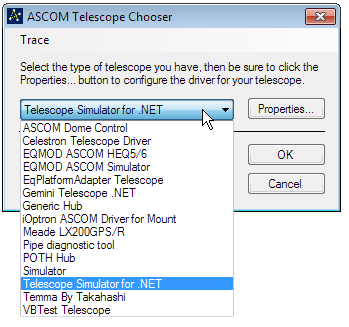
If you successfully installed the ASCOM platform and the driver for your mount, it would have been shown in the list of available mounts – the mount doesn’t need to be connected for that to happen. If you never saw your mount listed, I think the platform/driver install didn’t complete successfully. If the available mount list included the ASCOM telescope simulator (see below), that tells you the basic ASCOM platform installation probably worked. If that doesn’t show up, you then know where your problem lies (also a daytime activity). If the ASCOM mount simulator appears in the list but the driver for your mount does not, then the problem lies with the driver installation. Here is an example of what things look like on my laptop:

The entries at the bottom in the red rectangle are installed as part of the ASCOM platform installation – you should see all of these. The two entries at the top, shown by red arrows, are for particular physical devices I use. You won’t see these entries but you should see an entry for your Vixen mount.
There are several debugging tools included in the ASCOM platform, including the ASCOM diagnostics app and POTH. You can use these tools independent of PHD2 to be sure things got installed correctly. It’s important that you always use the same user-id for installation and execution of ASCOM-related apps, and you shouldn’t flip back and forth between admin and non-admin accounts. If you can’t get this sorted out, we can probably help you or you can ask for help on the ASCOM-talk forum.
Once you get everything connected and working and get a reasonable focus on the guide camera, you’ll need to complete a calibration. If you’ve run the new-profile-wizard and have specified the correct input parameters, this should pretty much take care of itself. You can probably expect your mount will have a significant amount of Dec backlash. To help sidestep that, you can manually move the mount north via the hand-controller immediately before starting the calibration. You may find some other useful tips here:
https://openphdguiding.org/phd2-best-practices/
Good luck – let us know if you run into problems,
Bruce

Mitch Mitchell
Richard Grudzien
Richard Grudzien
Richard Grudzien
Bruce Waddington
Hi Richard. I’m on vacation in a location with nearly zero internet availability. My sense of things is that you don’t have a clear idea of how the various mount connections are supposed to work. The images you included show that you’re set up for ST-4 guiding. That’s ok, in which case you don’t need the ASCOM platform or the ASCOM mount driver. That should work and I don’t see any evidence that there was a problem. Until you select a star while looping in PHD2, nothing is going to happen. So I don’t know what you’re frustrated about.
If you want to use the ASCOM environment, you need to download the ASCOM platform first, then install the ASCOM driver for the mount. You mentioned using the LAN cross-over cable for installing the ASCOM software – that doesn’t make any sense based on what I see in your document. The ASCOM software runs on your laptop, it doesn’t get installed in the mount. You need to go on the internet to the ASCOM web site (search for ASCOM Initiative) and follow the instructions from there. There’s some very good documentation there that describes how this stuff works. It’s your choice, you don’t need to use ASCOM, and if this is all too complicated maybe you don’t want to do it. I tried to explain this earlier, I don’t think you have the ASCOM platform installed. You can look in Program Files (x86) directory and look for a folder called ‘ASCOM’ – is it there?
If you think your mount is capable of unguided imaging, by all means try it. I’m pretty sure you’ll find it isn’t nearly as accurate as you think. You might be able to take 15-20 sec unguided exposures and maybe that’s all you want. Beyond that, I think you’ll get star-trailing. Interpreting the TheSkyX as “proof” that the ASCOM drivers are installed is incorrect – TheSkyX doesn’t use ASCOM. You can probably use TheSkyX to run your camera and guide your mount if you want to assemble all their software pieces to do that. The last time I looked, that would cost somewhere north of $500 but it will probably work.
Given my current location, I don’t think I’m going to be able to get you through all the basics of getting set up for imaging. Perhaps someone else can or maybe you want to get some help from local resources. It’s a little like trying to teach someone how to fly a place via e-mail. Imaging is still a complicated and difficult hobby despite what the equipment manufacturers like to tell you. J
Good luck,
Bruce
Richard Grudzien

Brian Valente
Hi Richard
Don’t know if this helps, but If you found ascom programs, chances are that’s the just ascom platform. You also need to install the specific ascom driver for your telescope (and other gear) on top of that.
Brian

Andy Galasso


Bruce Waddington
Hi Richard. Since you said that at least some part of the ASCOM software was on your system, I took a further look into your log files. There are repeated errors like this:
19:25:43.345 00.000 14300 GetString("/profile/2/indi/INDImount", "") returns ""
19:25:43.348 00.003 14300 CoCreateInstance: [80131500] Unknown error 0x80131500
19:25:43.348 00.000 14300 Error thrown from C:\cygwin\home\agalasso\projects\phd2\scope_ascom.cpp:97->ASCOM Scope: could not instantiate ASCOM profile class ASCOM.Utilities.Profile. Is ASCOM installed?
This means the ASCOM platform isn’t correctly installed – the “Profile” class that is being referenced is fundamental to the platform. You should probably repeat the download of the ASCOM release and carefully re-do the installation, looking carefully for any error messages. If you can’t get it installed, you can ask for help on the ASCOM-Talk forum:
Once you get the basic platform correctly installed, you’ll need to repeat the installation of the ASCOM driver for your mount.
Good luck,
Bruce
From: open-phd...@googlegroups.com [mailto:open-phd...@googlegroups.com] On Behalf Of Richard Grudzien
Sent: Wednesday, April 24, 2019 3:41 AM
To: open-phd...@googlegroups.com